

OnePlus Nord 2 Review: Build Quality, Software and Daily Speed
When the OnePlus Nord 2 arrived in late July 2021, it carried a simple job: keep the original Nord’s friendly price and clean software, and fix the two things people complained about most, the camera and the chip. OnePlus swapped the Snapdragon 765G for a custom MediaTek Dimensity 1200-AI, put a 50MP Sony IMX766 sensor with optical image stabilisation behind the main lens, and kept the 65W Warp Charge that had made the OnePlus 8T famous. This OnePlus Nord 2 review looks at what that recipe feels like years later, with honest attention to build quality, software and daily speed.
I have spent enough time with mid-range phones from 2021 to know how they usually age. Some slow down as apps get heavier, some lose battery health faster than expected, and a few keep surprising you because the fundamentals were right. The Nord 2 belongs mostly in that last group. It is not a flagship, and it never pretended to be one. It is a well-built, fast-charging, clean-software phone whose camera punches above its launch price, and that combination still makes sense for a certain kind of buyer in 2026.
This article covers the whole phone in one place. You get the build and the screen, the Dimensity 1200-AI chip and how it handles games and everyday apps, the full camera system, battery life and charging, the OxygenOS software story from Android 11 to OxygenOS 13, the complete specification table, a head-to-head comparison with its Nord siblings, and a clear verdict on who should still buy one and who should look elsewhere.
OnePlus Nord 2 Build Quality and Durability: Glass, Frame and Daily Wear
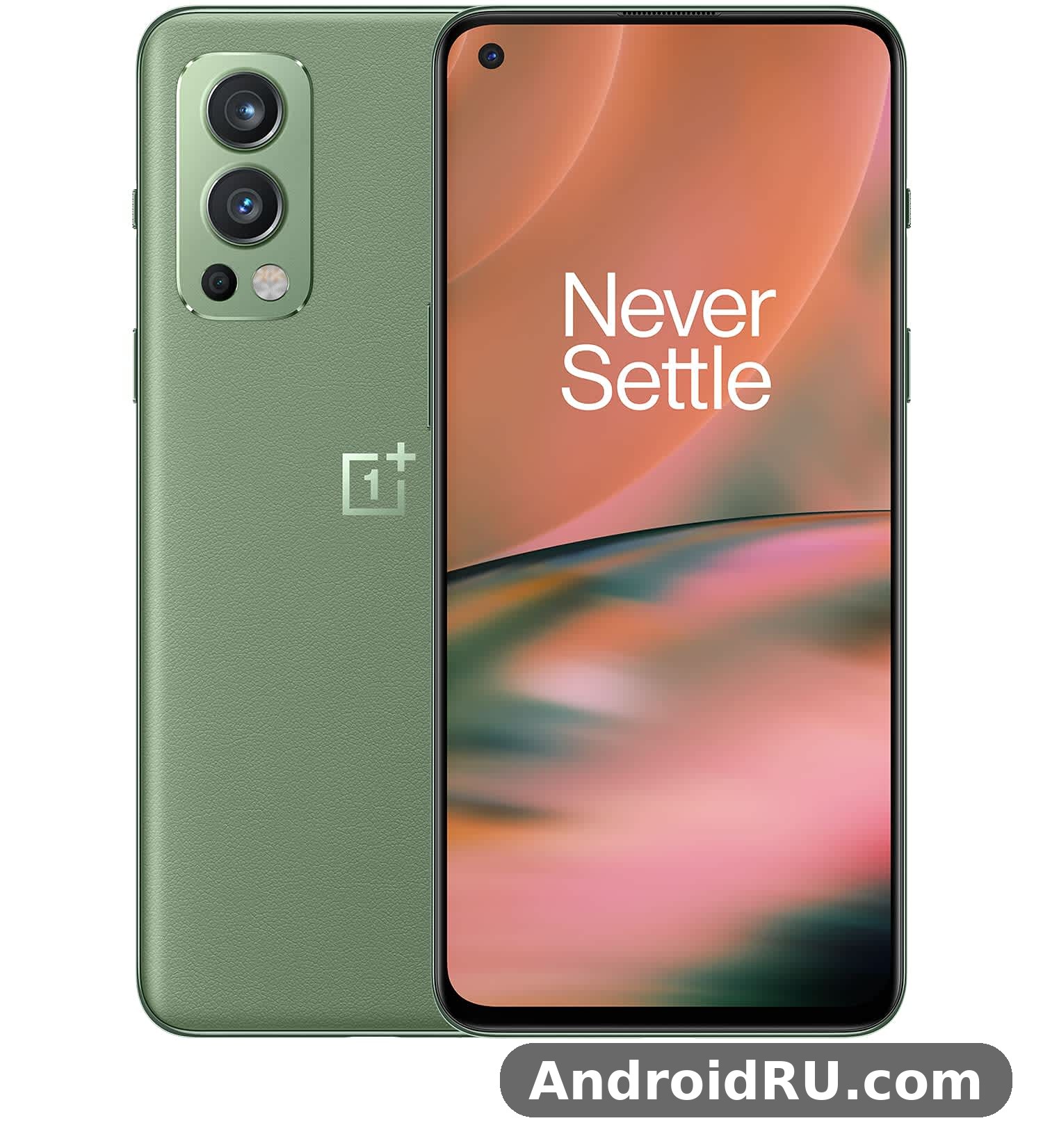
OnePlus Nord 2 build quality and durability start with a familiar sandwich: Gorilla Glass 5 on the front and back, wrapped around a plastic frame. Nord 2 durability in daily use is good for a glass phone at this price, as long as it lives in a case. The glass back is the first thing you notice. It catches the light in a way plastic never does, and in the Blue Haze colour it shifts between blue and grey depending on the angle. The Gray Sierra version is quieter, almost matte in feel, while the later Green Woods edition adds a textured finish that hides fingerprints far better than the glossy launch colours.
Hold the phone and the first surprise is how compact it feels for a modern handset. At 158.9 mm tall, 73.2 mm wide and 8.25 mm thick, it sits comfortably in one hand, and the 20:9 screen keeps the width in check. The Nord 2 weight is 189 grams, which is neither feather-light nor heavy; it has enough mass to feel solid without dragging a jacket pocket down. The camera module sits in the top-left corner and barely wobbles the phone when it lies flat on a desk, which is more than I can say for many phones with bigger camera islands.
Nord 2 Design: Colours, Camera Module and the Alert Slider
Nord 2 design keeps the touches that made OnePlus phones easy to recognise. The alert slider is still on the right edge, above the power button, and it remains one of the most useful hardware features on any Android phone. Flick it down for silent, middle for vibrate, up for ring, all without waking the screen. The volume rocker sits on the left edge, the USB-C port and a single speaker grille are on the bottom, and there is no headphone jack, a decision OnePlus had already made across the Nord line by then.
Nord 2 colors were Blue Haze and Gray Sierra at launch, with Green Woods joining later as a special edition. Blue Haze is the showpiece: a glossy, gradient back that looks different in every light but collects fingerprints within minutes of unboxing. Gray Sierra is the sensible pick, with a frosted finish that stays cleaner and looks more expensive than it is. If you buy one second hand, expect the Blue Haze back to show its history unless the previous owner used a case from day one.
In-Hand Feel After Years of Use
The curved glass back and the slim frame make the Nord 2 easy to hold for long stretches, whether you are reading, scrolling through photos or watching video. The power button and volume keys have a firm click with no rattle, and the alert slider moves with a satisfying snap. After years of use, the most common wear points are the glossy back picking up fine scratches and the frame showing small marks near the USB-C port. A case solves both, and the phone is slim enough that a thin case does not ruin the feel.
There is no official IP rating on the Nord 2, so treat it like any other glass phone: fine in light rain, not a phone to take into the shower or drop in a sink. The SIM tray takes two nano-SIM cards and there is no microSD slot, which means the storage you buy is the storage you keep. That makes the choice between the 128GB and 256GB versions worth thinking about before you pay, not after.
Gorilla Glass 5 Front and Back: Scratch Reality
Gorilla Glass 5 protects both faces of the Nord 2, and it does a decent job against keys and coins in a pocket. What it does not do is stay flawless. Fine hairline scratches appear over months of normal use, especially on the back if you put the phone down on rough surfaces. A screen protector on the front is cheap insurance, and the flat display makes protectors easy to fit without bubbles at the edges, unlike the curved screens on the flagship OnePlus 9 series.
What Is Missing: No Headphone Jack, No microSD, No Wireless Charging
The Nord 2 skips three things some buyers still want: a 3.5 mm headphone jack, a microSD card slot and wireless charging. The missing headphone jack is the one that stings most, because the phone’s stereo speakers and clean audio output would have paired well with wired headphones. Bluetooth earbuds are the practical answer, and the phone handles them well, with stable connections and low enough latency for video. The lack of wireless charging matters less at this price, and the 65W wired charging more than makes up for it in daily use.
OnePlus Nord 2 Display Quality: 6.43 Inch Fluid AMOLED at 90Hz
OnePlus Nord 2 display quality is one of the strongest parts of the package. The 6.43 inch Fluid AMOLED panel runs at 2400 by 1080 pixels, which works out to about 409 pixels per inch, and it refreshes at 90Hz. Text looks crisp, photos look rich, and scrolling feels fluid in a way 60Hz panels simply cannot match. The panel supports HDR10+ and covers the DCI-P3 colour space, so supported video on streaming apps shows deeper contrast and more accurate colour than the price suggests.
Brightness is good rather than record-breaking. Outdoors in direct sunlight the screen stays readable, though it does not reach the peak brightness of flagship panels from the same year. Indoors it is more than bright enough, and the automatic brightness tuning is quick without being jumpy. The always-on display shows the clock, date and notification icons, and you can schedule it to switch off at night so it never lights up the bedroom.
The 90Hz refresh rate is the detail that changes how the phone feels day to day. Scrolling through a long feed, swiping between home screens and opening the app drawer all look smoother than on a 60Hz phone, and once you get used to it, going back feels sluggish. The phone drops to 60Hz in some apps and videos to save battery, which is sensible, and most people never notice the switch. A 120Hz panel would have been nicer, but at this price in 2021, 90Hz was the right call.
Colours, HDR Video and the Punch-Hole Camera
Out of the box the display leans vivid, with saturated reds and greens that make photos and video pop. If you prefer accuracy, the screen colour settings offer a natural mode that reins the saturation in without making everything look dull. Video enhancement and AI colour boost are available in settings, and they lift the brightness and contrast of standard video a little; the effect is subtle and easy to leave on or switch off depending on taste.
The 32MP front camera sits in a small punch hole in the top-left corner of the display. It is small enough to ignore during normal use, and it does not eat into the status bar the way a notch does. Watching video in full screen, the hole disappears into the corner for most content, and games rarely put important controls there.
Nord 2 Speakers Test: Stereo Sound and Headphone Output
The OnePlus Nord 2 stereo speakers test is a pleasant surprise for a phone at this price. There are two speakers, one at the bottom and the earpiece doubling as the second, and together they produce proper stereo sound with clear dialogue and a reasonable amount of volume. They will not replace a small Bluetooth speaker, and bass is thin at full volume, but for watching video in bed or following a recipe in the kitchen they are genuinely good.
Call quality is solid, with clear voices on both ends and effective noise reduction in busy places. The earpiece is loud enough for calls on a noisy street, and the microphones pick up your voice cleanly for voice notes and video calls. Bluetooth audio is stable, and the phone supports the common high-quality codecs, so wireless earbuds sound as good as the earbuds themselves allow.
Reading Mode, Eye Comfort and Night Display
Reading mode turns the screen monochrome or chromatic depending on the setting, which is handy for long articles and ebooks. Eye comfort mode warms the colour temperature in the evening, and you can schedule it to switch on automatically at sunset. Both features are easy to find in settings, and they make the Nord 2 a comfortable phone for reading before bed without straining your eyes.
OnePlus Nord 2 Performance Review: Dimensity 1200-AI and Daily Speed
This OnePlus Nord 2 performance review starts with the chip that defines the phone. The MediaTek Dimensity 1200-AI is a 6nm octa-core processor with one Cortex-A78 core running up to 3.0GHz, three more A78 cores at 2.6GHz and four efficient A55 cores, paired with a Mali-G77 MC9 GPU. The AI suffix is not marketing fluff: OnePlus worked with MediaTek to tune the AI processing for camera work, display enhancement and gaming, so the chip handles image processing and frame prediction a little smarter than the standard Dimensity 1200.
In daily use the Nord 2 feels fast in the way that matters. Apps open quickly, switching between a browser, a messaging app and a camera is instant, and the 90Hz screen makes everything feel a touch quicker than the raw numbers suggest. Nord 2 performance in 2026 is still good for the everyday load: social apps, email, maps, streaming video and light photo editing all run without stutter. Heavy apps take a second longer to load than on a current flagship, but once they are running, the experience is smooth.
The OnePlus Nord 2 Dimensity 1200 AI benchmark story is strong for its class. In the synthetic tests of its day it scored close to the Snapdragon 870 in multi-core work and ahead of the Snapdragon 778G, which was the usual chip in rivals at this price. Benchmarks are not the whole story, but they line up with what you feel in the hand: this is a phone that was fast at launch and has enough headroom to stay usable years later, provided you keep storage from filling up completely.
OnePlus Nord 2 Gaming Performance: Frame Rates, Settings and Heat
OnePlus Nord 2 gaming performance covers the popular titles well. PUBG Mobile and Call of Duty Mobile run smoothly at high settings, Genshin Impact plays at medium settings with mostly stable frame rates, and lighter games like racing and puzzle titles run without any trouble at all. The Mali-G77 GPU is not a flagship part, so you will not get maximum graphics plus maximum frame rate in the heaviest games, but the balance the phone strikes is sensible: good-looking graphics at a steady frame rate, rather than prettier graphics that stutter.
Nord 2 gaming sessions of 30 to 45 minutes stay comfortable in the hand. The phone warms up around the camera module, as most glass phones do, but it does not get uncomfortably hot during normal play. The OnePlus Nord 2 heating issue while gaming shows up mainly in long sessions of demanding games in warm rooms, where the phone throttles the chip a little to protect itself. Frame rates dip for a while, then recover. Keeping the phone out of direct sunlight and closing background apps before a long session helps more than any setting tweak.
Game Space, the built-in gaming mode, is genuinely useful. It blocks notifications, locks the brightness, and lets you answer calls on speaker without leaving the game. Fnatic mode, the more aggressive option inside Game Space, pushes performance and network priority further for competitive play. These are small features, but they show that OnePlus thought about how people actually play on their phones, not just about benchmark scores.
Nord 2 Heating: When the Phone Warms Up and What to Do
Nord 2 heating is normal during charging plus gaming at the same time, during long 5G downloads, and when shooting 4K video for several minutes. If the phone feels hot, the fix is simple: stop charging while you play, drop the game graphics one notch, and give the phone a minute to cool. A case can trap heat, so taking it off during a long gaming session helps. None of this is unusual for a 6nm chip in a slim glass body, and it is well short of the overheating problems some 2021 flagships had.
RAM, Storage and Multitasking
Nord 2 RAM comes in 6GB, 8GB and 12GB options, and Nord 2 storage comes in 128GB or 256GB, both using fast UFS 3.1 storage. The 8GB with 128GB version is the sweet spot for most people: enough memory to keep a dozen apps in the background, enough storage for apps, photos and offline video. The 12GB with 256GB version is the one to pick if you keep phones for years, shoot a lot of video, or hate deleting apps to free space.
Multitasking is where the RAM shows. Switching back to a browser with ten tabs, a maps app mid-navigation and a music app playing in the background does not force reloads on the 8GB and 12GB models. The 6GB model reloads apps a little more often, but it still handles normal multitasking fine. OxygenOS memory management is fairly aggressive about background apps, which helps battery life but can occasionally close an app you wanted to return to; locking important apps in the recent-apps screen stops that happening.
OnePlus Nord 2 Camera Quality: 50MP IMX766, Ultrawide and Selfies
OnePlus Nord 2 camera quality is the headline upgrade over the original Nord, and it is the main reason the phone still gets recommended. The main camera uses a 50MP Sony IMX766 sensor with optical image stabilisation, a 1/1.56 inch sensor size and an f/1.88 aperture. This is the same sensor OnePlus used as the ultrawide camera on the flagship OnePlus 9 and 9 Pro, which tells you how seriously the company took the Nord 2 camera. A bigger sensor gathers more light, and more light means cleaner photos indoors and at night.
Daylight photos from the main camera are detailed, with natural colours and good dynamic range. The phone uses pixel binning to combine four pixels into one, producing 12.5MP images with less noise and better detail than a straight 50MP shot would give in most light. You can switch to the full 50MP mode for scenes with fine detail, like landscapes, but for everyday shots the binned mode is the better default. The IMX766 sensor also focuses quickly and reliably, which matters more than megapixels when you are photographing children, pets or anything else that refuses to sit still.
The camera app is quick to open and simple to use. Double-pressing the power button launches it from a locked screen, and the shutter responds without the lag that plagued some mid-range phones of this era. Nightscape, portrait, panorama, pro mode and slow motion are all a swipe away, and the pro mode gives control over ISO, shutter speed and white balance for anyone who wants it. Video goes up to 4K at 30 frames per second, with electronic stabilisation keeping handheld footage steady.
Night Mode Camera: Nightscape and Low-Light Photos
The OnePlus Nord 2 night mode camera uses the Nightscape mode plus the large IMX766 sensor and optical stabilisation to take low-light photos that hold up surprisingly well. In a dim restaurant or on a street at night, Nightscape takes a few seconds to capture several frames and merge them, and the result has far less noise and far more detail than a single quick snap. Colours stay natural rather than turning everything orange under street lights, and bright signs do not blow out as badly as they do on cheaper phones.
That said, Nightscape needs a steady hand or a surface to rest the phone on, because the multi-frame capture takes two to three seconds. Moving subjects blur, which is true of every night mode, so it is best for still scenes: buildings, streets, food on a table, a skyline. For quick candid shots in low light, the regular photo mode with the big sensor still does a respectable job without the wait.
OnePlus Nord 2 Ultrawide Camera Review: 8MP at 119 Degrees
This OnePlus Nord 2 ultrawide camera review has to be honest: the 8MP ultrawide is the weakest of the three rear cameras. The Nord 2 ultrawide covers a 119 degree field of view, which is great for fitting a whole building, a group of friends or a landscape into the frame. In bright daylight the results are good, with acceptable detail and colours that match the main camera reasonably well. In low light, though, the smaller sensor and slower f/2.25 aperture show their limits, and photos get noisy and soft at the edges.
Use the ultrawide for what it is good at: daylight landscapes, architecture, tight indoor spaces and group photos where stepping back is not an option. Do not expect it to match the main camera at night, and do not crop ultrawide shots heavily, because the 8MP resolution leaves little room to crop. For a phone at this price in 2021, an ultrawide of this quality was normal; the main camera was the star, and the ultrawide was the supporting act.
OnePlus Nord 2 Mono Camera Purpose: The 2MP Third Lens
The OnePlus Nord 2 mono camera purpose confuses people, so here it is plainly: the 2MP monochrome sensor exists to add detail and depth information to portrait shots and to enable a black-and-white photo mode. It does not take photos on its own in normal use. Its contribution is subtle, and most owners will never think about it, which is fine. The honest verdict is that the phone would lose almost nothing if the mono camera disappeared, but it costs nothing to have and does not hurt image quality.
OnePlus Nord 2 Selfie Camera Quality: 32MP Front Camera
OnePlus Nord 2 selfie camera quality is strong, thanks to a 32MP Sony IMX615 front sensor with an f/2.45 aperture. The Nord 2 selfie camera captures plenty of detail in good light, skin tones look natural without the waxy smoothing some phones apply, and the portrait mode on the front camera separates the subject from the background cleanly in most conditions. Video calls look sharp, and the front camera records 1080p video that is more than good enough for calls and short clips.
One thing the Nord 2 lost compared with the original Nord is the front ultrawide camera. The first Nord had two front cameras, including an ultrawide for group selfies; the Nord 2 has one. Group selfies need a longer arm or a selfie stick now, which is a small step back. For single-person selfies and video calls, the single 32MP camera is better than the pair it replaced, because the sensor is larger and the processing is smarter.
Portrait Mode Samples: People, Pets and Edge Detection
OnePlus Nord 2 portrait mode samples show what the combination of the big main sensor, the mono camera and the Dimensity AI processing can do. In good light, portraits have pleasing background blur, accurate edge detection around hair and glasses, and natural skin tones. The phone lets you adjust the blur strength after taking the shot, which saves portraits where the default blur is too strong. Pet portraits work well too, as long as the animal holds still for a second.
Edge detection struggles in the usual places: wispy hair against a busy background, glasses frames, and low light. The results are still usable for social media, which is where most portraits end up, and the failures are no worse than on other phones at this price. For the best portraits, use the main camera rather than the front camera, step back a little, and let the phone find a clean background.
OnePlus Nord 2 Battery Life and Warp Charge 65 Speed
OnePlus Nord 2 battery life is built around a 4500mAh dual-cell battery, and for most people it means a full day with charge to spare. A typical day of messaging, browsing, maps, streaming music and an hour or two of video leaves the phone at 20 to 30 percent by bedtime. Heavy days with lots of camera use, 5G and gaming will need a top-up in the evening, but light users can stretch to a day and a half, especially if the screen is kept at 60Hz and 5G is switched off where Wi-Fi is available.
The Nord 2 battery holds up well over time, as dual-cell batteries tend to degrade more gracefully than single-cell designs of the same capacity. After a few years, expect some loss of capacity, which is normal for any phone battery. Keeping the charge between 20 and 80 percent most of the time and avoiding leaving the phone on a hot dashboard will slow that decline. The phone’s battery health is not shown in settings the way some brands show it, so the practical test is simple: if a full charge no longer lasts a normal day, the battery is telling you it is tired.
Charging is where the Nord 2 still embarrasses phones that cost twice as much. The OnePlus Nord 2 charging speed test numbers are simple: the 65W Warp Charge adapter takes the phone from empty to full in about 30 minutes. A 15-minute charge from empty gives roughly two-thirds of a battery, which is enough for a full day for most people. That changes how you think about charging: instead of plugging in overnight, you can top up while you get ready in the morning and forget about the battery for the rest of the day.
OnePlus Nord 2 Warp Charge 65 Time: Real-World Charging Numbers
The OnePlus Nord 2 Warp Charge 65 time in real use matches the advertised claim closely. With the supplied 65W adapter and cable, the phone reaches about 60 percent in 15 minutes and 100 percent in around 30 minutes, with the last few percent slowing down to protect the battery. Using a standard USB Power Delivery charger is slower but still works, and the phone supports USB PD charging for times when the Warp charger is not at hand. Third-party 65W chargers that do not support the Warp protocol will charge at lower speeds, so the original adapter is worth keeping.
Warp Charge 65 does make the phone warm while charging, especially from empty, which is normal for charging this fast. The dual-cell design splits the current between two cells, which keeps the heat lower than a single cell charged at the same wattage would be. Charging overnight is unnecessary with speeds like this, and the phone’s optimised charging feature learns your routine and slows the final stretch if you do leave it plugged in all night.
How to Make the Battery Last Longer
A few habits stretch the Nord 2 battery noticeably. Switching the screen to 60Hz on days when you are mostly reading saves power without much visible difference. Turning off 5G where you have good Wi-Fi helps, because the 5G modem draws more power than 4G. Restricting background activity for apps you rarely open, lowering the screen brightness a notch, and using dark mode with the AMOLED screen all add up. None of these steps is dramatic on its own, but together they can add an hour or two of screen time.
OnePlus Nord 2 Software Experience: OxygenOS 11.3 and the OxygenOS 13 Upgrade
The OnePlus Nord 2 software experience is a big part of why the phone earned its reputation. It launched with OxygenOS 11.3, based on Android 11, and OxygenOS 11 at the time was famous for being close to stock Android with useful additions rather than a heavy skin. The interface is clean, the animations are quick, and there is very little bloatware: a handful of OnePlus apps and the usual Google apps, with almost nothing you need to uninstall on day one.
Daily use feels uncluttered. The shelf, a swipe down from the home screen, shows widgets, recent apps and a quick memo. Gestures replace the navigation buttons by default, and they are responsive and easy to learn. The customisation options cover icon packs, accent colours, fonts and the always-on display, so the phone can look the way you want without installing a third-party launcher. Dark mode is system-wide and works well with the AMOLED screen, saving battery at the same time.
The OnePlus Nord 2 OxygenOS update story is one of the better ones for a 2021 mid-range phone. OnePlus promised two major Android updates and three years of security updates, and the phone received them: the OnePlus Nord 2 OxygenOS 13 upgrade brought Android 13, with the new Aquamorphic design, a smoother animation engine and better privacy controls. That upgrade changed the look of the phone more than any other single update, with larger folders, redesigned widgets and a more colourful quick-settings panel.
Nord 2 Update Path: Android 13 and Security Support
The Nord 2 update path ended at Android 13 with OxygenOS 13, which means no Android 14 or later from OnePlus. Security patches continued for a while after that, but by 2026 the phone is past its official update window. That is the normal life cycle for a mid-range phone from 2021, and it is the main thing to weigh when buying one second hand. The phone still runs current apps fine, and Google Play services keep updating, but the system itself will not get new Android versions.
For everyday use this matters less than it sounds. Banking apps, messaging apps, streaming apps and browsers all still support Android 13 comfortably, and they will for some time. What you lose is the newest Android features and the latest security patches, which matters more if you install apps from outside the Play catalogue or keep sensitive work on the phone. For a second phone, a media device or a handset for a family member, Android 13 remains perfectly usable.
Fingerprint, Face Unlock and Everyday Security
OnePlus Nord 2 in-display fingerprint speed is fast and reliable. The optical sensor sits under the lower part of the screen, and it unlocks the phone in well under a second with a registered finger. It works with slightly damp fingers less reliably, and it needs the screen to light up the fingerprint area, which is normal for optical sensors. Registering the same finger twice improves accuracy noticeably, which is a trick worth knowing on any phone with this kind of sensor.
The Nord 2 fingerprint sensor is joined by face unlock, which uses the front camera and is quick in good light but less secure than the fingerprint reader and unreliable in the dark. For payments and banking apps, the fingerprint reader is the right choice. The phone also supports the standard Android security features: app permissions, a privacy dashboard showing which apps used the camera and microphone, and the ability to share only approximate location with apps that do not need the exact spot.
Useful OxygenOS Features Worth Turning On
A few OxygenOS features deserve a mention because owners often miss them. Work-life balance lets you silence work apps outside work hours. Zen Mode locks the phone down for a set period when you want a break. App cloning runs two accounts of the same messaging app side by side, which is handy if you carry a work number and a personal number. The hidden space in the app drawer hides apps behind a fingerprint, and the screen recorder built into the quick settings captures gameplay or tutorials without a third-party app.
Full Specifications
Here are the OnePlus Nord 2 full specifications in one place. The Nord 2 specs at a glance are a 6.43 inch 90Hz Fluid AMOLED display, the Dimensity 1200-AI chip, a 50MP main camera with optical stabilisation, a 4500mAh battery and 65W charging. The table below lists the complete details as they were at launch, plus the software the phone ended up on after its updates.
| Feature | OnePlus Nord 2 |
|---|---|
| Display | 6.43 inch Fluid AMOLED, 2400 x 1080, 90Hz, HDR10+, Gorilla Glass 5 |
| Chipset | MediaTek Dimensity 1200-AI, 6nm, octa-core up to 3.0GHz, Mali-G77 MC9 GPU |
| RAM | 6GB, 8GB or 12GB LPDDR4X |
| Storage | 128GB or 256GB UFS 3.1, no microSD slot |
| Rear camera | 50MP Sony IMX766 main, f/1.88, OIS, 8MP ultrawide 119 degrees f/2.25, 2MP mono f/2.4 |
| Front camera | 32MP Sony IMX615, f/2.45, 1080p video |
| Video | 4K at 30fps, 1080p at 30, 60 and 120fps, 720p slow motion at 240fps |
| Battery | 4500mAh dual-cell, non-removable |
| Charging | Warp Charge 65, 65W wired, full charge in about 30 minutes, USB PD supported |
| Operating system | Android 11 with OxygenOS 11.3 at launch, upgradable to Android 13 with OxygenOS 13 |
| Dimensions | 158.9 x 73.2 x 8.25 mm |
| Weight | 189 grams |
| Build | Gorilla Glass 5 front and back, plastic frame, no official IP rating |
| SIM | Dual nano-SIM, no microSD |
| Connectivity | 5G, 4G LTE, Wi-Fi 6, Bluetooth 5.2, NFC, GPS, USB-C |
| Sensors | In-display fingerprint, accelerometer, gyroscope, proximity, compass, ambient light |
| Audio | Dual stereo speakers, no 3.5 mm headphone jack |
| Colours | Blue Haze, Gray Sierra, Green Woods |
| Models | DN2101, DN2103 |
| Launch | Unveiled 22 July 2021, released 28 July 2021 |
OnePlus Nord 2 5G network support covers the sub-6GHz 5G bands used in most markets at launch, along with dual-SIM 5G standby, Wi-Fi 6 and Bluetooth 5.2. Check the exact band list for the DN2101 or DN2103 model against your carrier before buying second hand, because 5G band support varies by region and a phone imported from another market may miss a band your carrier uses.
OnePlus Nord 2 vs OnePlus Nord 2T and the Rest of the Nord Family
The Nord family grew quickly after the Nord 2, so the comparison that matters most is the one inside the family. The OnePlus Nord 2 vs OnePlus Nord 2T question comes up constantly, because the 2T arrived less than a year later with a Dimensity 1300 chip, a faster 80W charger and a slightly different camera setup. The 2T is the faster phone on paper, but the differences in daily use are small, and the Nord 2 often sells for less second hand, which changes the maths. Our full OnePlus Nord 2T Review: Cameras, Performance and Battery Life covers that phone in detail if you are choosing between the two.
| Model | Chipset | Main camera | Battery and charging | Display | Launch |
|---|---|---|---|---|---|
| OnePlus Nord 2 | Dimensity 1200-AI | 50MP IMX766 with OIS | 4500mAh, 65W | 6.43 inch AMOLED, 90Hz | July 2021 |
| OnePlus Nord 2T | Dimensity 1300 | 50MP IMX766 with OIS | 4500mAh, 80W | 6.43 inch AMOLED, 90Hz | May 2022 |
| OnePlus Nord (original) | Snapdragon 765G | 48MP IMX586 with OIS | 4115mAh, 30W | 6.44 inch AMOLED, 90Hz | July 2020 |
| OnePlus Nord 3 | Dimensity 9000 | 50MP IMX890 with OIS | 5000mAh, 80W | 6.74 inch AMOLED, 120Hz | July 2023 |
| OnePlus Nord 4 | Snapdragon 7+ Gen 3 | 50MP with OIS | 5500mAh, 100W | 6.74 inch AMOLED, 120Hz | July 2024 |
| OnePlus Nord CE5 | Dimensity 8350 Apex | 50MP with OIS | 7100mAh, 80W | 6.77 inch AMOLED, 120Hz | July 2025 |
Against the original Nord, the Nord 2 is a clear step up in every area that matters: a faster chip, a much better main camera, a bigger battery and far faster charging. The original Nord still has a front ultrawide camera the Nord 2 lacks, and it is lighter, but for almost everyone the Nord 2 is the better phone. Read the OnePlus Nord Review: Design, Software and Camera Quality to see where the family started and how far the Nord 2 moved it forward.
OnePlus Nord 2 vs Samsung Galaxy A52: The Rival From the Same Year
The OnePlus Nord 2 vs Samsung Galaxy A52 comparison was the classic mid-range fight of 2021. The Galaxy A52 answered with an official IP67 water resistance rating, a microSD slot, a headphone jack and Samsung’s longer update promise. The Nord 2 answered with a faster chip, a better main camera sensor, a smoother-feeling 90Hz display and charging that was more than twice as fast. If water resistance and expandable storage matter most, the A52 wins. If camera quality, charging speed and raw performance matter most, the Nord 2 wins. Neither phone is wrong; they simply chose different strengths.
Nord 2T, Nord 3, Nord 4 and Nord CE5: Should You Spend More?
The newer Nord phones are better on paper in every row of the table, and they cost more to match. The Nord 3 brings a flagship-class Dimensity 9000 chip and a bigger battery, which our OnePlus Nord 3 Review: Photo Quality, Video and Performance explains in depth. The Nord 4 adds a metal unibody and a huge 5500mAh battery; see the OnePlus Nord 4 Review: Daily Performance and Key Features for the details. The Nord CE5 goes furthest on battery, with a 7100mAh cell that lasts two days for many people, covered in our OnePlus Nord CE5 Review: Daily Performance and Key Features. The honest rule is simple: buy the newest Nord your budget allows, but do not stretch for a Nord 3 or newer if a well-priced Nord 2 covers everything you actually do with a phone.
Verdict Per Use Case: Which Nord Fits Which Buyer
For photography on a tight budget, the Nord 2 is the pick, because its IMX766 main camera still beats the cameras on most newer phones at the same second-hand price. For gaming, the Nord 3 or Nord 4 are worth the extra money for their faster chips and bigger batteries. For the longest battery life, the Nord CE5 is in a different league. For the lowest price that still feels fast and modern, the Nord 2 remains hard to beat, and that is why it still appears in so many best-value lists years after launch.
OnePlus Nord 2 Pros and Cons: Who the Nord 2 Is For
Here are the OnePlus Nord 2 pros and cons as they stand in 2026, after years of real-world use. The strengths have held up well; the weaknesses are mostly things that were true at launch and have only become more visible as newer phones raised the bar. Weigh them against what you actually do with a phone, not against a specification sheet.
Pros: What the Nord 2 Gets Right
- 50MP Sony IMX766 main camera with OIS — the best camera sensor in its price class at launch, still capable of excellent daylight and low-light photos years later.
- Warp Charge 65 — a full charge in about 30 minutes changes daily charging habits completely, and it still beats most new phones.
- Fast Dimensity 1200-AI performance with a smooth 90Hz Fluid AMOLED display that makes everyday use feel quicker than the price suggests.
- Clean OxygenOS software with little bloatware, a useful alert slider, and an upgrade path to Android 13 with OxygenOS 13.
- Solid build quality with Gorilla Glass 5 on both sides, stereo speakers and a fast in-display fingerprint reader.
Cons: Where the Nord 2 Falls Short
- No official water resistance rating, no headphone jack, no microSD slot and no wireless charging.
- The 8MP ultrawide camera is average in daylight and weak in low light, and the 2MP mono camera adds almost nothing.
- Software support ended at Android 13, so the phone will not receive new Android versions or the latest security patches.
- No front ultrawide camera, unlike the original Nord, which makes group selfies harder.
- Some heating and throttling during long gaming sessions in warm conditions.
Who It Is For: Students, Second Phones and Value Hunters
OnePlus Nord 2 for students in 2026 is an easy recommendation when the budget is tight. It handles lectures, notes, video calls, streaming and social apps without fuss, the camera is good enough for campus life and travel photos, and the 65W charging means a flat battery is a 15-minute problem, not an evening problem. A second-hand Nord 2 in good condition is one of the best value phones a student can buy.
The Nord 2 also suits anyone who wants a reliable second phone, a media device for the car or the kitchen, or a first smartphone for a family member who needs something fast and simple. It does not suit buyers who need the latest Android version, official water resistance, or a camera system that performs at night across all three lenses. Those buyers should look at a newer Nord or a recent mid-range phone with longer software support.
OnePlus Nord 2 daily speed after years of use is the detail that surprises people most. The phone does not feel old in normal use. Apps open promptly, the screen still looks good, and the battery plus fast charging cover a full day. The places where age shows are the software support window, the ultrawide camera and the lack of newer features like a faster refresh rate or wireless charging. If those do not matter to you, the Nord 2 still earns its place.
Frequently Asked Questions About the OnePlus Nord 2
Is OnePlus Nord 2 worth buying in 2026?
Is OnePlus Nord 2 worth buying in 2026? Yes, as a second-hand or refurbished phone at the right price, because the main camera, the 90Hz display, the Dimensity 1200-AI speed and the 65W charging still cover everyday needs well. It is not worth buying at a price close to a newer Nord 3 or Nord 4, and it is not the right pick if you need the latest Android version or long-term security updates. Check the battery health, the screen condition and the exact model number before paying, and buy from a seller who accepts returns.
What is the OnePlus Nord 2 price in 2026?
OnePlus Nord 2 price in 2026 depends on condition and region, because the phone is no longer sold new by OnePlus. At launch it cost around Rs 27,999 in India for the 8GB and 128GB version, about 399 euros in Europe and a similar mid-range price in other markets. Second-hand prices now vary widely, from very cheap for phones with worn batteries to a moderate price for clean 12GB and 256GB examples. A OnePlus Nord 2 second hand price check should compare several listings for the same storage version, and a phone with a fresh battery or a recent battery replacement is worth paying a little more for.
How long does the Nord 2 battery last, and how fast does it charge?
A healthy Nord 2 battery lasts a full day for most people, with 20 to 30 percent left at bedtime, and up to a day and a half for light users. Charging from empty to full takes about 30 minutes with the original 65W Warp Charge adapter, and 15 minutes gives roughly two-thirds of a charge. If your phone no longer lasts a day, the battery has likely degraded after years of cycles, and a battery replacement from a reputable repair shop is cheaper than buying another phone.
Does the OnePlus Nord 2 still get software updates?
No, the Nord 2 finished its official update path at Android 13 with OxygenOS 13, after two major Android updates and three years of security patches. Google Play services and individual apps still update normally, so everyday apps keep working, but the system will not receive new Android versions. That is normal for a mid-range phone launched in 2021, and it is the main trade-off to accept when buying one now.
Is the Nord 2 camera still good compared with newer budget phones?
The main camera is still good, and in daylight and low light it beats many newer budget phones that use smaller sensors. The ultrawide camera is the weak point, and it falls behind newer phones with better ultrawide sensors. If your photos mostly come from the main camera, the Nord 2 holds up well. If you shoot a lot of ultrawide landscapes or night scenes with the secondary lenses, a newer phone will serve you better.
Nord 2 verdict: the OnePlus Nord 2 was one of the best mid-range phones of 2021, and its best parts have aged gracefully. The main camera, the fast charging, the clean software and the daily speed are still genuinely good, while the weak ultrawide, the ended update support and the missing headphone jack are the prices you pay for buying a phone from another era. If you find a clean example at a fair second-hand price, check the battery, test the cameras and the fingerprint reader, and buy it with confidence. If the price is close to a newer Nord, spend the extra money and get the longer support and the bigger battery instead.

