

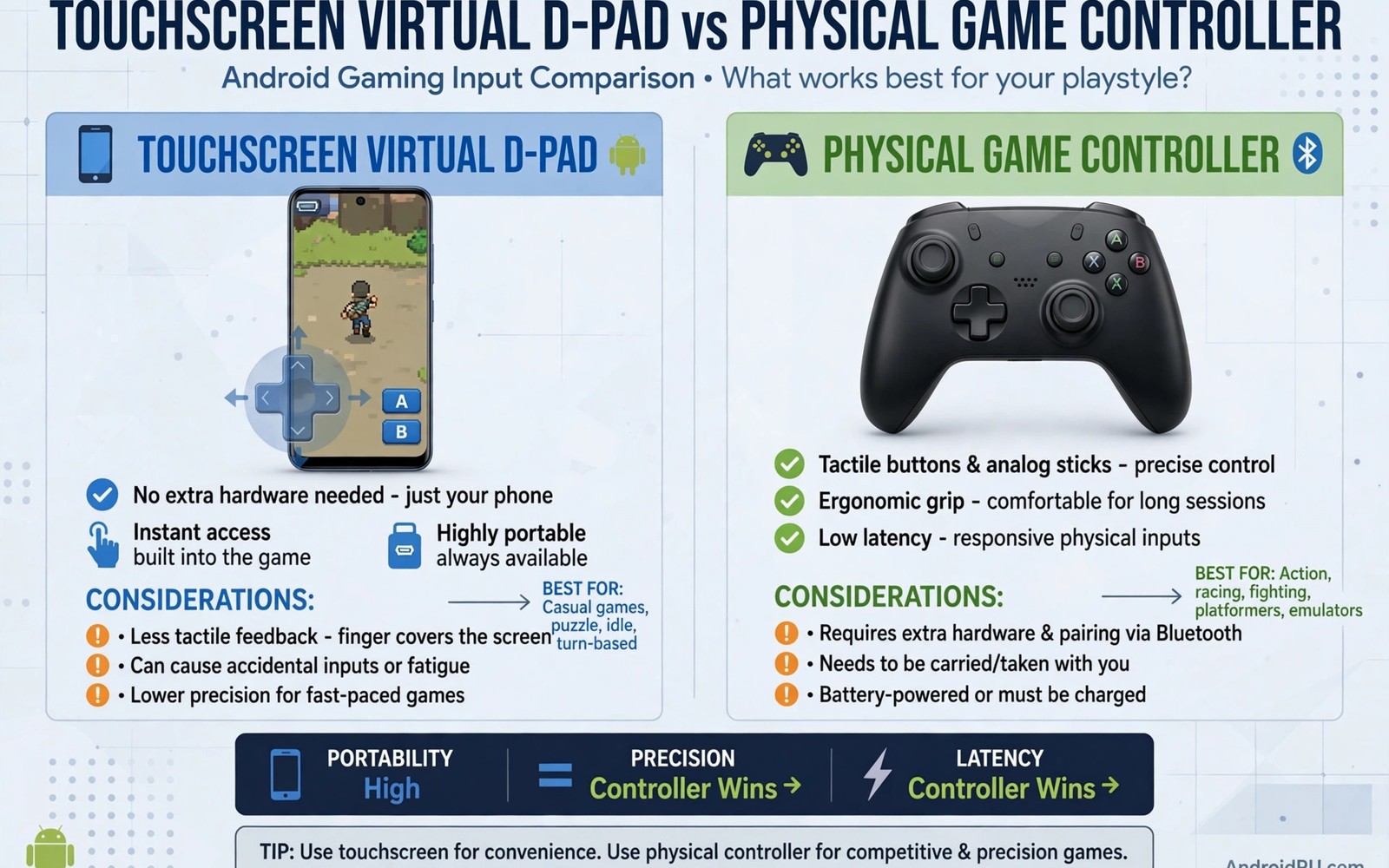
This guide covers virtual D-pads versus controllers in plain terms. Every mobile player faces one input choice. Touchscreen or physical controller. Comparing touchscreen virtual D-pads vs physical game controllers helps you choose per game. Neither input wins for every title. The right choice depends on speed and precision needs.
Virtual D-pads live on the screen itself. They cost nothing extra and they travel with the phone. Physical controllers add real buttons and sticks. They cost money and need carrying. Both inputs have clear strengths that suit different games.
Start by judging games on speed. Fast games reward physical buttons. Slow games work fine on touch. A careful button mapping improves both inputs a lot. Mapping is the hidden factor behind input feel.
How virtual D-pads feel
A virtual D-pad is a picture of buttons on glass. It gives no physical feedback when pressed. Your thumb must watch the screen to stay on target. That visual check steals attention from the game. Fast diagonal moves suffer most from this limit.
Virtual buttons also cover part of the game picture. Fingers hide sprites and text during play. Small phones suffer most from finger cover. Larger phones leave more visible picture. Screen size shapes the touch experience a lot.
How physical controllers feel
Physical buttons give tactile feedback on every press. Your thumb feels the button without looking. That feedback frees your eyes for the game. Fast combos and precise jumps become easier. Muscle memory builds faster with real buttons.
Physical controllers also free the full screen for the game. No fingers cover the action. The picture stays clear during busy scenes. That clarity matters for games with small details. A clear screen plus real buttons is a strong combination.
Precision in different game types
Platform games need precise jumps and quick direction changes. Physical controllers win clearly for platform titles. Touch controls can work for slow exploration platform games. Fast precision platform games frustrate on touch. Choose the controller for any game that demands pixel perfect jumps.
Puzzle and turn based games need little speed. Touch controls suit them very well. Tapping a tile feels natural on a screen. A controller adds no benefit for slow menu driven play. Save the controller for games that reward speed.
Comfort during long sessions
Touch play can strain thumbs during long sessions. Thumbs hover over glass without support. Physical controllers offer grips shaped for hands. Longer sessions feel easier with a controller. Hand comfort matters for daily play habits.
Phone weight also affects touch comfort. Holding a phone with both thumbs tires the hands. A controller with a phone clip balances weight better. Telescopic controllers spread weight across both hands. Comfort gains appear quickly with a good grip.
Cost and portability tradeoffs
Touch controls win on cost and portability. They need no extra purchase and no extra bag space. A phone alone is enough for a quick game. That convenience keeps touch relevant for travel. Many players use touch for travel and controllers at home.
Controllers cost money and add bulk to a bag. A small foldable controller reduces the bulk problem. A telescopic controller replaces a case for some players. Weigh cost against how often you play action games. Frequent action play justifies the purchase quickly.
Hybrid play: switching inputs mid game
Some players switch inputs during a single game session. Touch serves menu navigation while a controller serves action. Hybrid play uses each input for its strength. Menus feel fast with direct touch taps. Action feels precise with physical buttons. Switching takes seconds when both inputs stay connected. A hybrid habit suits games with heavy menus and action. Role playing games benefit most from hybrid input. Menus plus battles each get their ideal input.
Hybrid play needs a controller that stays paired reliably. A controller that disconnects mid game breaks the flow. Test pairing stability before relying on hybrid play. Keep the controller charged for long hybrid sessions. A dead controller forces an awkward mid game switch. Preparation keeps hybrid play smooth and enjoyable. Charge gear before sessions like you charge the phone. Ready gear is invisible gear during play.
Some games pause poorly during input switches. A sudden switch during action can cost progress. Switch inputs only during safe moments in the game. Menus and pause screens are safe switch points. Boss fights are dangerous switch points for obvious reasons. Plan switches around game structure for safety. Smart timing keeps hybrid play risk free. Patience with switching protects hard earned progress.
Choosing your first controller
A first controller should prioritise comfort over extra features. Extra buttons and triggers confuse beginners at first. A simple controller with a good D pad suits retro games. Test the D pad in a platform game before buying. A mushy D pad ruins retro platform play quickly. A crisp D pad with clear directions feels right instantly. Comfort and D pad quality decide first controller value. Features can wait for a second controller later.
Size and weight shape controller comfort during long sessions. A tiny controller cramps large hands quickly. A heavy controller tires small hands over time. Hold the controller in a store when possible before buying. A five minute hold reveals comfort problems clearly. Online buyers should check size dimensions carefully. Compare dimensions with a controller you already like. Physical fit matters more than brand reputation here.
Battery life and charging type affect daily controller use. A controller with long battery life needs less charging thought. USB C charging matches modern phone chargers conveniently. A controller that uses rare batteries adds ongoing cost. Check battery claims against user reviews honestly. Real world battery life often differs from marketing claims. A reliable battery keeps the controller ready when you are. Ready gear encourages more play sessions overall.
Ergonomics for handheld play
Handheld ergonomics start with grip size and shape. A phone alone offers a flat grip for thumbs. A controller grip adds curves that fit hands naturally. Natural grips reduce strain during long sessions. Test grips for at least twenty minutes before judging. Short tests hide strain that appears later. A grip that feels fine for five minutes may ache after an hour. Long tests give honest ergonomic verdicts.
Thumb reach shapes comfort more than players expect. Buttons far from natural thumb rest cause stretching. Stretching over hours leads to thumb fatigue. Move virtual buttons closer to thumb rest positions. Physical controllers place buttons within natural reach. Natural reach keeps thumbs relaxed during play. Relaxed thumbs play longer and more accurately. Comfort and accuracy improve together with good reach.
Screen angle affects neck comfort during handheld sessions. Looking down at a low phone strains the neck. Raise the phone closer to eye level when possible. A pillow or stand can lift the screen height. Higher screens reduce neck bending noticeably. Neck comfort matters for daily players especially. Small angle improvements add up over weeks. Posture care protects long term gaming enjoyment.
Breaks remain the simplest ergonomic tool available. A five minute break every hour rests hands and eyes. Stretch fingers and wrists gently during breaks. Gentle stretches prevent stiffness from long sessions. Breaks also cool the phone for steadier play. Shared benefits make breaks easy to justify. A break habit costs little play time overall. Healthy players enjoy games for many more years.
Common mistakes
The most common input mistake is judging touch by a bad layout. A poor button layout makes touch feel worse than it is. Move buttons to thumb friendly spots before you judge. A good touch layout changes the verdict for many games. Layout tuning comes before input switching.
Another mistake is buying a controller before testing touch properly. Some games play perfectly well on touch. A controller purchase for a puzzle game wastes money. Test touch for a week on your real game list. Buy a controller for the games that truly need it.
Do not ignore hand strain signals during play. Pain means the input or the posture needs change. Switch inputs or take a break when strain appears. A comfortable television setup can also relieve handheld strain. Comfort protects long term enjoyment.
A practical example you can try
# test both inputs on the same level
# note missed jumps with touch versus controller
# keep the input that matches the game speed
This snippet is an original example written for this article. It shows the idea in a compact form that you can adapt to your own setup and change as you learn what works best on your phone.
Frequently asked questions
Is a controller always better than touch?
No. Controllers win for fast action games. Touch wins for slow puzzle and menu games. A shared mapping setup lets you switch easily. Judge per game and not by a universal rule.
Controllers win for fast action games clearly. Touch wins for slow puzzle and menu games. A shared mapping setup lets you switch easily. Judge per game and not by a universal rule. Per game judgment is the honest approach.
Can touch controls work for fighting games?
They work for casual play but not for competitive precision. Fighting games need fast combos and exact directions. A budget phone still benefits from a cheap controller here. Touch remains fine for learning moves slowly.
Touch works for casual fighting play but not competitive precision. Fighting games need fast combos and exact directions. A budget phone still benefits from a cheap controller. Touch remains fine for learning moves slowly. Learning and competing need different inputs.
What controller style suits travel best?
A small foldable controller packs easiest for travel. A telescopic controller offers the best grip for long trips. A home television setup suits a full size controller instead. Match the controller size to the trip length.
A small foldable controller packs easiest for travel. A telescopic controller offers the best grip for long trips. A home television setup suits a full size controller. Match controller size to trip length. Travel length decides controller size sensibly.
Conclusion
Your concrete next step is a fair input test this week. Play one platform level with touch and then with a controller. Count missed jumps for each input honestly. Keep the input that gives fewer misses for that game. Repeat the test for each game type you play.
Run a two week input experiment across your real game list. Log which input won for each game type. That log becomes your personal input guide. Future purchases and settings can follow the log confidently. Evidence from your own play beats general advice always.

