

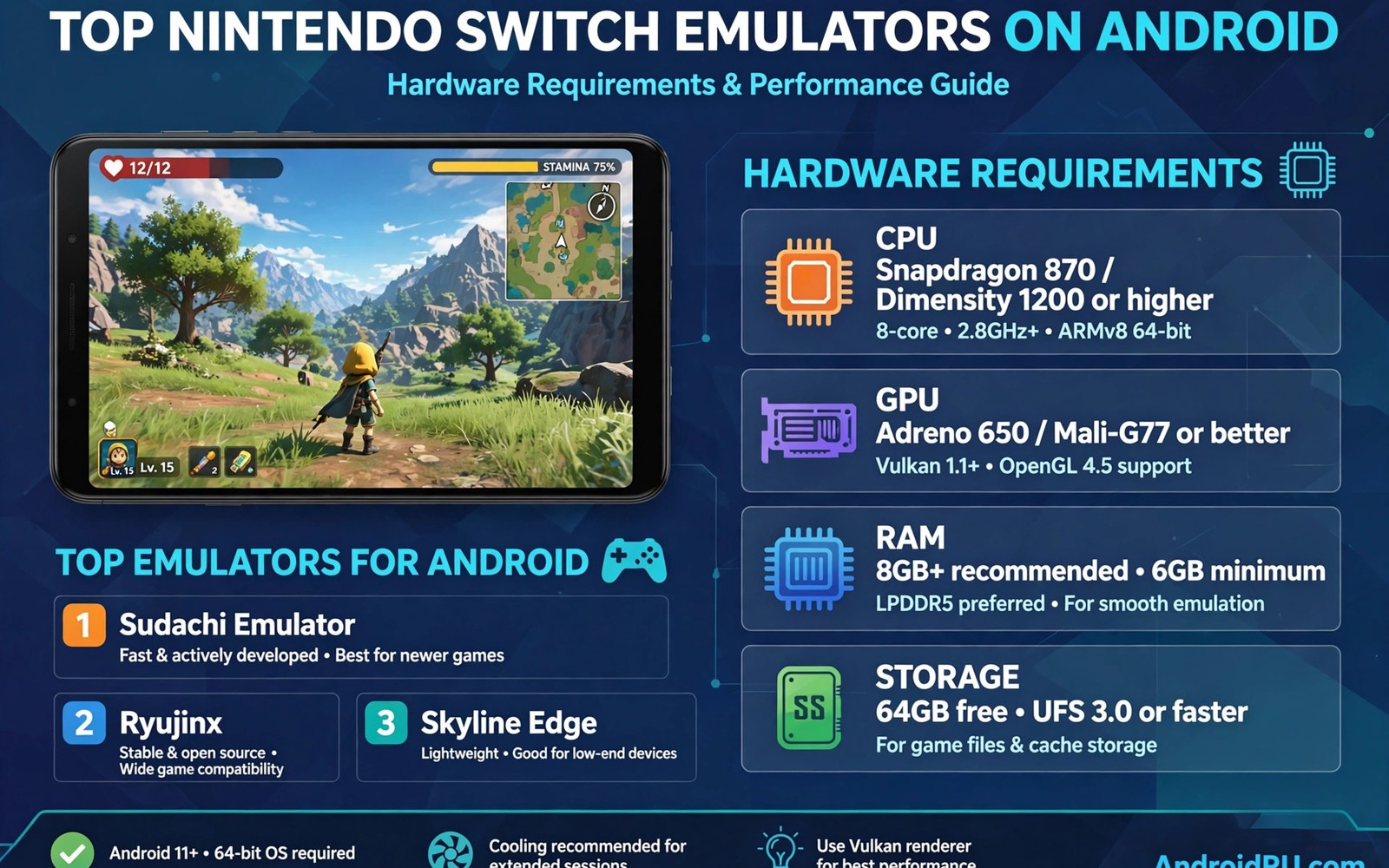
Switch emulation on Android is the most demanding retro project in this wave. Modern console games need serious phone power. Nintendo Switch emulators on Android can run some titles well on strong hardware. Many titles still struggle or fail. Honest expectations matter more here than anywhere else.
A flagship phone with a strong processor is the realistic starting point. Cooling and memory also shape the result. A mid range phone will run only light titles if any. This article explains requirements in plain terms. You will learn how to test your phone fairly.
Switch games also use modern controls and large files. Game files can take many gigabytes each. Storage planning matters before you start. A heavy console setup teaches similar lessons about limits. Switch emulation simply raises every requirement higher.
Real hardware requirements
A recent flagship processor gives the best chance of smooth play. Look for a phone from the last two generations if you can. Older flagships may run light titles with tuning. Budget phones are not realistic for this system. That limit is about hardware and not about effort.
Memory matters because Switch games load large assets. Eight gigabytes of memory is a sensible minimum for testing. More memory helps with large open world titles. Storage speed also affects loading times. Fast internal storage beats a slow card for this system.
Graphics drivers and compatibility
Switch emulators depend heavily on graphics drivers. The driver translates game graphics calls for the phone chip. A poor driver causes visual glitches or crashes. Updated drivers fix many problems over time. Check driver notes for your phone chip before you judge a game.
Custom drivers can help on phones with supported chips. They are not magic and they carry risk. A custom driver may fix one game and break another. Test drivers with a backup of your working setup. Keep the stock driver as a safe fallback.
Settings for a first test
Start with default settings for the first test of any game. Defaults show the baseline behaviour of your phone. Change resolution only after a stable baseline exists. Lower resolution helps speed more than any other single setting. Test busy scenes rather than quiet menus.
Frame pacing matters for how smooth a game feels. An uneven frame rate feels worse than a steady lower rate. Watch for stutter during camera movement. Camera stutter reveals pacing problems clearly. A steady pace beats a high peak rate here.
Controls for modern games
Switch games expect full modern controls with two sticks and many buttons. A physical controller is almost essential for enjoyable play. Touch controls can work for slow turn based games. Fast action games suffer badly on touch alone. Pair a good controller before you test action titles.
Controller layout should mirror the original console layout. Keep sticks and main buttons in familiar places. Test camera control early in a 3D game. Camera trouble ruins modern games quickly. A familiar layout reduces learning time a lot.
Which games to test first
Start with light and stylised games rather than huge open worlds. Stylised games cost less processor power. They also show fewer visual glitches. A light game that runs well proves the setup works. Heavy games can wait until the workflow feels easy.
Avoid testing a favourite huge game first. Disappointment with a beloved title sours the whole project. Test a game you like but do not love first. Learn tuning on that title. Then approach the favourite with realistic skills and settings.
Firmware and game updates
Switch emulators sometimes need firmware files for certain games. Firmware provides system software that games expect at runtime. Obtaining firmware follows the same ownership rules as BIOS files. Use firmware only from hardware you own where allowed. Keep firmware files private on your own devices. Never share system files publicly with other players. Private personal use remains the safest frame here. Ownership rules protect both players and developers.
Game updates can change compatibility with an emulator. An updated game may fix a bug or introduce a new issue. Test the base game version first before applying updates. A working base version gives a safe fallback point. Apply updates one at a time and test after each. That discipline isolates update problems quickly. Keep a backup of the working version before updates. Backups turn update trouble into a quick restore.
Emulator updates also change compatibility over time. New emulator versions fix old games and break others occasionally. Update the emulator only when you have time to test. Test favourite games after every emulator update. Roll back when an update breaks a game you play often. A rollback option is part of a healthy update routine. Never update right before an important play session.
Storage planning for huge Switch games
Switch games are among the largest files in mobile emulation. A single game can consume many gigabytes of phone storage. Plan storage before you test more than a couple titles. Keep only one or two active games on the phone. Store the rest on a computer backup drive. A lean active set leaves room for saves and updates. Storage pressure also slows the whole phone down. Free space protects speed as well as saves.
A fast memory card can help when internal space runs low. Switch games load better from fast internal storage though. Test loading times from the card with a light game first. Slow cards cause long loads and occasional stutter. A high speed card costs more but it helps daily. Check speed ratings carefully before buying a card. Marketing numbers often exaggerate real world card speed.
Delete shader caches and temporary files during cleanup. Emulators build caches that grow over time. A cache cleanup frees space without losing saves. Check the emulator storage settings for cache options. Clean caches after finishing a large game. Regular cleanup keeps the phone responsive for the next title. A tidy phone runs the next game better.
Controller options for Switch games
Switch games expect a modern controller with many inputs. A controller with two sticks and triggers suits most titles. Gyro controls in some Switch games need special handling. Phone controllers rarely include gyro features. Games that require gyro may feel awkward without it. Check gyro needs before choosing a Switch game to play. A game without gyro demands suits phone controllers best. Input research prevents disappointment with motion heavy titles.
Button layout for Switch games should mirror the original console. Keep the main action buttons in familiar positions. A familiar layout reduces learning time for new games. Test camera control early in any 3D Switch game. Camera trouble ruins modern games faster than graphics flaws. Adjust stick sensitivity when camera movement feels too fast. Sensitivity tuning is personal and worth ten minutes. A tuned stick transforms camera control completely.
Wireless controller latency matters for Switch action games. Bluetooth latency varies between controller models noticeably. A low latency controller feels responsive during fast play. A high latency controller feels sluggish and disconnected. Test latency in a rhythm or fighting game. Timing sensitive games expose latency most clearly. Choose a controller with proven low latency for action. Latency is invisible in specifications but obvious in play.
Battery life for controllers matters during long Switch sessions. Switch games encourage longer play than light retro titles. A controller that dies mid session interrupts immersion. Charge the controller before planned long sessions. Keep a charging cable near the play area always. A second controller provides a backup for marathon sessions. Backup gear turns battery failure into a brief pause. Preparation keeps long sessions enjoyable throughout.
Common mistakes
The biggest Switch mistake is expecting every game to run. Switch emulation remains partial on phones. Some games run well and others fail completely. Accept that range before you start. A realistic list of working games keeps the hobby enjoyable.
Another mistake is raising resolution on a struggling phone. High resolution costs speed that a struggling game cannot spare. Lower resolution first and test speed again. Beauty means nothing when the game stutters. Stability is the foundation for everything else.
Do not skip driver checks when a game glitches. A visual glitch may come from the driver and not the game. Check driver notes and test a different driver when supported. A driver change can transform a glitched game. Keep a fallback driver ready.
A practical example you can try
cat /proc/cpuinfo | grep 'model name' | head -4
# check your phone processor class first
# compare it with emulator requirement notes
This snippet is an original example written for this article. It shows the idea in a compact form that you can adapt to your own setup and change as you learn what works best on your phone.
Frequently asked questions
Can a mid range phone run Switch games?
Only light titles have a real chance on mid range hardware. Most demanding games will stutter or fail. Test a small stylised game first for an honest answer. A cool phone helps but it cannot replace missing power. Judge by real tests on your own device.
Light stylised titles have the best chance on mid range phones. Most demanding games will stutter or fail there. Test a small stylised game first for an honest answer. A cool phone helps but cannot replace missing power. Judge by real tests on your own device.
Why do some games crash at startup?
Crashes can come from driver gaps or missing game data. Check the emulator logs if the app offers them. Test a different game to isolate the problem. A heavy console title may crash for similar driver reasons. One working game proves the base setup is sound.
Crashes can come from driver gaps or missing game data. Check emulator logs when the app offers them. Test a different game to isolate the problem. A heavy console title may crash for similar reasons. One working game proves the base setup is sound.
Is a controller required for Switch games?
It is not strictly required but it is strongly advised. Modern games need many buttons and two sticks. Touch controls cover only slow games well. A tuned graphics setup still needs good input to feel right. Pair a controller before action games.
A controller is strongly advised though not strictly required. Modern games need many buttons and two sticks. Touch controls cover only slow games well. A tuned graphics setup still needs good input to feel right. Pair a controller before action games.
Conclusion
Your concrete next step is a fair hardware test this week. Pick one light stylised game and run it at default settings. Note speed in a busy scene and any visual glitches. That honest test tells you whether Switch emulation suits your phone. Build from that result rather than from hope.
Revisit Switch emulation after major emulator updates arrive. Compatibility improves steadily over time for many titles. A game that fails today may run well next year. Keep a short list of games to retest after updates. Periodic retesting turns a limited library into a growing one.

