

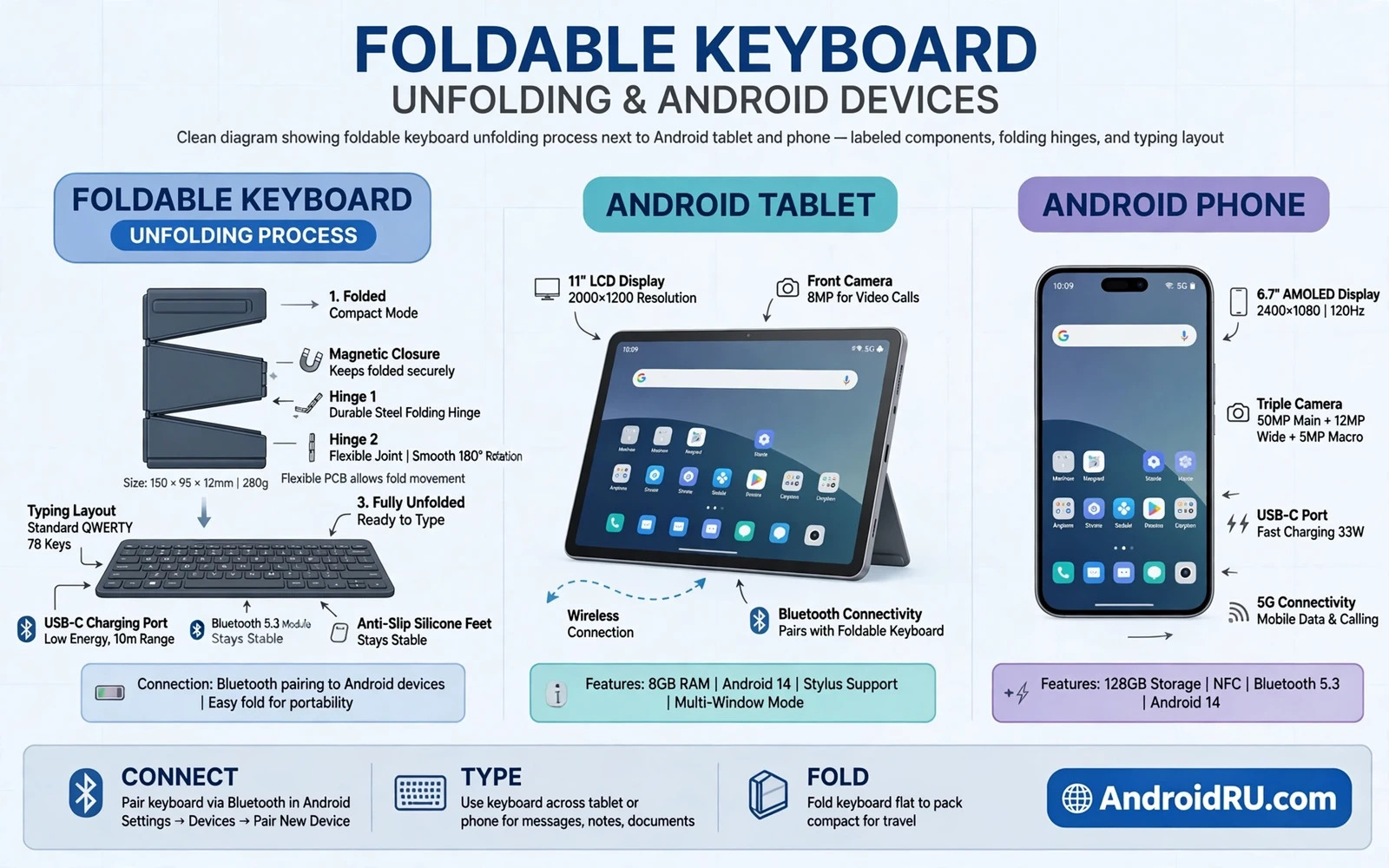
Full Typing From A Pocket Package
A foldable keyboard solves the oldest mobile productivity problem in a simple way. Phone screens are excellent for reading and poor for long writing because on-screen keyboards cover content and force slow thumb typing. A foldable keyboard unfolds into a full sized layout and folds back into a compact package that fits a jacket pocket or a small bag. Writers and students and field workers gain a real typing surface without carrying a laptop. The phone or tablet provides the screen and apps while the keyboard provides the comfortable input that long documents demand.
Fold designs vary from a single hinge that folds in half to multi-panel designs that fold into thirds. A single hinge design usually offers larger keys and a sturdier feel. A multi-panel design folds smaller but may use smaller keys or a split layout that takes adjustment. Key travel and spacing decide comfort more than folded size alone because a tiny keyboard that folds beautifully still frustrates long writing if keys feel cramped. Readers building a phone-centred workspace can explore Android desktop mode and whether it can replace a laptop to see how a keyboard completes a portable desk setup.
Layouts Key Feel And Connection Types
Layout familiarity matters because a keyboard that rearranges common keys slows every writer. Check the position of the enter key and the shift keys and punctuation keys against your habits. Some foldable keyboards shrink the right shift key or move punctuation to save space. Those compromises matter little for short messages but they irritate long form writers constantly. Backlighting helps evening work but it drains battery faster. A keyboard with adjustable backlight levels suits varied lighting better than a keyboard with a single bright setting.
Bluetooth connection suits most Android devices because it works wirelessly and pairs quickly. Some keyboards also offer a wired USB connection for latency sensitive work or for devices with Bluetooth restrictions. Bluetooth version and pairing memory matter for users who switch between phone and tablet because re-pairing every time wastes minutes daily. Battery life varies from days to months depending on backlight use and size. A keyboard that charges through USB-C simplifies travel charging because one cable can serve phone and keyboard together. Readers moving files alongside typing work can review transferring files between Android and PC wirelessly and by USB for the data side of mobile productivity.
Choosing For Writing Travel And Tablet Use
Writers should prioritise key travel and layout completeness over extreme compactness. A slightly larger folded keyboard that types beautifully beats a credit card sized keyboard that causes errors. Travellers should prioritise folded size and weight and durability because the keyboard must survive a bag without a dedicated case. Tablet users should check that the keyboard pairs stably and that tablet stands or cases hold the screen at a comfortable angle. A keyboard without a screen stand forces the user to prop the tablet awkwardly or to hold it while typing.
Students benefit from a keyboard with a number row and common shortcuts for documents and spreadsheets. Field workers benefit from splash resistance and a rugged hinge that tolerates dust. Language users should check that the keyboard layout matches their language needs because some foldable keyboards offer only one regional layout. Test typing speed and error rate on a sample passage rather than judging by appearance alone. A keyboard that feels good for a minute may still fatigue hands after an hour of real writing.
- Full sized layout with familiar enter and shift positions
- Comfortable key travel for hour-long writing sessions
- Bluetooth pairing memory for phone and tablet switching
- USB-C charging so one travel cable serves both devices
- Backlight levels adjustable for evening and dark rooms
Setting Up A Comfortable Mobile Typing Station
Pair the keyboard before a deadline and test it with your main writing app. Check autocorrect behaviour because an external keyboard can interact with phone autocorrect in surprising ways. Disable on-screen keyboard popups when a physical keyboard is connected if the phone offers that option. Set the tablet or phone on a stand at eye level when possible because typing on a flat screen while looking down strains the neck during long sessions. Keep the keyboard on a stable surface because a wobbling keyboard on a lap undermines the comfort it should provide.
Learn the keyboard shortcuts that your apps support because shortcuts transform a foldable keyboard from a typing surface into a productivity tool. Common shortcuts for copy and paste and undo and document navigation save constant screen touching. Customise key mappings only when necessary because heavy customisation creates confusion when switching back to a standard keyboard. A simple consistent setup travels better across devices than a complex personal mapping that only works on one keyboard.
Care Durability And Common Problems
Hinges are the weak point of foldable keyboards so open and close them gently and fully rather than forcing a half folded position. Keep crumbs and dust out of the hinge because debris grinds the mechanism over time. Charge the keyboard before long trips and carry a short USB-C cable as backup. If keys repeat or miss then check battery level and Bluetooth interference before assuming hardware failure. Other Bluetooth devices nearby and low battery both cause input problems that mimic a broken keyboard.
If pairing fails then remove the old pairing from the phone and restart Bluetooth on both devices before pairing fresh. If the keyboard types the wrong characters then check language and layout settings on the phone because a mismatched layout explains many mysterious character problems. Readers who use a phone as a webcam during typed meetings may find using an Android phone as a webcam for video calls relevant when a typing station doubles as a meeting station. Systematic checks solve most foldable keyboard frustrations quickly.
Choosing A Keyboard And A Final Checklist
Choose by writing volume first. Heavy writers need key feel above all else. Occasional writers can prioritise compactness. Travellers need durability and folded size. Tablet users need a stand solution alongside the keyboard. Read experiences from writers with similar habits because a keyboard praised for travel may disappoint a novelist and a keyboard praised for novels may burden a light traveller.
Test during the return window with a real writing task of at least an hour. Check hand fatigue and error rate and hinge confidence and battery behaviour. A foldable keyboard that passes an hour of real writing earns a permanent place in your bag. A keyboard that only impresses when folded should return before it becomes an unused gadget.
- Prioritise key feel for heavy writing and size for travel
- Confirm layout familiarity for enter shift and punctuation
- Test pairing and shortcuts with your main writing apps
- Write for a full hour before deciding during returns
Foldable Keyboard Use For Students And Field Workers
Students gain particular value from foldable keyboards because lecture notes and essays demand long typing on devices that must travel between classes. A foldable keyboard plus a tablet creates a light study station that fits a small bag and works in libraries and cafes. Students should practise touch typing on the foldable layout before exams or deadlines because an unfamiliar layout slows writing under pressure. Keep lecture notes backed up to cloud storage because a lost tablet with unbacked notes creates academic stress that a keyboard alone cannot solve. A reliable typing setup plus reliable backups supports student success together.
Field workers gain value differently because notes and reports must be entered in varied environments. A foldable keyboard with splash resistance suits outdoor data entry better than a delicate keyboard. A rugged case for the keyboard protects hinges during transport in work vehicles. Bright sunlight can make phone screens hard to read while typing outdoors so a shade or a tablet with a bright screen helps. Field workers should test the full setup in real outdoor conditions before relying on it for time-sensitive reports. A setup that works at a desk may fail in wind and glare and dust.
Writers who travel for research benefit from a foldable keyboard as a drafting tool rather than a final editing tool. Draft chapters on the phone during travel and edit on a larger screen later. That division suits the strengths of each device. Drafting needs only a comfortable keyboard and a distraction-free app while editing benefits from a large display and precise navigation. A foldable keyboard earns its place by making drafting possible anywhere without carrying a laptop through airports and field sites.
- Practise touch typing on the foldable layout before deadlines
- Back up student notes to cloud storage alongside typing work
- Choose splash resistance and hinge protection for field work
- Test outdoor readability in sunlight before field reliance
- Draft on the phone while travelling and edit on a larger screen later
Foldable Keyboard Shortcuts And App Pairing
Shortcut knowledge transforms a foldable keyboard from a typing tool into a fast editing tool. Learn shortcuts for selecting text and moving between words and undoing changes in your main apps. Practise those shortcuts until they feel automatic because conscious shortcut hunting slows writing more than touch typing alone. Pair the keyboard with apps that support external keyboard shortcuts well because some mobile apps ignore many shortcuts. A keyboard plus a shortcut-friendly app creates a mobile editing experience close to a laptop for many writing tasks.
App pairing also affects file handling because documents started on a phone should move easily to larger devices for final editing. Use cloud storage or a simple transfer method that keeps versions clear. Name files consistently so phone drafts and desktop edits do not create confusing duplicates. A tidy file habit prevents the common problem of editing an old version while a newer version sits elsewhere. Mobile productivity depends as much on file discipline as on keyboard hardware.
- Learn text selection and undo shortcuts until automatic
- Pair the keyboard with apps that support shortcuts well
- Use cloud storage with consistent file naming
- Avoid editing old versions while newer versions sit elsewhere

