

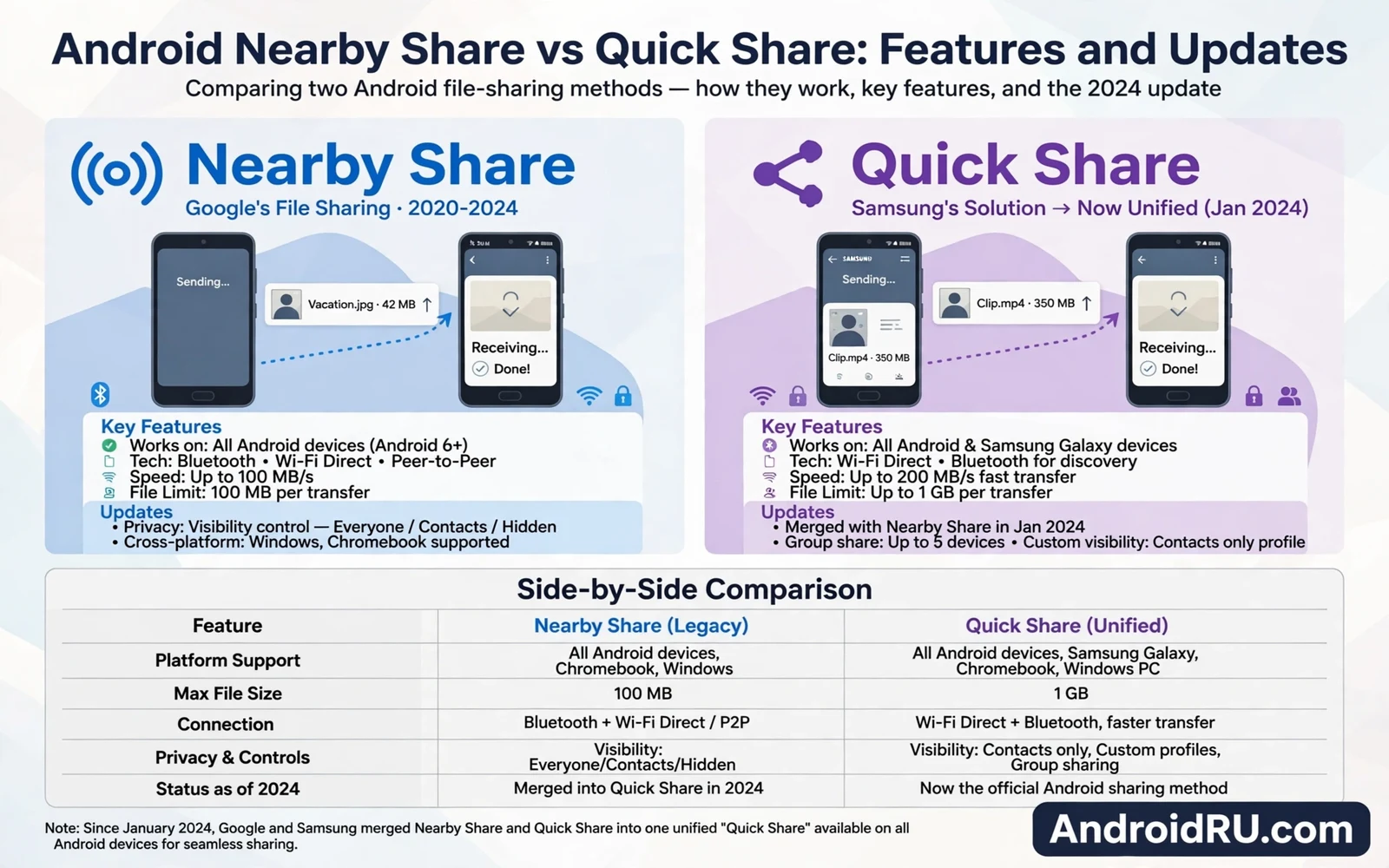
Nearby Share and Quick Share describe the same fast file sharing system under two names from different eras. Google launched Nearby Share as a built in Android sharing tool. Google later merged Nearby Share with Samsung Quick Share under the Quick Share name. This guide compares Android Nearby Share vs Quick Share features and updates. It explains the rename and the current behavior and the settings owners need. Readers will learn why older guides mention one name while newer phones show the other.
Fast local sharing matters because cloud uploads waste time for nearby transfers. A large video sent through cloud storage uploads and then downloads again. A local share moves the file directly between devices over Wi-Fi or Bluetooth. That direct path saves data and saves time and works without strong internet. Nearby Share and Quick Share both use that direct path. The rename changed branding and compatibility more than core speed.
Fast Pair accessory pairing uses nearby discovery for a different job from file sharing. Readers who pair accessories can study how Android Fast Pair technology works with accessories to see how pairing cards differ from share sheets. Fast Pair builds a lasting accessory link. Quick Share moves a single file or link. Both features rely on nearby radios yet they answer different owner needs. Keeping those jobs separate prevents confusion when prompts appear.
From Nearby Share To Quick Share
Nearby Share debuted as a system level share target inside the Android share sheet. Owners could send photos and videos and links and files to nearby Android devices. The system handled discovery and connection and transfer without a separate app. Samsung phones carried a separate Quick Share tool with similar goals. Two similar tools on Samsung phones confused owners about which tool to use. The merger unified those tools under one Quick Share brand across Android.
Current Android phones show Quick Share inside the share sheet where Nearby Share once appeared. Older guides and older menus may still say Nearby Share. Owners should treat both names as references to the same modern system. A phone that updated to the merged version shows Quick Share branding. A phone that missed that update may still show Nearby Share branding. Function remains similar across that branding gap for common file types.
How Quick Share Transfers Files
Quick Share discovers nearby devices through Bluetooth and Wi-Fi signals. The sender picks a target device from the share sheet list. The receiver sees an accept prompt with file details. Acceptance starts a direct transfer over the fastest available local path. Wi-Fi Direct usually carries large files faster than Bluetooth alone. The transfer shows progress on both devices until completion. Owners can share many files in one session without repeated setup.
- Open the file or photo to share
- Tap share and choose Quick Share
- Pick the nearby target device
- Accept the transfer on the receiving device
- Confirm that the file opens correctly
Visibility settings control who can discover a phone through Quick Share. Owners can limit visibility to contacts only or to everyone nearby for a short window. Contacts only mode suits daily use because it blocks strangers. Everyone mode suits one time sharing with a new acquaintance. Owners should return visibility to contacts only after a public share session. Leaving everyone mode on invites unwanted share requests in crowded places.
Quick Share And Other Platforms
Quick Share now reaches Windows PCs through a dedicated app in supported cases. That cross platform path helps owners move files between phone and computer without cables. ChromeOS devices also support Quick Share receiving in supported cases. Apple devices do not support Quick Share natively so owners need other methods for iPhone transfers. Cloud storage or cable transfer still serve cross platform gaps. Owners should check platform support before promising Quick Share to a mixed device group.
App archiving and file management habits affect how shared files land on a receiving phone. Readers who manage storage can explore how Android app archiving saves storage without deleting data before sharing large files. A receiving phone with low storage may fail a large transfer. Archiving unused apps frees room for incoming files. Senders should confirm file size with receivers before large transfers. That courtesy prevents failed transfers and wasted time.
Privacy And Security Notes
Quick Share transfers stay local yet they still deserve caution with unknown senders. Owners should accept files only from known contacts or from people they can see. A malicious file from a stranger can carry harmful content even over a local link. Owners should scan unexpected files and avoid opening unknown executables. Visibility settings provide the first defense by hiding the phone from strangers. Accept prompts provide the second defense by requiring explicit approval.
Satellite and connectivity news sometimes overshadows local sharing yet local tools remain essential. The connectivity story in the impact of satellite connectivity on future Android phones shows how wide area links evolve while local sharing stays fast. Satellite links serve remote areas where local peers stay absent. Quick Share serves nearby transfers where peers sit in the same room. Both paths matter for different distances.
Troubleshooting Quick Share Problems
A missing target device usually means Bluetooth or Wi-Fi or location permissions block discovery. Owners should confirm that both devices hold Bluetooth on and Wi-Fi on. Owners should confirm that location permission allows nearby discovery where the system requires it. A restart of both devices clears stuck discovery sessions. Owners should also confirm that visibility allows the sender to see the receiver. A contacts only receiver will hide from a sender outside contacts.
Slow transfers often stem from weak Wi-Fi Direct negotiation or from large file sizes. Moving devices closer usually improves transfer speed. Closing heavy network apps on both devices can free local bandwidth. Owners should prefer Wi-Fi paths for videos and large folders. Bluetooth fallback suits small photos and links yet it crawls on large videos. Patience helps for very large folders because progress may pause briefly during file handoffs.
Nearby Share became Quick Share through a merger that unified Android file sharing. The core promise stayed constant across the rename. Owners pick a nearby device and accept a prompt and receive files directly. Visibility settings and platform support shape the modern experience. Owners who set visibility wisely and who check platform limits will share files fast and safely. The name changed while the job of quick nearby sharing stayed exactly the same.
Quick Share For Creators And Teams
Creators share large video files between phone and computer frequently during editing workflows. Quick Share to Windows reduces cable hunting during shoots. A creator can move clips to a laptop for editing without cloud upload delays. That speed matters when deadlines press and internet stays slow. Creators should still keep cloud backups for finished projects. Quick Share serves transfer speed while cloud serves archival safety.
Small teams benefit from Quick Share during meetings because files move without email attachments. A team member can share a presentation to a colleague tablet in seconds. That speed keeps meetings focused on discussion rather than on file logistics. Teams should agree on visibility settings before meetings to avoid discovery delays. Contacts only visibility works when all members share contacts. Everyone mode for a short window helps when guests join.
Teachers can use Quick Share to distribute materials to student tablets in classrooms. A teacher can send worksheets without printing or emailing. Students receive files directly on their devices. Teachers should confirm student device visibility before class to avoid delays. A quick test share before class reveals permission problems early. Classroom sharing works best with a rehearsed routine.
Quick Share Limits Worth Knowing
File size limits and transfer interruptions deserve attention for very large folders. A large video folder may take significant time even over fast local Wi-Fi. Interruptions from phone sleep or app closure can pause transfers. Owners should keep both devices awake during large transfers. Owners should also avoid switching networks mid transfer. Patience and stable conditions produce reliable large transfers.
File type support covers common media and documents yet some specialized formats may need companion apps. A receiver without an app for a specialized file can receive yet cannot open it. Senders should confirm receiver app support for unusual formats. Cloud links sometimes serve specialized files better because the receiver can choose an app. Quick Share excels for common files while cloud links handle edge cases. Owners should pick the tool that matches file type.
Duplicate files after repeated shares can clutter receiving devices quickly. Owners should check download folders after sharing sessions and remove duplicates. A naming habit that includes dates helps receivers spot duplicates. Senders should avoid resending unchanged files. Clean receiving habits keep storage tidy across frequent sharing. Small discipline prevents a download folder from becoming chaos.
Quick Share And Privacy Settings Review
Privacy settings review should accompany Quick Share use because visibility choices determine discovery exposure. Owners who set visibility to contacts only limit discovery to known people. Owners who forget an everyone window leave discovery open longer than intended. A monthly visibility check prevents stale open settings. That check takes seconds inside share settings. Regular review keeps convenient sharing from becoming a privacy leak.
Received file hygiene also belongs in privacy review because shared files may contain location metadata. Photos shared through Quick Share can carry location tags from capture. Owners who share sensitive photos should strip location metadata first where apps allow it. Receivers should also respect metadata privacy and avoid resharing sensitive files. Metadata awareness protects both senders and receivers. Sharing convenience should never override location privacy.

