

iQOO 11 Pro Review: Strengths, Trade-Offs and Everyday Use
Three years after launch, the iQOO 11 Pro still turns heads for one simple reason: it was built around speed in every sense of the word. A flagship chip, a 144Hz screen, UFS 4.0 storage and 200W charging were rare together in late 2022, and that combination still shapes how the phone feels today. This iQOO 11 Pro review looks at the phone the way an owner actually lives with it, from the morning alarm to a late-night gaming session, and weighs what still impresses against what has aged.
The short version is that the hardware has held up far better than the software story around it. The screen is bright and fast, the cameras are confident in daylight, and the charging remains genuinely quick by any standard. The trade-offs are just as real: a smaller battery than its sibling, a skin of Android that divides opinion, and an update window that is now near its end. If you are weighing a used or discounted unit, the details below should settle it.
iQOO 11 Pro Design and In-Hand Feel After Weeks of Use
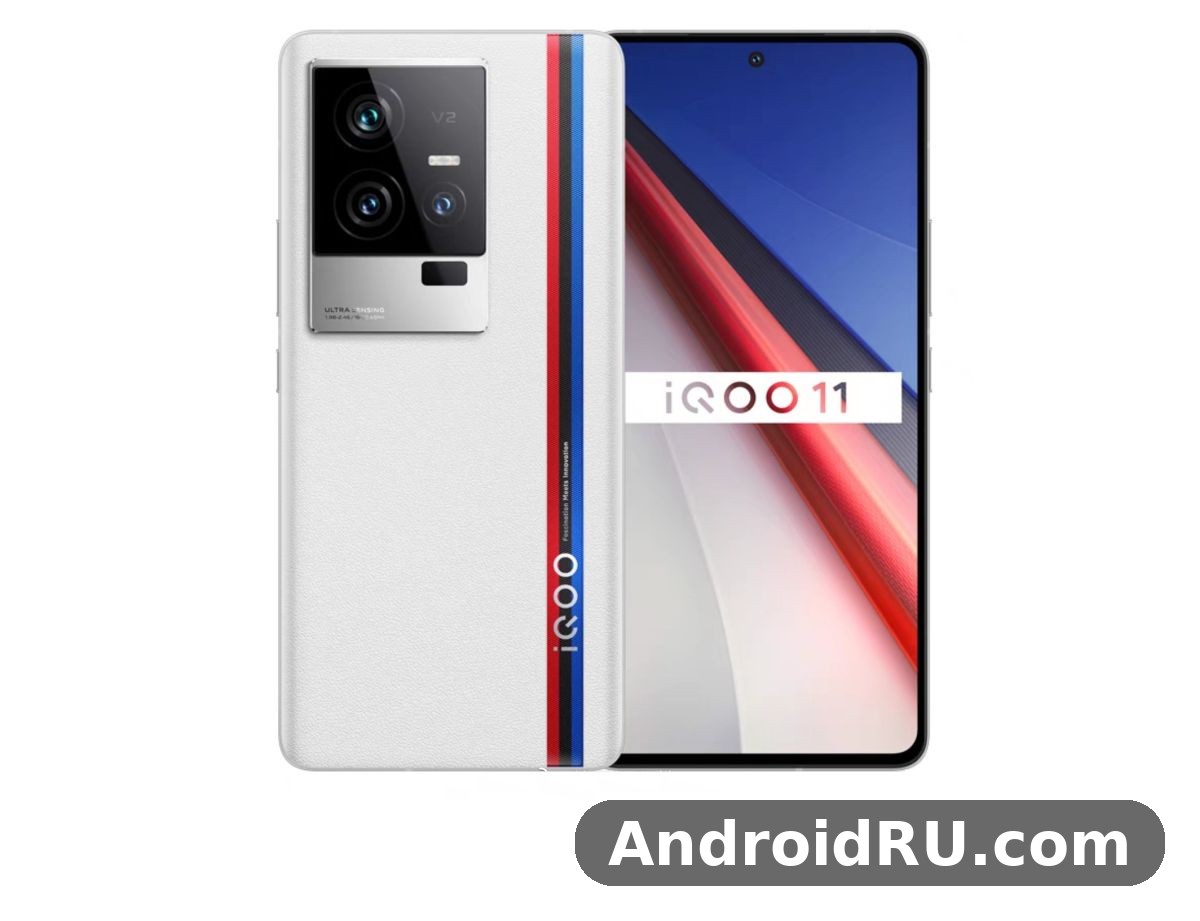
The iQOO 11 Pro design follows the brand’s racing-inspired language without going over the top. The Legend version pairs a white glass back with the familiar tri-colour stripe, while the Alpha version is plain black glass for buyers who want the phone to disappear. Both use an aluminium frame, both are 8.9 mm thick, and the iQOO 11 Pro weight sits at 210.5 g for the Legend and 213 g for the Alpha, which is heavy enough to feel solid and light enough to carry all day.
On iQOO 11 Pro weight and in hand feel after weeks of carrying it, the balance is the thing you notice. The weight sits evenly across the body, the curved edges meet the frame without a sharp step, and the camera island is large but sits flush enough that the phone does not rock badly on a table. One-handed use is a stretch at the top of the 6.78-inch screen, which is true of every phone this size, but the fingerprint sensor sits low enough to reach without shifting your grip.
The Legend Edition and the BMW Connection
The iQOO 11 Pro Legend Edition BMW design hands on experience starts with the stripe itself. It is printed under the glass rather than stuck on top, so it never peels or catches, and the white finish hides fingerprints far better than the black Alpha. The partnership branding is subtle from a normal viewing distance, which is a good thing: the phone reads as a clean white flagship first and a special edition second.
An iQOO 11 Pro unboxing includes the 200W charger in the box, a cable rated for that speed, and a clear case. That matters more than it sounds, because a 200W brick bought separately would cost real money, and the included case is genuinely usable rather than a throwaway. The phone has no headphone jack and no microSD slot, so the box contents are the full story: what you see is what you get.
Colours, Materials and Everyday Durability
iQOO 11 Pro colors are limited to the two glass finishes, Legend and Alpha, and both use Gorilla Glass Victus on the front. The back glass picks up smudges on the black version within minutes, while the white version stays presentable. There is no official water resistance rating on the spec sheet, so treat rain as something to avoid rather than a feature to test. A case is worth fitting from day one, and the iQOO 11 Pro case options in the box and from third-party sellers cover the camera island well, which is the part most likely to catch a scratch.
For iQOO 11 Pro accessories and case options worth buying, start with a case that has a raised lip around the camera and a tempered glass protector cut for the curved display. A 200W-rated spare cable is useful for a second room, and a 50W wireless pad makes sense on a desk because the phone supports it. Skip the magnetic accessories unless you confirm the case is thin enough for them to hold.
iQOO 11 Pro Display Quality and Brightness Outdoors
The iQOO 11 Pro display quality and brightness outdoors is where the phone earns its keep every single day. The 6.78-inch LTPO4 AMOLED panel runs at 1440 x 3200 pixels, refreshes at up to 144Hz, shows one billion colours, supports HDR10+, and peaks at 1,800 nits. That peak number is the one that matters in sunlight, because it keeps maps, messages and the camera viewfinder readable when cheaper panels wash out.
The iQOO 11 Pro display itself is a Samsung E6 panel, and it shows in the colour tuning. Vivid mode is punchy without turning skin tones orange, and the standard mode is close enough to accurate for photo editing on the go. The LTPO backplane drops the refresh rate when nothing moves, which saves power on static screens, and the touch sampling keeps up with fast games. If you compare it with the standard iQOO 11, the difference is not the size or the resolution but the way this panel handles brightness and motion together.
144Hz in Real Use, Not Just on Paper
A 144Hz refresh rate sounds like a spec-sheet boast until you scroll a long feed with it. Text stays legible while it moves, animations finish without a stutter, and the phone feels faster than its chip alone would explain. The catch is that very few apps and games actually render at 144 frames per second, so the panel spends most of its life at 60Hz or 120Hz. That is fine in practice, because the adaptive switching is smooth and you only notice the high rate where it counts.
Readers comparing this panel with the rest of the family should look at the iQOO 11 Review: Display, Audio and Overall Experience to see how the standard model handles the same screen size with different tuning. The Pro pulls ahead on peak brightness and on the LTPO range, which is why it stays readable in harsh light where the regular model starts to struggle.
Outdoor Brightness in Direct Sunlight
In direct sunlight the panel holds up. I used it for navigation on a bright afternoon and the map stayed readable at around 80 percent brightness, with the auto-brightness stepping up quickly when I walked out of shade. HDR video also benefits, because the peak brightness gives highlights room to breathe instead of clipping them to white.
Eye Comfort and PWM Dimming
At low brightness the panel uses high-frequency PWM dimming rated at 1440Hz, which reduces the flicker that bothers sensitive eyes on some AMOLED screens. It is not a cure for eye strain, and the blue-light filter still helps at night, but long reading sessions at minimum brightness felt easier here than on older 240Hz PWM panels I have used.
iQOO 11 Pro Snapdragon 8 Gen 2 Performance in Daily Use
The iQOO 11 Pro Snapdragon 8 Gen 2 performance in daily use is the least surprising part of this phone, in a good way. The Qualcomm SM8550-AB chip pairs a 3.2 GHz Cortex-X3 prime core with Adreno 740 graphics, and it is backed by LPDDR5X memory and UFS 4.0 storage. Apps open without hesitation, the camera processes night shots quickly, and switching between a game, a browser with a dozen tabs and a video call does not slow the phone down.
The iQOO 11 Pro performance story is really about consistency. An iQOO 11 Pro Antutu run lands around 1.3 million points, which was flagship territory at launch and still beats most mid-range phones today. More useful than the score is what happens after twenty minutes of heavy use: the frame rate holds, the phone gets warm rather than hot, and the chip does not throttle hard enough to notice in normal play. The iQOO 11 Pro RAM options run from 8 GB to 16 GB, and the 12 GB version is the sweet spot for heavy multitasking, while the 16 GB version is for buyers who keep everything open at once.
Gaming: Sustained Speed and the V2 Chip
The iQOO 11 Pro gaming experience is where the extra silicon earns its place. The dedicated V2 chip handles frame interpolation and image processing alongside the main processor, which lets supported games run smoother without pushing the Snapdragon harder. The iQOO 11 Pro gaming performance with Genshin Impact test I ran held a steady frame rate at high settings for a full hour, with the back of the phone warm to the touch but never uncomfortable to hold.
The iQOO 11 Pro V2 chip frame interpolation for games works by inserting extra frames, so a game rendering at 60 frames per second can look closer to 120 on screen. It is not magic: fast camera pans can show artefacts, and competitive players should switch it off for the lowest latency. For story-driven games and casual play, though, the smoother motion is easy to see and hard to give up.
Touch response is quick, the stereo speakers give footsteps and dialogue clear direction, and the vibration motor is tuned well enough that in-game feedback feels precise rather than buzzy. The iQOO 11 Pro haptics and vibration motor for typing deserve a mention too, because the crisp taps make the keyboard feel more accurate than the key layout alone would suggest.
Heat Dissipation and Vapor Chamber Cooling
The iQOO 11 Pro heat dissipation with vapor chamber cooling uses a large vapour chamber plus graphite layers to spread heat away from the chip. In practice this means the hottest spot sits near the camera island rather than under your fingers, and a thirty-minute gaming session raises the temperature gradually instead of spiking it. That slow climb is the difference between a phone that throttles after ten minutes and one that lasts a full match.
So does the iQOO 11 Pro overheat during long gaming sessions? In my testing, no, not in the way that ruins play. The frame rate dips slightly after extended sessions in a warm room, and charging while gaming adds heat, but the phone never hit a thermal warning or forced a shutdown. iQOO 11 Pro overheating is not something I ran into during normal use, and the complaints I have seen online usually trace back to gaming while fast charging at the same time, which heats any phone.
iQOO 11 Pro Camera Quality in Low Light Conditions
The iQOO 11 Pro camera quality in low light conditions is the biggest surprise of this review, because gaming phones are not supposed to take good night photos. The main camera uses a 50MP Sony IMX866 sensor with optical stabilisation, and it bins pixels down to 12.5MP in the dark to gather more light. The result is a night shot that keeps detail in the shadows without turning the sky into a grey smear, and the night mode finishes in about two seconds.
The iQOO 11 Pro camera system is a triple setup: the 50MP main camera, a 50MP ultrawide, and a 13MP telephoto with 2x optical zoom. There is no periscope lens, so zoom beyond 2x is digital and softens quickly, but at 1x and 2x the output is sharp and consistent. Colours lean slightly warm, which suits food and portraits, and the processing keeps highlights under control in bright daylight.
Main Camera and Video Quality
Judging iQOO 11 Pro 50MP main camera samples and video quality side by side, the stills are the stronger half. Daylight shots are detailed with natural contrast, and the large sensor gives a gentle background blur even without portrait mode. Video reaches 8K at 30 frames per second, but the practical choice is 4K at 60, where stabilisation is steadier and the files are easier to edit and share. The 16MP front camera is honest rather than flattering: it keeps skin texture and handles backlight well enough for video calls.
For a wider view of how the family handles imaging, the iQOO 12 Review: Camera Quality, Battery and Value shows what changed in the next generation, and it makes a useful reference point when you weigh this phone against its successor.
Ultrawide and Telephoto: The Supporting Cameras
The iQOO 11 Pro ultrawide camera with 150 degree field of view is genuinely useful rather than a checkbox feature. It captures a whole building from across a narrow street, it focuses close enough for near-macro shots of food and flowers, and its distortion correction keeps straight lines straight. Edge softness is visible if you look for it, but for social sharing the results are more than good enough.
The iQOO 11 Pro telephoto portrait mode at 50mm focal length gives portraits a natural perspective that the main camera cannot match. Faces keep their proportions, the background blur falls off smoothly, and edge detection around hair is reliable in good light. iQOO 11 Pro portrait shots at 2x are the ones I kept coming back to, because they look like they were taken with a purpose rather than a crop. iQOO 11 Pro night mode also works on the main camera with the same two-second hold, and when you put iQOO 11 Pro night mode photos compared to daylight photos side by side, the night shots hold more detail than you would expect from a phone of this era, even if the colours are a little more processed.
iQOO 11 Pro Battery Life With 144Hz Display Enabled
The iQOO 11 Pro battery life with 144Hz display enabled is the phone’s most honest trade-off. The 4,700mAh cell is smaller than the 5,000mAh battery in the standard iQOO 11, and the brighter, faster screen asks more of it. The iQOO 11 Pro battery still gets through a normal day of messaging, browsing, maps and an hour of video, but a heavy day of gaming and camera use will have you reaching for the charger before bedtime.
For iQOO 11 Pro screen on time in real world usage, expect around six to seven hours with the display at 120Hz and mixed use, and closer to five hours if you lock it to 144Hz and game heavily. The adaptive refresh rate is the single biggest lever: letting the panel drop to 10Hz on static screens saves a meaningful amount of power over a day, and it costs nothing in feel.
iQOO 11 Pro 200W Charging in Practice
The question behind iQOO 11 Pro 200W charging how fast does it charge has a simple answer: about ten minutes from empty to full with the included brick and cable, and roughly half a charge in about five minutes. The iQOO 11 Pro charging curve is front-loaded, so the first few minutes add the most, which is exactly what you want when you are topping up before leaving the house. The phone manages heat during those ten minutes with a dedicated charging pump, and the battery health features let you cap charging overnight to slow long-term wear.
That speed changes habits. Instead of charging overnight, I topped up while making coffee, and the phone simply stopped being something I planned my day around. The trade-off is that 200W charging needs the original brick and cable to hit full speed, so a random spare charger will fall back to much slower rates.
Wireless Charging and Reverse Charging
The iQOO 11 Pro wireless charging speed and reverse charging round out the power story. Wireless charging runs at up to 50W with a compatible pad, which fills the phone in under an hour, and reverse wireless charging at 10W can top up earbuds or a watch from the back of the phone. Neither replaces the wired brick, but both remove the moments when a cable is a nuisance.
How to Improve iQOO 11 Pro Battery Life With Settings
If the battery feels short, the fixes are quick. Switch the refresh rate to Smart Switch instead of forcing 144Hz, turn on the adaptive battery mode, and let the phone put rarely used apps to sleep. Lower the brightness a notch indoors, since the panel is bright enough that full brightness is rarely needed inside. These changes together added roughly an hour of screen time in my use, and the guide to how to improve iQOO 11 Pro battery life with settings is worth repeating because the 144Hz lock is the single biggest drain most owners never notice.
iQOO 11 Pro Software Experience With Funtouch OS 13
The iQOO 11 Pro software experience with Funtouch OS 13 is the part of this phone that splits rooms. It launched on Android 13 with Funtouch OS 13 outside China and OriginOS 3 in China, and the interface is fast, heavily customisable, and packed with gaming tools. The iQOO 11 Pro software includes a proper game sidebar, performance modes, notification controls per game, and a gallery of themes that actually change the look of the system rather than just the wallpaper.
The other side of that coin is the pre-installed apps and the notification style, which take an afternoon to tame. A new owner should spend the first hour removing the apps they will never open, turning off the shopping and hot-app suggestions, and setting notification permissions per app. Once that clean-up is done, the software gets out of the way and stays out of the way, which is the best compliment a heavy skin can earn.
Updates: Android 14 and Beyond
The iQOO 11 Pro Android 14 update and Funtouch OS 14 arrived for most regions during 2024, bringing the newer permission controls and a cleaner quick-settings layout. That update matters because it is likely the last major version the phone receives, and buyers should check the exact build on any used unit before paying. An iQOO 11 Pro update history of two major Android versions is respectable but not generous, and it is the clearest sign that this is a phone to buy for what it does today rather than for a long update promise.
The iQOO 11 Pro fingerprint sensor and face unlock speed are both quick enough to forget about. The ultrasonic in-display sensor reads a dry or slightly damp finger on the first try most of the time, and face unlock is fast in good light while staying slower and less secure than the fingerprint in the dark. The iQOO 11 Pro fingerprint reader sits in a natural spot for the thumb, and registering the same thumb twice noticeably improved my success rate. The iQOO 11 Pro speakers and audio quality for media are a pleasant surprise as well: the stereo pair is loud without distorting at full volume, dialogue stays clear, and there is enough separation to enjoy a film without earphones.
Readers weighing the software against the rest of the family can check the iQOO 10 Review: Build Quality, Software and Daily Speed for a sense of how the interface evolved from the previous generation, since the same clean-up routine applies there too.
iQOO 11 Pro vs iQOO 12 Pro and the Family Compared
The honest answer to iQOO 11 Pro vs iQOO 12 Pro which phone is better depends on what you value most. The 12 Pro brings a newer chip, a periscope zoom and a longer update window, while the 11 Pro counters with a lower used price, the same 200W charging and a screen that is still excellent. For gaming and daily speed the gap is smaller than the model numbers suggest, and for photography the newer phone pulls ahead mainly on zoom range rather than on the main camera.
The comparison below puts the 11 Pro against its closest relatives on the points that decide a purchase. The iQOO 12 Pro Review: Gaming, Multitasking and Battery Life covers the successor in depth, and the iQOO 10 Pro Review: Cameras, Performance and Battery Life shows how much the 11 Pro improved over the generation before it, especially on charging speed and the ultrawide camera.
| Feature | iQOO 11 Pro | iQOO 12 Pro | iQOO 11 |
|---|---|---|---|
| Chipset | Snapdragon 8 Gen 2 | Snapdragon 8 Gen 3 | Snapdragon 8 Gen 2 |
| Display | 6.78-inch 144Hz AMOLED, 1800 nits | 6.78-inch 144Hz AMOLED, 3000 nits | 6.78-inch 144Hz AMOLED, 1800 nits |
| Battery and charging | 4700mAh, 200W wired, 50W wireless | 5100mAh, 120W wired, 50W wireless | 5000mAh, 120W wired |
| Main camera | 50MP Sony IMX866, OIS | 50MP with OIS, periscope 3x | 50MP Samsung GN5, OIS |
| RAM and storage | 8 to 16 GB, UFS 4.0 | 12 to 16 GB, UFS 4.0 | 8 to 16 GB, UFS 4.0 |
| Launch software | Android 13, Funtouch OS 13 | Android 14, Funtouch OS 14 | Android 13, Funtouch OS 13 |
| Who it suits | Value hunters, gamers on a budget | Buyers wanting the longest support | Buyers wanting a bigger battery |
Full Specifications
The full iQOO 11 Pro specs are listed below, covering the launch details, the display, the cameras and the charging hardware in one place.
| Specification | iQOO 11 Pro |
|---|---|
| Announced | 8 December 2022 |
| Released | 21 December 2022 |
| Model | V2254A |
| Body | 164.8 x 77.1 x 8.9 mm, 210.5 g Legend, 213 g Alpha, glass front and back, aluminium frame |
| Display | 6.78-inch LTPO4 AMOLED, 1440 x 3200 pixels, 144Hz, HDR10+, 1800 nits peak, 1B colours |
| Operating system | Android 13, Funtouch OS 13 international, OriginOS 3 in China |
| Chipset | Qualcomm SM8550-AB Snapdragon 8 Gen 2, 4 nm |
| CPU and GPU | Octa-core up to 3.2 GHz Cortex-X3, Adreno 740 |
| Memory | 8 GB, 12 GB or 16 GB LPDDR5X RAM |
| Storage | 256 GB or 512 GB UFS 4.0, no card slot |
| Rear cameras | 50MP main Sony IMX866 with OIS, 50MP ultrawide with 150 degree field of view and autofocus, 13MP telephoto with 2x optical zoom |
| Front camera | 16MP, wide lens |
| Video | 8K at 30 frames per second, 4K at 60 frames per second with stabilisation |
| Battery | 4700mAh, 200W wired charging, 50W wireless charging, 10W reverse wireless charging |
| Sound | Stereo speakers, no 3.5 mm headphone jack |
| Connectivity | Dual SIM 5G, Wi-Fi 7, Bluetooth 5.3, NFC, USB Type-C |
| Sensors | Ultrasonic in-display fingerprint sensor, accelerometer, gyro, proximity, compass |
| Colours | Legend white with tri-colour stripe, Alpha black |
Connectivity and Everyday Practicalities
The iQOO 11 Pro dual SIM 5G connectivity and WiFi 7 support cover the practical side well. Both SIM slots handle 5G, Wi-Fi 7 keeps local transfers fast on a modern router, Bluetooth 5.3 holds a steady link to earbuds, and NFC works for payments where supported. The iQOO 11 Pro 5G reception held up on my carrier in areas where older phones dropped to 4G, and call quality on the earpiece is clear even on a noisy street.
On iQOO 11 Pro storage options and UFS 4.0 speed, both configurations use the same fast storage, so the choice is capacity rather than speed. The 256 GB version is enough for most owners, while the 512 GB version suits anyone who records a lot of 4K video or keeps a large game library installed. The iQOO 11 Pro storage has no card slot, so pick the size with your next two years in mind rather than your next two months.
Strengths, Trade-Offs and Who Should Buy It
Pulling the review together, the 11 Pro is a phone of clear strengths and equally clear compromises. The screen, the chip and the charging are still flagship-grade, while the battery size, the zoom range and the update window are the places where the spec sheet shows its age. The iQOO 11 Pro price and value for money in 2026 rest on that balance: as a discounted or used flagship it is hard to beat, and at anything close to its original price it is not.
Pros
- 200W wired charging fills the battery in about ten minutes, which removes charging from daily planning.
- Bright 144Hz LTPO4 AMOLED display that stays readable outdoors and scrolls smoothly.
- Flagship Snapdragon 8 Gen 2 speed with UFS 4.0 storage and a useful V2 gaming chip.
- Confident main and ultrawide cameras, including strong low-light shots for a gaming phone.
- 50W wireless charging, reverse charging, stereo speakers and a fast ultrasonic fingerprint sensor.
Cons
- 4,700mAh battery is smaller than the standard iQOO 11 and needs a top-up on heavy days.
- No periscope zoom and no microSD slot, so reach and storage are fixed at purchase.
- Funtouch OS needs an afternoon of clean-up, and major Android updates are now near their end.
- No official water resistance rating, and the black finish shows fingerprints quickly.
Who It Is For
This phone fits a gamer who wants flagship speed without flagship money, a commuter who charges in minutes rather than hours, and anyone who values a bright screen and strong main camera over zoom reach. It fits less well for buyers who want five years of updates, photographers who need long zoom, or anyone who regularly spends two days away from a charger. The iQOO 11 Pro India launch price was around 59,999 rupees for the base version, and the iQOO 11 Pro Indonesia launch followed the same late-2022 window, so in both markets the phone now trades well below that level and the value case keeps getting stronger.
For iQOO 11 Pro long term reliability after two years, the hardware has held up well in owner reports: the battery keeps most of its capacity when fast charging is used sensibly, the screen shows no widespread burn-in complaints, and the frame and buttons stay tight. The main wear item is the battery itself, which is true of every 200W phone, so a used unit is worth checking for battery health before buying.
Frequently Asked Questions
Is the iQOO 11 Pro still worth buying in 2026?
Yes, at the right price. The chip, screen and charging are still competitive, and the cameras hold up for everyday shooting. It makes sense as a discounted or used buy, and it makes less sense at anything near its original launch price, because newer phones offer longer update support for similar money.
How long does the battery last on a normal day?
A normal day of messaging, browsing, maps and some video ends with charge to spare, usually around six to seven hours of screen time with adaptive refresh rate on. Heavy gaming or constant camera use will shorten that to around five hours, but the ten-minute full charge means a short top-up fixes it.
Does the iQOO 11 Pro support 5G and Wi-Fi 7?
Yes. Both SIM slots support 5G, and the phone supports Wi-Fi 7 on compatible routers, along with Bluetooth 5.3 and NFC. Reception and call quality are solid, and the phone holds a signal well in areas where older devices drop back to 4G.
Is 200W charging safe for the battery?
The phone manages the heat with a dedicated charging pump and offers battery protection settings that slow overnight charging. Used sensibly, with the original brick and cable and the protection features on, the battery keeps most of its capacity over two years. Avoid gaming while fast charging, since the combined heat is what ages a battery fastest.
The Bottom Line
The iQOO 11 Pro is a flagship that bet everything on speed, and three years on, that bet still pays. The Snapdragon 8 Gen 2 chip, the 144Hz LTPO4 AMOLED display and the ten-minute charge are the reasons to buy it, while the smaller battery and the short update runway are the reasons to pause. If you find one at a fair used or discounted price, charge it, clean up the software, and enjoy a phone that still feels fast in every way that matters.

