

Our Acer Iconia Tab A3 Review: Usability, Storage and Detailed Specs
This tablet review looks at a large Android tablet from the autumn of 2013, a time when 10 inch tablets were a popular middle ground between a phone and a laptop. The Acer Iconia Tab A3 review for everyday tablet use starts with a simple question: what could a 10.1 inch device with a quad-core processor, 1 GB of RAM and a 7300 mAh battery do well, and where did its limits show? This article answers that question from the specification sheet, the design, the screen, the software and the connectivity, so a reader who finds a used example or who studies classic Acer hardware can judge it fairly. The Acer Iconia Tab A3 specifications and full hardware details are set out in full later in this article, with a table that covers both the Wi-Fi model and the 3G model.
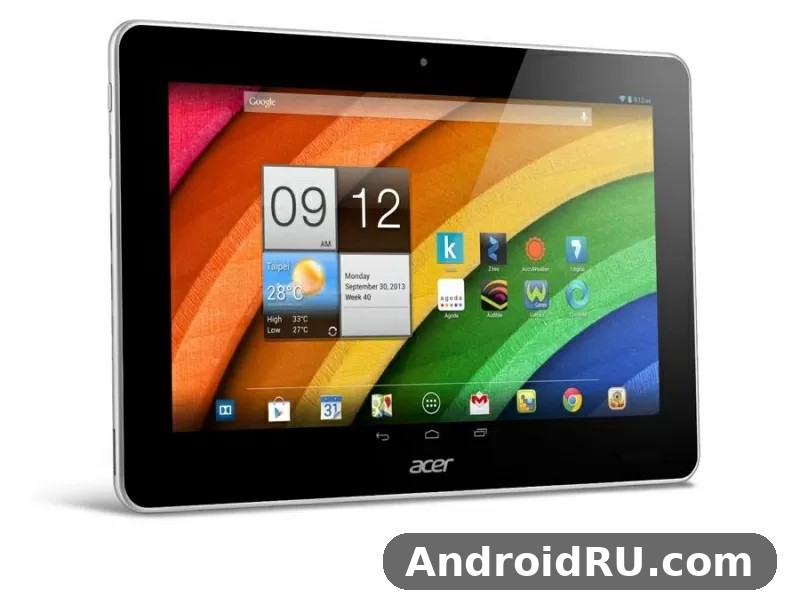
As an Android tablet from 2013, this model sits in a clear historical place. It was announced in September 2013 and released in November 2013, at an early price of about 190 euros. That price put it in the affordable large-tablet group of its year, below many premium rivals and above the smallest budget tablets. The Acer Iconia Tab A3 tablet was not presented as a flagship, and this review treats it as it was: a practical, large-screen device for reading, video, web browsing and light apps, with a classic design and a battery that was large for its class.
Overview: A Classic 10.1 Inch Tablet from 2013
The Acer Iconia Tab A3 released November 2013 after September announcement, and that timing matters. Android 4.2.2 Jelly Bean was current for this class of device, 10.1 inch screens were a standard size for home tablets, and microSD expansion was a common way to add room for media. The Acer Iconia Tab A3 features include a 10.1 inch IPS LCD, a MediaTek quad-core chip, 1 GB of RAM, 16 GB or 32 GB of internal storage, a 5 MP rear camera, a VGA front camera and a 7300 mAh non-removable battery. The Acer Iconia Tab A3 hardware reflects the choices of its year: a plastic body, a wide bezel, a 1280 x 800 screen and ports that were standard at the time.
The Acer Iconia Tab A3 model came in two main forms. The Wi-Fi model, known as the A3-A10, used the MediaTek MT8125T chipset. The 3G model, known as the A3-A11, used the MediaTek MT8389W chipset and added a SIM slot for mobile data. That split is easy to miss in a short listing, so the full specification table below keeps the two chipsets apart. A reader who wants a wider view of Acer devices from the same period can also read the Breaking Down the Acer Iconia Tab A1-811: Review, Build Quality and Full Specs, which covers a smaller Acer tablet from the same family and helps put the size and price of the A3 in context.
What This Tablet Was Made For
The Acer Iconia Tab A3 tablet for reading and web browsing was a natural fit. A 10.1 inch screen gives room for a book page, a web page, a map or a video, without the cramped feel of a 7 inch screen. The Acer Iconia Tab A3 use cases for media and reading include long reading sessions, video playback, recipe pages in a kitchen, video calls, light games and simple note taking. It was not built for heavy multitasking or for demanding modern apps, and the 1 GB of RAM is the main reason for that limit.
How to Read This Review
This review is based on the published specifications and on the design and software of the period. It does not claim a fresh hands-on test, and it does not present new measurements. Instead, it explains what each specification meant in daily use in 2013, what still works in a classic context, and what a buyer of a used example should check. The Acer Iconia Tab A3 price at launch around 190 euros is used here as a guide to its original position, not as a current market price, because used prices now depend on condition, battery health and the included accessories.
Design and Build
The Acer Iconia Tab A3 design is simple and practical. The front is dominated by the screen and a fairly wide bezel, the back is a plain plastic panel, and the edges hold the power button, volume control and ports. There is no premium metal unibody here, and no fingerprint sensor or other later hardware. The focus is on a light, easy-to-hold large tablet that can sit on a table, rest on a lap or fit in a bag with a book.
The Acer Iconia Tab A3 dimensions are 260 x 167 x 10.1 mm, and the Acer Iconia Tab A3 weight is 560 g. The Acer Iconia Tab A3 weight and dimensions for portability place it in the middle of its class for 2013: heavier than a 7 inch tablet, lighter than many early 10 inch tablets with metal bodies, and still easy to carry in a bag. The Acer Iconia Tab A3 560 gram weight in daily use means it is comfortable for short reading sessions in the hand, while longer sessions are more comfortable with a case, a stand or a table. The Acer Iconia Tab A3 design with 10.1 mm thickness is slim enough to slip into a bag, and the rounded edges help the grip.
Size, Weight and Grip
A 560 g body is not feather-light, and the wide screen means two hands are often the most stable way to hold it. The plastic back gives a warm, matte feel and resists fingerprints better than a glossy panel, while the bezel gives the thumbs a place to rest without covering the screen. For a reader who plans to hold the tablet for an hour, a case with a stand is a sensible addition. The 560 g body is a useful figure to keep in mind when comparing this model with smaller tablets, because the extra screen area comes with extra weight.
Ports and Buttons
The power and volume controls sit on the edge where they can be reached without looking, and the charging and audio connections follow the layout that was common for Acer tablets of this period. A microSD slot adds expansion without opening the device, and the 3G variant adds a SIM tray. The layout is plain rather than clever, which is a fair trade for a device at this price in 2013.
Display
The Acer Iconia Tab A3 display is a 10.1 inch IPS LCD with a resolution of 1280 x 800 pixels. The Acer Iconia Tab A3 screen uses IPS technology, so colours stay fairly steady when the screen is viewed from an angle, and text remains clear for reading. The IPS display is a good match for video and for web pages, because the wide screen and the 16:10 shape give room for a video player, a browser toolbar and a page of text at the same time.
The Acer Iconia Tab A3 10.1 inch IPS display quality is best judged against other tablets of 2013, not against later high-resolution screens. At 1280 x 800, the picture is sharp enough for books, news, maps and standard video, while small text can look a little soft if the reader holds the screen very close. The Acer Iconia Tab A3 1280×800 screen resolution for video gives a clear picture for films and clips, and the large screen makes subtitles and controls easy to see. The large 10.1 inch screen is the main reason to choose a tablet of this size, and it remains the strongest part of the design for media and reading.
Resolution and Colour
IPS panels of this period offered better viewing angles and more natural colour than many cheaper TN panels, and that advantage shows in shared viewing. Two people can watch a clip from slightly different angles without a strong colour shift, and a photo looks broadly the same from the left or the right. Brightness is adequate for indoor use and for a shaded room, while direct sunlight will wash the picture out, as it did for most tablets of this year.
Viewing Angles and Outdoor Use
The Acer Iconia Tab A3 screen size compared to smaller tablets is a real advantage for maps, comics, magazines and video. A 7 inch screen can feel cramped for a full web page, while this 10.1 inch screen shows more of the page at a readable size. Outdoors, the glossy screen surface can reflect light, so a shaded spot or a higher brightness setting gives a better result. Indoors, the screen is comfortable for long sessions, with a simple brightness control and a standard colour balance for its class.
Performance and Software
The Acer Iconia Tab A3 performance with MediaTek MT8125T chipset defines the Wi-Fi model. That chip has four Cortex-A7 cores running at 1.2 GHz, with a PowerVR SGX 544 graphics unit. The Acer Iconia Tab A3 processor in this form is a quad-core processor built for everyday tasks, not for heavy gaming or for many apps running at once. The Acer Iconia Tab A3 quad core 1.2 GHz Cortex A7 processor handles web browsing, email, video playback, e-books and simple games, while more demanding apps will feel slow.
The Acer Iconia Tab A3 chipset in the 3G model is different. The Acer Iconia Tab A3 MediaTek MT8389W chipset in 3G model also has four Cortex-A7 cores at 1.2 GHz, with the same graphics unit, but it adds the mobile data hardware for the A3-A11. The two models therefore feel similar in speed, and the choice between them is mainly about connectivity, not about raw speed. A reader who follows Acer phones from the same era may also enjoy the Acer Liquid S1 Review and Specifications: Value for Money, Everyday Performance and the Verdict, which shows how Acer balanced price and everyday speed in a different form factor.
Chipset and RAM
The Acer Iconia Tab A3 RAM is 1 GB, and that figure sets the practical limit for multitasking. The Acer Iconia Tab A3 1GB RAM multitasking performance limits mean that switching between a browser with several tabs, a video app and a mail app can lead to reloads and pauses. One app at a time works best, and a light browser with few tabs gives a smoother result than a heavy browser with many tabs. The Acer Iconia Tab A3 software and the 1 GB of RAM are a matched pair for 2013, when many apps used less memory than their later versions.
Android 4.2.2 Jelly Bean in Daily Use
The Acer Iconia Tab A3 Android 4.2.2 Jelly Bean software gives a clean home screen, widgets, a notification shade and access to apps from its period. The system runs Android 4.2.2 Jelly Bean, with the standard Acer touches of the time rather than a heavy custom skin. The Acer Iconia Tab A3 Android experience is simple to learn, with large icons, a clear settings menu and a standard keyboard. The Acer Iconia Tab A3 software limitations on Android Jelly Bean are plain: many current apps need a later Android version, security updates for this version ended long ago, and some web services may not work in an old browser. For classic use, such as reading saved books, playing saved video and using period apps, the software is still coherent.
For a wider view of how Acer handled software and value in phones of the same period, the Acer Liquid Z3 vs the Rest: Review and Specifications Compared is a useful companion piece. It shows the same focus on price and everyday use, in a much smaller device.
Camera and Battery
The Acer Iconia Tab A3 camera is a practical extra rather than a main feature. The rear camera is 5 MP, the front camera is VGA at 0.3 MP, and neither camera is meant to replace a phone camera or a dedicated camera. The Acer Iconia Tab A3 camera quality 5MP rear camera is adequate for a quick photo in good light, for a scan of a document, or for a simple snapshot, while low light will show noise and soft detail. The Acer Iconia Tab A3 front VGA camera for video calls is best for a basic video call in a bright room, where the other person can see a clear, if modest, image.
Rear and Front Cameras
The 5 MP rear camera records photos and video at a basic level, with autofocus and a simple camera app. There is no flash listed for this model, so indoor photos need good room light. The front VGA camera is low in resolution by any later standard, and it is best used for calls rather than for self-portraits. A reader who wants a strong camera should look at a phone instead, and the Acer Liquid S2: Full Review and Specifications shows how Acer approached camera quality in a phone from the same period.
Battery Life in Practice
The Acer Iconia Tab A3 battery is a 7300 mAh non-removable unit, and it was one of the larger batteries in an affordable 10 inch tablet of 2013. The Acer Iconia Tab A3 battery life with 7300mAh battery was a headline feature at launch, because a large battery promised long reading and video sessions without a charger nearby. The Acer Iconia Tab A3 7300mAh battery capacity and charging time should be judged with care on a used example: a new battery of this size could last through a day of mixed reading and video, while an aged battery will hold less charge and may need more frequent charging.
The Acer Iconia Tab A3 non removable battery replacement considerations matter for anyone buying a used tablet. A non-removable battery cannot be swapped by the user in a simple way, so a buyer should check that the tablet charges, holds a charge and does not swell or heat up in an unusual way. If the battery is weak, a repair shop may be able to replace it, but the cost and the age of the device should be weighed first. In normal use, lowering screen brightness, closing unused apps and using Wi-Fi rather than mobile data will help the charge last longer.
Storage and Connectivity
The Acer Iconia Tab A3 storage is offered in two sizes, and the choice between them depends on how much media the owner plans to keep on the device. The Acer Iconia Tab A3 storage options 16GB and 32GB cover a basic model for apps and a few films, and a larger model for more books, music and video. The Acer Iconia Tab A3 16GB internal storage for apps and media is enough for a modest app set and a small media library, while the 32 GB model gives more room before a microSD card is needed.
Internal Storage Choices
The Acer Iconia Tab A3 microSD card expansion support adds a practical way to grow the space. A microSD card can hold photos, music, video and books, and it can be swapped between devices. The internal storage is used for the system and for apps, so a card does not remove the limit on app installs, but it does remove the limit on media. A buyer should check the card slot on a used example and test it with a known card if possible.
Connectivity Options
The Acer Iconia Tab A3 connectivity includes Wi-Fi 802.11 b/g/n, Bluetooth 4.0 and GPS. The Acer Iconia Tab A3 WiFi supports the 802.11 b/g/n standards that were common in home routers of 2013, and it connects in a standard way to a home network. The Acer Iconia Tab A3 Bluetooth 4.0 and GPS connectivity cover wireless headphones, a keyboard, a speaker and location for maps. The Acer Iconia Tab A3 WiFi model A3-A10 versus 3G choice is the key decision here: the Wi-Fi model needs a wireless network, while the Acer Iconia Tab A3 3G variant, the A3-A11, adds a SIM slot for mobile data on the move. A reader who wants to compare another Acer tablet from the same family can read the Acer Iconia Tab A1-810 Specifications, Review and Verdict: Is It Worth It?, which covers a smaller tablet with its own storage and connectivity trade-offs.
Full Specifications
The Acer Iconia Tab A3 specs are listed in the table below. The tablet specs in this table cover the Wi-Fi model and the 3G model together, with the chipset and SIM differences noted where they apply. The full specification table below is the quickest way to check a detail, and the sections above explain what each detail meant in daily use.
| Feature | Detail |
|---|---|
| Announced | September 2013 |
| Released | November 2013 |
| Display | 10.1 inch IPS LCD, 1280 x 800 pixels |
| Dimensions | 260 x 167 x 10.1 mm |
| Weight | 560 g |
| Chipset, Wi-Fi model A3-A10 | MediaTek MT8125T, quad-core 1.2 GHz Cortex-A7 |
| Chipset, 3G model A3-A11 | MediaTek MT8389W, quad-core 1.2 GHz Cortex-A7 |
| Graphics | PowerVR SGX 544 |
| RAM | 1 GB |
| Internal storage | 16 GB or 32 GB |
| Card slot | microSD |
| Operating system | Android 4.2.2 Jelly Bean |
| Rear camera | 5 MP |
| Front camera | VGA, 0.3 MP |
| Battery | 7300 mAh, non-removable |
| Wi-Fi | 802.11 b/g/n |
| Bluetooth | 4.0 |
| GPS | Yes, with A-GPS in the 3G model |
| SIM | Yes, in the 3G model A3-A11 only |
| Launch price | About 190 euros |
Pros and Cons
The Acer Iconia Tab A3 pros and cons below give a balanced summary. The Acer Iconia Tab A3 verdict in the final section builds on this list, and the list itself is a useful check for anyone who finds a used example.
Pros
- Large 10.1 inch IPS screen with good viewing angles for reading and video.
- Large 7300 mAh battery for long sessions away from a charger.
- Two storage choices, 16 GB or 32 GB, plus microSD expansion for media.
- Clear split between a Wi-Fi model and a 3G model, so a buyer can choose the connectivity that fits.
- Simple Android 4.2.2 software that is easy to learn and use for basic tasks.
- Light plastic body at 560 g for a 10.1 inch tablet of its year.
Cons
- Only 1 GB of RAM, which limits multitasking and later apps.
- Android 4.2.2 Jelly Bean is old, with no current app support or security updates.
- 1280 x 800 resolution is modest for a 10.1 inch screen by later standards.
- 5 MP rear camera and VGA front camera are basic, with no flash listed.
- Non-removable battery, so a weak battery on a used example is harder to deal with.
- Plastic build feels plain next to metal tablets, and the bezel is wide.
Frequently Asked Questions
Is the Acer Iconia Tab A3 still usable for reading and video?
For classic use, yes, within clear limits. Reading saved books, watching saved video, browsing simple web pages and using period apps can still work, while many current apps and secure web services may need a later Android version. A used example should be checked for a healthy battery, a working screen and a working microSD slot before it is bought for this purpose.
How long does the Acer Iconia Tab A3 battery last on a charge?
That depends on the age and health of the battery, the screen brightness and the apps in use. A new 7300 mAh battery of this size was made for long reading and video sessions, and a used battery will hold less charge. A buyer should ask for a charge test, watch how fast the percentage falls during video playback, and expect a shorter life from an aged unit than from a new one.
Does the Acer Iconia Tab A3 support a microSD card?
Yes. The tablet has a microSD card slot, and a card can be used for photos, music, video and books. The card does not replace internal storage for the system and for apps, so the 16 GB or 32 GB internal choice still matters, but it does give a simple way to carry a larger media library.
Which chipset does the Acer Iconia Tab A3 use in the Wi-Fi and 3G versions?
The Wi-Fi model, the A3-A10, uses the MediaTek MT8125T chipset, and the 3G model, the A3-A11, uses the MediaTek MT8389W chipset. Both chips have four Cortex-A7 cores at 1.2 GHz and the same PowerVR SGX 544 graphics, so everyday speed is similar, and the main difference is the SIM slot and mobile data in the 3G model.
Verdict: Who Should Buy It
The Acer Iconia Tab A3 verdict is that this is a fair classic tablet, not a current daily driver for most people. The Acer Iconia Tab A3 value for money as classic tablet rests on its large screen, its large battery and its simple software, rather than on speed or on camera quality. A reader who wants a cheap, large-screen device for reading, for saved video, for a kitchen or a workshop, or for a collection of classic Acer hardware, can find a sensible use for it, provided the battery and the screen are in good condition.
Who Should Buy It
A buyer who needs a large screen for reading and for simple media, who is comfortable with Android 4.2.2, and who can test a used example before paying, is the best match. The Acer Iconia Tab A3 comparison with Acer Iconia Tab A1 shows why size matters here: the A3 gives more room for a book page, a web page or a video than a smaller tablet, and that room is the main reason to choose it over a 7 inch or 8 inch model.
Who Should Skip It
A buyer who needs current apps, secure browsing, heavy multitasking, a strong camera or a long software life should skip this model and choose a later tablet. The 1 GB of RAM, the old Android version and the basic cameras are hard limits, and no accessory can remove them. For that buyer, the value of the A3 is as a historical example of an affordable 10 inch tablet from 2013, not as a main device for 2026.

