

Acer Iconia Tab P10 (2025) vs the Rest: Review and Specifications Compared
Picking a budget tablet in 2025 feels harder than it should. Every listing promises a big screen, long battery life and smooth performance, yet the real differences hide in the details: the panel technology, the exact chip inside, how much memory you actually get, and whether the battery survives a full day of classes or video streaming. This Acer Iconia Tab P10 review cuts through that noise with the numbers that matter, a side-by-side tablet comparison against the strongest rivals at this price, and a straight verdict for each kind of buyer.
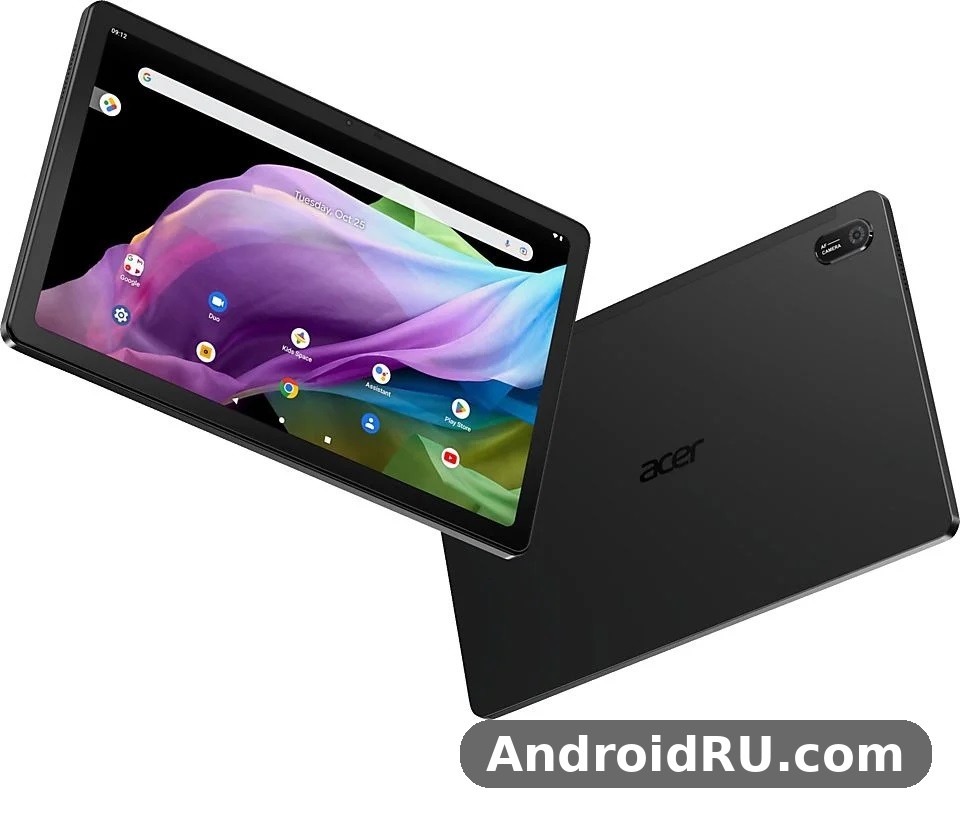
The short version is that Acer aimed this tablet squarely at everyday use. It pairs a bright 10.4-inch QLED screen with the proven MediaTek Helio G99, a sensible 6 GB memory configuration, and a large battery, all in a slim aluminum body that costs far less than a flagship slate. Readers who want the full picture will find the Acer Iconia Tab P10 specifications laid out in the table below, followed by honest notes on where this tablet shines and where a rival does something better.
Before the details, here is the context that frames everything else. The Acer Iconia Tab P10 release date fell in November 2025, when Acer announced the tablet and put it on sale the same month, so this is a current model running Android 14 rather than a leftover from an older range. The Acer Iconia Tab P10 Android 14 tablet competes with Samsung, OPPO, Infinix and OnePlus slates that share the same chip, which makes the comparison fair and the differences easy to spot. The Acer Iconia Tab P10 price sits in the budget range at roughly US$200 to US$300 depending on region and retailer, so the question is not whether it is cheap, but whether it is the best cheap tablet for your needs.
Acer Iconia Tab P10 Review: Design, Build and First Impressions
The first thing you notice about this Acer tablet is how little it feels like a budget device in the hand. The Acer Iconia Tab P10 aluminum alloy body gives the back a cool, solid feel, while the glass front keeps the screen flush with the frame and the narrow bezels leave more room for video and reading. At 8.1 mm thin it slips into a bag beside a laptop without a fight, and the tablet weight of 495 grams is light enough to hold with one hand during a long reading session, though two hands feel better when you type.
Dimensions matter more than most buyers expect, because a tablet lives in bags, on desks and on laps. The tablet dimensions are 251.2 x 162.8 x 8.1 mm, which puts it in the same footprint class as most 10-inch slates, neither the smallest nor the bulkiest. This 8.1mm tablet stays comfortable on a crowded train or a small cafe table, and the flat aluminum back sits steady on a desk without rocking. The Acer Iconia Tab P10 495 gram weight is the number to remember if you plan to read in bed or hold the tablet up for video calls, since every extra 50 grams starts to count after half an hour.
Aluminum Alloy Body and 495 Gram Weight
An aluminum tablet at this price is not a given, and Acer made the right call here. Plastic bodies creak, flex and pick up scratches, while this alloy frame resists daily knocks and keeps the tablet feeling solid when you grip the edges. The 495 gram weight and slim profile also help younger users and students who carry the tablet between rooms all day, and the metal back spreads heat better than plastic, so the rear stays comfortable during long video sessions. Color options vary by region, so check the listing in your region before you assume a particular finish is available.
What Is in the Box: Bumper Case Included
Acer bundles a bumper case with this tablet, which is a small detail that saves a real purchase on day one. With the Acer Iconia Tab P10 bumper case included in the box, the corners and edges get protection from the first drop, and the case adds grip without hiding the aluminum design completely. The exact box contents beyond the case can vary by region and retailer, so check the listing in your region for the charger and cable situation before you order. What is certain is that the case is part of the standard package in the main retail configuration, and that is a genuine plus at this price.
How the Bumper Case Changes Daily Handling
A bumper case trades a little slimness for a lot of peace of mind. The tablet grows slightly thicker and heavier in the case, yet it becomes far easier to hold, especially with one hand, because the rubberized edge stops the smooth metal from slipping. Students who toss the tablet into a backpack full of books will value that protection most, while home users who keep the tablet on a stand may take the case off for movie nights. Either way, starting with a case in the box beats paying extra for one later.
Acer Iconia Tab P10 Display Quality: 10.4-Inch QLED Panel and 90Hz Refresh
The screen is the reason many buyers will pick this tablet, and Acer Iconia Tab P10 display quality is genuinely strong for the money. The Acer Iconia Tab P10 10.4 inch display uses QLED quantum dot technology, a step up from the plain IPS panels found on many budget slates, and it shows in richer colors when you watch films or browse photos. This 10.4-inch QLED display pairs a 2000 x 1200 resolution with a 90Hz refresh rate, so text looks sharp and scrolling feels fluid at the same time.
Look closer and the numbers keep impressing. The Acer Iconia Tab P10 QLED quantum dot display covers 100% of the NTSC color gamut, which means colors stay vivid and reasonably accurate for a tablet at this price, and the 350-nit brightness is enough for indoor use and shaded outdoor reading. The tablet display uses an in-cell touch panel, which bonds the touch layer into the screen itself, and that keeps the image crisp while making taps feel direct. As a tablet screen for video, comics, textbooks and video calls, this panel is the clearest strength of the whole device.
2000 x 1200 Resolution and Color Coverage
Resolution decides how sharp text looks, and the Acer Iconia Tab P10 2000 x 1200 resolution delivers a clean 2K image on a 10.4-inch panel. That 2000×1200 display resolution works out to a pixel density that keeps small textbook text readable without zooming, and the 16:10 shape suits widescreen video with only slim black bars. Colors benefit from the quantum dot layer, so sunsets, nature documentaries and photo galleries look livelier than on a standard budget IPS screen, while skin tones in video calls stay natural rather than washed out.
Brightness, Color and Outdoor Readability
At 350 nits, this screen is bright for a living room, a classroom or an office, though direct sunlight will still wash it out the way it washes out almost every tablet at this price. The 100% NTSC coverage helps here, because saturated colors hold up better than pale ones when the light gets harsh. For night reading, the warm tones and the option to lower brightness keep eye strain down, and the narrow bezels mean less glare from the frame itself. Nobody should buy this tablet expecting flagship outdoor brightness, but indoors it is a pleasure to look at.
90Hz Refresh Rate in Daily Use
The Acer Iconia Tab P10 90Hz refresh rate is the second half of the display story. A 90Hz display redraws the screen 90 times per second, so scrolling through a long article, swiping between home screens and flicking through a photo gallery all feel smoother than on a 60Hz panel. The difference is easy to feel within minutes, and once you get used to it, going back to 60Hz feels sluggish. The trade-off is a small extra battery drain, and the tablet manages that sensibly by pairing the faster panel with a large battery.
Acer Iconia Tab P10 Helio G99 Performance, Gaming and Everyday Speed
Under the screen, the Acer Iconia Tab P10 Helio G99 performance is the part of this tablet that buyers should understand most clearly, because the chip decides what the tablet can and cannot do. The Helio G99 chipset is an octa-core MediaTek design with two Cortex-A76 performance cores running at 2.2 GHz and six Cortex-A55 efficiency cores at 2.0 GHz, plus a Mali-G57 MC2 graphics unit. That tablet chipset has powered a whole generation of budget tablets and phones, which means app developers know it well, and most apps in the Play catalog run smoothly on it.
In everyday use, this tablet performance feels quick where it counts. Opening apps, switching between a browser and a notes app, streaming video and scrolling social feeds all happen without the stutter that marks a weak tablet. The chip is built on a 6nm process, so it sips power during light work and only ramps up when you ask for more, and that efficiency is one reason the battery lasts as well as it does. Heavy multitasking with a dozen apps open will eventually slow things down, as it does on any 6 GB tablet, but for the daily mix of reading, video, messaging and light work, the Helio G99 is a proven and sensible choice.
Gaming Performance on the Helio G99
Games are where buyers ask the hardest questions, so here is a plain answer. Acer Iconia Tab P10 gaming performance is good for casual and mid-range titles: puzzle games, racing games at balanced settings, battle royale games at medium graphics, and long sessions of the most popular mobile games all run well. This tablet gaming experience benefits from the 90Hz screen, which makes motion look smoother in titles that support higher frame rates, and from the dual speakers, which give games a wider sound than a single bottom speaker ever could.
Demanding 3D titles at maximum graphics are a different story. The Mali-G57 graphics unit will handle them, but only at reduced settings, and frame rates will dip during the busiest scenes. That is normal for every tablet with this chip, including the rivals in the comparison table below, so it is not a flaw unique to Acer. If your main goal is competitive play at the highest settings, a tablet with a flagship chip is the honest answer, but if you play for fun after school or work, this one delivers.
Settings That Keep Frame Rates Steady
The trick with this tablet is to let the game choose balanced settings rather than forcing everything to maximum. Medium graphics with high frame rate usually looks and feels better than ultra graphics with stutter, and the 90Hz panel makes that high frame rate mode worth using. Close background apps before a long session, keep the tablet out of its bumper case if it feels warm, and download game data over Wi-Fi before you start, so the chip spends its power on the game instead of on downloads.
Heat and Throttling After Long Sessions
Long gaming sessions warm any thin tablet, and this one is no exception. The aluminum back spreads that warmth across the whole body, so no single spot gets uncomfortably hot, and the chip eases its speed down a little to stay within safe temperatures. In practice that means the first twenty minutes feel fastest, then performance settles to a steady level that holds for hours. Short breaks between matches help, and the tablet cools quickly once you stop playing.
6GB RAM and 128GB Storage in Practice
Memory and storage decide how the tablet ages, so Acer got the balance right here. The Acer Iconia Tab P10 6GB RAM configuration uses LPDDR4X memory, which keeps several apps alive in the background, so switching back to a browser tab or a document does not force a reload every time. The Acer Iconia Tab P10 128GB storage option uses UFS storage, which loads apps and opens large files faster than the older eMMC storage found on cheaper tablets, and some regions also list a 256GB version for buyers who want more room.
That tablet storage goes further than the raw number suggests, because the Acer Iconia Tab P10 microSD expansion up to 512GB lets you add a memory card for films, photos, music and documents. The microSD slot sits beside the main storage, so you can keep apps on the fast internal memory and move media to the card, which is the setup that works best in daily use. A few regional listings show a 4GB memory version instead of 6GB, so check the exact configuration in the listing in your region before you buy, and pick the 6GB version when both are available, since the extra memory keeps the tablet feeling fast for longer.
Acer Iconia Tab P10 Battery Life, Charging and Connectivity
Battery life is where big tablets either earn their keep or disappoint, and Acer Iconia Tab P10 battery life is one of the stronger points of this device. The 8,000 mAh battery is a large cell for a 10.4-inch tablet, and it pairs with an efficient 6nm chip and a power-friendly panel, so a full charge covers a day of mixed use for most people. That tablet battery handles a school day of notes and reading, an evening of video streaming, or a long video call schedule without forcing a midday search for a charger.
Honest expectations matter more than a single headline number. Acer does not publish an official video playback hour figure in the listings checked for this model, so any exact hour count you see elsewhere is an estimate, not a promise. What the capacity does guarantee is a clear margin over smaller tablets: streaming, reading and browsing draw power slowly, while gaming and maximum brightness draw it faster, and the tablet simply lasts longer than a 5,000 mAh rival under the same load. Standby drain is low, so the tablet still has charge left after a weekend in a bag.
8000mAh Battery Capacity and Real-World Endurance
The Acer Iconia Tab P10 8000mAh battery capacity deserves a closer look, because capacity alone does not tell the whole story. This cell is a lithium-polymer unit sized for a full day, and in real use it behaves like one: morning reading and email, midday video lessons, afternoon browsing and an evening film add up to a comfortable day, with charge to spare for the next morning. Heavy users who game for hours or stream at full brightness will still reach the charger by bedtime, which is normal, while light users can stretch two days between charges without trying.
Charging runs through the Acer Iconia Tab P10 USB-C charging port, the modern connector that most phones and laptops already use, so one cable can serve several devices. This USB-C tablet connection also handles data transfer and accessories, which keeps the desk tidy. Acer does not list a fast-charging wattage in the official specifications checked, so expect a standard charge rather than a flagship-speed top-up, and check the listing in your region for the exact charger included in the box.
Wi-Fi 5, USB-C and Everyday Connections
Wireless connectivity covers the essentials for a home and school tablet. Acer Iconia Tab P10 Wi-Fi 5 connectivity runs on dual-band Wi-Fi, so the tablet joins both 2.4 GHz networks for range and 5 GHz networks for speed, and video streaming stays stable on a decent home router. The listings checked show a Wi-Fi model, and buyers who need mobile data should check whether a cellular version exists in their region rather than assuming one does, since no cellular variant is listed in the official specifications reviewed here.
Sound is better than the price suggests. The Acer Iconia Tab P10 dual stereo speakers sit on opposite sides of the body, so films and games get a wider soundstage than a single speaker can deliver, and voices in video calls stay clear at normal volume. Those dual speakers pair well with the QLED screen for movie nights, and a pair of Bluetooth earphones or wired USB-C earphones covers private listening. The tablet also carries an ambient light sensor, which adjusts screen brightness to the room and saves battery without any input from the user.
Acer Iconia Tab P10 Camera Quality: 13MP Rear and 5MP Front
Cameras on a tablet serve a different job than cameras on a phone, and Acer Iconia Tab P10 camera quality fits that job well. The Acer Iconia Tab P10 13MP rear camera uses autofocus and a flash, so it captures sharp document photos, whiteboard shots and quick outdoor pictures, and it records video at 1080p. That tablet camera will not replace a good phone camera, and nobody should expect it to, but for the tasks a tablet camera actually performs, it is a capable and honest setup.
The front camera matters more on a tablet than the rear one, because video calls are the daily use. The Acer Iconia Tab P10 5MP front camera sits above the screen in landscape orientation, which keeps your face centered when the tablet rests on a stand or a keyboard cover. Its 1080p video keeps classes, work meetings and family calls clear, and the sensor handles normal indoor lighting without turning faces into shadows. Low light still softens the image, as it does on every tablet at this price, so a desk lamp or a window behind the screen helps more than any setting.
Video Calls with the 5MP Front Camera
Video calls are the front camera’s home turf, and this one is built for them. Acer Iconia Tab P10 for video calls means a 5MP sensor with 1080p video, dual speakers so you hear the other side clearly, and a microphone setup that picks up normal speaking voices at arm’s length. Students joining online classes, workers dialing into meetings, and families catching up across time zones all get a steady, usable picture. Prop the tablet on its bumper case or a stand, face a window or a lamp, and the call quality jumps a level without spending anything extra.
Document Scanning and Quick Photos with the 13MP Rear Camera
The rear camera earns its keep in classrooms and offices. Point it at a page, a receipt or a whiteboard, and the 13MP sensor with autofocus captures text sharply enough to read later, while the flash fills in dim rooms. Quick outdoor photos look bright and colorful in daylight, thanks to the QLED screen that shows them well, though fine detail fades in low light and there is no night mode magic to rescue dark scenes. Treat it as a scanner and a memory keeper rather than a photographer’s tool, and it will not disappoint.
Full Specifications of the Acer Iconia Tab P10 (2025)
Here is the complete picture in one place. This tablet specs table gathers every confirmed detail of the 2025 model, and it marks the few points where regional listings differ, so you can compare the exact configuration on sale near you. One warning matters before you read it: Acer sold an older tablet under a similar P10 name with a different chip and an 8MP rear camera, so always check the model code P10-21Q on the listing and confirm the Helio G99 and 13MP camera before you buy.
| Feature | Specification |
|---|---|
| Model | Acer Iconia Tab P10 (2025), model P10-21Q-870Q |
| Announced | November 2025 |
| Released | November 2025, available in shops |
| Operating system | Android 14 |
| Display | 10.4-inch QLED quantum dot IPS LCD, in-cell touch |
| Resolution | 2000 x 1200 pixels (WUXGA, 2K), 16:10 aspect ratio |
| Refresh rate | 90Hz |
| Color and brightness | 100% NTSC color gamut, 350 nits brightness |
| Chipset | MediaTek Helio G99, 6nm process |
| CPU | Octa-core: 2x Cortex-A76 at 2.2 GHz + 6x Cortex-A55 at 2.0 GHz |
| GPU | Arm Mali-G57 MC2 |
| RAM | Up to 6GB LPDDR4X (some regional listings show 4GB) |
| Storage | 128GB UFS onboard (some regions list up to 256GB) |
| Expandable storage | microSD card reader, up to 512GB |
| Rear camera | 13MP with autofocus and flash, 1080p video |
| Front camera | 5MP, 1080p video |
| Battery | 8,000 mAh lithium-polymer |
| Charging | USB-C charging port (fast-charging wattage not listed officially) |
| Connectivity | Wi-Fi 5 dual-band, USB-C, microSD card reader |
| Audio | Dual stereo speakers |
| Sensors | Ambient light sensor (other sensors vary by region, check the listing) |
| Build | Glass front, aluminum alloy frame and back |
| Dimensions | 251.2 x 162.8 x 8.1 mm (9.89 x 6.41 x 0.32 inches) |
| Weight | 495 g (1.09 lb) |
| In the box | Tablet, bumper case (charger and cable vary by region) |
| Price | Around US$200 to US$300 depending on region and retailer |
A few notes keep this table honest. The battery figure of 8,000 mAh comes from the specification databases that list this model, while the official Acer product page highlights the display, chip, memory and cameras without publishing a battery number, so treat the capacity as the listed figure for the retail model. Memory and storage also vary: the main retail configuration is 6GB of LPDDR4X RAM with 128GB of storage, yet some regions list 4GB or 256GB, which is why the table shows the range. The Iconia P10 name has covered more than one hardware generation, so the model code and the Helio G99 chip are the safest way to confirm you are looking at the 2025 tablet and not the older one.
What the table does not show is equally worth stating. There is no cellular version listed in the official specifications reviewed here, no stylus in the box, and no fingerprint reader mentioned in the listings checked, so buyers who need mobile data, pen input or biometric sign-in should check the regional listing carefully or look at a different tablet. Those gaps are normal at this price, and they explain part of how Acer keeps the cost down while spending the budget on the screen, the chip and the battery instead.
Acer Iconia Tab P10 vs the Rest: Comparison Table and Verdict per Use Case
The title of this article promises a real comparison, so here it is. This tablet comparison puts the P10 next to five rivals that buyers actually cross-shop, all sharing the same price class and most of them sharing the same Helio G99 chip, which makes the differences easy to judge. The Acer Iconia Tab P10 vs Tab P11 question comes first in many readers’ minds, since the P11 is the closest Acer sibling in the 2025 range, and the Acer Iconia Tab P10 vs Iconia X12 question follows it, since the X12 is another Acer tablet that shoppers meet in the same listings. Both are covered below, with links to their full reviews, while the table handles the wider field.
| Tablet | Display | Chipset | RAM | Battery | OS |
|---|---|---|---|---|---|
| Acer Iconia Tab P10 (2025) | 10.4-inch QLED, 2000 x 1200, 90Hz | MediaTek Helio G99 | Up to 6GB | 8,000 mAh | Android 14 |
| Samsung Galaxy Tab A9 | 8.7-inch, 800 x 1340, 60Hz | MediaTek Helio G99 | 4GB | 5,100 mAh | Android 13 |
| OPPO Pad Neo | 11.36-inch, 2408 x 1720, 90Hz | MediaTek Helio G99 | 6GB | 8,000 mAh | Android 13 |
| Infinix XPAD | 11-inch, 1200 x 1920, 90Hz | MediaTek Helio G99 | Up to 8GB | 7,000 mAh | Android 14 |
| OnePlus Pad Go | 11.35-inch, 1720 x 2408, 90Hz | MediaTek Helio G99 | 8GB | 8,000 mAh | Android 13 |
| Honor MagicPad 2 | 12.3-inch, 1920 x 3000, 144Hz | Snapdragon 8s Gen 3 | 8GB | 10,050 mAh | Android 14 |
Read the table from left to right and a pattern appears. Four of the six tablets share the Helio G99, so performance is close across the group and the real choice comes down to screen size, screen quality, battery and price. The P10 wins on screen technology for its size, with the only QLED panel in the budget group, while the Honor MagicPad 2 wins on raw power and battery but costs far more and sits in a different class. The Samsung Galaxy Tab A9 is smaller and weaker on battery, yet it suits buyers who want the smallest tablet possible, and the OPPO Pad Neo and OnePlus Pad Go trade the QLED panel for larger screens.
Acer Iconia Tab P10 vs Tab P11
The closest comparison of all is inside Acer’s own range. The full detail lives in Acer Iconia Tab P11 (2025) Review and Detailed Specs: Key Features and Performance Covered, and that review is the right next read for anyone torn between the two Acer tablets. The P10 is the compact value pick of the pair: a 10.4-inch QLED screen, the Helio G99, 6GB of memory and a large battery at a budget price. Buyers who want the P10’s screen quality in the smallest and lightest Acer package should stay here, while buyers who want the larger sibling should read the P11 review and compare its screen size, battery and price before deciding. Neither tablet is the wrong answer; they serve different bag sizes and different budgets.
Acer Iconia Tab P10 vs Iconia X12
The X12 is a different branch of the Acer tablet family, and the comparison is worth making because the two tablets appear side by side in many shops. Acer Iconia X12: Full Review and Specifications covers the X12 in full, including its own screen, chip and battery, so readers can weigh it directly against the P10 numbers in the table above. The P10’s case rests on its QLED panel, its 90Hz refresh rate and its bundled bumper case, while the X12’s case depends on its own screen size and configuration, which the linked review lays out. The Iconia X14 is another Acer option in the same family, covered in Acer Iconia X14 Review and Full Specifications: Everything You Should Know, and it suits buyers who want to compare the whole Acer tablet range before spending.
Acer Iconia Tab P10 vs Samsung Galaxy Tab A9
Samsung’s Galaxy Tab A9 is the best-known rival, and the comparison is simple. The Tab A9 has a smaller 8.7-inch screen with a much lower 800 x 1340 resolution, the same Helio G99 chip, and a smaller 5,100 mAh battery, while the P10 gives you a bigger, sharper QLED screen and far more battery for the money. The A9 wins on portability and on Samsung’s software support, and it fits a small bag or a child’s hands better than any tablet in this group. For video, reading and classes, though, the P10’s larger and brighter screen is the better daily tool, and its battery means fewer charging stops.
Acer Iconia Tab P10 vs OPPO Pad Neo and Infinix XPAD
OPPO and Infinix attack from the large-screen side. The OPPO Pad Neo pairs an 11.36-inch screen with the same Helio G99 and the same 8,000 mAh battery, so it suits buyers who want the biggest screen for the money and do not mind the older Android 13 software. The Infinix XPAD brings an 11-inch 90Hz screen, Android 14 and up to 8GB of memory, with a smaller 7,000 mAh battery as its trade-off. Against both, the P10 answers with its QLED color quality, its lighter 495-gram body and its bundled case, which makes it the better pick for readers and commuters, while the larger rivals suit buyers who watch films on the biggest screen they can carry.
Pros and Cons at a Glance
Every honest tablet review needs both sides, so here they are. The strengths start with the screen, continue through the battery and the build, and end with the sensible price, while the weaknesses are the limits that come with any budget tablet. Weigh them against your own use, not against a flagship, and the picture stays fair.
- QLED quantum dot display with 100% NTSC color, 2000 x 1200 resolution and a smooth 90Hz refresh rate, which is rare at this price.
- Large 8,000 mAh battery that covers a full day of mixed use without a midday charge.
- Proven Helio G99 chip with 6GB of LPDDR4X memory, fast enough for everyday apps and casual games.
- Slim aluminum body at 495 grams and 8.1 mm, with a bumper case included in the box.
- microSD expansion up to 512GB, so storage grows cheaply as your media library grows.
- No cellular version listed in the official specifications, so mobile data on the move needs a phone hotspot or Wi-Fi.
- Cameras are practical rather than impressive, with 1080p video and no 4K recording.
- Charging speed is not published, so expect a standard charge rather than a quick top-up.
- Regional listings vary between 4GB and 6GB of memory, so careless buyers can end up with the weaker version.
- No stylus in the box and no fingerprint reader mentioned in the listings checked.
Who the Iconia Tab P10 Is For
Acer Iconia Tab P10 for students is the clearest match. The tablet covers reading, note-taking, video lessons, research and video calls in one light device, and the bundled case survives a backpack. Video watchers come next, since the QLED screen and dual speakers turn a bedroom or a train seat into a small cinema, and the battery lasts through a whole season of episodes. Casual gamers get a smooth 90Hz screen and a chip that handles popular titles, while families get a shared tablet that is cheap enough to hand to a child without worry. Buyers who need a work tablet for heavy documents and split-screen multitasking can use it, though a larger screen or a keyboard accessory would serve them better.
Acer Iconia Tab P10 Price, Release Date and Who Should Buy It
Price decides most budget tablet purchases, so here is the honest picture. The tablet price varies by region and retailer, landing at roughly US$200 to US$300 for the main 6GB and 128GB configuration, with the lowest listings near US$200 and some regions asking more. That range puts the P10 against the Samsung Galaxy Tab A9, the OPPO Pad Neo and the Infinix XPAD, and the comparison table above shows why the P10 holds its own: the QLED screen and the large battery cost no more than the rivals’ plain panels and smaller cells.
The release timing helps buyers too. With a November 2025 launch, this tablet arrives with Android 14, a current chip and a current screen, so it should stay relevant for several years of everyday use. Acer’s range does not stop at tablets, and readers comparing Acer devices may also want to see what the brand offers in phones: Is the Acer Super ZX Pro Worth It? Review, Specs and Verdict covers the higher-end Acer phone, while Everything About the Acer Super ZX: Review, Storage and Full Specifications covers its more affordable sibling. A tablet suits reading, video and classes better than any phone, but the phone reviews help buyers who are choosing between one big device and two smaller ones.
Who Should Buy It
Students should buy it first, since the screen, battery, case and price line up exactly with school needs. As an Android tablet, it runs the full range of classroom, video and reading apps without extra setup. Video watchers come next, because the QLED panel and the tablet speakers make films and shows look and sound better than on any rival at this price, and the tablet speakers are loud enough for a small room without earphones. Commuters get a light 495-gram slate that reads well on a train, parents get a sturdy shared tablet with a case already in the box, and casual gamers get a 90Hz screen with a chip that handles popular titles. Anyone who wants a simple, honest tablet for daily use will feel at home here.
Who Should Look Elsewhere
Some buyers should pass, and saying so keeps this review honest. Anyone who needs mobile data without a phone hotspot should look at a tablet with a cellular version, since none is listed for this model. Artists and heavy note-takers who want pen input should look at a tablet that ships with a stylus, and power users who edit video or run demanding games at maximum settings should spend more on a flagship chip. Buyers who want the biggest possible screen should compare the 11-inch and 12-inch rivals in the table above, and buyers who want the longest software support should check Samsung’s update promise for the Tab A9 before deciding.
Acer Iconia Tab P10 FAQ: Common Questions Answered
Is the Acer Iconia Tab P10 good for students?
Yes, students are the best audience for this tablet. The 10.4-inch QLED screen keeps textbooks and lecture slides readable, the 8,000 mAh battery lasts through a school day, the bundled bumper case survives a backpack, and the 5MP front camera handles online classes clearly. Add the microSD slot for storing lecture recordings and e-books, and the whole package covers study needs at a price that fits a student budget.
Does the Acer Iconia Tab P10 support microSD expansion?
Yes, the tablet has a microSD card reader that supports cards up to 512GB. That expansion is the cheapest way to grow storage: keep apps and the system on the fast 128GB internal memory, and move films, photos, music and documents to the card. A good-quality card matters, so buy a known brand and a fast speed class if you plan to play video straight from the card.
How long does the Acer Iconia Tab P10 battery last?
The 8,000 mAh battery covers a full day of mixed use for most people, including reading, browsing, video streaming and video calls, with charge left over at bedtime. Light users can stretch it toward two days, while heavy gaming or maximum brightness will drain it faster, which is true of every tablet. Acer does not publish an official playback-hour figure in the listings checked, so treat any exact hour claim as an estimate and judge by the capacity, which is larger than most rivals at this price.
Can the Acer Iconia Tab P10 run demanding games?
It can run demanding games, but at balanced or medium settings rather than maximum. Popular casual and mid-range titles run smoothly, and the 90Hz screen makes motion look fluid, while the heaviest 3D games need reduced graphics to hold a steady frame rate. The aluminum body spreads heat well during long sessions, and the chip settles to a steady speed rather than overheating. Competitive players who need maximum settings should look at a flagship tablet, but everyone else will find the gaming performance fair for the price.
Final Verdict: Should You Buy the Acer Iconia Tab P10?
The tablet verdict is simple: this P10 tablet is the best-value screen in its price class, wrapped in a light aluminum body with a battery that lasts the day. Its QLED panel beats every rival screen at this price, its Helio G99 chip and 6GB of memory handle daily work and casual games without fuss, and the bundled bumper case plus microSD expansion remove two extra purchases from the first week. The limits are real but fair: no cellular version listed, practical cameras rather than great ones, and charging speed that Acer does not publish.
Your next step takes five minutes. Check the current price in your region, confirm the listing shows the 2025 model with the Helio G99 chip, 6GB of memory and the 13MP rear camera, and compare it once against the Tab P11 and Iconia X12 reviews linked above if you are torn between Acer tablets. If the price sits near US$200 and the configuration matches, buy it with confidence: for students, readers, video watchers and families, this is a tablet that delivers more than its price promises, and it does so without asking you to accept a weak screen or a small battery.

 review: 10.4-inch QLED 90Hz display, Helio G99, 6GB RAM and 8,000mAh battery compared with rival tablets. See if it fits you.)