

Samsung Galaxy M12 Review: Build Quality, Battery and Daily Use
The Samsung Galaxy M12 arrived in 2021 as a budget phone with a simple promise: a big battery, a smooth 90Hz screen, and the familiar Samsung experience at a price that undercut most rivals. It was never meant to be a flagship, and it never pretended to be one. What it offered instead was practical value — a phone that could last two days on a charge, handle everyday apps without drama, and take decent photos in good light. For buyers who wanted a reliable daily driver rather than a spec-sheet champion, that combination was genuinely appealing. Many buyers ask, is Galaxy M12 worth buying? For buyers who want a big battery, a headphone jack and a low price, the answer is yes. The Galaxy M12 specs cover the essentials: Exynos 850, 5,000 mAh battery, 48MP main camera and a 6.5-inch PLS LCD display.
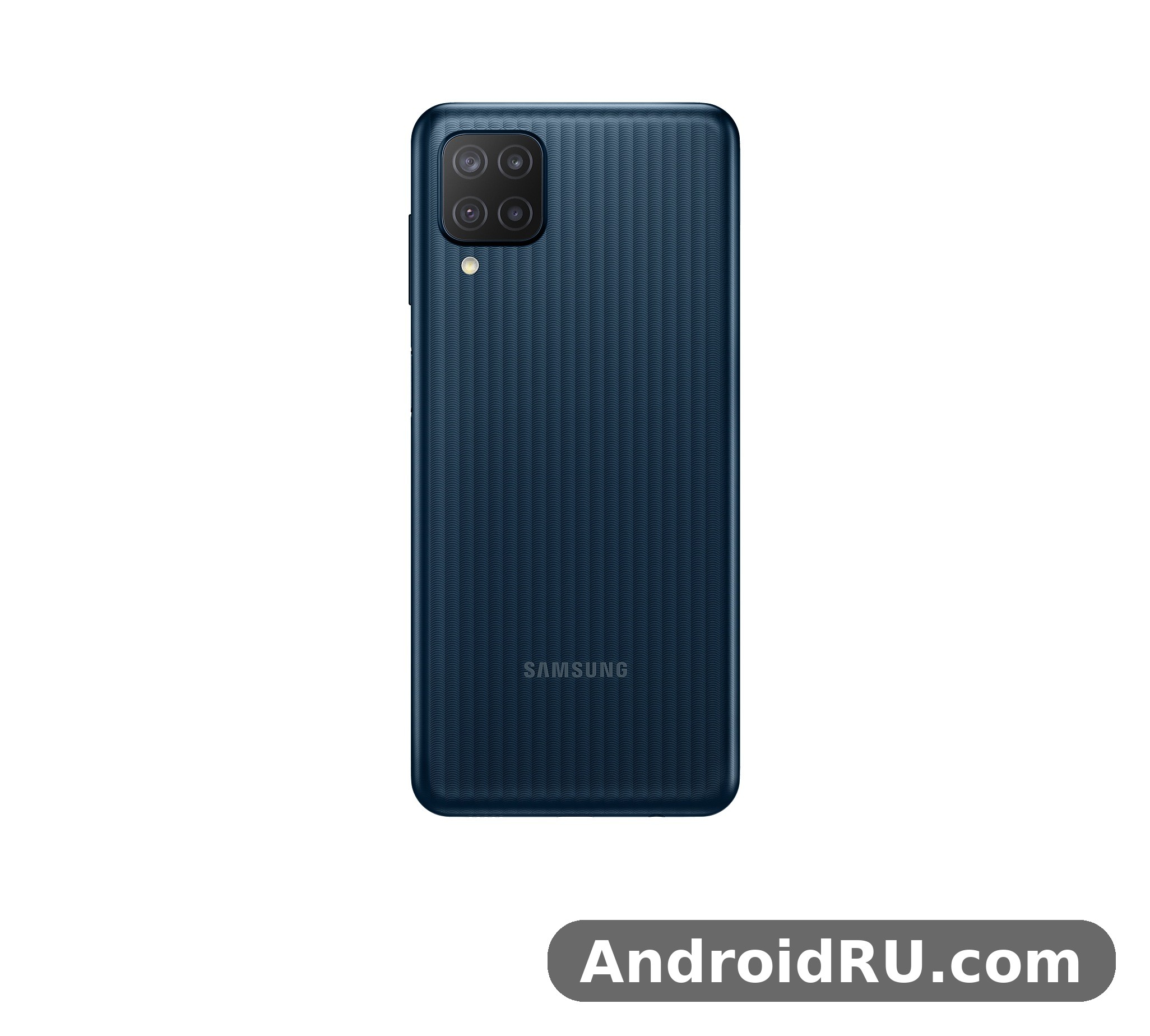
This review looks at the phone the way a real owner would use it: carrying it in a pocket, charging it overnight, scrolling through feeds, taking photos of family and food, and playing a casual game before bed. We cover build quality, the 90Hz display, battery life in real use, Exynos 850 performance, the 48MP quad camera, software, and the full specifications, so you can decide whether the Galaxy M12 still makes sense as a budget pick or a second phone. In a Galaxy M12 camera test, daylight shots come out clear and well exposed, while low light shows noise sooner than on newer phones. The Samsung Galaxy M12 price varies by region and storage option, so compare a few sellers before you buy.
Samsung Galaxy M12 Build Quality and Design for Everyday Carry
Pick up the Galaxy M12 and the first thing you notice is its size and weight. At around 221 grams with a 6.5-inch screen, it is a chunky phone, and the thick plastic body makes no attempt to hide that. The back panel has a subtle textured pattern that helps grip and hides fingerprints far better than glossy plastic, which is a small but real advantage for a phone that will spend most of its life without a case in some hands. The frame is plastic too, and the whole device feels solid rather than hollow, with no creaks when you squeeze the sides. A Galaxy M12 battery life test with mixed use shows it reaches the end of the day, and lighter users often get into a second day. If you are tracking the M12 price, the 64GB model is usually the best-value option.
The design is understated. A square-ish camera module sits in the top-left corner of the back, the Samsung logo sits low and quiet, and the front is dominated by a waterdrop notch for the selfie camera. Bezels are noticeable, especially the chin at the bottom, but that is normal for this price class and easy to forget after a day. Colours at launch included black, blue, green, and white, with the blue and green finishes catching light in a way that makes the phone look more expensive than it is. The Galaxy M12 full specifications run from the Exynos 850 chip and 5,000 mAh battery to the 48MP camera and 6.5-inch PLS LCD display. The Galaxy M12 camera setup is built around a 48MP main sensor and a 5MP ultrawide beside it.
Plastic Body, Textured Back and Grip in Daily Use
Plastic gets a bad reputation, yet for a budget phone it has real advantages. It does not shatter the way glass does, it survives small drops with scuffs instead of cracks, and it keeps repair costs low. The textured finish on the M12 back panel adds grip when your hands are dry and reduces the slippery feeling that smooth plastic can have. After weeks of pocket carry, the back tends to pick up fine scratches rather than deep marks, and a cheap clear case solves most of that. If you want a phone you can hand to a child or carry on a work site without worrying, the plastic build is a feature, not a flaw. The Galaxy M12 price and specifications together make it a strong budget option, with the screen and battery leading the list. The Galaxy M12 display is a 6.5-inch PLS LCD panel with a 90Hz refresh rate, which keeps scrolling smooth.
How the Galaxy M12 Handles Drops and Scratches
No phone in this class is drop-proof, and the M12 has no official rugged rating. In practice, the plastic body and the slightly raised camera module mean short falls onto a desk or a tiled floor usually end with a scuffed corner rather than a broken screen. A tempered glass screen protector is still worth fitting, because the display glass is the most fragile part of any phone. A simple silicone case adds grip and absorbs the shock of the occasional drop from a table, and both accessories cost very little for this model. In a Galaxy M12 vs Galaxy M13 comparison, the deciding factors are 5G support, chipset and camera. A Galaxy M12 vs Galaxy M13 comparison comes down to 5G support, chipset and camera.
Side Fingerprint Sensor, Buttons and Ports
The fingerprint sensor is built into the power button on the right edge, which is a sensible place for it. Your thumb lands on it naturally when you pick the phone up right-handed, and it is fast enough that unlocking feels instant most of the time. Face unlock is also available through the front camera, though it is less secure and slower in dim light, so the fingerprint sensor remains the better daily option. Volume buttons sit above the power key and have a firm, clicky feel. How long does Galaxy M12 battery last? With mixed use it reaches the end of the day, and lighter users often get into a second day. The Galaxy M12 charging setup tops out at 15W, so a full charge takes a while but overnight charging covers it.
Ports and slots are generous for a budget device. There is a USB-C port at the bottom for charging and data, a 3.5mm headphone jack on the top edge for wired earphones, and a dedicated microSD card slot alongside the dual SIM tray, so adding storage does not force you to give up a second SIM. That combination — USB-C plus headphone jack plus expandable storage — was already becoming rare in 2021, and it remains one of the practical reasons people still look at this phone. A Galaxy M12 performance test shows the Exynos 850 handling everyday apps well enough, with heavy games needing low settings. The Galaxy M12 features include Exynos 850, a 5,000 mAh battery and a 48MP camera, which is a strong set for the price.
Galaxy M12 90Hz PLS LCD Display: Smooth Scrolling on a Budget
The 6.5-inch PLS LCD display is one of the main reasons to consider the M12. It runs at a 90Hz refresh rate, which makes scrolling through social feeds, web pages, and menus feel noticeably smoother than the 60Hz screens common at this price. The difference is easy to feel the moment you swipe: motion looks less juddery, and the interface feels more responsive even though the processor underneath is modest. Samsung lets you switch between 90Hz and standard 60Hz in settings, which is handy if you want to squeeze extra battery life. The Galaxy M12 display quality is clear indoors, though it is dimmer outdoors than AMOLED panels. The Galaxy M12 price in India varies by seller and variant, so check a few listings before ordering.
Resolution is HD+ at 720 x 1600 pixels. On a 6.5-inch panel that works out to around 270 pixels per inch, which is fine for video, reading, and social media, though sharp-eyed users will notice text is not as crisp as on a Full HD+ screen. Colours are pleasant and natural rather than oversaturated, which suits long reading sessions, and viewing angles are good for an LCD panel. Brightness is adequate outdoors in shade but can struggle under direct sunlight, so reading the screen on a bright day may need a hand shading it. The Galaxy M12 camera quality at night is modest, with night mode helping a little but noise showing in dark areas. The Galaxy M12 benchmark score reflects an entry-level chip: fine for everyday apps, modest in games.
90Hz Refresh Rate: What Changes in Real Use
The 90Hz mode shines in everyday scrolling. News apps, messaging threads, and browser pages glide rather than stutter, and animations in One UI feel fluid. It does not make games run faster — the Exynos 850 still sets the ceiling there — but it makes the phone feel quicker than its price suggests. One thing to know is that the refresh rate drops in some situations to save power, and not every app holds 90Hz all the time. Even so, the smoothness is the single most noticeable upgrade over older 60Hz budget phones, and it is the feature most owners mention first when asked what they like. Should I buy Galaxy M12 or wait for a sale? If you want a big battery, a headphone jack and a low price, it is an easy recommendation. The Galaxy M12 colours range from understated dark shades to lighter finishes, so pick the one that hides smudges best for you.
Display Brightness, Colours and Outdoor Visibility
Indoors the screen is comfortable at around half brightness, and the blue-light filter in One UI helps for night reading. Video looks good for the class: YouTube and streaming apps play smoothly, colours stay natural, and the large screen makes the M12 a decent pocket media player. Outdoors, the panel reaches enough brightness for shaded use, but direct sun washes it out, so checking a map on a sunny street can be a strain. The waterdrop notch is small and easy to ignore during video, though it does cut into the top of the picture in full-screen playback. This Galaxy M12 honest review keeps the trade-offs in view: the screen and battery impress, while there is no 5G, no NFC in some variants and 15W charging is slow. A Galaxy M12 case is worth buying from day one, since it protects the camera lenses and the corners from drops.
Galaxy M12 Battery Life: 5000 mAh and Two-Day Use
Battery life is the Galaxy M12 headline feature, and it delivers. The 5000 mAh battery in most markets powers through a full day of heavy use with charge to spare, and lighter users regularly see two days between charges. Typical mixed use — messaging, calls, an hour or two of video, social scrolling, and some camera use — leaves around 30 to 40 percent at bedtime. That kind of endurance changes how you use a phone: you stop hunting for chargers at midday and stop carrying a power bank for a normal day out.
There is one regional variation worth knowing. The version sold in India shipped with an even larger 6000 mAh battery, while most other markets, including the global and European versions, have the 5000 mAh cell. Both are large by any standard, and both use the same 15W charging, so the Indian variant simply lasts a little longer between charges. If you are buying second-hand, check which variant you are getting, because the difference is real even though the phone looks identical from the outside. The Galaxy M12 charging time from empty is two hours with a 15W charger, so overnight charging is the easy routine. The Galaxy M12 NFC supports contactless payments in markets where the feature is included.
How Long the Battery Lasts With Video, Gaming and Calls
Video playback is where the big battery shows its strength. Streaming video over Wi-Fi for several hours barely dents the charge, and the phone can manage a long flight or a full day of video calls without needing a top-up. Gaming drains it faster, as on any phone, but casual games are light on power and even an hour of heavier play leaves plenty in reserve. Voice calls are barely a factor. The main drains are the screen at high brightness and mobile data in weak signal areas, so keeping brightness on auto and using Wi-Fi where possible stretches each charge further. A Galaxy M12 gaming test shows casual games running smoothly, while demanding titles need medium settings to stay stable. The Galaxy M12 dual SIM support covers two nano-SIM cards in most regions.
15W Charging Speed and What to Expect
Charging is the trade-off for that big battery. The M12 supports 15W wired charging over USB-C, and a full charge from empty takes around two hours or a little more. A 30-minute top-up adds roughly a quarter of a charge, enough for an evening out but not the quick rescue that faster-charging rivals offer. There is no wireless charging. The practical fix is overnight charging: plug it in before bed and it is full by morning, and because the battery lasts so long, most owners only need to do that every second night. A 15W charger was included in the box in many markets at launch, though later retail bundles vary, so check what comes with the unit you buy. The Galaxy M12 unboxing covers the phone, a USB-C cable and the paperwork, so check what your retailer includes before you buy. The Galaxy M12 water resistant claims are limited: there is no official IP rating, so keep it away from water.
Exynos 850 Performance and Daily Use: What the Chip Can and Cannot Do
The Exynos 850 is an octa-core chip built on an 8nm process, paired with 3GB or 4GB of RAM depending on the variant. For everyday tasks it is adequate: messaging, email, web browsing, social apps, YouTube, and calls all run smoothly enough, and One UI 3.1 keeps animations tidy. App opening times are not flagship-fast — a heavy app can take a second or two longer than you might hope — but once open, apps behave well. Multitasking with 4GB of RAM is comfortable for a handful of apps; the 3GB version needs more patience, as background apps reload more often. A Galaxy M12 battery drain overnight fix usually starts with battery saver and a check for apps running in the background. The Galaxy M12 fingerprint sensor sits in the power button and unlocks the phone quickly once you register the same finger twice.
Storage comes in 32GB, 64GB, and 128GB options, with a microSD slot for expansion up to 1TB. The 32GB version is tight once system files and a few large apps are counted, so the 64GB or 128GB variant is the safer buy if you keep photos, offline video, or games on the phone. Internal storage uses eMMC rather than faster UFS, which shows up in install times and file transfers, but it does not spoil normal use. For a Galaxy M12 fingerprint sensor not working problem, re-register the same finger twice and clean the sensor area first. The Galaxy M12 microSD slot takes cards up to 1TB, which is the easy way to add room for photos and offline video.
Everyday Apps, Multitasking and One UI Smoothness
Day to day, the M12 feels calm rather than quick. Scrolling is smooth thanks to the 90Hz screen, switching between a browser and a chat app is fine, and split-screen works for light pairs such as a video and a notes app. Heavy multitasking — a game, a map, and a camera app all held in memory — will push the 3GB model to reload, while the 4GB model copes better. Keeping the phone updated, clearing unused apps, and avoiding live wallpapers all help keep it feeling responsive over time. A Galaxy M12 screen flickering issue is rare, and a restart or a software update usually clears it. The Galaxy M12 headphone jack is a 3.5mm port, so wired earphones work without an adapter.
Gaming on the Galaxy M12: Casual Play and Limits
Casual games such as puzzle titles, card games, and light runners play well, and the large screen plus big battery make the M12 a pleasant casual gaming device. Demanding 3D games will run, but at low to medium settings and with occasional frame drops in busy scenes. The Mali-G52 GPU is modest, and the phone can warm up during long sessions, though it rarely gets uncomfortably hot. If mobile gaming is your main hobby, a phone with a stronger chip is a better fit; if gaming is an occasional pastime between messages and videos, the M12 is fine. Wondering how to take a screenshot on Galaxy M12? Press power and volume down together, or use a palm swipe. The Galaxy M12 gaming performance is fine for casual titles, though heavy games run best at medium settings.
Galaxy M12 Cameras: 48MP Quad Camera in Daylight and at Night
The rear camera setup has four lenses: a 48MP main camera, a 5MP ultrawide, a 2MP macro, and a 2MP depth sensor. The main camera does most of the work and, in good daylight, produces pleasant photos with natural Samsung colours, decent detail, and reliable autofocus. Photos of food, pets, and street scenes come out well for sharing on social media, and the 48MP sensor bins pixels down to 12MP by default, which keeps file sizes sensible while preserving detail. HDR handles bright skies and shaded subjects reasonably, though very high-contrast scenes can blow out highlights. This is how to factory reset Galaxy M12 safely: back up first, then use Settings, General management, Reset. The Galaxy M12 overheating reports are rare in normal use, and the phone stays comfortable during long video sessions.
The 5MP ultrawide is useful for landscapes, group shots, and tight indoor spaces, capturing much more of the scene than the main lens. Its images are softer at the edges and noisier in dim light, which is normal for a small ultrawide sensor at this price, but it is a genuinely handy second lens rather than a filler. The 2MP macro lets you get close to small subjects such as flowers or food details, though focus is fixed and results need steady hands and good light. The depth sensor assists portrait mode, which blurs the background behind people with fair edge detection in daylight. Does Galaxy M12 have a headphone jack? Yes, the 3.5mm port on the edge takes wired earphones. A Galaxy M12 screen protector is a cheap add-on that keeps the display free of scratches.
48MP Main Camera Photo Quality and Portrait Mode
Portrait mode is one of the nicer surprises. In good light, subject separation is clean, skin tones look natural, and the blur level can be adjusted after the shot. The camera app offers the usual Samsung modes: photo, video, portrait, panorama, night, and a pro mode with manual controls for ISO, white balance, and focus. Night mode helps in low light by stacking exposures, but results stay grainy and soft compared with phones that have larger sensors or optical stabilisation, which the M12 lacks. For evening shots, holding the phone steady and using night mode gives the best result, while very dark scenes are better left to a phone with a stronger night mode. Does Galaxy M12 support microSD card expansion? Yes, the slot takes cards up to 1TB. The Galaxy M12 64GB price is the one most buyers compare, since that is the standard storage option.
8MP Front Camera, Selfies and Video Calls
The 8MP front camera in the waterdrop notch takes clear selfies in daylight, with a beauty mode that can be turned down or off for a more natural look. Video calls look fine on a small screen, and the front camera records video at up to 1080p, which is enough for calls and short clips. In dim indoor light, selfies get noisy and lose detail, so a window or a lamp nearby makes a real difference. Compared with newer budget phones the front camera is modest, yet it covers the basics — selfies, video calls, and face unlock — without fuss. Readers weighing newer Samsung budget options can compare this setup with the Samsung Galaxy F55 5G Review: Everyday Speed, Cameras and Value, which shows how much camera hardware has moved on in later models.
Full Specifications of the Samsung Galaxy M12
The table below gathers the complete specifications of the Galaxy M12 in one place. Figures are the standard global specifications; the Indian variant differs only in battery capacity, with a 6000 mAh cell instead of 5000 mAh. Storage and RAM vary by market and retailer, so confirm the exact variant before buying, especially second-hand. The Galaxy M12 best settings for battery life are adaptive brightness, a 60Hz cap when you need it, and battery saver overnight. The Galaxy M12 used price depends on condition and battery health, so check the screen and charging port before paying.
| Specification | Galaxy M12 Detail |
|---|---|
| Display | 6.5-inch PLS LCD, HD+ 720 x 1600, 90Hz refresh rate |
| Processor | Samsung Exynos 850, octa-core, 8nm |
| Graphics | Mali-G52 GPU |
| RAM | 3GB or 4GB, depending on variant |
| Storage | 32GB, 64GB or 128GB, expandable with microSD up to 1TB |
| Rear cameras | 48MP main + 5MP ultrawide + 2MP macro + 2MP depth |
| Front camera | 8MP, waterdrop notch |
| Video recording | 1080p at 30fps (rear and front) |
| Battery | 5000 mAh (global); 6000 mAh (India variant) |
| Charging | 15W wired charging, USB-C |
| Operating system | Android 11 with One UI 3.1 at launch, upgradable |
| Security | Side-mounted fingerprint sensor, face unlock |
| Connectivity | 4G LTE, Wi-Fi, Bluetooth 5.0, GPS, USB-C, 3.5mm headphone jack |
| SIM and storage slots | Dual Nano-SIM plus dedicated microSD slot |
| Weight | About 221 grams |
| Colours | Black, blue, green, white (availability varies by market) |
Display, Processor and Memory Summary
Read together, the specs tell a coherent story: a large 90Hz screen, a power-efficient Exynos 850 chip, and a big battery, with RAM and storage that cover normal use when you pick the 4GB and 64GB or 128GB variant. The HD+ resolution is the clearest compromise, trading sharpness for price and battery life, while the dedicated microSD slot and headphone jack are practical wins that many newer phones have dropped. The Galaxy M12 hidden features include one-handed mode, edge panels and routines that automate daily tasks. A Galaxy M12 battery replacement is a repair-shop job, and it is worth pricing before you decide to keep an old phone.
Camera, Battery and Connectivity Summary
The camera set is led by a capable 48MP main sensor with a useful ultrawide beside it, the battery is the largest in its class at launch, and connectivity covers 4G LTE, Wi-Fi, and Bluetooth 5.0 without 5G. That last point matters for buyers planning to keep the phone for years: 4G remains fast enough for video, calls, and browsing in most places, but the phone cannot use 5G networks. Anyone who needs 5G should look at a newer model instead, such as the one covered in the Samsung Galaxy M14 5G Review: App Performance and Camera Quality.
Software: Android 11, One UI 3.1 and Updates
The Galaxy M12 launched with Android 11 and Samsung One UI 3.1, and Samsung provided major Android upgrades and security patches after launch, in line with its budget-phone update policy at the time. One UI is one of the friendlier Android skins: large touch targets, a clean settings layout, a good dark mode, and useful extras such as Digital Wellbeing, a secure folder, and edge panels. The interface is consistent across Samsung phones, so anyone moving from another Galaxy device will feel at home immediately. A Galaxy M12 overheating while gaming fix is to lower the graphics settings and take the case off during long sessions. The Galaxy M12 screen replacement cost varies by repair shop, so get two quotes before booking a repair.
One UI also brings practical tools that suit this phone. The battery settings show which apps drain power, the device care menu cleans storage and memory in a couple of taps, and the camera app keeps its modes simple enough for beginners while offering a pro mode for those who want control. Some pre-installed Samsung and partner apps are present, and most can be disabled or uninstalled. Keeping the phone on the latest available software matters, because updates bring security fixes and small performance improvements that help an older budget phone age gracefully. For a sense of how Samsung later tuned battery and software for daily use, the Samsung Galaxy M13 Review: Daily Use, Software and Battery Life is a useful next read.
Galaxy M12 Pros and Cons: Who This Phone Is For
Every budget phone is a set of trade-offs, and the M12 is honest about its own. Its strengths are endurance, screen smoothness, and practical features; its weaknesses are charging speed, screen sharpness, and raw power. Weighing them side by side makes the buying decision much simpler. A Galaxy M12 camera blurry photos fix is to clean the lens, tap to focus, and hold the phone steady for a second longer. The Galaxy M12 best price usually shows up during sales events, so wait for a promotion if you are not in a hurry.
- Two-day battery life: the 5000 mAh cell, or 6000 mAh in the India variant, is the phone’s best feature and the main reason to buy it.
- Smooth 90Hz display that makes scrolling and menus feel faster than the price suggests.
- Capable 48MP main camera with a genuinely useful ultrawide lens for daylight photos.
- Headphone jack, USB-C, and a dedicated microSD slot with dual SIM support.
- Side fingerprint sensor that is fast and reliable, plus clean One UI software.
- Slow 15W charging means a full charge takes around two hours.
- HD+ resolution is less sharp than Full HD+ rivals, and outdoor brightness is average.
- Exynos 850 is fine for everyday apps but slow with demanding games and heavy multitasking.
- No 5G, no NFC in some variants, and no wireless charging.
- Plastic build feels sturdy but plain next to glass-backed rivals.
The M12 fits a clear set of buyers: anyone who wants a phone that lasts two days, a parent buying a first phone for a teenager, a worker who needs a dependable second phone, or a buyer on a tight budget who values battery and a big screen over gaming power. It is a weaker fit for heavy mobile gamers, for anyone who needs 5G, or for buyers who want the sharpest possible screen. The rugged-use angle is worth a look too — the Samsung Galaxy XCover7 Review: Build Quality, Workday Use and Battery covers a Samsung phone built for tougher workdays, which is the natural alternative if durability matters more than price.
Frequently Asked Questions About the Galaxy M12
Is the Samsung Galaxy M12 battery really good for two days?
For light to moderate use, yes. The 5000 mAh battery typically ends a normal day with 30 to 40 percent left, so many owners charge every second night. Heavy video streaming, gaming, or mobile data in weak signal areas will shorten that, and the India variant with its 6000 mAh cell lasts longer still. Battery health on a second-hand unit matters, so check the battery condition before buying used. The Galaxy M12 software update problems are uncommon, and a restart after installing usually clears a stuck update. The Galaxy M12 weight feels balanced in the hand for a phone with a large screen, and a case adds only a little.
Does the Galaxy M12 support 5G networks?
No. The Galaxy M12 is a 4G LTE phone built around the Exynos 850, which has no 5G modem. It works on 4G networks for calls, messaging, browsing, and video, and 4G speeds are enough for everyday use in most areas. If 5G is a requirement, look at a newer Samsung 5G model instead, and check coverage in your area before paying extra for the feature. Does Galaxy M12 support 5G? No, the Galaxy M12 is a 4G phone, so mobile data tops out at LTE speeds.
How fast does the Galaxy M12 charge, and does it have wireless charging?
The phone charges at up to 15W over USB-C, taking around two hours or slightly more for a full charge from empty. There is no wireless charging. Overnight charging is the easiest routine, since the big battery means you rarely need a midday top-up, and a 30-minute charge adds roughly a quarter of a full battery. A Galaxy M12 slow charging fix is to use a 15W USB-C PD charger and a good cable, since old low-wattage chargers charge slowly.
Is the Galaxy M12 still worth buying in 2026?
As a cheap second phone, a backup device, or a first phone for light use, it can still be worth it at the right price, because the battery, 90Hz screen, and headphone jack remain useful. As a main phone for years ahead, it is harder to recommend: the Exynos 850 is ageing, software support has ended, and newer budget phones offer 5G, sharper screens, and faster charging for not much more. Buy it cheap, check the battery and the exact variant, and go in with realistic expectations. If you want a newer budget Samsung with a similar value-first approach, the Samsung Galaxy M15 5G Review: Display, Cameras and Budget Trade-Offs shows what the line offers now.
Galaxy M12 Verdict: Battery First, Everything Else Second
The Samsung Galaxy M12 is a phone that knows exactly what it is. It puts a huge battery and a smooth 90Hz screen ahead of speed, sharpness, and premium materials, and for the buyers it was made for, that is the right order. Two-day battery life is not a marketing line here; it is the daily reality of owning this phone, and it removes the low-battery worry that shapes how people use weaker phones. The 48MP camera handles daylight well, One UI stays friendly, and the headphone jack plus microSD slot keep it practical. Is Galaxy M12 good for students? With a big battery and a low price and a price that fits a student budget, it is a sensible pick.
Its limits are just as clear: 15W charging is slow, the HD+ screen is soft next to Full HD+ rivals, the Exynos 850 will not impress gamers, and there is no 5G. None of those are surprises, and none of them matter much if you buy the phone for what it does best. Check the variant and the battery health, pick the 4GB RAM model if you can, fit a case and a screen protector, and you get a dependable daily phone that keeps going long after pricier handsets are hunting for a charger. The Galaxy M12 price puts it firmly in the budget range, and it undercuts most rivals with the same screen and battery.

