

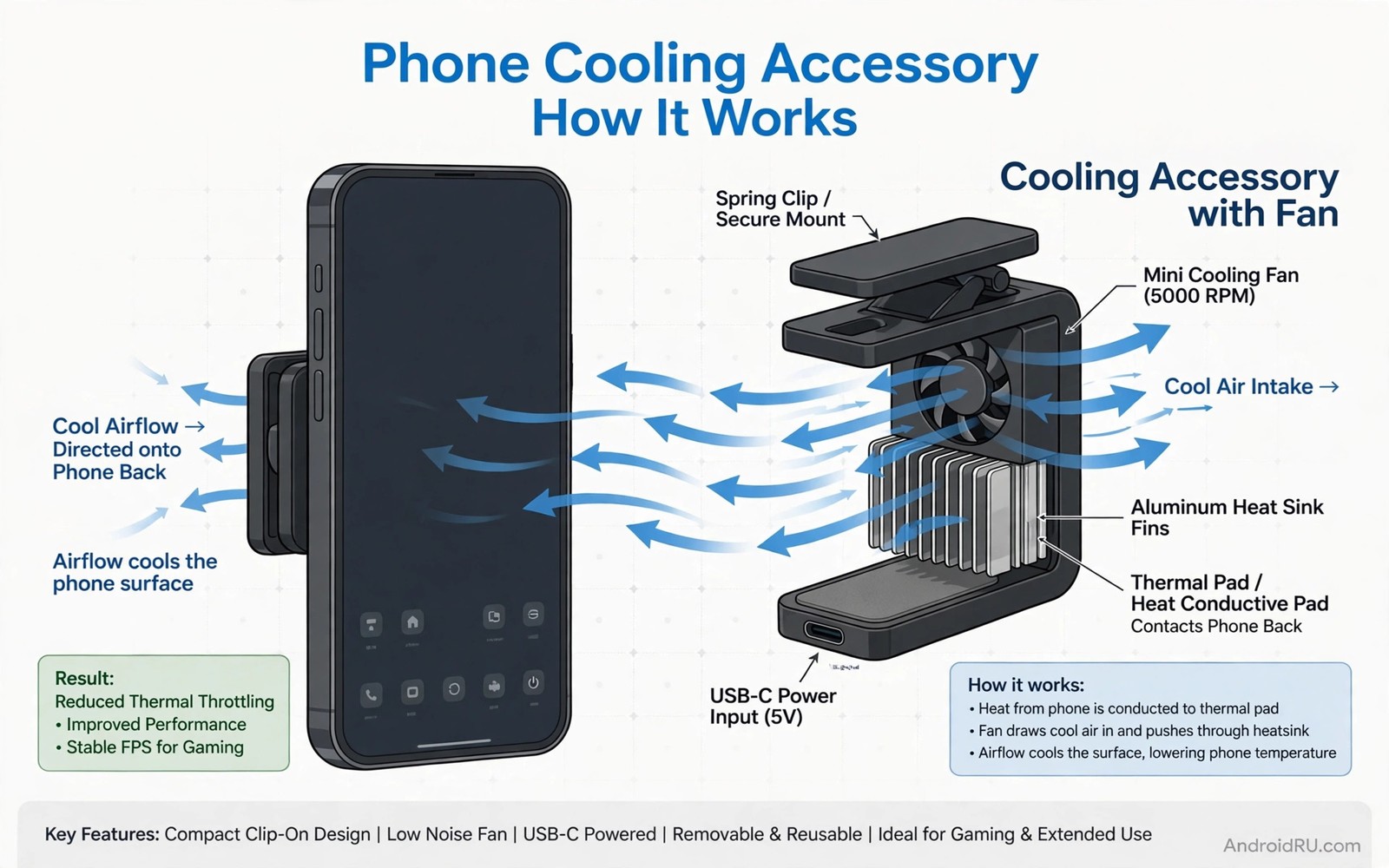
Heat is the silent enemy of mobile gaming because it forces a phone to slow down to protect itself. That slowdown appears as frame drops and stutter during intense moments. Cooling accessories help a phone maintain performance by removing heat faster. They do not make a phone faster than its design limit. They help it stay near that limit for longer. Understanding heat flow helps you choose cooling gear that actually works.
A phone generates heat mainly from the processor and the battery during gaming. That heat travels to the back of the phone and then to the air. A case can trap heat if it insulates the back. A cooler can draw heat away if it contacts the back well. Airflow around the phone also matters because still air heats up quickly. Cooling accessories work by improving one of those heat paths. The best accessory improves the weakest path in your setup.
Start by measuring heat in your usual games. Note when throttling starts and how hot the back feels. A phone that throttles after ten minutes needs stronger cooling than a phone that lasts an hour. That measurement guides accessory choice. A light ventilated case may suffice for mild heat. A fan cooler may be needed for severe heat. For gaming comfort beyond cooling see accessories for long gaming sessions for comfort gear.
Fan coolers and semiconductor coolers
A fan cooler blows air across the phone back to remove heat. It is light and simple and works with many phone models. A fan cooler needs a secure clamp to stay in contact during play. A loose fan wastes cooling power. Test fan noise as well because a loud fan can distract during quiet game moments. A quiet fan with good airflow is the best daily choice for many gamers.
A semiconductor cooler uses a cold plate to draw heat actively from the phone back. It can cool more strongly than a fan alone. It also uses more power and adds more weight. A semiconductor cooler needs a power source during play. That power can come from a power bank or a wall adapter. Test weight and power use over a full session before relying on it for ranked play. A cooler that is too heavy can cause fatigue.
Condensation is a risk with semiconductor coolers in humid conditions. A very cold plate can cause moisture to form on the phone back. Wipe the phone back dry after use in humid weather. Do not use a semiconductor cooler at maximum cold for long periods in humidity. A moderate cooling setting is safer and still effective. That moderation protects the phone from moisture damage.
Ventilated cases and stands for airflow
A ventilated case has holes or channels that let air reach the phone back. That airflow helps passive cooling during play. A solid case traps heat and can worsen throttling. Choose a case with vent cutouts near the processor area if possible. Test temperature with and without the case to see the difference. A case that raises temperature significantly is a poor gaming case even if it protects well.
A stand improves airflow by lifting the phone off a surface. A phone lying flat on a bed traps heat underneath. A stand allows air to flow around the back and sides. That airflow alone can delay throttling in moderate games. A stand also improves posture during controller play. Combine a stand with a ventilated case for a strong passive cooling setup. Passive cooling costs nothing in power or weight.
Room airflow also matters because a hot room limits cooling effectiveness. Play in a ventilated room when possible. Avoid playing under blankets that trap heat around the phone. A blanket is a common cause of severe throttling during long sessions. Remove blankets from the phone area and let air circulate. That free change can improve performance more than a cheap accessory. For charging heat during play see fast charging overheating accessories for charging cooling.
Power and settings that reduce heat
Charging while gaming generates extra heat from both gaming and charging. That combined heat accelerates throttling. If possible start a session with a full battery and avoid charging during intense play. A power bank charge during a break is cooler than a charge during a boss fight. That timing choice reduces peak heat. It also extends battery health over time.
Graphics settings affect heat directly because higher settings demand more processor work. Lowering shadows or resolution can reduce heat significantly. That reduction may improve frame stability even though visual quality drops slightly. Stable frames matter more than maximum graphics for competitive play. Test a lower graphics preset for temperature and frame stability. A stable lower preset often feels smoother than a hot high preset.
Background apps also generate heat by using processor and network resources. Close unnecessary apps before a gaming session. That closure frees processor capacity and reduces heat. A clean background also improves frame stability. Make app closure a pre game routine. That routine costs seconds and improves both cooling and performance.
cooling_test_log.txt
Game: demanding action title
Start temp: warm
After 30 minutes with fan: stable
Frame drops: fewer than without cooler
Battery drain: normal for session
The log above is an original example written for this guide. It shows a simple format for comparing cooling accessories. Use the same game and session length for each test. Consistent tests make the better cooler obvious.
Review cooling results after each test and note the accessory that gave stable frames. A stable frame result matters more than a low temperature number alone. A cooler that keeps frames stable is a keeper. A cooler that lowers temperature but adds weight and noise may not be worth it. Balance cooling with comfort for long sessions. That balance decides daily usefulness.
Monitor temperature with a simple app
A temperature monitoring app can show when throttling is about to start. Check the temperature before a long session and during breaks. A rising temperature trend warns you to reduce graphics settings early. Early action prevents a sudden frame drop during a critical match. That warning gives you control over performance instead of reacting to stutter.
Record temperature alongside frame stability in your cooling log. A log that links temperature and frames reveals the throttling threshold for your phone. That threshold guides cooler choice and graphics settings. A data driven approach beats guessing about heat. Use the log for a week and then set a stable graphics preset based on real numbers.
Common mistakes
The most common mistake is using a solid insulating case during intense gaming. That case traps heat and causes early throttling. Another mistake is playing under a blanket that blocks airflow. That blanket creates a hot pocket around the phone. A third mistake is charging at maximum speed while gaming. That combination generates peak heat and accelerates throttling. Avoid those three habits for better performance.
People also buy a cooler without checking clamp fit for their phone. A cooler that does not contact the back well wastes cooling power. Test clamp fit with your exact phone and case. A cooler that fits well cools well. A cooler that fits poorly is a waste of money. Fit testing is essential for active cooling gear.
A final mistake is expecting a cooler to fix a phone that throttles in minutes due to a fault. A faulty battery or a damaged processor can cause abnormal heat. If a phone overheats quickly in light games then seek service. A cooler cannot fix a hardware fault. Professional diagnosis protects the phone from further damage and for general gaming gear see accessories for mobile gamer peak frame rates for performance gear.
FAQ
Do phone coolers really prevent throttling?
Coolers can delay throttling by removing heat faster. They cannot eliminate throttling entirely in extreme games. A good cooler keeps the phone below the throttling threshold for longer. That longer stable period improves frame rates. Test with your game to see the real benefit. A cooler that delays throttling by thirty minutes is valuable for long sessions.
Passive cooling through a ventilated case and airflow also delays throttling. Active cooling adds more benefit for demanding games. Choose cooling based on measured throttling time. A measured approach avoids overbuying. That approach also helps you compare cooler types fairly.
Is it safe to use a semiconductor cooler on my phone?
Yes if used at a moderate setting and in normal humidity. Avoid maximum cold settings for long periods in humid weather. Wipe moisture from the phone back after use. Do not use a cooler on a phone with a cracked back. A crack can allow moisture to enter the device. A moderate setting with regular checks is safe for most phones.
Stop using a cooler if you notice condensation inside the camera lens area. That condensation signals excessive cooling in humidity. Reduce the cooling setting or switch to a fan cooler. A fan cooler has no condensation risk. Choose the cooler type that suits your climate. Humid climates favour fan coolers over semiconductor plates.
Should I remove my case when gaming?
Removing a solid case can improve cooling during intense gaming. A ventilated case can stay on because it allows airflow. Test temperature with and without your case. If removal lowers temperature significantly then use a ventilated case or play without a case in a safe setting. A safe setting means a stable surface where a drop is unlikely. Balance cooling with drop protection for your play style.
A case with vent cutouts gives a good middle ground. It protects against drops while allowing airflow. Choose a ventilated case for daily gaming. That case type supports both protection and cooling. A solid case is better for non gaming use where heat is low.
Conclusion
Thermal cooling accessories improve mobile gaming by removing heat faster and delaying throttling. Fan coolers offer light active cooling. Semiconductor coolers offer stronger cooling with weight and power costs. Ventilated cases and stands improve passive airflow. Power timing and graphics settings reduce heat at the source. Together those choices keep frames stable for longer sessions.
Your concrete next step is to measure throttling time in your hardest game tonight. Note when frame drops start without any cooler. Try a ventilated case or a light fan cooler tomorrow and measure again. Keep the accessory only if stable play time clearly increases in your own test.

