

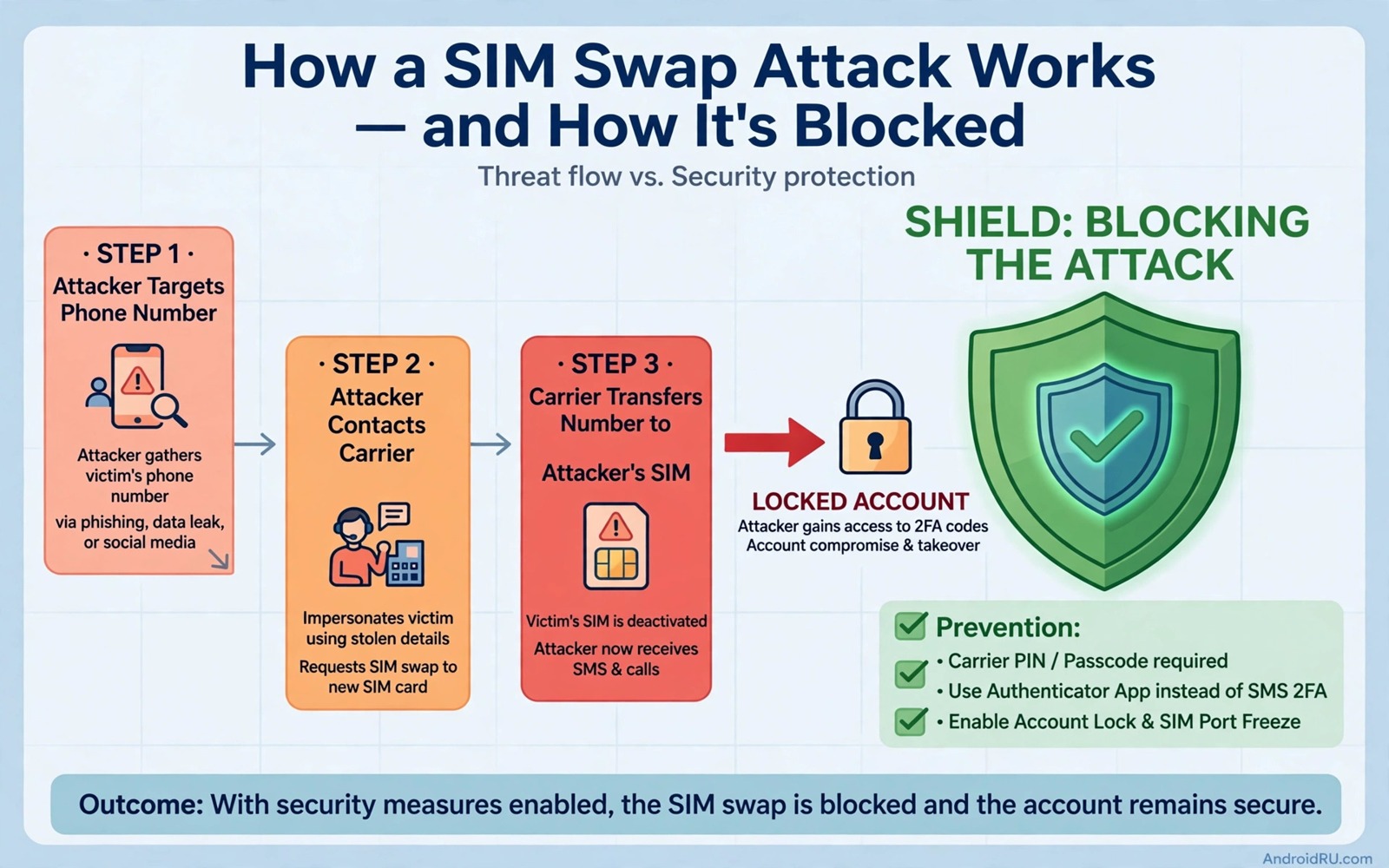
SIM swapping is a scam where a criminal convinces your carrier to move your phone number to a SIM they control. Once the number moves the scammer receives your calls and your text codes. Those codes can reset passwords and bypass second factor checks on many services. The attack targets your number rather than your phone so a locked handset alone cannot stop it.
Victims often discover the attack when their own phone suddenly loses signal. By that time the scammer may already be resetting email and banking passwords. The speed of the attack makes prevention far more valuable than recovery. A few carrier settings and account changes can make your number a hard target.
This guide explains how SIM swapping works and how to lock down your number. You will learn about carrier PINs and port out blocks and account recovery changes. You will also learn why text based second factors should move to app based codes wherever possible.
Understand the SIM swap attack
A scammer starts by collecting personal details about you from social media and from old breaches. They may know your name and address and date of birth and even answers to common security questions. They then call or visit a carrier store and pretend to be you. They claim that you lost your phone and need a new SIM urgently.
If the carrier agent accepts weak proof of identity then the number moves to the scammer SIM within minutes. Your own SIM stops working at that moment. The scammer then requests password resets for services that send codes by text. Each reset code arrives on the scammer phone instead of yours.
The attack succeeds because many services still treat a phone number as proof of identity. A number is easy to move and hard to protect when carrier checks are weak. That weakness is why you must add extra layers both at the carrier and inside each important account. No single setting fixes the problem alone.
Lock down your carrier account
Call your carrier or visit its app and set a strong account PIN that is different from your phone unlock PIN. Ask the agent to require that PIN for any SIM change and any port out request. Also ask for a port out block or a number transfer lock if your carrier offers one. That block stops another carrier from pulling your number away without extra verification.
Remove weak security questions from your carrier account where the settings allow it. Replace answers that anyone could guess with random phrases stored in your password manager. A security question about your first pet is not secure when your social media shows that pet clearly. Random answers turn a guessable question into a second password.
Ask the carrier to add a note that SIM changes require in person identification with a photo ID. That note may not bind every agent but it raises the bar for a phone based scam. Keep a record of the date and the agent name for the change. That record helps if you later need to prove that protection was requested.
Move second factors away from text messages
Open each important account and replace text message second factors with an authenticator app or a security key. Start with email because email resets unlock many other accounts. Then move to banking and cloud storage and social accounts. Each move removes one more account from the reach of a SIM swap.
Keep a text code option only for services that offer no alternative and monitor those services closely. For those services set up email alerts for sign-ins and password changes. An alert gives you a chance to react even when the scammer controls your number. Reacting fast can mean the difference between a blocked reset and a full takeover.
Store backup codes for authenticator accounts on paper in a safe place. A SIM swap should not lock you out of your own accounts when you move away from text codes. Backup codes give you a path back in without depending on your number. That independence is the whole point of moving away from text based verification and it is explained further in how to enable two factor authentication apps for maximum protection for the accounts you protect first.
Watch for the warning signs
Sudden loss of mobile signal while you are in a normal coverage area is the classic warning sign. Your phone may show no service or emergency calls only without any network outage around you. Do not dismiss that signal as a temporary glitch if it lasts more than a few minutes. Contact your carrier from another phone or from Wi-Fi calling immediately.
Unexpected password reset emails and sign-in alerts are another warning sign. A scammer who controls your number will trigger resets quickly. If you receive a reset code that you did not request then treat it as an active attack. Change the affected password from a trusted device and check the account for new recovery details.
Calls from your carrier about a SIM change that you did not request should be treated as urgent. Verify the call by hanging up and calling the official carrier number yourself. Scammers sometimes pose as carrier staff to extract the very PIN that protects your account. Never share a carrier PIN with an incoming caller no matter how urgent the story sounds.
adb shell settings get global mobile_data
# Check mobile data state on your own device
# A sudden loss of service deserves a carrier check
# Contact the carrier from another device at once
The commands above are an original example written for this guide to show a basic device check after a sudden signal loss. They read a mobile data setting on a phone that you own so that you can rule out a simple setting change. A real SIM swap will not be fixed by a setting change and it requires an urgent carrier call.
Business numbers deserve extra protection because a swapped business line can expose customer calls and supplier messages at once. Keep a business number on a separate carrier account with its own PIN and its own recovery rules. Train staff who answer that line to never share verification codes with callers who claim urgency. That training closes the social engineering path that technical settings alone cannot fully block.
Travel SIM cards add another layer to protect because a temporary number used abroad should not be tied to banking recovery. Keep your main number for banking and use a travel number only for local calls and maps. That separation means that a swap on a travel number cannot trigger banking resets. Return to your main number settings after travel and confirm that no changes occurred while you were away.
Common mistakes
One common mistake is using the same PIN for the carrier account and the phone lock screen. A thief who sees one PIN may guess the other. Another mistake is posting a phone number publicly on social media and in business listings. A public number is easier to target because the scammer does not need to hunt for it. A third mistake is keeping text codes as the only second factor for email and banking.
People also make the mistake of ignoring a short signal loss because service returned quickly. A brief swap window can be enough for a scammer to trigger a reset and then move the number back. Investigate any unexplained outage even when it resolves on its own. A quick carrier check costs minutes and it can reveal a swap attempt that you would otherwise miss.
Another error is sharing carrier account details with family members through normal chat messages. Those messages can be read if a device is lost or if an account is compromised. Share sensitive account information only through secure channels and change the PIN after any necessary sharing. That caution also supports avoiding password mistakes that put your Google account at risk across all your accounts.
FAQ
Can a SIM swap happen without my phone being stolen?
Yes and that is what makes the attack dangerous. The scammer never touches your phone. They manipulate the carrier into moving your number to their SIM. Your phone simply loses signal while the scammer phone gains your number. Physical possession of your handset is irrelevant to this attack.
Protection therefore focuses on the carrier account and on moving away from text codes. A strong carrier PIN and a port block make the manipulation harder. App based second factors make a successful swap less useful to the attacker. Both layers together give you real defence.
What should I do the moment I lose signal unexpectedly?
Connect to Wi-Fi and contact your carrier through its app or website or from another phone. Tell the carrier that you suspect a SIM swap and ask them to freeze SIM changes immediately. Then check your email and banking accounts from a trusted device and change passwords where you see suspicious activity. Speed matters because the scammer will act within minutes.
Do not wait for signal to return on its own before acting. A short delay can be enough for a password reset to succeed. Treat an unexplained outage as an incident until the carrier confirms otherwise. That urgency feels excessive until you experience a real swap attempt.
Is a virtual number safer than a carrier number?
A virtual number from a reputable provider can be safer when it offers strong account protection and app based login. It still depends on the security of that provider account. A weak password on the virtual number account recreates the same problem in a new place. Protect the virtual account with a strong password and an authenticator app.
Some services refuse virtual numbers for verification which limits this option. Use a virtual number for services that accept it and keep your carrier number private for essential contacts. Reducing public exposure of your main number lowers the chance that a scammer picks it as a target and it pairs well with auto filtering suspicious SMS phishing scams for the messages that still arrive.
Conclusion
SIM swapping works because phone numbers are treated as identity proof while carrier checks remain weak. A carrier PIN and a port block and app based second factors together close most of the attack path. No single step is enough but the combination makes your number an unattractive target. Scammers prefer easy numbers and yours should not be one of them.
Your concrete next step is to call your carrier this week and set a unique account PIN and enable a port out block. Then replace text codes with an authenticator app on your email account first. Those two actions will protect the accounts that matter most within a single day.

