

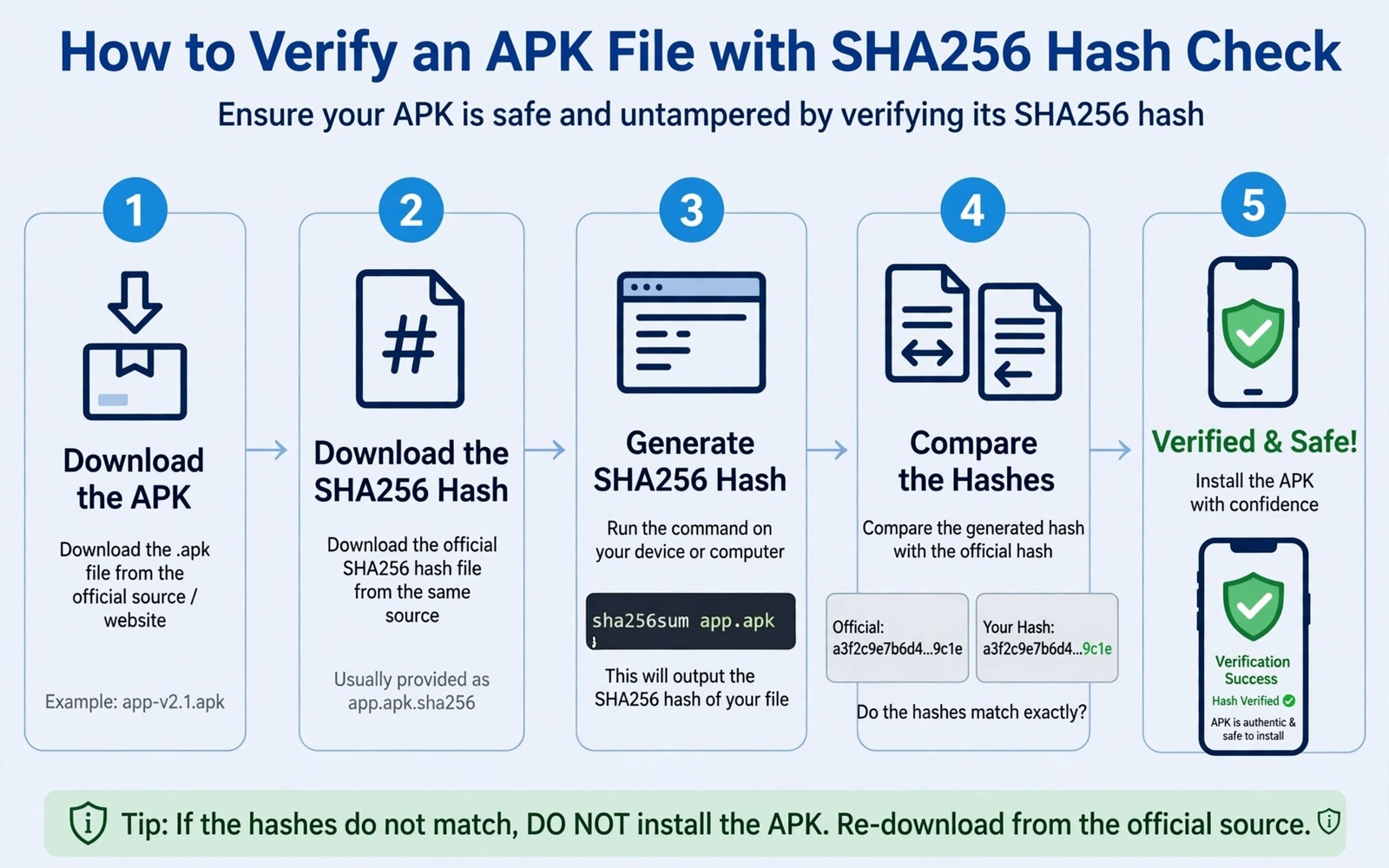
An APK file from outside the official store can look identical to the real app while hiding altered code inside. A hash check gives you a way to prove that the file you downloaded matches the file the developer published. Without that proof you install on trust alone and trust is easy to fake.
SHA256 creates a unique fingerprint for a file based on every byte inside it. A single changed byte produces a completely different fingerprint. When your fingerprint matches the published fingerprint you know the file arrived intact and unaltered.
This guide shows the full verification routine using tools that already exist on most computers and phones. You will find the published hash and compute your own hash and compare the two values with care. The routine takes a few minutes yet it prevents a compromised install.
Find the published hash from a trusted place
A developer who cares about verification publishes a SHA256 value on an official download page or in a signed release note. Copy that value exactly and keep it in a text file for comparison. A hash posted in a random forum comment carries far less weight than a hash on the official page.
When no published hash exists you cannot verify the file against the developer intent. In that case you must decide whether the source deserves trust based on reputation and history. A missing hash is not proof of tampering yet it removes your best verification tool.
Watch for hashes that appear only inside the same download page as a suspicious file. An attacker who replaced the file can also replace the hash shown beside it. Cross check the hash through a second channel when the app matters for banking or messaging.
Compute the hash on your computer
Open a terminal on your computer and navigate to the folder that holds the downloaded APK file. A single command computes the SHA256 fingerprint and prints it as a long string of letters and digits. Copy the output carefully because a single character difference means a different file.
Compare the computed value with the published value character by character. Do not rely on a quick glance because the two strings look similar even when they differ in the middle. A text comparison tool can highlight differences when your eyes grow tired.
Readers who want a wider safety routine will find daily security habits that protect a smartphone useful alongside hash checks. Verification catches a tampered file yet habits catch the social tricks that push you to install it. Both layers together give far stronger protection than either one alone.
Compute the hash on Android itself
A file manager with hash support or a small verification app can compute SHA256 directly on the phone. Open the APK file inside the tool and wait for the fingerprint to appear. That method helps when you downloaded the file straight to the phone without a computer nearby.
Avoid granting broad storage access to a verification tool you have never used before. A hash tool only needs read access to the single APK file you want to check. Choose a tool with a clear reputation and remove it after the check when you do not need it again.
Record the verified hash beside the app name and version so future updates can be compared quickly. A simple note saves time when the same app releases a new version next month. You will know at once whether the new file matches its own published hash.
Understand what a match does and does not prove
A matching hash proves the file arrived intact from the source that published the hash. It does not prove that the source itself is honest or that the app is safe to use. A malicious developer can publish a correct hash for a malicious app and the check will still pass.
A matching hash also does not guarantee that the app will behave well after install. Permissions and network behaviour still matter and you should review them after install. Hash verification is a file integrity check rather than a full safety verdict.
A mismatch always means stop. Delete the file and download again from a different trusted mirror or contact the developer for a fresh link. Never install a mismatched file in the hope that the difference is harmless because a small change can hide a large threat.
A small code check for APK hashes
The command below computes a SHA256 fingerprint for an APK file on a computer terminal. Replace the file name with the exact name of your downloaded file. The output is the fingerprint you compare with the published value.
sha256sum app-release.apk
sha256sum -c checksum.txt
The snippet above was written for this article to show a safe read only hash check for an APK file. It changes nothing inside the APK and it leaves your phone untouched. You can run the same check again after any re-download to confirm that the new file matches. Keep the published hash in a separate note so a tampered download cannot alter both values.
Verify updates the same way as first installs
An update file deserves the same hash check as a first install because an update can carry tampered code. Download the update from the official source and compare its hash before you install it. A verified update protects the trust you built with the first install.
Keep a note of the hash for each version you install. A version history lets you spot a reissued file that claims to be the same version yet carries a different hash. A different hash for the same version number deserves investigation before install.
Delete an update file that fails verification even when the app nags you to update. A nagging prompt does not prove the file is safe. Wait for a fresh official download rather than forcing a mismatched file.
Use signatures as a second check
A digital signature proves that a file came from a known developer key. A hash proves file integrity yet a signature proves authorship as well. Together they answer two different questions about the same file.
Check the signer information in the APK details when your verification tool shows it. A signer that differs from previous versions deserves caution even when the hash matches a published value. A changed signer can signal a repackaged app.
Keep a record of the expected signer for important apps. A record helps you notice a signer change during a future update. That notice can stop a repackaged app before it gains permissions.
Teach verification to a friend in five minutes
Show a friend how to compute a hash on a computer with one command. A live demo makes the abstract fingerprint idea concrete. A friend who sees the hash change after a tiny edit understands why full comparison matters.
Explain that a hash check is a routine rather than a sign of paranoia. A routine check before sideloading takes less time than recovering from a bad install. A calm explanation encourages a friend to adopt the habit without fear.
Share the official hash source with a friend rather than sharing the APK file itself. A shared official source lets each person verify independently. Independent verification beats trust in a forwarded file every time. Readers who want a wider safety plan will also like early warning signs of ransomware on a phone because verified files and early warning together reduce install risk.
Verify files transferred between devices
A file that moves from a computer to a phone can change during transfer without a visible warning. A USB transfer or a cloud sync can corrupt a byte and break the hash match. Compute the hash again on the phone after transfer rather than trusting the computer hash. A post transfer check proves the final file matches the published value.
Cloud storage can also alter a file through compression or metadata changes. A cloud service that optimises an APK file may change its bytes and its hash. Download the file directly from the official source on the phone when possible. A direct download avoids intermediate changes that a cloud service might introduce.
Keep a transfer log with the hash value for each device that receives the file. A log lets you compare hashes across devices quickly when a mismatch appears. A mismatch on one device points to that transfer rather than to the original file. That pinpointing saves time during troubleshooting.
Use a wired transfer for large APK files when Wi-Fi feels unstable. A wired transfer reduces the chance of a partial download that looks complete. A partial file can install partially and fail in confusing ways. A hash check after a wired transfer still remains the final proof.
Common mistakes
The biggest mistake is comparing only the first few characters of a hash. Attackers can craft files that share a short prefix yet differ elsewhere. Compare the full string every time even when the start looks identical.
Another mistake is copying a hash from the same untrusted page that hosts the file. A compromised page can show a hash that matches a compromised file. Verify through an official channel or a second independent source whenever possible.
People also forget to recheck after a download resumes or after a file transfer between devices. A transfer can corrupt a file without any visible warning. Run the hash check on the final file that you actually install rather than on an earlier copy.
Frequently asked questions
Where do I find a published SHA256 hash?
Look on the official download page or in the release notes for the app version you downloaded. Some developers include a checksum file beside the APK download. When no hash exists you cannot complete a full verification for that release.
Does a matching hash mean the app is safe?
A match proves file integrity against the published hash yet it does not prove the app is benign. A developer can publish a correct hash for a harmful app. Review permissions and source reputation alongside the hash result.
What should I do when hashes do not match?
Delete the file at once and do not install it. Download again from the official source and compute the hash again. When the mismatch repeats contact the developer because the published hash or the file may be wrong.
Conclusion
SHA256 verification turns blind trust into a concrete check that takes only minutes. A published hash and a computed hash together prove that a file arrived intact. That proof matters most for apps installed from outside the official store.
Your concrete next step is to download your next APK and compute its SHA256 fingerprint before you install it. Compare the full value with the published hash and delete any file that mismatches. Readers who want to hide sensitive tools can also explore how to hide secure apps from the launcher drawer as a useful next layer.

