

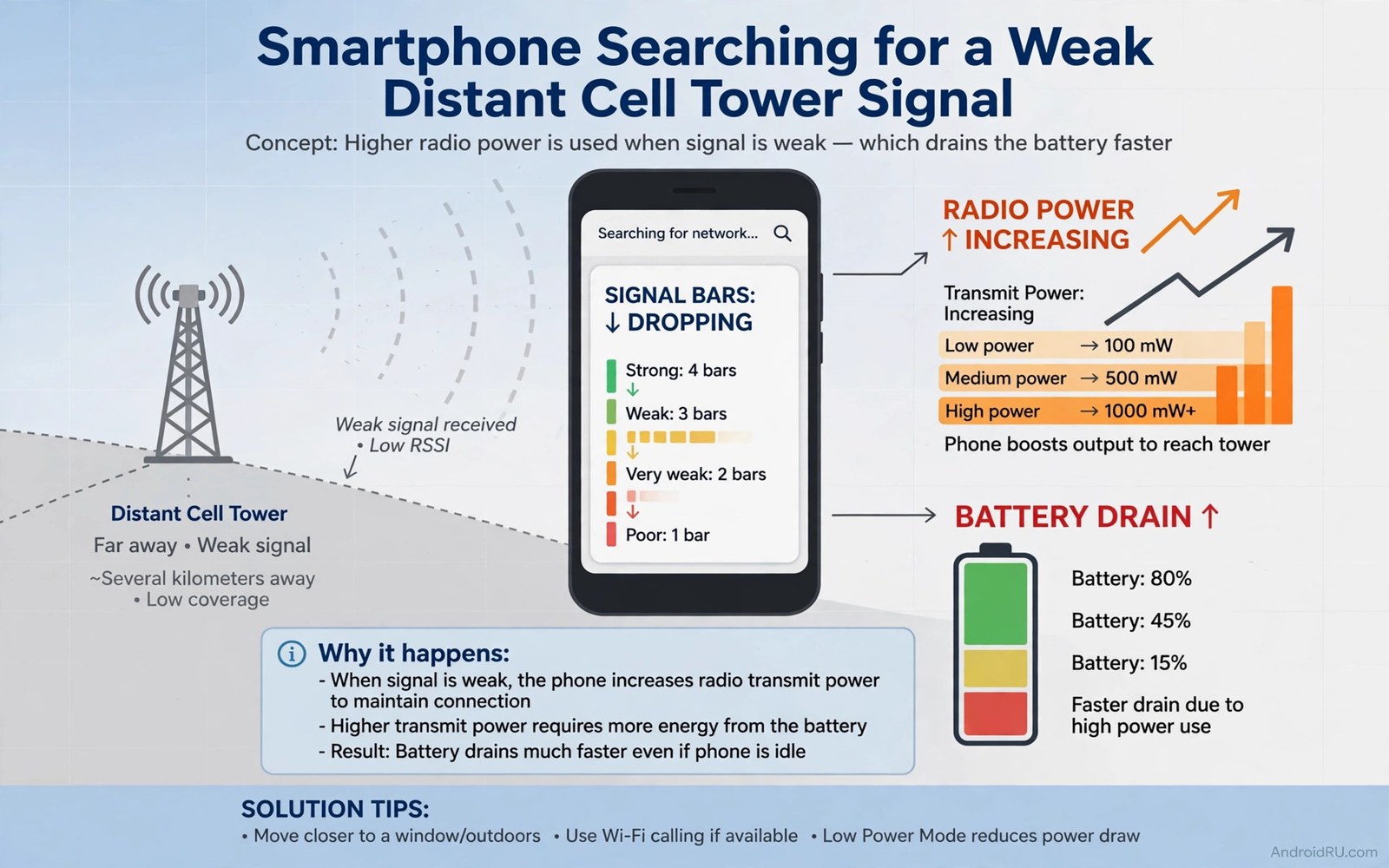
You can leave your phone untouched on a desk and still watch the battery fall. No app runs. The screen stays off. Yet by evening the charge is far lower than you expected. The cause often sits outside the phone entirely. It sits in the air between your phone and the nearest tower. When that link is weak your phone works much harder to stay connected. That hidden work drains the battery hour after hour.
Signal strength is easy to ignore because the phone hides the real numbers. You see bars on the screen. Bars look simple and they change slowly. Behind those bars the radio constantly measures the tower signal and adjusts its power. A strong signal needs only a whisper of power. A weak signal needs a shout. A very weak signal needs repeated shouts plus constant scanning for a better tower. You never hear that shouting. You only feel it as a dead battery.
This article explains why low signal drains power so fast. You will learn how the radio behaves in weak coverage. You will learn how to measure your real signal. You will learn practical fixes for home and work and travel. Some fixes cost nothing. Others need a small change in habit. All of them beat blaming apps for a drain that apps did not cause.
How A Phone Radio Behaves In Weak Coverage
A phone radio must stay in touch with a tower at all times. It listens for paging messages that announce incoming calls. It sends short updates so the tower knows where the phone is. When the signal is strong these tasks use tiny bursts of power. The radio sleeps between bursts and wakes only for a moment. That sleep pattern is what makes standby time so long on a good signal.
When the signal weakens the radio cannot sleep as deeply. It must listen longer to catch a faint paging message. It must transmit at higher power so the tower can hear its reply. Higher transmit power is one of the most expensive things a phone does. A phone at full transmit power can use several times more energy than a phone at low transmit power. The difference adds up across thousands of short transmissions per day.
Scanning adds a second cost. When the current tower fades the phone searches nearby frequencies for a stronger tower. Scanning means powering the receiver across many bands. It also means testing each candidate tower briefly. In a building with patchy coverage the phone may scan again and again. Each scan costs power and each failed handover costs more. The phone does this to keep you reachable. It has no way to know that you would rather save battery than hold a faint link.
How To Measure Your Real Signal
Bars lie by design. Different phones show different bars for the same signal. One phone may show two bars where another shows one bar. Real signal strength is measured in dBm. Open Settings and tap About phone. Then tap SIM status and look for signal strength. A value near negative 70 dBm means an excellent signal. A value near negative 90 dBm means a fair signal. A value near negative 110 dBm means a weak signal. A value near negative 120 dBm means a very weak signal that will drain fast.
Walk around your home and note the value in each room. A basement or a far corner may read far worse than a window seat. That map tells you where the phone rests best. Charge the phone near a window when you can. Keep it out of a metal drawer or a thick bag during the day. Small moves in position can change the signal by a large margin. A phone resting in a good spot sleeps far better than one buried in a weak spot.
Check the value at work and on your commute too. A train route through tunnels will show deep dips. An office behind thick concrete may read weak all day. Knowing the pattern helps you choose fixes that fit each place. A fix for home may not help on a train. A fix for work may not help at home. Measure first and then act. Guessing wastes effort on the wrong place.
Why One Bar Costs More Than Video Streaming
Video streaming looks expensive because the screen stays on and data flows fast. Yet streaming on a strong signal can cost less per hour than standby on a very weak signal. The reason is transmit power. Streaming mostly receives data at moderate power. Weak signal standby transmits at high power again and again. The radio never rests properly. Over a full day the weak signal standby total can pass the streaming total.
Apps also behave worse on weak signal. An app that tries to sync will retry when the link fails. Each retry wakes the radio and the processor. A chat app may retry a message several times before it gives up. A mail app may retry a sync across a fading link. Those retries look like app drain in battery stats. The root cause is still the signal. Fixing the app alone will not stop the retries. Fixing the link or pausing sync will.
Calls suffer in a similar way. A call on a weak link forces the phone to hold high transmit power for the whole call. The call may also drop and reconnect. Each reconnection costs a burst of power. A short call on a weak signal can cost more than a longer call on a strong signal. If you must take a long call then move near a window or step outside when you can. A better signal makes the call clearer and cheaper at once.
Free Fixes That Work Today
Airplane mode is the strongest free fix for a known dead zone. When you enter a basement or a tunnel or a remote area with no useful signal turn on airplane mode. The radio stops searching entirely. The phone then sips power instead of shouting into the void. Turn airplane mode off when you return to coverage. This habit alone can save a large share of battery on travel days. It also pairs with the emergency charging trick in why airplane mode helps emergency charging because both ideas rest the radio when it cannot help you.
Wi-Fi calling helps when Wi-Fi is strong and mobile signal is weak. The phone routes calls over Wi-Fi and lets the mobile radio rest a little. Turn on Wi-Fi calling in the SIM or calling settings if your carrier supports it. Test it for a few days at home. Keep it if calls stay clear and the battery improves. Turn it off if calls break up. Wi-Fi calling is not magic but in a strong Wi-Fi home it removes the worst mobile drain.
Choose a stable network mode in weak areas. A phone set to hunt for the newest network will jump between types as coverage fades. Each jump costs power. A mode that stops one step lower holds a steadier link. Open Network settings and pick a stable preferred network type for your area. The link may be slower on paper. In practice it stays connected and the battery lasts longer. Stability beats speed when the signal is thin.
Fixes For Home And Work
At home the phone position matters more than any setting. Keep the phone near a window that faces the nearest tower when you can. Avoid metal shelves and thick concrete corners for long rests. A simple stand by a window can improve the signal by a useful margin. Charge the phone in that spot overnight. The phone will sleep better and charge without fighting a weak link at the same time.
A signal booster or a femtocell can help a home with consistently weak coverage. A booster amplifies the outdoor signal indoors. A femtocell creates a small local cell using your broadband link. Both options cost money and need carrier support. Check with your carrier before buying any booster. An approved device helps a lot. An unapproved device can cause interference and may be illegal in some regions. Do not buy a random booster without carrier guidance.
At work talk to your facilities team when the whole office suffers weak signal. A building wide fix helps everyone at once. A single phone fix cannot beat thick concrete and metal framing. Some offices add indoor coverage for staff. Others allow Wi-Fi calling on the office network. Either path beats every employee burning battery all day. Raise the issue with data from your signal readings. Numbers persuade faster than complaints about bars.
When To Change Carrier Or SIM Setup
Sometimes the carrier itself is the problem in your area. One carrier may have a tower nearby while another has none. Ask neighbours which carrier works best at your address. A SIM from a stronger carrier can transform battery life at home. Test with a prepaid SIM for a week before you switch fully. The test costs little and the result is clear in battery stats. A stronger carrier is often the cheapest long term fix.
Dual SIM users should check both lines. A second SIM with no coverage in your area keeps searching all day. Turn off that SIM when you do not need it. Set mobile data to the stronger SIM. These steps cut the search cost at once. The link between SIM setup and drain is covered in depth in the hidden battery drainer in SIM settings and the two articles work best together. A good SIM setup plus a good signal position beats either fix alone.
Bluetooth use in weak areas adds little compared with the mobile radio. Still it helps to know the real cost before you blame it. A short test with Bluetooth off for a day shows the true impact. For that test see the real battery impact of leaving Bluetooth on and compare it with your signal readings. Most weak signal users find the mobile radio dwarfs Bluetooth by a wide margin.
Travel And Temporary Weak Signal
Travel days create the worst signal pattern. Trains and rural roads pass through gaps between towers. The phone scans hard in each gap. Airplane mode between stops saves the most power. Turn it off at stations or towns to catch messages in batches. Batching messages this way uses far less power than constant scanning. It also reduces the stress of watching a dying battery on a long trip.
Roaming in a new area can worsen the search pattern. The phone may hunt for partner networks it barely knows. Turn off automatic network selection and pick a carrier manually when roaming feels unstable. A fixed carrier stops the hunting. Turn data roaming off when you do not need live data. Download maps and media before the trip. Offline content removes the need for a live link in gaps.
Weak signal battery check
1. Settings > About phone > SIM status
2. Note signal strength in dBm
3. Walk each room and note the value
4. Charge near the strongest spot
5. Use airplane mode in known dead zones
6. Set a stable preferred network type
7. Test Wi-Fi calling for a few days
The checklist above was written for this article as a plain summary of the measurement and fix steps. It uses only built-in menus and free choices. Run it once at home and once at work. Keep the readings in a note so you can compare after a carrier change or a move. A short note turns a vague drain into a clear pattern.
Common mistakes
Many users blame the newest app they installed for a signal drain. They delete the app and the drain stays. Check signal strength before you delete anything. A radio line high in battery stats points at coverage not apps. Deleting useful apps solves nothing when the tower link is the cause.
Another mistake is keeping the phone in a bag or drawer all day in a weak building. The phone then fights both a weak signal and a shielded position. Keep the phone on a desk near a window when you can. A small change in resting place can save more power than a new setting.
Some users chase the fastest network mode in a weak area. The fastest mode hunts hardest when coverage fades. A stable mode holds the link and rests more. Speed means little when the link keeps dropping and the battery dies early.
A final mistake is ignoring airplane mode in dead zones. The phone cannot help you when no tower is reachable. It only burns power searching. Airplane mode in a dead zone is not giving up. It is smart power management until coverage returns.
FAQ
Why does my phone die faster at work than at home?
Work buildings often block signal with concrete and metal. Your phone then transmits at higher power all day. Home may have a clearer path to a tower. Compare dBm readings at both places. A large gap confirms that coverage explains the difference.
Can a case cause weak signal drain?
A metal case can weaken the signal a little. The effect is small on a strong signal. It matters more when the signal is already weak. Test a day without the case in your worst spot. A clear improvement means the case contributes to the drain.
Does Wi-Fi use less power than weak mobile signal?
Wi-Fi usually costs less than a weak mobile link when the Wi-Fi signal is strong. The phone can rest between Wi-Fi bursts. A weak mobile link forces high transmit power and scanning. Use strong Wi-Fi when it is available and let the mobile radio rest.
Conclusion
Low signal strength is a silent battery killer because the work happens out of sight. The radio shouts louder and scans longer when the tower link fades. Bars hide the true cost. Real dBm readings reveal it. Position and airplane mode and stable network choice and Wi-Fi calling each cut the cost in a different way. Together they can add hours back to a day in weak coverage.
Your concrete next step is to measure your signal now. Open SIM status and note the dBm value where you sit most. If it reads near negative 110 or worse then turn on airplane mode in dead zones and move your charging spot near a window today. Recheck the battery stats after two days and keep the fixes that lift your bedtime percentage.

