

Best Family Cell Phone Plans with Shared High Speed Mobile Data
Family phone bills have a way of creeping up one line at a time. A parent adds a line for a teenager, then another for a grandparent, then a tablet line for homework, and suddenly the household pays for four separate plans that never talk to each other. Each line carries its own data allowance, its own fees, and its own renewal date, while light users waste data that heavy users desperately need. That is the exact problem a shared plan is built to solve.
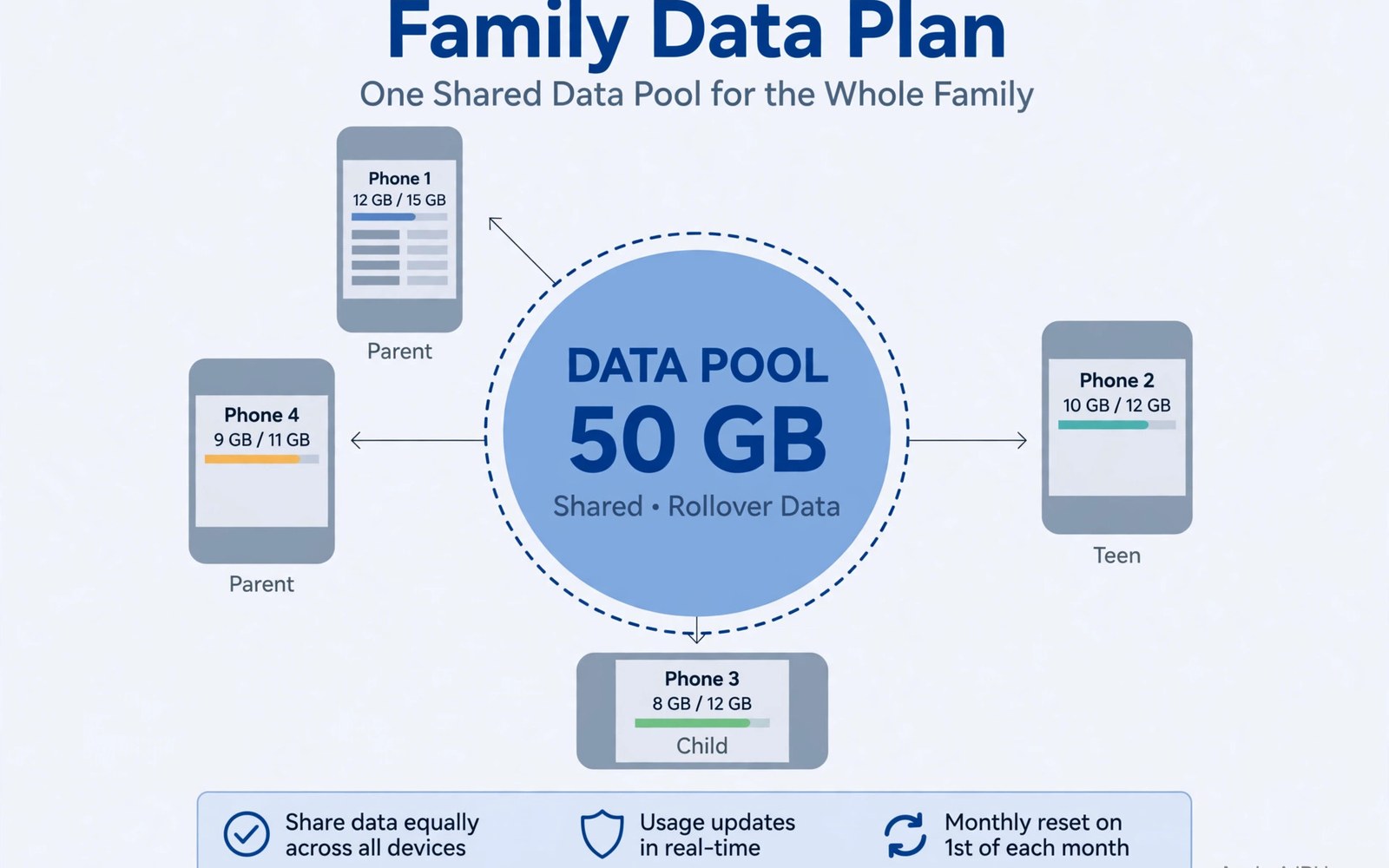
A shared high speed data pool puts the whole household on one bucket of data. The teenager streaming video after school draws from the same bucket as the parent who only checks email and maps. The grandparent who uses half a gigabyte a month leaves slack that the rest of the family can actually use. One bill replaces four, and the family stops paying for data that expires untouched on one line while another line gets throttled.
This guide compares the family plans that matter in the United States, explains how to size a pool so it lasts the month, and shows how to read the final bill instead of the advertised price. It covers the big three carriers, the cheaper alternatives that run on the same networks, parental controls, hotspot rules, and the switching steps that keep every number working. Prices change often, so treat every range here as a starting point and check the current plan before you buy.
How Shared High Speed Mobile Data Pools Actually Work for Families
A shared pool is one data allowance for the whole account, refilled at the start of each billing cycle. Every line on the account draws from it, and the carrier counts total use rather than use per line. When the pool runs out, the whole account slows down, moves to a lower speed, or pays for a top-up, depending on the plan. That shared fate is both the strength and the risk of pooling: generous months feel effortless, and one heavy week can affect everyone.
Most modern family plans sold as unlimited work a little differently. Instead of a fixed pool of gigabytes, each line gets its own high speed allowance, and the account gets a shared pool of premium data that is not slowed in busy places. The practical question stays the same, though. How much fast data does the household really use, and what happens when it runs out? A plan that drops to 128 Kbps after the allowance ends feels very different from one that drops to 600 Kbps, even when both are sold as unlimited.
Shared Pool vs Per-Line Allowance for Family Plans
A per-line allowance isolates every user. A teenager cannot touch a parent’s data, and a parent cannot borrow from a teenager’s unused gigabytes. That isolation protects light users, but it wastes data every month, because unused allowances simply expire. A shared pool does the opposite. It lets heavy users borrow slack from light users, which suits most real families, because usage inside a household is almost never even. The trade-off is that one extreme user can drain the pool early, so shared plans need warnings and caps more than per-line plans do.
Families with two heavy streamers and two light users usually win with a shared pool. Families with four heavy streamers often do better with large per-line allowances or true unlimited lines, because there is no slack to borrow. Count total household use first, then decide which shape fits. Line count alone tells you almost nothing about the right plan.
What High Speed Means After the Pool Runs Out
High speed usually means full 5G or LTE speed up to the plan’s premium allowance. After that allowance, carriers slow the line, and the slowed speed decides whether the phone stays usable. At 600 Kbps, maps load, messages send, and low quality audio streams, though video stutters. At 128 Kbps, even loading a web page becomes a test of patience. Ask the carrier for the exact slowed speed in writing before you choose, because two plans with the same headline allowance can feel completely different in the last week of the month.
How Deprioritisation Works in Busy Places
Some plans also slow you down before the allowance ends, when the network is congested. This is called deprioritisation, and it hits cheaper plans first. A family plan with a generous premium data allowance keeps full speed in a crowded stadium or a busy school pickup line, while a budget plan on the same towers may crawl at the same moment. If anyone in the family regularly uses data in crowded places, premium data matters more than the headline gigabyte number.
T-Mobile vs Verizon vs AT&T Family Plans Compared
The big three carriers sell the most complete family plans, with the widest coverage, the most perks, and the highest prices. They differ less in headline speed than in where they are strong, how much premium data they include, and what they bundle. The table below compares them on the points that decide a family bill, using broad monthly ranges for four lines. Check the current plan on each carrier page, because promotions change the totals every few weeks.
| Carrier | Shared data approach | Typical 4-line monthly range | Hotspot and perks | Best for |
|---|---|---|---|---|
| T-Mobile | Unlimited lines with a large premium data allowance per line | Roughly $120 to $180 with autopay | Generous hotspot allowance, streaming perks on higher tiers, taxes and fees often included | Families who stream a lot and want perks bundled in |
| Verizon | Unlimited lines with tiered premium data, myPlan extras per line | Roughly $130 to $200 with autopay | Strong hotspot on higher tiers, optional perks picked per line, wide rural coverage | Families who need coverage outside cities and want to pick perks line by line |
| AT&T | Unlimited lines with tiered premium data, per-line extras | Roughly $120 to $190 with autopay | Hotspot allowance grows with tier, streaming and cloud extras on some plans | Families already using AT&T home internet who want one provider |
| Mint Mobile | Shared-style savings with per-line buckets on T-Mobile network | Roughly $60 to $120 for four lines paid in advance | Hotspot included from the line allowance, few perks, low price is the perk | Budget families with Wi-Fi at home and school |
| Visible | Unlimited lines on Verizon network, simple flat pricing | Roughly $100 to $140 for four lines | Hotspot included at a capped speed, no bundled streaming perks | Families who want Verizon coverage without Verizon prices |
| Google Fi | Flexible or unlimited lines with shared data billing | Roughly $80 to $160 for four lines | Hotspot from the plan allowance, strong international roaming | Families who travel abroad or use widely different amounts of data |
Coverage is the first filter, not price. A cheap plan on a network with no signal at your home, your kids’ school, and your parents’ house is not a bargain at any price. Test coverage with a prepaid SIM or a trial line before moving the whole family, and check the signal in the rooms where people actually use their phones, not just outside the front door.
T-Mobile Family Plan Strengths and Limits
T-Mobile family plans suit households that stream video and music every day. The higher tiers include generous premium data, a solid hotspot allowance, and streaming perks that a family can genuinely use every week. Taxes and fees are included in the advertised price on several plans, which makes the bill easier to predict than rivals that add fees afterwards. The weak spot is rural coverage. In some rural areas, T-Mobile still lags Verizon and AT&T, so a family with a rural grandparent should test that line first.
When T-Mobile Fits a Family Best
T-Mobile fits best when most of the family lives and works in towns and cities, streams daily, and would pay separately for the bundled streaming services anyway. Add up the standalone cost of those services. If the family already pays for them, the higher tier often costs less than a cheaper plan plus separate subscriptions.
Verizon Family Plan Strengths and Limits
Verizon family plans suit households that need signal in more places. Its network reaches further into rural areas and holds up well inside large buildings, which matters for a grandparent in a small town or a parent who works in a concrete office. The myPlan system lets each line pick its own perks, so a teenager can add a streaming perk while a parent adds cloud storage, instead of the whole family paying for the same bundle. The weak spot is price. Verizon usually costs the most of the big three, and the extras that make it flexible also make the bill harder to predict.
AT&T Family Plan Strengths and Limits
AT&T family plans suit households that already buy internet or television from AT&T, because bundling discounts can pull the total down noticeably. Its unlimited tiers include solid premium data and hotspot allowances that grow with the tier, and its coverage sits between Verizon and T-Mobile in most regions. The weak spot is complexity. The tier names and the bundled extras change often, and two families on plans with similar names can have very different hotspot limits. Read the tier details line by line rather than trusting the tier name.
Mint Mobile, Visible and Google Fi Family Options Compared
The cheaper carriers, often called MVNOs, rent network capacity from the big three and sell it for less. They cut costs by selling online, offering fewer perks, and keeping support lean. For a family with good Wi-Fi at home, at school, and at work, the savings can reach hundreds of dollars a year. For a family that leans on mobile data all day, the limits show up fast, so the decision comes down to honest usage numbers rather than brand loyalty.
Mint Mobile for Budget Families
Mint Mobile runs on the T-Mobile network and charges in advance, usually for three, six, or twelve months at a time. Paying upfront is the catch that gives the lowest monthly rate, and it is also the risk, because the money is committed before the family has tested the service for a full year. Data buckets are per line rather than one shared pool, so a heavy teenager cannot borrow from a light grandparent. That suits families where each member’s use is predictable. Mint includes hotspot data from the line allowance, which keeps homework tethering simple, and it works best when the family spends most of its day on Wi-Fi.
Visible for Simple Unlimited Family Lines
Visible runs on the Verizon network and sells unlimited data with flat, simple pricing and no annual contract. Each line costs the same, so adding a fourth line does not trigger a new round of maths, and the bill stays easy to read. Hotspot is included, though at a capped speed that suits email and homework better than 4K streaming. Visible has no shops to walk into, so a family that needs in-person help for a grandparent may miss the retail support that Verizon itself offers. Test the Verizon signal at every family home first, because the coverage is the point of choosing Visible at all.
Google Fi for Mixed-Use and Travelling Families
Google Fi charges differently from the others. Its flexible plan bills for the data the family actually uses, which suits households where one person uses very little and another uses a lot, because the light user pulls the bill down instead of subsidising a fixed pool. Its unlimited plans add a shared high speed allowance with strong international roaming, which matters for families who travel abroad together or have relatives overseas. Fi works on a mix of networks and switches between them, which helps in cities and hurts in places where its partner coverage is thin. Check Fi coverage at the specific addresses the family cares about before switching.
Who Saves Most With an MVNO Family Setup
The biggest savers are families with strong Wi-Fi at home, at school, and at work, with phones that are already paid off, and with nobody who needs premium data in crowded places every day. If the household pays for phones in monthly instalments through a carrier, the device discounts on a big carrier plan can wipe out the MVNO saving, so compare the whole cost, phones included, before deciding.
How Much Shared Data Does Your Family Really Need
Guessing pool size is how families end up throttled in week three. Measuring takes two months and saves a year of arguments. Open the data usage screen on every phone in the household, write down each person’s monthly total, and add them together. That sum is the family baseline. Then add a buffer for growth, because streaming quality rises, apps update in the background, and school holidays push teenager use sharply higher.
Measure Every Member for Two Months
One month of measurements can mislead. A holiday month, a school trip, or a big app update can double one person’s total and distort the average. Two months smooth out those spikes and show the real pattern, including who uses data steadily and who uses it in bursts. Look at the per-app breakdown too. Video apps usually dominate, followed by social feeds with autoplay video, then cloud photo backup. Turning off autoplay and setting cloud backup to Wi-Fi only can cut a heavy line by a third without anyone feeling deprived.
Add a 25 Percent Buffer and Plan for Holidays
Take the two-month average, add a 25 percent buffer, and treat that as the pool target. A family that averages 80 GB a month should shop for a pool near 100 GB. The buffer absorbs holiday spikes, new apps, and higher video quality without throttling the whole household. If one teenager regularly doubles their use in school holidays, consider a separate line for that person. A separate heavy line can use prepaid data options to cap the cost, while the shared pool stays calm for everyone else. That hybrid setup, one shared pool plus one isolated heavy line, solves more family arguments than any single plan choice.
- Video streaming at standard quality uses far less data than the same video at the highest quality, so set video apps to standard quality on mobile data and save high quality for Wi-Fi.
- Cloud photo backup should run on Wi-Fi only, because a phone that backs up a holiday photo album over mobile data can burn several gigabytes in one afternoon.
- Social apps with autoplay video deserve a data warning of their own, since silent autoplay is the most common reason a light user suddenly becomes a heavy user.
- Software updates should wait for Wi-Fi, because a single system update can be larger than a light user’s whole monthly allowance.
Parental Controls, Data Caps and Hotspot Rules That Keep a Pool Healthy
A shared pool without rules lasts until the first teenager discovers unlimited video. Controls are not about distrust. They are about making the shared resource visible so everyone can see the effect of their own use. Most carriers include a family app that shows per-line usage, lets a parent pause data for one line, sets bedtime cutoffs, and blocks premium purchases. Set it up together with your kids rather than in secret, because rules that children helped shape are rules they actually follow.
Data Warnings and Caps per Line
Set a warning at half the pool and a second warning near the end, and make sure every line receives the alert, not just the account holder. Warnings teach budgeting without sudden cutoffs. Where the carrier allows it, set a cap on the heaviest line so it stops at an agreed amount instead of draining the pool. Talk about the numbers at a family meal and show the usage screen to everyone. Teenagers often have no idea that two hours of video a day adds up to tens of gigabytes a month, and visible numbers change behaviour faster than any lecture.
Hotspot Rules for Homework and Travel
Hotspot data is where family pools leak fastest. A laptop doing homework video calls can use several gigabytes in an afternoon, and a tablet streaming cartoons over a phone hotspot can drain a pool in a weekend. Decide which devices may use hotspot, and for what. Homework comes first, entertainment second, and downloads should wait for Wi-Fi wherever possible. Families with a heavy tetherer should also check hotspot tethering plans for that line, because a plan with a dedicated hotspot allowance protects the shared pool from one laptop. Teach kids to download lessons and videos on Wi-Fi before leaving home, so live classes and homework keep the fast data.
Perks, Multi-Line Discounts and the Real Final Bill
Perks decide more family plan choices than they should, because a free streaming service feels like a gift even when the family never opens it. List the perks each member would genuinely use every week, price each one at its standalone rate, and add the total to the comparison honestly. A plan that costs twenty dollars more but includes thirty dollars of services the family already pays for is cheaper than the plan with the lower headline price. A plan whose perks nobody uses is simply twenty dollars more expensive.
Streaming, Cloud Storage and Device Protection Perks Worth Paying For
Streaming perks pay off when the whole family watches the same service. Cloud storage pays off when parents share photos across phones and need room for backups. Device protection pays off for children with fragile phones, though it only pays if the family actually files claims instead of living with cracked screens. Hotspot allowances pay off for homework and travel. Count only the perks that survive that honest test, and ignore the rest when comparing prices.
Reading the Final Bill Total Before You Sign
Multi-line discounts make the fourth line look almost free, and that maths is real for larger families. The first line costs the most, later lines cost less each, and four lines often cost little more than three. Small families gain less, and two lines may cost almost the same as two separate plans. Fees multiply across lines too. Activation fees, taxes, and device payments add up per line, and a plan with low line prices but high fees misleads. The final bill total is the only fair comparison, so ask for it in writing before signing anything, including taxes, fees, device payments, and the cost after any promotional period ends.
Switching Carriers as a Family Without Losing Numbers or Coverage
Moving a whole family to a new carrier fails when it is done in one rushed afternoon. Porting a number takes coordination, and a mistake can leave a line without service for a day. The safe method is staged. Keep the old lines active until every port finishes, test the new network on one line first, and only then move the rest. That pilot line reveals the truth about coverage at home, at school, and at work, before the whole family depends on it.
Test the New Network on One Pilot Line
Move one line, usually an adult’s, and use it as the household’s main phone for two weeks. Test calls from the rooms where people actually talk, test data during the school run, and test the signal at the grandparents’ house. If the pilot line struggles anywhere that matters, the family has learned the truth for the price of one line instead of four. A network that works at the shop and fails at home is a network that fails.
Port Numbers in Order and Time the Switch
Port numbers one at a time and confirm each one works before starting the next, following the steps in switching carriers while keeping your number so no number is lost in the move. Time the switch near the end of the billing cycle, because switching early wastes days the family already paid for. Check device compatibility for every phone before porting, since older phones may lack the network bands the new carrier relies on. A phone that fails the band check needs replacing, so budget replacements before switching rather than discovering the problem on moving day.
Frequently Asked Questions About Family Cell Phone Plans With Shared Data
How many lines make a family plan cheaper than separate plans?
Three or four lines is where family plans usually pull ahead, because multi-line discounts grow with each added line while separate plans keep charging full price per line. Two lines often cost about the same either way, so compare the final bill total for two lines before assuming the family plan wins. Five or more lines usually favour the family plan strongly, provided the shared pool is large enough for everyone. The deciding factor is always total household data use, not line count alone.
What happens when one person uses all the shared data?
When a shared pool runs out, every line on the account slows down or pays for a top-up, depending on the plan. That shared consequence is why warnings and caps matter. Set a warning at half the pool, a second warning near the end, and a cap on the heaviest line if the carrier allows it. Talk about the numbers openly. In practice, most pool drain comes from video autoplay and cloud backup running on mobile data, and fixing those two settings solves the problem without any family argument.
Can grandparents keep their number and phone on a family plan?
Yes, in most cases. A grandparent can port their existing number to the family account and usually keep their phone, provided the phone supports the new carrier’s network bands. Check band compatibility before porting, test the signal at their home with a pilot line, and set up their phone with large text and a simple home screen after the move. Save the carrier support number in their contacts, because light users need good support more than they need data.
Is an unlimited family plan better than a shared data pool?
It depends on how the household uses data. An unlimited plan suits families with several heavy users, because there is no fixed pool to drain and no end-of-month slowdown to a crawl, provided the premium data allowance is generous. A shared pool suits families with mixed use, because light users leave slack that heavy users can borrow, and the monthly price is usually lower. Measure total use for two months first. If the total keeps growing and the pool keeps running out, unlimited is the honest answer. If the pool usually lasts with room to spare, the shared plan is money saved.
A Family Plan That Fits Without Arguments
The best family plan is the one nobody argues about. Measure real use for two months, add a buffer, and choose a pool or an unlimited tier that fits that number with room to spare. Set warnings and caps before the first bill, test the network on one pilot line, and read the final bill total including every fee. Those steps take an afternoon, and they prevent a year of throttled evenings and surprise charges.
Start today by opening the data usage screen on every phone in the house and writing the numbers down. That single list tells you more about the right plan than any advertisement. Review it together once a year, because kids grow, habits change, and the pool that fit last year may fail this year. Adjust before throttling causes arguments, and switch when the value fades, because a family plan should reduce stress, not create it.

