

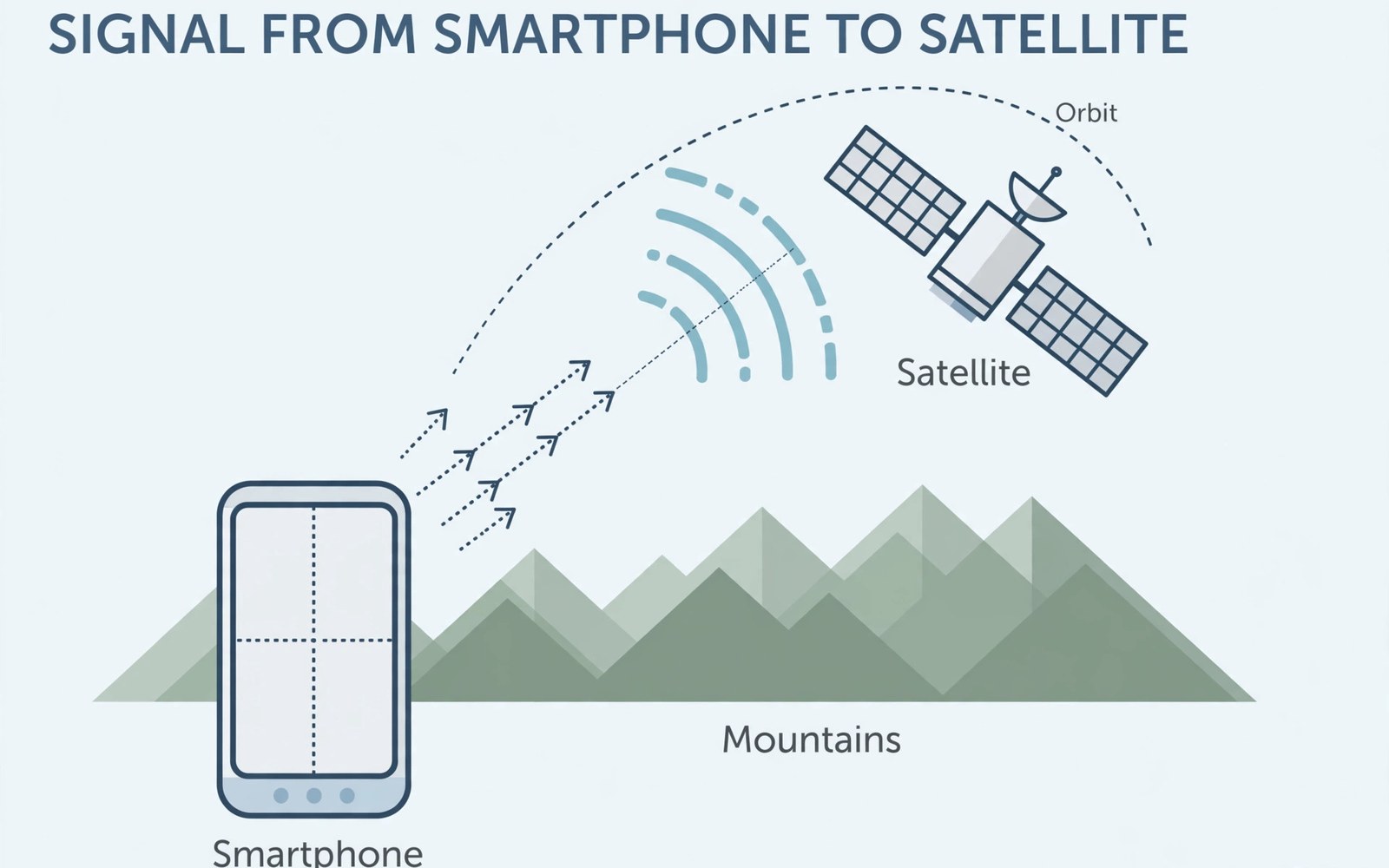
Cell towers do not reach everywhere people travel. Mountains and oceans and deserts lack coverage. Satellite SOS fills that gap for emergencies. It lets phones message satellites directly. Those satellites relay messages to rescue teams. The technology is rolling out gradually worldwide. This article explains how it will work. It covers requirements and limits honestly.
Satellite SOS is not a replacement for cell service. It handles short emergency messages only. It cannot stream video or browse the web. It works best under open sky. Buildings and dense forests block signals. Understanding limits prevents false confidence. Read the sections below before relying on it. Preparation still matters most in remote areas.
How Direct-to-Cellular Satellites Work
Direct-to-cellular satellites act as towers in space. They orbit low above Earth. Phones connect to them like cell towers. The satellite relays signals to ground stations. Ground stations connect to carrier networks. Emergency messages then reach rescue dispatchers. The chain adds delay compared to cell service. Messages may take minutes rather than seconds.
Satellite links use special radio bands. Phones need modem support for those bands. Newer phones include that support natively. Older phones cannot gain it through updates. Hardware limits decide compatibility firmly. Check phone specs for satellite support. Carrier support matters equally for service. Both phone and carrier must support the feature.
What Satellite SOS Can and Cannot Do
Satellite SOS sends short emergency texts. It shares your location with rescuers. It can answer dispatcher questions briefly. It cannot carry voice calls initially. Voice needs far more bandwidth than text. It cannot send photos or videos. Large files exceed satellite link capacity. Text-only service suits emergencies well.
Satellite SOS cannot replace a personal locator beacon fully. Beacons use dedicated rescue frequencies. They work in harsher conditions sometimes. Satellite phone service depends on carrier coverage. Beacon service depends on rescue networks. Carry both on extreme expeditions. Casual hikers may rely on phone SOS alone. Extreme adventurers should carry dedicated beacons too.
Phones and Plans That Support It
Support starts with recent flagship phones mostly. Mid-range phones are gaining support yearly. Check maker specs for satellite messaging. Look for satellite SOS in feature lists. Carrier plan pages state service availability. Some carriers include SOS free initially. Others may charge after introductory periods. Read plan terms before remote trips.
Regional availability varies widely today. Some countries approve satellite service early. Others await regulatory approval still. Approval depends on spectrum rules locally. A phone that works in one country may fail elsewhere. Check destination approval before travel. Carrier pages list supported countries. Travelers crossing borders should also check international roaming on dual SIM phones for normal network coverage abroad.
Using Satellite SOS in an Emergency
Move to open sky before starting SOS. Clear sky view improves satellite lock. Hold the phone steady during transmission. Follow on-screen pointing guidance closely. The phone guides aiming toward satellites. Messages send in short bursts. Stay still until confirmation arrives. Movement during bursts can interrupt sending.
Answer dispatcher questions briefly and clearly. State injuries and location details. State group size and conditions. Short answers transmit faster and reliably. Do not send long stories over satellite. Dispatchers need facts first. Follow their instructions after contact. Stay in open sky until rescue arrives.
Location Accuracy and Rescue Response
Satellite SOS shares GPS coordinates automatically. GPS accuracy varies by terrain and sky view. Open areas give accuracy within meters. Canyons and forests reduce accuracy. Dispatchers use coordinates plus your answers. Together they guide rescue teams. Response times vary by remoteness. Remote rescues may take hours or days.
Keep the phone charged for ongoing contact. Rescue teams may ask follow-up questions. A dead phone ends communication entirely. Carry a power bank on remote trips. Solar chargers help on multi-day trips. Conserve battery by closing other apps. Satellite messaging uses extra radio power. Battery planning is part of rescue planning.
Everyday Messaging Beyond Emergencies
Carriers plan basic messaging beyond SOS soon. Short texts to family may follow. Those texts will carry delays of minutes. They will not support group chats well. They will not support media sharing. Basic messaging suits check-ins from remote areas. It reassures family during long trips. It does not replace cell service for daily use.
Pricing for everyday satellite texts remains unclear. Carriers may bundle a few messages monthly. Extra messages may cost per message. Heavy use will stay expensive for years. Satellite capacity is limited compared to towers. Carriers must ration it through pricing. Expect satellite texts as a backup only. Daily chatting will remain a cell and Wi-Fi activity.
Limits in Forests Canyons and Buildings
Satellite signals need clear sky paths. Dense forest canopies block signals partly. Deep canyons block signals from low satellites. Buildings block signals almost entirely. Move to clearings for reliable connections. Ridge tops offer better sky views. Valleys offer the worst satellite access. Plan routes with clearings for check-ins.
Weather affects satellite links mildly. Heavy storms can weaken signals. Normal rain rarely blocks messages fully. Snow on the phone antenna matters more. Keep the phone dry and clear. Wipe snow from the device before sending. Test SOS features before remote trips. A home test reveals menu locations fast.
Privacy and Security of Satellite Messages
Satellite messages travel through carrier systems. Carriers handle them like normal texts. They may store messages for service quality. Rescue dispatchers receive location data necessarily. Location sharing is essential for rescue. It also creates a location record. Understand that trade-off before use. Emergency needs outweigh privacy concerns usually.
Satellite links use encryption for message content. Encryption protects against casual interception. Determined attackers face high barriers. No system is perfectly secure forever. Avoid sending sensitive personal data over SOS. Send only rescue-relevant facts. Financial details never belong in SOS messages. Keep emergency messages factual and brief.
Future of Satellite Phone Service
Future satellites will add voice calling slowly. Voice needs larger capacity than text. More satellites will improve coverage gaps. Launch rates increase each year steadily. Costs should fall as constellations grow. Rural users may gain basic service first. Remote workers benefit earliest from expansion. Everyday networks still rely on towers and readers can learn cell tower handshakes and network switching to understand that side.
Integration with car systems may follow phones. Cars in remote areas could call for help. Wearables may add satellite SOS too. Smaller devices face antenna challenges. Antenna size limits wearable performance. Phones remain the best satellite platform today. Future devices will shrink the gap gradually. Expect steady progress rather than sudden revolution.
Preparing for Remote Trips Today
Test satellite features before leaving home. Learn menu locations without stress. Charge all devices fully before departure. Pack power banks and spare cables. Tell family your route and return date. A known route speeds rescue if contact fails. Carry paper maps as backup navigation. Paper maps work without any signal.
Pack a dedicated beacon for extreme trips. Pack extra food and shelter too. Technology assists rescue but never replaces preparation. Weather can delay rescue for days. Self-sufficiency matters most in remote areas. Satellite SOS is a safety net not a plan. Plan as if no signal exists at all. Then satellite service becomes a welcome bonus.
Satellite SOS for Drivers and Rural Workers
Rural drivers face long stretches without towers. Satellite SOS gives them an emergency option. Truck drivers on remote routes benefit early. Farm workers in large fields benefit too. A phone SOS feature suits lone workers. Employers should check phone compatibility for staff. Provide compatible phones for remote roles. Safety equipment includes connected phones now.
Drivers should mount phones with sky visibility. Dashboard mounts near windshields help signals. A phone buried in a pocket connects poorly. Keep the phone accessible during remote drives. Test SOS menus before remote shifts. A familiar menu saves time in crises. Employers should train staff on SOS use. Training turns a feature into a real safety tool.
Costs and Carrier Rollout Timelines
Carriers roll out satellite service in phases. Emergency SOS arrives first in most markets. Basic messaging follows in later phases. Voice calling arrives last if at all. Timelines vary by carrier investment. Larger carriers launch earlier usually. Smaller carriers partner with satellite firms. Partnerships speed smaller carrier rollouts.
Introductory free periods attract early users. Free periods may end after a year or two. Paid satellite tiers may follow free periods. Read introductory terms carefully before trips. A free feature today may cost tomorrow. Budget for paid tiers on regular remote trips. Compare carrier satellite timelines yearly. Timelines shift as launches accelerate.
Satellite SOS Versus Personal Locator Beacons
Beacons transmit on dedicated rescue frequencies. They need no carrier subscription at all. They work after phone batteries die. They lack two-way messaging features. Rescuers receive location but no injury details. Phone SOS adds two-way dispatcher contact. That contact guides rescue preparation better. Each tool covers the other weakness partly.
Serious expeditions should carry both tools. A beacon serves as the last resort. A phone serves as the detailed communicator. Redundancy saves lives when one tool fails. Casual day hikers may carry phones only. Their risk profile stays lower. Match gear to trip risk honestly. Overpacking safety gear never harmed anyone.
Satellite SOS Trip Checklist
- Confirm phone and carrier support satellite SOS.
- Check satellite service approval for your destination.
- Test SOS menus at home before remote travel.
- Pack a power bank and keep the phone charged.
- Tell family your route and expected return date.
- Move to open sky and hold still during transmission.
Before trip: confirm satellite SOS support + destination approval
In emergency: move to open sky, hold phone steady
Follow on-screen satellite aiming guidance
Send short facts: injuries, location, group size, conditions
Stay in open sky until rescue confirms arrival
The steps above reflect publicly described satellite emergency messaging practice for modern phones. Availability and features vary by phone maker carrier and country. Always confirm current support with your own carrier before remote travel.
A Safety Net in the Sky
Satellite SOS extends help beyond cell towers. It sends short texts and locations to rescuers. It needs open sky and compatible hardware. It cannot replace preparation or beacons fully. Test features before remote trips. Pack power and tell family your route. Satellite service then becomes a real safety net. Users comparing connectivity options should also understand 5G bands and coverage for everyday networks.
Future satellite service will grow steadily. Voice and basic messaging may follow SOS. Costs should fall as constellations expand. For now treat satellite SOS as emergency backup. Plan remote trips as if no signal exists. Then any satellite contact becomes a welcome rescue aid.

