

Power users love control. Developers love open tools. Android gives both groups room to build. The system is open at its core. Makers shape it freely. Users bend it further still. Closed systems trade that room for polish. Many builders gladly take the trade in reverse.
This article explains the open advantage. It covers open source roots. It covers automation and scripting. It covers sideloading and testing. It also covers limits and duties. By the end you will see why builders pick Android first.
Open Source Roots and What They Mean
Android builds on open source code. Anyone can read the core system. Anyone can build a variant for a device. Makers add their own layers on top. This openness speeds innovation. A good idea can spread fast across brands.
Open roots do not mean everything is free. Key apps and services stay proprietary. But the base invites study and change. Students learn from real system code. Small makers ship phones without huge license fees. The base lowers the barrier to build.
Automation and Scripting Power
Power users automate boring tasks. Android automation apps chain triggers and actions. A location trigger can silence the phone at work. A time trigger can back up photos at night. A plug trigger can start a playlist. The phone becomes a helper, not just a tool.
Scripting extends that power further. Termux style tools run shell commands on device. Developers test scripts on the go. They manage servers from a phone. They run small tools without a laptop. This depth has no equal on closed phones.
Sideloading and Fast Testing
Developers test builds on real phones daily. Sideloading installs a test build in seconds. Testers give feedback the same day. Fixes ship the next day. The loop stays tight and fast. Store review never blocks a test.
Power users join betas the same way. They try features months early. They report bugs that shape releases. They keep old versions they trust. The loop rewards curious users. For install safety rules, see the sideloading rules first.
Files, USB and Real Computer Habits
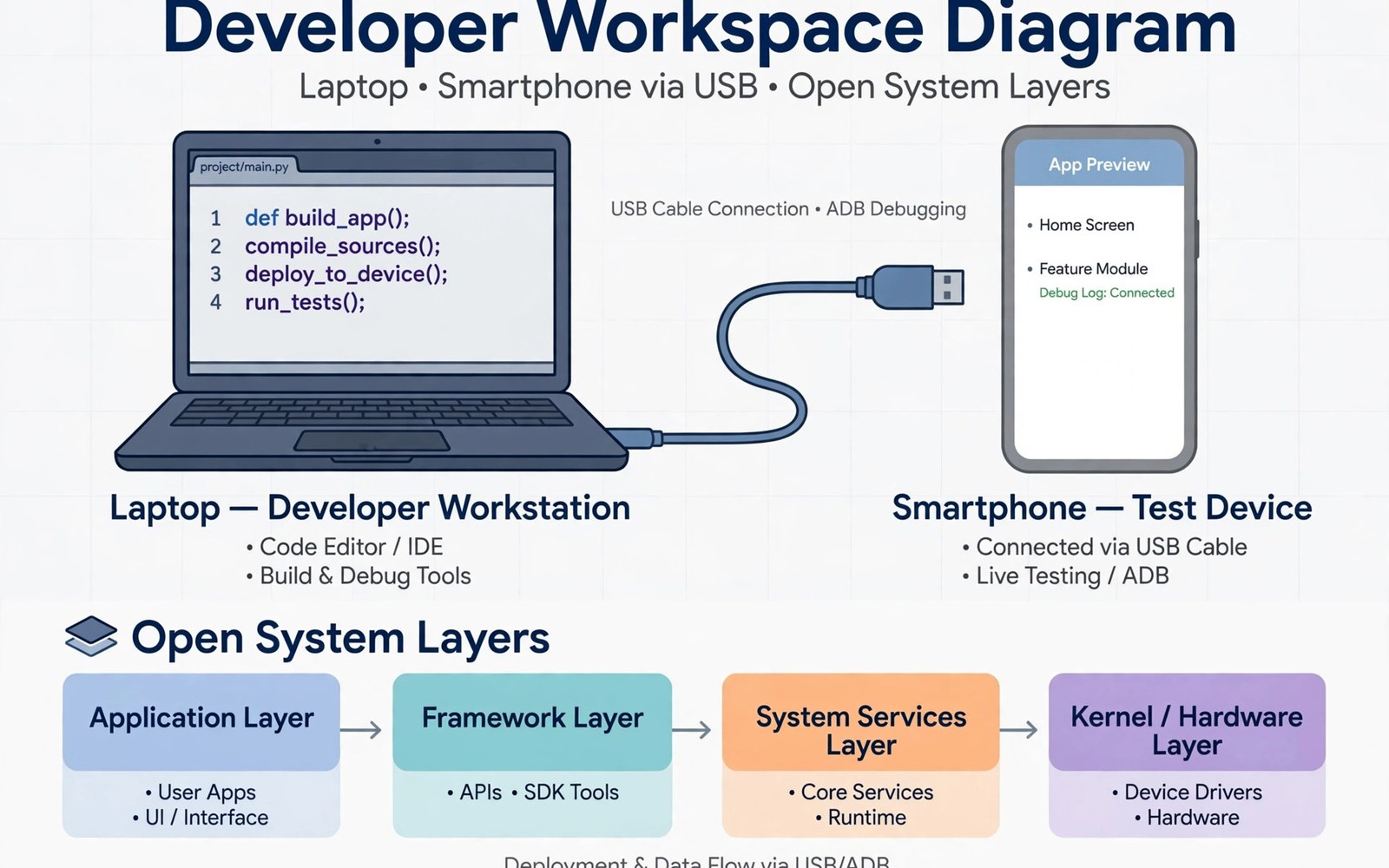
Developers live in files and terminals. Android exposes a real file system. Plug in USB and drag a project folder. Edit code on a laptop and test on the phone. Logs flow over USB with ease. The phone acts like a small computer.
Power users share those habits. They back up by folder, not just by cloud. They move media by cable. They keep local copies of key work. The file system comparison shows how open files help builders daily.
Custom ROMs and Long Device Life
Custom ROMs extend life beyond official support. A community build can revive an old phone. It adds new features and fresh patches. It strips bloatware that slows the device. Enthusiasts keep phones alive for years.
ROM life needs skill and care. Unlocking can void warranties. A bad flash can brick a phone. Back up fully before you try. Read guides for your exact model. The reward is a phone that outlives its maker plan.
A Builder Starter Kit
Start with a test device, not your main phone. Enable developer options with care. Turn on USB debugging only when needed. Install a code editor and a terminal app. Keep a backup of the stock system.
builder_kit = [
  "test device",
  "usb debugging",
  "terminal app",
  "stock backup"
]
for item in builder_kit:
    print("Ready: " + item)
The snippet above is a simplified illustration of a builder starter kit. It shows the idea in plain form. Adjust the kit to match your own projects and skill level.
Limits and Duties of Openness
Openness brings duty with it. Open phones face more malware traps. Users must judge sources with care. Fragmentation splits features across models. An app may behave differently per phone. Developers test more variants.
Security needs active habits. Keep scanning on. Update promptly. Grant narrow permissions. Openness rewards the careful and punishes the careless. That bargain defines the platform. For privacy controls that pair with openness, see the privacy controls guide in plain terms.
Root Access: Power and Peril
Root access grants full control of the system. You can remove any app. You can change any setting. You can block ads system wide. You can back up every byte. Power users love that depth. The peril matches the power. A wrong change can brick the phone. Malware with root owns everything. Banking apps may refuse rooted phones. Safety checks fail on modified systems. Work apps may block root too. Root suits spare devices best. Keep banking off a rooted phone. Keep key chats off it too. A rooted spare is a lab. A rooted main phone is a risk.
Rooting also voids warranties in many cases. Makers may refuse repairs for rooted phones. Updates may fail on modified systems. A failed update can loop the phone. Recovery needs skill and backups. Only root when you accept those costs. Read guides for your exact model. Models differ in unlock steps. A guide for another model can brick yours. Root freedom rewards exact knowledge. It punishes guesswork hard.
Building Your Own Tools
Builders create tools that stores lack. A small script can rename hundreds of files. A small app can log battery use daily. A widget can show server status at a glance. Android lets you build and run these tools. Learn one scripting language first. Python suits many phone tasks well. Shell scripts suit system tasks well. Start with a tiny useful tool. A tool that saves five minutes daily is a win. Share tools with friends who need them. Feedback improves tools fast. Keep tools simple and focused. A tool that does one job well beats a suite that does none.
Testing your own tools needs discipline. Test on a spare phone first. Log errors plainly for review. Fix one bug at a time. A tool that crashes daily helps no one. Document the tool in plain words. Future you forgets today’s logic fast. A short readme saves hours later. Building tools teaches systems deeply. Each tool reveals a new system layer. Builders grow skill with every small win.
Community and Open Projects
Open communities power Android depth. Forums share guides and fixes. Developers share code openly. Users test builds and report bugs. A good community answers new users kindly. It also warns about risky steps. Join a community for your exact model. Model groups know model quirks best. Lurk first to learn the norms. Ask questions with device details included. Details earn faster answers. Thank helpers when fixes work. Gratitude keeps communities alive.
Open projects need contributors of all skills. Writers improve guides. Testers find bugs. Translators open projects to new users. Designers polish interfaces. Code is only one contribution. Pick a project you use daily. Contribute a small fix first. A typo fix counts as a start. Small starts grow into deep roles. Open work builds a public record of skill. That record can open jobs later. Community work pays in skill and friends. It rarely pays in cash at first. Contribute for learning and joy.
Terminal Tools on the Go
Terminal tools turn phones into pocket servers. Shell apps run commands anywhere. Developers check logs from cafes. They restart services from trains. They edit configs without laptops. Terminal use needs care with typing. Small screens invite typos in commands. Typos in destructive commands harm fast. Preview destructive commands before running. A preview habit saves servers daily. Use tab completion to cut typos. Completion fills long paths safely. Keep a command cheat sheet in notes. Cheat sheets speed recall under pressure. Terminal phones suit admins and learners. Admins gain freedom from desks. Learners gain real system practice. Both gain skill with steady use. Terminal power rewards careful fingers.
SSH keys secure terminal access well. Keys beat passwords for remote logins. Generate keys on the phone securely. Never share private keys by chat. Store private keys encrypted on device. Back up keys to a safe vault. A lost key locks you out remotely. A leaked key invites intruders silently. Rotate keys yearly for safety. Rotation limits leak damage windows. Test new keys before deleting old ones. A test login proves the new key works. Terminal habits plus key hygiene win. Careless keys lose servers fast. Treat phone terminals like laptop terminals. Same rules, smaller screens.
Home Servers and Phone Control
Home servers store media and files locally. Phones control them from anywhere. A phone app can start downloads remotely. It can check server health at a glance. It can stream home media abroad. Local servers cut cloud fees yearly. They also keep data at home. Home data avoids broker exposure. Servers need maintenance though. Updates patch security holes monthly. Backups protect server data from drive failure. A server without backups is a risk. Automate updates and backups together. Automation keeps servers healthy quietly. Monitor server health weekly by phone. A weekly glance catches failing drives early. Early catches save data and money.
Remote access to home servers needs secure tunnels. Open ports invite scans hourly. Scans probe for weak passwords constantly. Use VPN tunnels for remote access. Tunnels hide servers from public scans. Never expose admin panels publicly. Public admin panels fall fast to bots. Strong passwords plus tunnels plus updates win. Layers protect home servers like castles. One wall never holds alone. Phone control plus secure tunnels serves homes well. It also teaches real networking skills. Home servers turn consumers into operators. Operators learn by running real systems. Learning by running beats learning by reading.
Learning to Build for Android
Learning Android building starts small. Build a hello app first. A hello app teaches tools and flow. Add a button next for interaction. Add a list next for data. Each step adds one skill only. One skill per step prevents overwhelm. Tutorials guide early steps well. Official docs guide deeper steps best. Community forums answer stuck points fast. Ask questions with code and errors included. Errors guide helpers to fixes. Vague questions earn vague answers. Publish a tiny app early. A published app motivates further learning. It also teaches store rules plainly. Store rules shape real apps deeply. Early publishing demystifies the process. Demystified processes invite bolder projects.
Practice beats theory for builders. Code daily even in short bursts. Twenty minutes daily beats weekend marathons. Daily reps build muscle memory. Marathons build fatigue and gaps. Review old code monthly for growth. Old code reveals past mistakes clearly. Mistakes visible become lessons learned. Keep a project journal for insights. Journals capture tricks that tutorials miss. Share journals with learners behind you. Teaching cements knowledge deeply. A builder who teaches learns twice. Android building rewards steady practice. Start tiny, practice daily, teach others. The path from user to builder is open.
Why Builders Stay With Android
Builders stay because the system respects their skill. It lets them automate and script. It lets them test and share fast. It lets them revive old hardware. It treats the phone as a tool to shape.
Closed systems offer polish and calm. Many users prefer that calm. Builders prefer the workshop. They accept rough edges for real power. If you love to tinker and build then Android is your workshop. Enter it with care and enjoy the freedom.

