

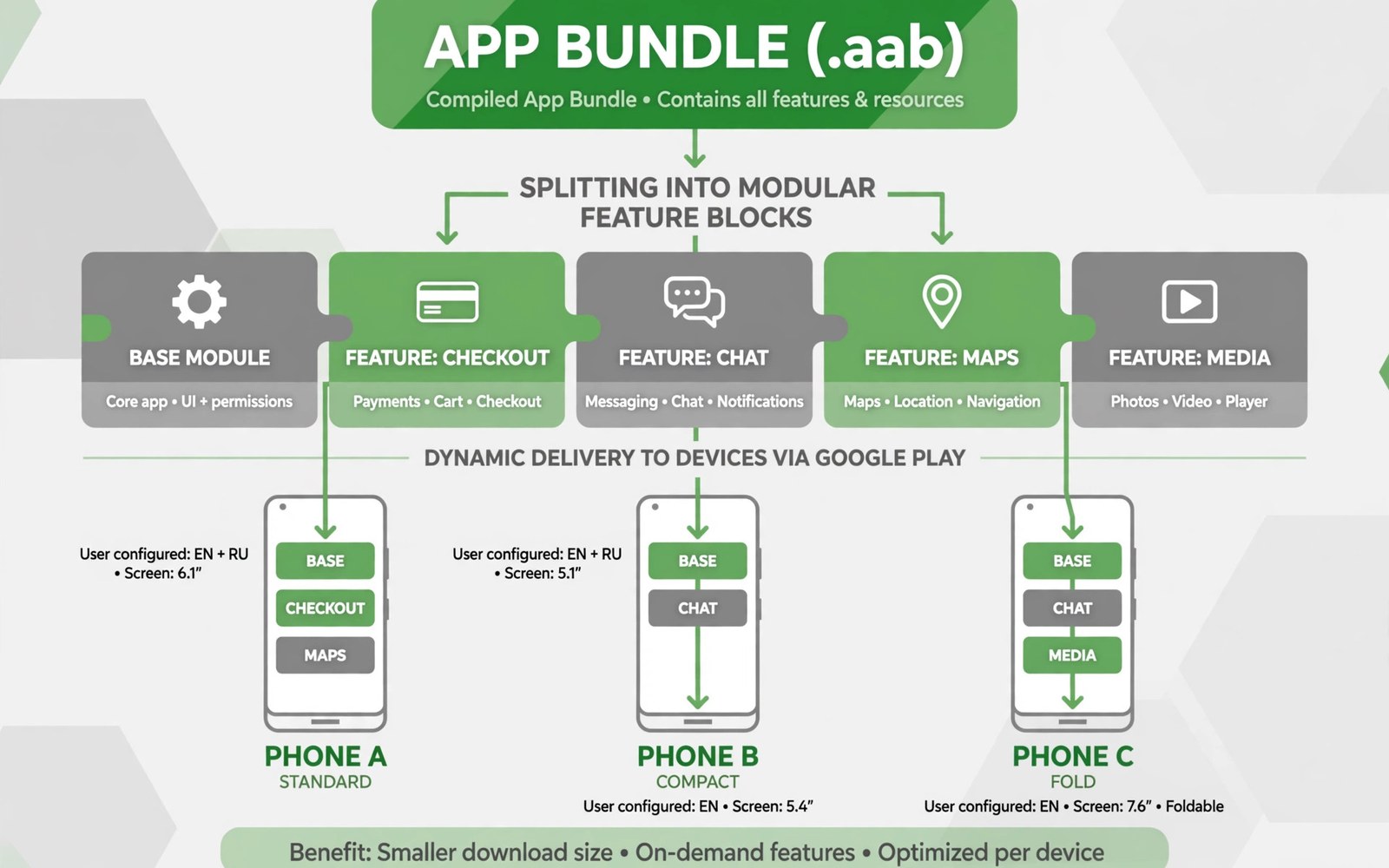
An app bundle is a publishing format that contains all of your code and resources in one package. The store then generates optimized packages for each device. A device receives only the code and resources that it needs. That optimization reduces download size and install time for users.
Dynamic feature delivery extends that idea to features themselves. A feature module can download on demand when the user first needs it. A large feature that few users need does not burden every install. Users get a smaller initial app and a faster first launch.
Bundles change how developers think about app structure. Features become modules with clear boundaries and dependencies. A module boundary forces clean design because modules cannot share code carelessly. Clean boundaries also make testing easier because each module can be tested alone.
Bundle Versus Single Package
A single package ships the same resources to every device. A phone with a small screen still downloads large screen resources. A device with one language still downloads every language. Waste grows as the app adds features and markets.
A bundle lets the store split resources by device configuration. Language and screen density and processor type each get a tailored package. Users download less and install faster. Smaller downloads also improve conversion in markets with slow networks.
How The Store Builds Packages
When you upload a bundle the store signs and splits it into device packages. Each package contains the base module plus the configuration slices for that device. The store handles signing with the key that you enrolled. You do not build each device package by hand.
Test the splitting process with a local bundle tool before upload. Generate device packages for several configurations and install them. A local test reveals missing resources or broken splits early. Upload only after local packages install and run correctly.
Design Feature Modules Well
A feature module should serve one clear user task. A chat module and a photo editor module are good examples. A module that serves many unrelated tasks becomes hard to maintain. Clear task boundaries keep modules small and testable.
Keep shared code in the base module or in a library module. Feature modules should depend on shared code rather than duplicating it. Duplication grows the bundle and creates divergent behavior. Shared code keeps behavior consistent across features.
On Demand Delivery Basics
On demand modules download when the user triggers the feature. Show a clear loading state while the download runs. Handle download failure with a retry option. A user who taps a feature and sees nothing will assume that the app is broken.
Check module availability before showing a feature entry point. Hide or disable the entry when the module cannot download. A hidden entry is better than a broken entry. A clear message about network needs helps users understand a temporary unavailability.
Install Time Delivery Option
Some modules can install at first install even though they are separate modules. Install time modules suit features that most users need soon after launch. They keep the code organized while still delivering the feature immediately. Choose install time delivery for core adjacent features.
Balance install time modules against initial download size. Every install time module adds to the first download. Measure the total size with each new module. A module that grows the first download too much should move to on demand delivery instead.
Conditional Delivery By Device
Conditional delivery installs a module only on devices that meet a condition. A high end camera feature can target devices with the required hardware. A tablet layout module can target large screens. Conditions prevent wasted downloads on devices that cannot use the feature.
Test conditional modules on devices inside and outside the condition. A device inside the condition should receive the module. A device outside should run without it and without errors. Boundary testing catches condition mistakes that affect whole device groups.
Manage Module Dependencies
Modules can depend on other modules but the dependency graph must stay simple. A deep chain of dependencies makes downloads slow and failures hard to trace. Keep the graph shallow with the base module at the root. A shallow graph is easier to test and easier to debug.
Declare dependencies explicitly in module configuration. Implicit dependencies through shared code paths create hidden coupling. Hidden coupling breaks when one module changes. Explicit declarations let build tools catch problems before upload.
Test Dynamic Features Thoroughly
Test each module in isolation and in combination with the base app. Test download and install and first use as one flow. Test failure cases such as network loss during download. A module that works in isolation can still fail when combined with another module.
Use test tracks to verify dynamic delivery on real devices. Emulators can simulate module downloads but real networks reveal timing issues. Ask testers to trigger on demand features on varied networks. Real world timing data improves loading states and retry logic.
Handle Download Size And Storage
Monitor the total download size for the base app and for each module. Users on limited storage will uninstall large apps first. Show module sizes before a large on demand download when possible. A size warning lets users choose a Wi-Fi download rather than a mobile download.
Clean up module data when a feature is no longer needed if the platform allows it. Do not leave large module files on devices forever. Storage hygiene matters for users with small devices. An app that respects storage will stay installed longer.
Update Modules Independently
Feature modules can update alongside the base app in a new bundle version. Plan module updates with the same care as base updates. A module update that breaks its interface with the base app will fail at runtime. Version module interfaces carefully and test compatibility.
Communicate module changes in release notes when users will notice them. A new on demand feature deserves a note that explains how to reach it. A changed module that fixes a fault deserves a note for affected users. Release notes help users discover and trust dynamic features.
Debug Delivery Problems
Delivery problems often appear as missing features rather than as crashes. Log module install states during testing to see what the device actually received. Compare the log with the expected state for that device. A state log turns a vague missing feature report into a precise diagnosis.
Check store configuration when a module never arrives on any device. A module that is not enabled for delivery will never download. Check device conditions when a module arrives on some devices but not others. A condition error affects a group rather than a single user.
Optimize For Slow Networks
Design on demand downloads for slow and unreliable networks. Use resumable downloads where the platform supports them. Show progress in a way that reassures users during a long download. A progress indicator with a clear size estimate reduces abandonment.
Offer a retry path that preserves progress when possible. A download that restarts from zero after a network drop frustrates users. Test retry behavior on a throttled connection. Slow network testing reveals faults that fast office Wi-Fi hides completely.
Security For Dynamic Modules
Treat dynamic modules with the same security review as base code. A module downloaded later still runs with app permissions. Review module code for data handling and for network calls. A weak module can undermine the security of the whole app.
Sign modules through the bundle process rather than through a separate channel. A separate download channel bypasses store protections. Keep all module delivery inside the supported bundle flow. Supported flows give users the same trust guarantees as the base app.
Measure Feature Adoption
Measure how often each on demand feature is requested and completed. A feature with high requests and low completion may have a download problem. A feature with low requests may need better discovery in the app. Adoption data guides both engineering and design work.
Compare adoption before and after moving a feature to on demand delivery. Initial download size should fall. Feature completion should stay stable. If completion falls sharply then the download experience needs improvement. Data keeps dynamic delivery honest about its benefits.
Plan A Modular Future
Plan new features as modules from the start when they suit modular delivery. A feature designed as a module is easier to test and to update. A feature retrofitted as a module later requires refactoring that could have been avoided. Early modular thinking saves rework.
Review the module map each year and merge modules that no longer justify separation. Too many tiny modules create overhead. Too few large modules lose the size benefit. A yearly review keeps the module structure aligned with how users actually use the app.
- Split resources by device configuration with bundles
- Design each feature module around one user task
- Show loading and retry states for on demand downloads
- Test modules on devices inside and outside conditions
- Monitor total size for base app and each module
- Measure adoption after moving a feature to on demand
Migrating From APK To Bundle
Migration from a single package to a bundle starts with modularizing code and resources. Move feature code into modules step by step rather than all at once. Test each step with local device packages before the next step. A gradual migration keeps the app shippable throughout the process.
Check signing enrollment before your first bundle upload. The store signing key must match your existing app signing. A signing mismatch can block updates for existing users. Confirm signing details with a test upload to an internal track before a production migration.
Handling Large Asset Packs
Large assets such as high resolution textures can use asset packs alongside feature modules. Asset packs deliver large files on demand or at install time. Choose delivery mode by how soon users need the asset. An asset needed at first launch suits install time delivery.
Monitor asset pack sizes and download completion rates separately from feature modules. A large pack with low completion may need compression or splitting. Test asset downloads on slow networks before release. Slow network behavior determines whether large assets help or hurt the user experience.
For reference the snippet below shows a basic request that starts an on demand module download.
// Dynamic feature request example
val request = SplitInstallRequest.newBuilder()
    .addModule("photo_editor")
    .build()
splitInstallManager.startInstall(request)
For more context read device compatibility exclusions for unsupported hardware and app store screenshots and video previews for conversions. You may also find access permissions policies for accessibility storage and SMS helpful for your next release.
The steps above follow the approach described in the official developer documentation for this platform. That guidance explains the same sequence in general terms. This article adapts those ideas into a practical workflow for independent developers and small teams.

