

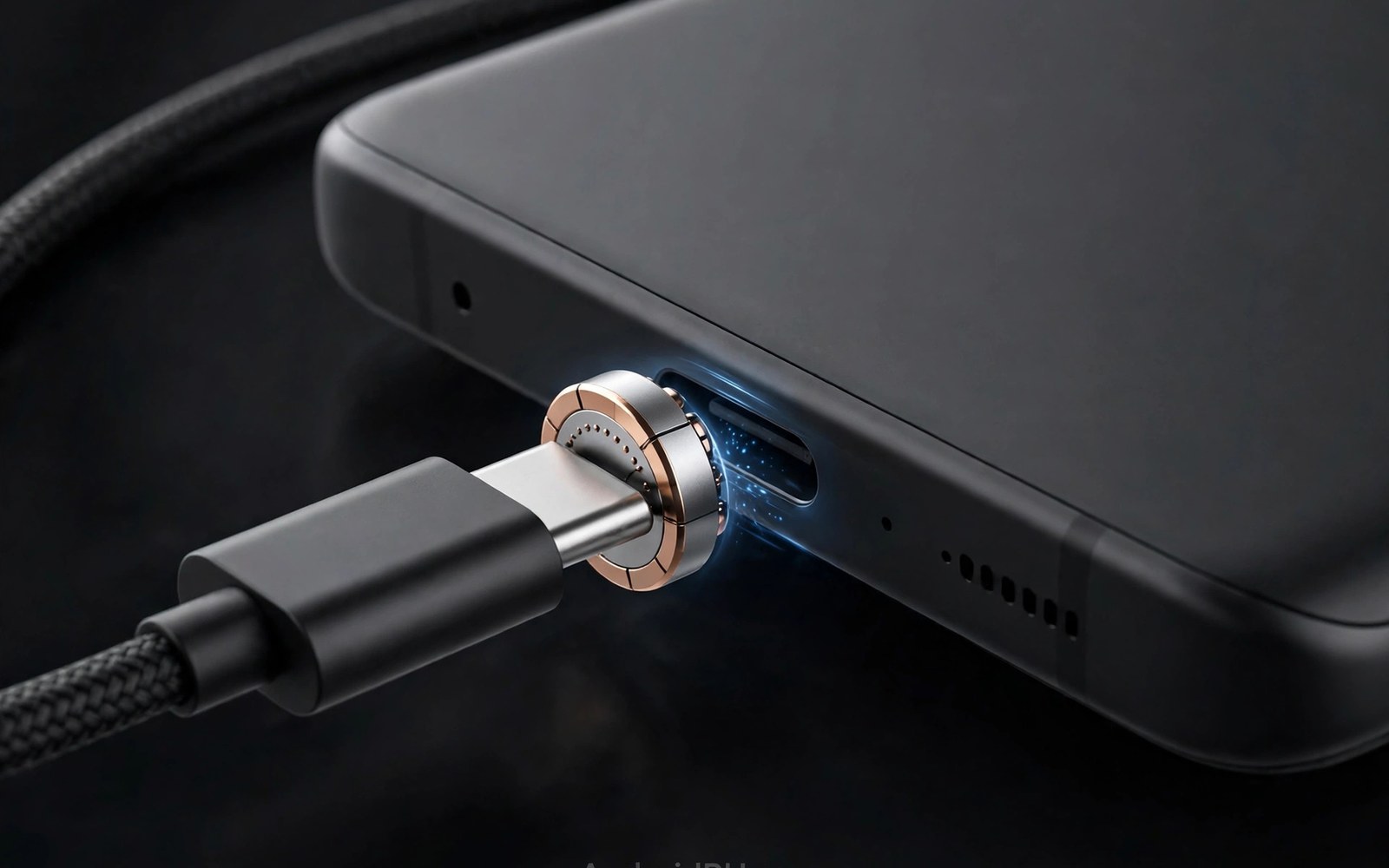
A magnetic adapter adds a small tip to the phone port. A magnetic cable snaps onto that tip. The snap feels satisfying and quick. It helps in the dark. It helps when one hand holds the phone. It also reduces wear from repeated plugging. The plug stays in the port. Only the magnetic joint separates. That design appeals to many users. It also raises safety questions. The tip leaves metal contacts exposed. Exposed contacts can touch metal objects. That contact can cause a short circuit. This guide weighs convenience against risk. It shows how to use magnetic adapters more safely.
Magnetic tips come in several shapes. Some tips sit flush with the phone edge. Others stick out slightly. A flush tip looks neat. A protruding tip is easier to remove. Both types leave the tip in the port all day. The tip blocks the port for other cables. A user must remove the tip to use a normal cable. Removal needs a small tool or a fingernail. Frequent removal defeats the convenience. Most users leave the tip in place permanently. That permanent tip changes how the port behaves. It also changes how dust and moisture interact with the port. Those changes deserve attention before buying.
How Magnetic Tips and Cables Work
The tip contains small metal pins. The cable head contains matching magnets and pins. Magnets pull the head onto the tip. The pins align and carry power and data. The magnetic force is strong enough to hold the cable. It is weak enough to release under a sharp pull. That release protects the phone from a trip over the cable. A normal cable would drag the phone off a table. A magnetic cable separates instead. The phone stays on the table. That safety benefit is real. It helps in homes with children and pets. It helps in busy desks where cables snag often.
Pin layout varies across magnetic products. Some tips carry power only. Others carry power and data. A power only tip cannot transfer files. A data tip can transfer files at modest speed. Check the product spec for data support. A tip that claims data support should state its speed. A vague claim may hide slow data. The magnet strength also varies. A weak magnet drops the cable easily. A strong magnet holds well but may be hard to detach. A balanced magnet feels firm yet releases under a tug. Test the magnet feel on arrival. A cable that falls off during normal use is annoying. A cable that never releases defeats the trip safety benefit.
The tip adds a small extra length to the phone. That length affects cases. A case with a tight port opening may block the tip. A case with a wide opening fits it well. Check case compatibility before buying. Some tips ship with a case friendly design. Others assume a bare phone. A tip that presses against a case may sit at an angle. An angled tip can stress the port. It can also cause intermittent charging. Remove the case or choose a slimmer tip in that case. A proper fit matters more than a fancy magnet. A poor fit creates daily annoyance.
The Convenience Case in Daily Life
Night charging benefits most from magnetic adapters. A user can attach the cable without looking. The magnet guides the head into place. No fumbling with plug orientation occurs. USB-C already has no wrong orientation. The magnet still speeds the motion. It also helps users with limited hand strength. A snap connection needs less precision than a plug insertion. That ease matters for elderly users. It matters for users with hand injuries. Small daily frictions add up over years. A magnetic tip removes one friction. That removal feels meaningful to those users.
Car charging also benefits from a magnetic tip. A driver can attach the cable with one hand. The other hand stays on the wheel or the gear lever. Safety improves when attention stays on driving. Attach the cable before driving when possible. A magnetic tip still helps at a red light. It helps when the phone sits in a holder. The cable head finds the tip quickly. A normal plug needs more fumbling in a car. That fumbling distracts the driver. A magnetic connection reduces that distraction. It does not remove all distraction. Always set up the phone before moving.
Port wear reduction is another claimed benefit. Repeated plugging wears the phone port over time. The tip stays in the port and takes the wear instead. The magnetic joint wears rather than the phone port. A worn tip costs little to replace. A worn phone port costs much more to repair. That logic holds when the tip fits well. A loose tip can wobble and wear the port itself. A well fitting tip protects the port. A poorly fitting tip harms it. Buy a tip that fits snugly without wobble. Replace a tip that becomes loose. The protection only works with a good fit.
Short-Circuit Risks Explained Plainly
Exposed pins create a short risk when metal touches them. Keys and coins in a pocket are metal. A paperclip in a bag is metal. A metal desk object can also bridge the pins. A bridge lets current flow where it should not. That flow creates heat. Heat can damage the tip. Heat can damage the phone port. In rare cases heat can damage the battery circuit. The risk rises when the tip stays powered. A tip connected to a charger carries voltage. A tip alone in a pocket carries no charger power. The phone may still supply a small voltage to detect a cable. That voltage is low. It rarely causes serious heat alone. The main risk comes with a charger attached.
Moisture raises the risk further. A wet tip can conduct current across pins. Rain and sweat can wet the tip. A spilled drink can wet it too. Water plus power creates corrosion over time. Corrosion raises resistance at the pins. Higher resistance creates heat during charging. Heat and corrosion feed each other. A tip exposed to moisture should be dried fully. Do not charge through a wet tip. Wait until the tip and the port are dry. A dry tip is far safer than a damp tip. Users in humid climates should check tips often. Green or white deposits signal corrosion. Replace a corroded tip at once.
Cheap tips raise the risk more than quality tips. A cheap tip may lack short protection circuits. A quality tip may include a protection chip. The chip cuts power when it detects a fault. The chip adds cost to the product. A bargain tip may skip it. A tip without protection relies on the charger protection alone. Charger protection helps but may react slower. The gap matters during a direct metal short. A direct short can heat pins in seconds. A protection chip reacts faster. Check the product spec for protection features. A spec that omits protection deserves doubt. Readers worried about fake parts can also read about identifying cheap counterfeit charging cables that can damage ports for warning signs.
Data and Charging Limits of Magnetic Tips
Many magnetic tips limit charging power. A tip rated for modest power cannot carry fast charging. The small pins and the magnetic joint limit current. A tip may cap power at a level below the phone need. The phone then charges slowly. Users blame the charger for the slowdown. The tip is the real limit. Check the tip power rating before buying. Match it to the charger and the phone. A tip rated below the charger wastes fast charging. A tip rated at or above the charger preserves it. Few magnetic tips reach the highest power ratings. High power users should verify the rating carefully.
Data transfer through magnetic tips is often slow or absent. The magnetic joint adds resistance and noise. That noise limits data speed. Many tips support only slow data or no data. A user who copies files through such a tip faces long waits. A user who expects video output will be disappointed. Magnetic tips rarely support video. The video lanes need a stable high speed link. A magnetic joint struggles to provide it. Use a normal cable for file transfers and video. Use the magnetic tip for charging only. That split gives convenience without sacrificing file speed. It also avoids video failures.
Heat at the magnetic joint signals a problem. A warm joint during fast charging is common. A hot joint is not normal. Heat suggests poor contact or excessive resistance. Clean the pins gently with a dry cloth. Check for debris between the tip and the head. Debris can block full contact. A blocked contact creates a hot spot. Remove debris and test again. If heat persists then replace the tip. A hot joint can damage the phone port over time. It can also melt the tip housing in extreme cases. Never ignore a joint that becomes too hot to touch. Safety comes before convenience.
Safer Use Habits for Magnetic Adapters
Keep the phone away from loose metal when a tip is fitted. Do not toss the phone into a pocket full of keys. Use a separate pocket for the phone. Use a bag pocket without metal objects. A simple habit removes most short risk. Cover the tip when the phone is stored for a long time. Some tips ship with a small cap. Use the cap when provided. A cap blocks metal contact and dust. It also blocks moisture to a degree. A capped tip is far safer in a bag. The cap costs nothing to use. It only needs a moment to fit.
Inspect the tip weekly for damage and debris. Look at the pins under good light. Bent pins signal a need for replacement. Dark marks signal heat damage. Dust in the joint signals a need for cleaning. Clean with a dry soft brush. Never use a wet cloth on a powered tip. Disconnect the charger before cleaning. Let the tip dry fully if it gets wet. A weekly check takes less than a minute. It catches problems before they grow. It also extends the tip life. A neglected tip fails sooner and risks more. A cared for tip serves longer and safer.
Remove the tip before using a normal cable or a hub. A tip left in place blocks other accessories. Forcing a cable against a tip can damage the port. Remove the tip gently with the tool provided. Store the tip in a small case. A loose tip in a pocket risks metal contact. A cased tip stays clean and safe. Refit the tip carefully and check the fit. A tip that rocks side to side is worn. Replace a rocking tip rather than forcing it. For port care basics see USB-C connector wear and cleaning dust from device charging ports for safe cleaning steps.
- Keep the phone away from keys and coins when a tip is fitted.
- Check the tip power rating against your charger before buying.
- Use a normal cable for file transfers and video output.
- Inspect pins weekly for bent pins and heat marks.
- Replace any tip that runs hot or fits loosely.
Magnetic adapter safety checklist:
1. Tip power rating: ____
2. Data support: yes or no
3. Protection chip: stated or not
4. Case fit: snug without angle
5. Weekly check: pins clean and straight
6. Heat test: warm is fine and hot is a fail
7. Storage: phone pocket free of metal
Who Should Avoid Magnetic Adapters
Users who need fast charging should think twice. A magnetic tip may cap charging below the phone maximum. That cap wastes a fast charger. A normal cable preserves full speed. Users who transfer files daily should also think twice. A magnetic tip may slow transfers or block them. A normal cable gives full data speed. Users who drive monitors from a phone should avoid magnetic tips. Video output rarely works through them. A direct cable gives a stable video link. For those users convenience costs too much function. A normal cable serves them better.
Users in wet or dusty workplaces should be cautious. Construction sites and kitchens expose tips to moisture and dust. A tip in such a place collects debris quickly. Debris raises heat and short risk. A normal cable with a closed port is safer there. Remove the tip at work and use a normal cable. Refit the tip at home if desired. That split limits exposure. Users with small children should also weigh the risk. A child may put a magnetic tip near metal objects. A child may also swallow a small tip if it falls out. Keep spare tips out of reach. Supervise use around young children.
Users who value simplicity may still enjoy magnetic tips. A home user with a bedside charger gains real ease. A user with hand mobility issues gains real ease too. The risk for those users is manageable with good habits. A quality tip and a metal free pocket reduce risk greatly. A weekly inspection catches early wear. Those habits cost little time. They preserve the convenience benefit. The decision is personal. It balances ease against a small but real risk. An informed user can choose well. An uninformed user may miss the risk entirely.
Final Thoughts on Magnetic Adapters
Magnetic adapters trade a small risk for real convenience. The snap connection feels effortless. The trip safety benefit is genuine. The port wear benefit holds with a good fit. The short risk comes from exposed pins and metal contact. The power and data limits come from the small joint. Quality tips reduce risk with protection chips. Good habits reduce risk further. A metal free pocket and a weekly check go a long way. A hot or loose tip deserves immediate replacement.
Readers may also find USB-C cable ratings for 60W and 100W and 240W power useful for a related setup.
Decide based on your daily routine rather than marketing. A bedside charger user may love the snap. A fast charging and file transfer user may prefer a normal cable. Test a quality tip for a week before committing. Note charging speed and joint heat. Note fit and case compatibility. The steps above follow the approach described in the official developer documentation for accessory safety and power handling. That approach stresses checking ratings and heat before relying on any accessory. Follow it and a magnetic adapter can be a handy tool rather than a hidden hazard.

