

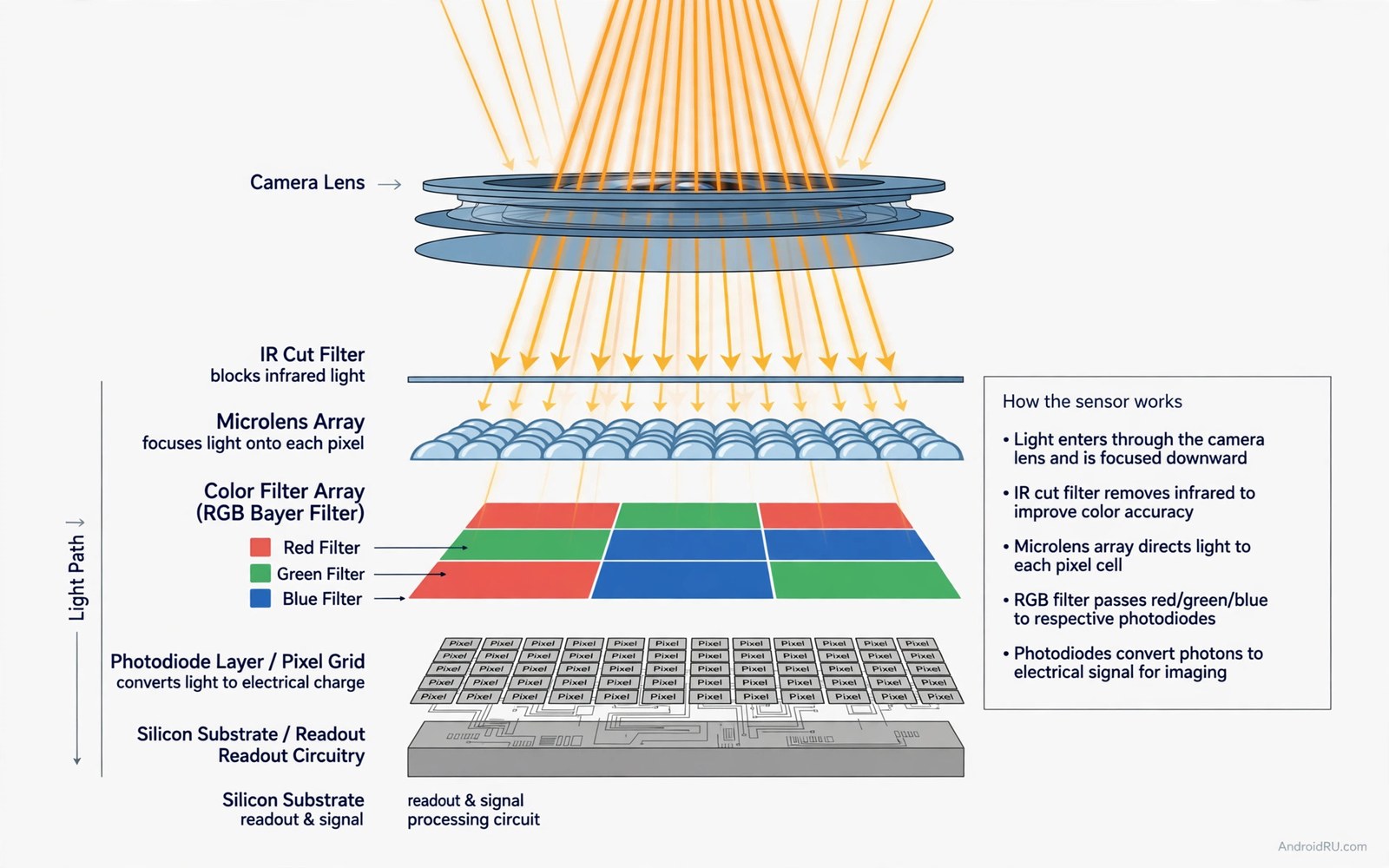
Two hundred megapixels sounds like a photographic revolution. The number dwarfs professional cameras and promises endless detail. Reality is subtler because a phone sensor must balance resolution against light gathering and processing speed. Understanding that balance reveals when huge resolution helps and when it merely markets.
Most phones with huge sensors do not save a full resolution photo by default. They combine neighbouring pixels into larger virtual pixels that gather more light. That process improves low light results while reducing the final resolution sharply. The headline number describes the sensor and not the photo you usually keep.
This guide explains sensor size and pixel size and binning in plain language. You will learn when to shoot full resolution and when to trust the binned mode. You will also learn how to test a high resolution camera honestly before you pay.
Sensor size beats pixel count
Sensor size decides how much light the camera gathers. A larger sensor collects more light and produces cleaner images with less noise. A small sensor with huge pixel counts squeezes tiny pixels together and each pixel receives little light. Noise grows and detail suffers despite the impressive count.
Compare sensor dimensions rather than megapixels when judging cameras. A larger sensor with fewer but bigger pixels often wins in dim rooms. A smaller sensor with many pixels wins only in bright light with static subjects. Light gathering shapes most real photos because perfect light is rare.
Lens quality also limits what a sensor can resolve. A weak lens blurs fine detail before the sensor records it. Extra pixels then record blur in higher resolution rather than true detail. Optics and sensor must improve together for resolution to matter.
How pixel binning actually works
Pixel binning groups several small pixels into one larger output pixel. A common grouping turns sixteen small pixels into one bright pixel. The resulting photo has far fewer megapixels but much cleaner light data. Night shots benefit most because combined pixels gather light more effectively.
Binning also reduces file size and processing load. A full resolution photo can exceed fifty megabytes and slow sharing and editing. A binned photo stays manageable and looks clean on screens and prints. Most users keep binned photos because they balance quality and convenience.
Some phones let you force full resolution for specific shots. Full resolution helps when you plan a large print or a heavy crop of a static scene. It hurts in low light where noise overwhelms fine detail. Choose the mode for the scene rather than leaving full resolution on always.
When huge resolution truly helps
Huge resolution helps landscape photographers who print large and crop boldly. A static mountain scene in bright light rewards every pixel. Architectural details and distant textures also benefit from a large file. These uses exploit resolution as a creative tool.
Digital zoom through cropping also benefits from a large sensor file. You can crop a central subject and still keep enough detail for sharing. That crop zoom works best in bright light with a steady hand. Low light crops still suffer from noise even with huge counts.
Product photographers and document scanners gain from fine text detail too. A full resolution shot can preserve small print and fabric texture. Casual family photos gain little because faces and motion matter more than extreme detail. Match resolution to your output rather than to a number.
When huge resolution disappoints
Moving subjects expose the weakness of huge resolution sensors. Tiny pixels need more light and longer exposure to gather clean data. Children and pets and sports blur more easily when light falls. A larger pixel sensor with faster capture often freezes motion better.
Night photography also challenges huge counts. Noise reduction must work harder to clean tiny pixel data. Skin can look waxy and foliage can look painted after heavy processing. A balanced sensor with bigger pixels produces more natural night results.
Video rarely uses full sensor resolution either. Video modes read the sensor in binned or cropped forms for speed. A huge stills count does not guarantee superb video quality. Judge video stabilisation and audio and colour separately from stills resolution.
Test resolution with a simple comparison
A short script can compare file sizes and effective detail across shooting modes. Record the file size and the output resolution for binned and full modes. The script below totals storage cost for a week of shooting in each mode.
modes = {"binned": 8, "full": 55}
shots_per_day = 20
days = 7
for mode, size_mb in modes.items():
    total = size_mb * shots_per_day * days
    print(mode, total, "MB per week")
This snippet was written for this guide so you can compare weekly storage cost between binned and full resolution shooting. Adjust the shot count to your habit and check whether full resolution storage feels worth it.
Storage cost is only one part of the decision. Also compare detail on a large screen after cropping both modes equally. A full resolution win must survive cropping and printing to justify its size. Otherwise binned mode wins on balance.
Printing and cropping from high resolution files
Print size maths shows when high resolution truly matters. A standard large print needs roughly three hundred dots per inch for crisp detail. A binned photo still prints beautifully at common poster sizes. Full resolution becomes necessary only for very large prints viewed closely.
Viewing distance changes print requirements sharply. A poster viewed from two metres needs far less resolution than a photo viewed at arm length. Gallery prints demand more detail than wall posters. Match resolution to viewing distance rather than to maximum size.
Cropping maths follows a similar logic. Cropping to half the frame width leaves a quarter of the original pixels. A huge sensor file survives that crop with plenty of detail. A modest sensor file may look soft after the same crop. Crop plans justify resolution for disciplined shooters.
File workflow also matters for high resolution shooters. Large files slow backups and cloud uploads and editing on modest computers. A photographer who shoots hundreds of full resolution frames needs fast storage. Casual shooters gain little and pay workflow costs.
Sharpening and noise reduction interact with resolution during printing. A clean binned file often prints sharper than a noisy full resolution file. Printers and papers smooth fine noise differently. Test prints beat screen pixel peeping for final judgement.
Choose your default mode by output habit rather than by sensor pride. Print makers and heavy croppers should use full resolution selectively. Social sharers and casual printers should trust binned mode daily. Output habit is the honest resolution guide.
Sensor generations explained
Sensor generations improve light handling beyond raw megapixel counts. Stacked designs read data faster and reduce rolling shutter. Dual gain designs capture bright and dark areas in one shot. Generation leaps often beat count leaps.
Newer sensors also process high dynamic range scenes more naturally. Skies stay detailed while shadows retain texture. Older sensors blow out highlights or crush shadows in contrasty light. Dynamic range matters for landscape and window shots.
Readout speed affects focus tracking and burst shooting. Faster sensors lock onto moving subjects more reliably. Sports and pet photography benefit most from speed gains. A fast older sensor can beat a slow newer sensor in action.
Ask which sensor generation a phone uses rather than only its count. Generation details appear in detailed specifications and teardowns. A previous generation huge sensor may trail a current generation modest sensor. Generation context completes the picture.
Common mistakes
Many buyers assume more megapixels automatically mean sharper photos. Sharpness depends on lens and focus and light and processing together. A huge count with weak optics produces large soft files. Judge final photos rather than sensor numbers.
Another mistake is leaving full resolution on for every shot. Full resolution fills storage and slows the camera and adds noise in dim light. Use binned mode daily and reserve full resolution for bright static scenes. Mode choice beats megapixel pride.
Shoppers also judge cameras only from bright store samples. Store light flatters every sensor and hides noise. Test in dim rooms and with moving subjects before you trust a camera. Your home light reveals the truth.
Finally avoid comparing megapixels across sensor sizes directly. A large sensor with fifty megapixels can beat a small sensor with two hundred. Compare sensor size and pixel size and sample photos together. Context turns numbers into meaning.
Frequently asked questions
Should I shoot in full 200MP mode daily?
Daily shooting works better in binned mode for most people. Binned photos look cleaner in mixed light and use far less storage. Reserve full resolution for bright static scenes and large prints. Mode discipline improves both quality and convenience.
Does 200MP improve zoom quality?
High resolution helps crop zoom in bright light because you retain detail after cropping. Low light crop zoom still suffers from noise and blur. Optical zoom remains superior for distant subjects in varied light. Treat crop zoom as a bonus rather than a replacement.
Will 200MP photos print better?
Large prints benefit from high resolution when the original shot used good light and steady capture. A noisy full resolution file prints worse than a clean binned file. Print quality depends on capture quality first and pixel count second. Good light and focus matter most.
Conclusion
Huge megapixel counts help specific bright and static uses and disappoint in low light and motion. Sensor size and lens quality and processing decide real photo quality. Choose a camera by sample photos in your light rather than by a headline number.
Your concrete next step is to test a high resolution phone in a dim room and in bright daylight and compare binned and full shots on a large screen. Keep the mode that wins your typical scenes and ignore the number on the box. Flagship shoppers can revisit a flagship camera comparison for context and sceptical buyers should read about marketing tricks that inflate specs while value hunters can avoid costly features with little value and durability fans can check durable phones that survive daily drops before choosing a camera phone.

