

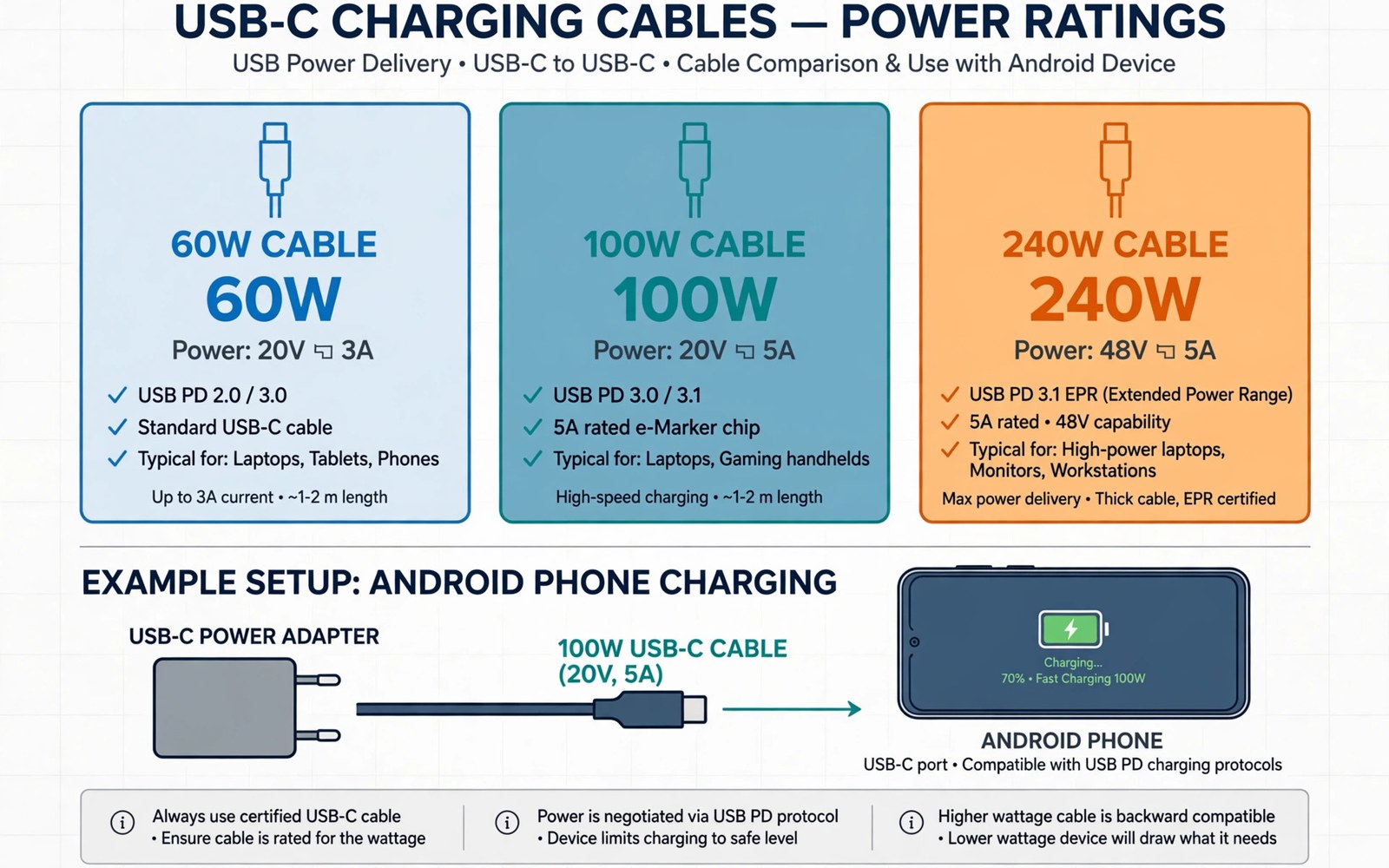
A USB-C cable rating tells you how much power the cable can carry safely. The rating is printed on the packaging or stamped on the cable itself. A phone charger can only deliver what the cable can handle. A weak cable can limit charging speed even when the charger is powerful. A strong cable does not force extra power into a phone. The phone and the charger agree on a safe level first. That agreement is called power negotiation. It happens every time you plug the cable in. If the cable rating is too low the negotiation settles on a lower level. Your phone then charges more slowly than you expect. This guide explains the three common ratings in plain terms. It also shows how to match a cable to your charger and your phone.
Many buyers focus only on the charger wattage and forget the cable. That mistake leads to slow charging and needless frustration. A charger rated for fast charging still needs a cable rated for the same level. The cable acts like a road for electric power. A narrow road limits traffic even when the vehicles are fast. A wide road lets traffic move at full speed. The same idea applies to charging cables. A higher rating means thicker wires and stronger materials inside. Those materials handle more current without excess heat. Heat is the main enemy of safe charging. A cable that runs hot may wear out sooner. It may also damage the port over time. Choosing the right rating protects both the phone and the cable. Readers who want the full picture can also explore data transfer speeds across USB generations before they buy a new cable.
What a Watt Rating Really Means
Watts measure power. Power is voltage multiplied by current. A 60W cable can carry up to 60 watts under its rated conditions. A 100W cable can carry up to 100 watts. A 240W cable can carry up to 240 watts. These numbers describe a maximum limit. They do not describe the power that always flows. A phone that needs only 25 watts will draw only 25 watts. The cable simply allows a higher ceiling. The ceiling matters when you use a powerful charger. A laptop charger may offer 100 watts or more. A phone charger may offer far less. The cable must match the highest power in the chain. If any part is weaker the whole chain slows down. That rule keeps charging safe and predictable. It also explains why two cables can look identical yet charge at different speeds.
Voltage and current work together inside the cable. Higher voltage lets a cable carry more power with less current. Lower current means less heat in the wires. Modern fast charging uses higher voltage for this reason. The cable must be built for the voltage and current combination. A cable rated for 60 watts may use 20 volts and 3 amps. A cable rated for 100 watts may use 20 volts and 5 amps. A cable rated for 240 watts may use 48 volts and 5 amps. Those combinations need different wire thickness and insulation. The chip inside the cable also matters. Many high rated cables carry a small marker chip. The chip tells the charger what the cable can handle. Without that chip the charger stays at a safe lower level. That is why a cheap cable without a chip may charge slowly. It is not broken. It is simply unknown to the charger.
Labels can be confusing because brands use different words. Some labels say 60W while others say 3A. Some labels say 100W while others say 5A. Both styles describe the same idea. The amp number alone does not tell the full story. You need voltage and current together to find watts. A cable marked 5A at 20 volts gives 100 watts. A cable marked 5A at 48 volts gives 240 watts. Always look for the watt number when it is printed. If only amps are printed then check the voltage range too. A good product page lists both numbers clearly. If the page hides those numbers then treat the cable with caution. Clear labelling is a sign of a serious maker. Vague labelling is a warning sign. The next section breaks down each common rating in turn.
The 60W Cable and Everyday Phones
A 60W cable suits most Android phones on the market today. Most phones charge between 15 watts and 45 watts. A 60W cable gives comfortable headroom above those levels. It also works well with tablets and small accessories. It is usually lighter and more flexible than higher rated cables. That flexibility makes it pleasant for daily carry. It fits easily in a pocket or a small bag. It also costs less than a 100W or 240W cable. For a single phone and a standard charger it is often the best value. You do not need a heavier cable for a phone that never draws more than 45 watts. Spending more brings no extra speed in that case. The phone sets the limit and the cable simply meets it.
A 60W cable can also charge many small laptops at a slower pace. A laptop that wants 65 watts will charge slowly on a 60W cable. It may still gain charge while it is idle. It may lose charge while it runs heavy tasks. That behaviour is normal and not a fault. The charger and the laptop negotiate a safe level. The cable rating sets the ceiling for that negotiation. A user who only charges a phone will rarely notice this limit. A user who charges a laptop should step up to a higher rating. The choice depends on the most powerful device you own. Buy for that device and the cable will serve every smaller device too. That simple rule avoids most buying mistakes. It also keeps your cable drawer simpler.
Durability matters as much as rating for a daily cable. A 60W cable used every day bends at the plugs. The bends stress the wires near the connector. A good strain relief spreads that stress over a longer area. Braided covers add another layer of protection. They resist fraying better than thin plastic covers. Check the connector for a firm fit in the phone port. A loose connector can cause intermittent charging. It can also cause heat at the contact point. Replace a cable that feels loose or wobbly. A new cable costs far less than a port repair. Readers comparing daily carry options may also like multi-port hubs that connect keyboards and power to phones for a desk setup.
The 100W Cable and Powerful Chargers
A 100W cable is the sweet spot for users with several devices. It charges phones at full speed. It charges most laptops at full speed too. It handles tablets and handheld consoles with ease. The wires inside are thicker than those in a 60W cable. The cable may feel slightly stiffer as a result. The extra stiffness is a fair trade for the extra headroom. A 100W cable also future proofs a purchase. Phones and laptops keep gaining faster charging modes. A cable bought today may serve devices for several years. A higher ceiling means fewer replacements over time. That saving offsets the higher price. Many users find one good 100W cable covers the whole desk.
The marker chip inside a 100W cable is essential. The chip identifies the cable as safe for 5 amps. The charger reads the chip before it offers full power. A cable without the chip stays limited to 3 amps. That limit caps power at 60 watts even with a strong charger. Some sellers claim 100W support without a proper chip. Those claims should be treated with doubt. A trusted cable lists its chip and its certification clearly. Certification means an independent test checked the design. It does not guarantee perfection. It does raise the chance of honest labelling. Look for certification marks on the packaging. Compare the marks with the product description. Mismatched claims are a reason to choose another product.
Length affects a 100W cable more than many buyers expect. Longer cables lose more power as heat along the wire. A very long 100W cable may still meet its rating. It needs thicker wires to do so. A thin long cable may struggle to hold full power. Keep high power cables as short as practical. A one metre cable is a good default for a desk. A two metre cable suits a bedside or a sofa. Beyond two metres check the maker claims carefully. The cable should state full power at that length. If it does not state power at length then ask before buying. A short strong cable beats a long weak cable for fast charging. The section on length later in this guide explains the physics in more detail.
The 240W Cable and Heavy Power Needs
A 240W cable serves powerful laptops and workstations. Few phones need anywhere near 240 watts today. A phone will simply draw its normal lower level from such a cable. The cable does no harm by offering a higher ceiling. It may feel thicker and heavier than other cables. It may cost more than a 100W cable. Those downsides matter for pocket carry. They matter less for a fixed desk setup. A user with a gaming laptop benefits most from this rating. A user with only a phone gains little from it. Buy a 240W cable when your laptop charger exceeds 100 watts. Otherwise a 100W cable gives the same phone charging speed. The extra rating stays unused in that case.
The 240W standard uses higher voltage than older standards. The cable insulation must handle that voltage safely. The connectors must also handle the higher voltage. Older cables should never be assumed to support this level. A cable made before the standard existed cannot be trusted for it. Check the product date and the stated standard. A genuine 240W cable states its voltage and current clearly. It also carries a marker chip rated for the higher level. The chip prevents older chargers from misreading the cable. Safety testing for this level is stricter. The stricter testing reflects the higher energy involved. A failure at 240 watts carries more risk than a failure at 60 watts. Quality matters more as power rises.
Heat management is a key part of high power design. Thick copper wires spread heat along the cable. Good connectors use quality metal contacts. Poor contacts create hot spots at the plug. Hot spots can discolour plastic over time. They can also loosen the fit in the port. Touch the plug after ten minutes of charging. Warm is normal for high power charging. Hot to the touch is not normal. Stop using a cable that becomes very hot. Try another cable and another charger to isolate the fault. If the heat follows the cable then replace the cable. If the heat follows the charger then replace the charger. Never ignore heat as a minor issue. Heat is the clearest early warning of a failing part.
How to Choose the Right Cable
Start with your most powerful charger. Read its watt number from the label. Choose a cable rated at or above that number. Next check your most powerful device. A laptop may need more than a phone. The cable must cover the larger of the two needs. Then choose a length that fits your daily routine. Shorter is better for speed and for durability. Longer is better for reach across a room. Balance those needs rather than chasing the longest cable. Then check the connector quality in your hand. A firm click and a snug fit signal good build. A loose fit signals poor build. Finally check the price against the rating. A very cheap high rating claim deserves doubt. A fair price from a known maker is safer.
Data speed is a separate feature from power rating. A cable can charge fast yet transfer data slowly. Another cable can transfer data fast yet charge slowly. Check both specs when you need both jobs. Many charging cables use slower data wires to save cost. That trade is fine when you only charge. It is a problem when you move large video files. A cable that does both jobs well costs more. The extra cost buys better wires for both tasks. Read the data speed on the product page. Do not assume a power rating implies a data speed. The two specs live in different parts of the cable design. Buyers who move files often should also read about how cable length affects power delivery and charging speeds before they pick a length.
- Read the watt rating on the packaging before you buy.
- Match the cable rating to the strongest charger you own.
- Keep high power cables short when fast charging matters.
- Check for a marker chip on cables rated above 60 watts.
- Replace any cable that runs hot or fits loosely in the port.
Cable buying checklist:
1. Charger watts: ____
2. Device watts: ____
3. Cable rating: at least the larger value
4. Length: shortest length that reaches
5. Data need: charge only or charge plus files
6. Fit test: firm click and no wobble
7. Heat test: warm is fine and hot is a fail
Common Mistakes and Simple Fixes
The most common mistake is using an old cable with a new fast charger. The old cable may be limited to slower power. The phone then charges slowly and the user blames the charger. Swapping in a rated cable often fixes the problem at once. Test charging speed with a different cable before you replace a charger. The test costs nothing when you already own another cable. Another common mistake is buying the cheapest cable with the highest claimed rating. False claims are common in bargain listings. A false 240W claim on a thin cable is a safety risk. Buy from sellers with clear specs and honest reviews. Return a cable that fails a simple speed test. A genuine cable should reach near the expected speed with a matching charger.
Another mistake is bending cables sharply at the plug. Sharp bends break wires inside over time. The cable may still look fine outside. Inside the broken wires cause slow charging or heat. Coil cables loosely for storage. Avoid tight knots and sharp folds. Keep cables away from chair wheels and heavy objects. A cable crushed under furniture may fail later. Inspect cables every few months for fraying or swelling. Swelling near a plug means internal damage. Stop using a swollen cable at once. A damaged cable is not worth the risk to a phone port. Small care habits extend cable life by years. They also keep charging safe and steady.
People also forget that ports wear out too. A phone port collects lint and dust over months. Lint can stop a plug from seating fully. A plug that does not seat fully may charge slowly. It may also heat up at the contact point. Clean the port gently with a wooden toothpick or a soft brush. Never use a metal tool inside the port. Metal can short the contacts and damage the phone. Power off the phone before cleaning. Shine a light into the port to check for debris. A clean port and a good cable solve many charging complaints. If cleaning does not help then try another cable. If no cable helps then the port may need professional repair.
Final Thoughts on Cable Ratings
Cable ratings are simple once you know the rule. The cable must meet or beat the charger power. The phone will take only what it needs. A higher rating does not harm a smaller device. A lower rating limits a stronger charger. That single rule guides almost every purchase. Match the rating first and then think about length and data speed. A good cable lasts for years across many devices. A poor cable causes slow charging and needless worry. Spend a little more on a trusted cable. The extra cost pays for thicker wires and honest labelling. It also pays for safer charging every day.
Start your next purchase by checking the charger label. Write down the watt number before you shop. Compare that number with the cable rating on the listing. Choose the shortest length that fits your space. Test the new cable on arrival with a full charge cycle. Note the charging time and the plug temperature. Keep the packaging until the test passes. A careful first test prevents later surprises. The steps above follow the approach described in the official developer documentation for power delivery and safe charging practice. That approach stresses matching ratings and checking heat during use. Follow it and your phone will charge at its best speed with less risk.

