

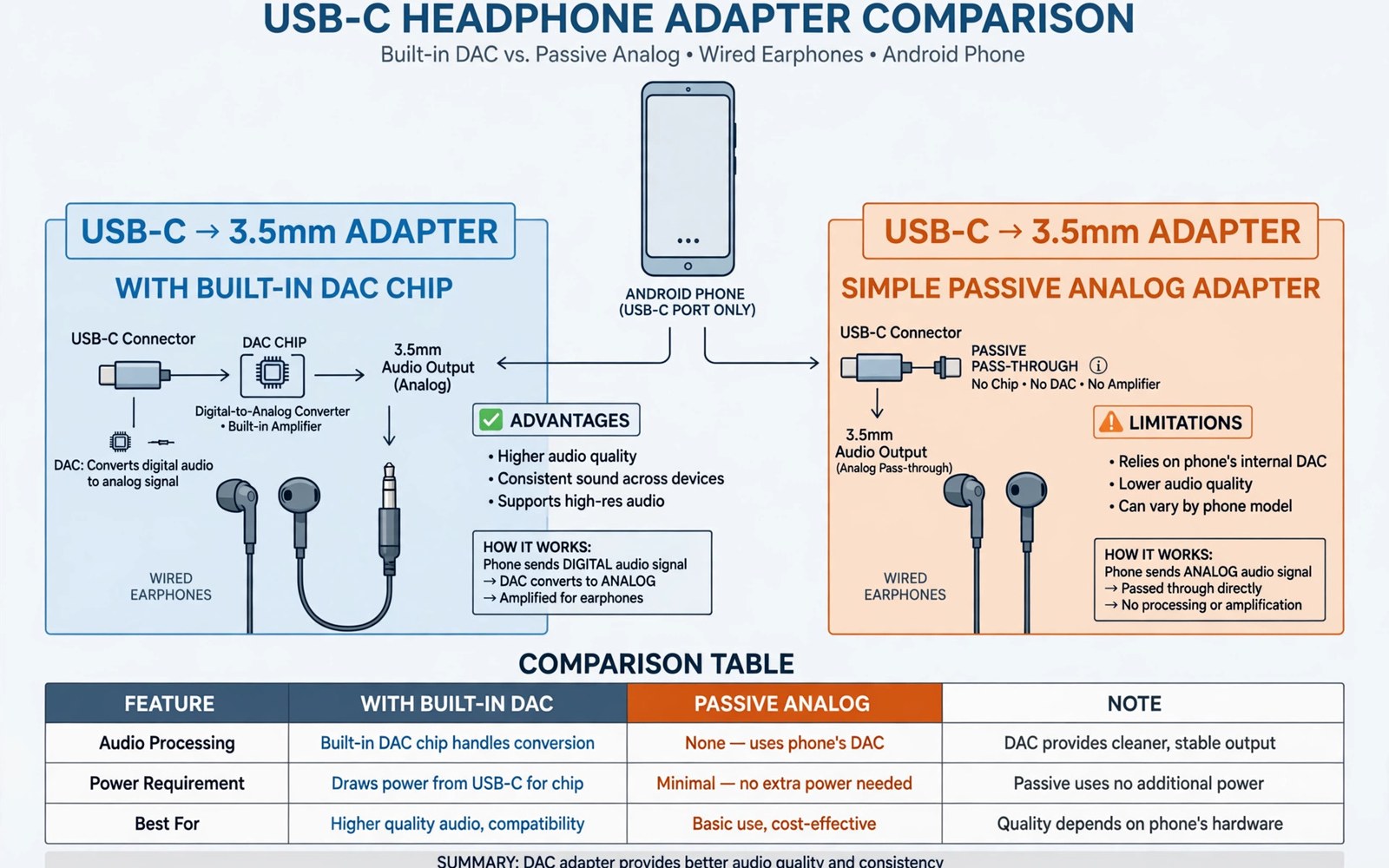
Many Android phones lack a headphone jack. A USB-C adapter restores wired listening. Two adapter types exist. One type carries a built in digital converter. The other type passes an analog signal through. The difference decides sound quality and compatibility. The difference also decides price. A buyer who picks the wrong type may hear nothing at all. A buyer who picks the right type enjoys clear sound. This guide explains both types in plain terms. It shows how to tell them apart. It helps you pick the type that fits your phone.
Sound starts as digital data inside the phone. Headphones need an analog signal to move their drivers. A converter changes digital data into analog sound. That converter is called a DAC. The DAC can live inside the phone. It can also live inside the adapter. The location matters. A phone with an internal DAC can use a simple passive adapter. A phone without an internal DAC needs an adapter with its own DAC. The phone maker decides which design to use. The buyer must match the adapter to that design. A mismatch gives silence. No volume setting fixes a mismatch. The hardware path must be correct first.
How a Passive Analog Adapter Works
A passive adapter contains no converter chip. It simply reroutes analog pins from the phone port to the headphone jack. The phone DAC creates the analog sound. The adapter carries that sound to the headphones. The design is simple and cheap. It adds almost no bulk. It draws no extra power from the phone. It also adds no extra noise when built well. The sound quality depends on the phone DAC. A good phone DAC gives clean sound through a passive adapter. A poor phone DAC gives noisy sound. The adapter cannot improve a poor phone DAC. It can only carry what the phone produces.
Passive adapters work only on phones with analog output support. That support is a hardware feature. It is not a software setting. A phone without it sends no analog signal to the port. A passive adapter then carries silence. The user hears nothing. The adapter looks fine. The headphones work elsewhere. The phone works with other adapters. The mismatch explains the silence. Check phone support before buying a passive adapter. Maker specs sometimes mention analog audio support. User reports often confirm it more clearly. A quick search for your model and passive adapter saves a wasted purchase.
Build quality still matters for a passive adapter. Thin wires can add noise. Loose jacks can cause crackling. A firm jack fit keeps sound steady. A good strain relief protects the wire near the plug. Passive adapters are cheap enough to replace often. That low cost tempts buyers to choose the cheapest option. A very cheap adapter may use poor contacts. Poor contacts cause one channel to drop out. A mid priced adapter from a known maker avoids that fault. Spend a little more for a solid jack and clean wiring. The sound gain comes from reliability rather than fancy parts.
How a Built-in DAC Adapter Works
A DAC adapter contains its own converter chip. The phone sends digital audio over USB. The adapter chip converts that digital audio to analog sound. The headphones receive the analog sound from the adapter. This design works on almost every Android phone. It does not need analog support in the phone. The phone only needs to send USB audio. Most modern phones support USB audio. That broad compatibility is the main advantage. A DAC adapter is the safe default choice. It works when you are unsure about phone support. It also works across different phone models.
Sound quality depends on the DAC chip inside the adapter. A good chip gives clean detailed sound. A poor chip gives flat or noisy sound. Chip quality varies widely at similar prices. Reviews that test sound quality help here. Look for tests with real headphones. A test should mention noise and clarity. It should also mention volume output. Some DAC adapters output low volume. Low volume forces the phone volume to maximum. Maximum volume can add distortion. A good adapter reaches comfortable volume at a mid setting. That headroom keeps sound clean. It also protects hearing by avoiding constant maximum volume.
DAC adapters draw a small amount of power. The power comes from the phone battery. The draw is modest for music listening. It rarely affects battery life noticeably. A DAC adapter with an amplifier draws more power. An amplifier helps hard to drive headphones. It also drains the battery faster. Most users need no extra amplifier. Standard earphones work well with a basic DAC adapter. High impedance headphones may need an amplifier. Check headphone impedance before buying an amplifier adapter. A normal earphone needs no amplifier at all. Extra power without need adds cost and battery drain.
Sound Quality Compared Honestly
Sound quality differences are smaller than marketing suggests. A good passive adapter on a good phone sounds excellent. A good DAC adapter on any phone sounds excellent too. The gap appears at the extremes. A poor phone DAC limits a passive adapter. A poor adapter DAC limits a DAC adapter. In both cases the weakest converter decides the result. A buyer cannot improve a weak converter with a better cable. The converter must be good in the first place. Focus on the converter quality rather than the adapter type alone. A well reviewed adapter of either type beats a poor adapter of the other type.
Noise floor describes the background hiss in quiet passages. A low noise floor means silence stays silent. A high noise floor adds hiss to quiet music. Cheap DAC chips often have a higher noise floor. Good phone DACs often have a lower noise floor. Sensitive earphones reveal noise more clearly. They need very little power to sound loud. That sensitivity also reveals hiss. Users with sensitive earphones should prioritise a low noise adapter. Reviews that measure noise help those users. A simple listening test also works. Play a quiet track and listen for hiss between notes. Hiss that annoys you in a test will annoy you daily.
Volume and dynamics matter for enjoyable listening. Dynamics describe the gap between quiet and loud sounds. A good converter preserves that gap. A poor converter flattens loud peaks. Music then feels dull and lifeless. Most modern adapters handle normal music well. The difference shows in complex orchestral passages. It shows in live recordings with wide dynamics. Casual listeners may not notice the gap. Critical listeners will notice it at once. Choose a reviewed adapter if you listen critically. Choose any decent adapter if you listen casually. Both groups benefit from a firm jack fit and a clean cable.
Compatibility Checks Before You Buy
Start by checking your phone model online. Search for the model and headphone adapter compatibility. Owner reports reveal which adapter types work. A model with analog support works with both types. A model without analog support needs a DAC adapter. When reports conflict choose a DAC adapter. It works in both cases. That safe choice avoids silence. Keep the receipt until you test the adapter. Test with your own headphones. Test at normal volume and at low volume. Listen for hiss and channel balance. A good adapter sounds balanced in both ears. A faulty adapter may favour one ear.
Test calls as well as music. Some adapters handle music well but fail on calls. The microphone path differs from the music path. A headset microphone needs a correct pin layout. A mismatch may mute the microphone. Test a short call after buying. Speak and ask the other person about clarity. A clear call confirms the microphone path. A muted call points to a layout mismatch. Return the adapter if calls matter and the microphone fails. A different adapter model may fix the issue. The issue comes from pin layout rather than sound quality. A DAC adapter with a proper headset chip usually handles calls well.
Check the adapter length and shape for daily use. A short adapter keeps the phone pocket friendly. A long adapter adds strain on the port. A right angle plug reduces strain in a pocket. A straight plug suits desk use better. The shape does not affect sound quality. It affects comfort and durability. A comfortable adapter gets used more often. An awkward adapter gets left at home. Choose the shape that fits your routine. Readers who also charge while listening may like USB-C splitter adapters for charging and listening at the same time for that use case.
Price and Value Guidance
Passive adapters cost very little. A decent one costs less than a meal. DAC adapters cost more. A decent one costs several times a passive adapter. The price gap reflects the chip inside. It does not always reflect sound quality. A cheap DAC adapter may sound worse than a good passive adapter. A good DAC adapter may sound better than a poor phone DAC. Compare reviewed models rather than prices alone. A mid priced DAC adapter from a known maker is a safe value. It gives broad compatibility and clean sound. It also lasts longer than a bargain adapter. The extra cost pays for reliability.
Do not chase extreme audiophile claims for daily listening. Claims of dramatic sound transformation rarely hold up in blind tests. A decent adapter already delivers clean sound for most headphones. Expensive adapters may offer slightly lower noise. The gain is subtle for most ears. Spend the extra money on better headphones instead. Headphones change sound far more than adapters do. A good headphone with a decent adapter beats a poor headphone with an expensive adapter. That rule guides sensible spending. It keeps the focus on the part that matters most.
- Choose a DAC adapter when phone analog support is unknown.
- Choose a passive adapter only for phones with analog support.
- Test music and calls with your own headphones.
- Check volume headroom before accepting an adapter.
- Prefer a firm jack fit and a comfortable plug shape.
Headphone adapter checklist:
1. Phone analog support: yes unknown or no
2. Adapter type: passive or DAC
3. Test music: balanced and clear
4. Test call: microphone works
5. Volume: comfortable below maximum
6. Fit: firm jack and snug phone plug
7. Comfort: shape suits pocket or desk
Common Problems and Fixes
Silence is the most common complaint. First check the adapter type against phone support. A passive adapter on a phone without analog support gives silence. Swap to a DAC adapter to fix it. Next check the headphone plug seating. Push the plug fully into the jack. A half seated plug gives one channel only. Clean the jack if dust blocks seating. Try another headphone to rule out headphone failure. Try the adapter on another phone to rule out phone failure. Each swap isolates the fault. A systematic swap saves time.
Crackling often comes from a loose jack or a damaged cable. Wiggle the plug gently while music plays. Crackling that follows movement points to the jack. A firm replacement jack fixes it. Crackling that stays constant may come from the DAC chip. Try another adapter to confirm. Interference from a nearby charger can also cause noise. Move the phone away from the charger during a test. A noise that fades with distance points to interference. A shielded adapter reduces that noise. A poor adapter may need replacement. Do not accept constant crackling as normal. Clean sound should be steady.
Low volume has several causes. A DAC adapter with low output needs maximum phone volume. That setting may still feel quiet with some headphones. An amplifier adapter can fix low output for hard headphones. It adds cost and battery drain. Check headphone impedance first. High impedance headphones need more power. Low impedance earphones should sound loud on a basic adapter. If low impedance earphones sound quiet then the adapter is weak. Replace it with a reviewed model. Also check phone volume limits in settings. A volume limit cap can mimic a weak adapter. Disable the cap for testing. Restore it later if you prefer a safe limit.
Final Thoughts on Headphone Adapters
The adapter choice is simple once the phone design is clear. A phone with analog support accepts either type. A phone without it needs a DAC adapter. A DAC adapter is the safe default for unknown phones. Sound quality depends on the converter in use. A good converter of either type sounds clean. A poor converter limits the result. Test music and calls on arrival. Keep the receipt until both tests pass. A careful test prevents later disappointment.
Readers may also find MIDI keyboards and audio interfaces connected to Android via USB useful for a related setup. Readers may also find USB-C cable ratings for 60W and 100W and 240W power useful for a related setup.
Start by checking your phone model for analog support. Choose a DAC adapter when in doubt. Pick a reviewed model with comfortable volume headroom. Test it with your own headphones and a short call. The steps above follow the approach described in the official developer documentation for USB audio and accessory compatibility. That approach stresses matching the accessory to the device capability before judging sound quality. Follow it and your wired listening should work cleanly from the first plug in.

