

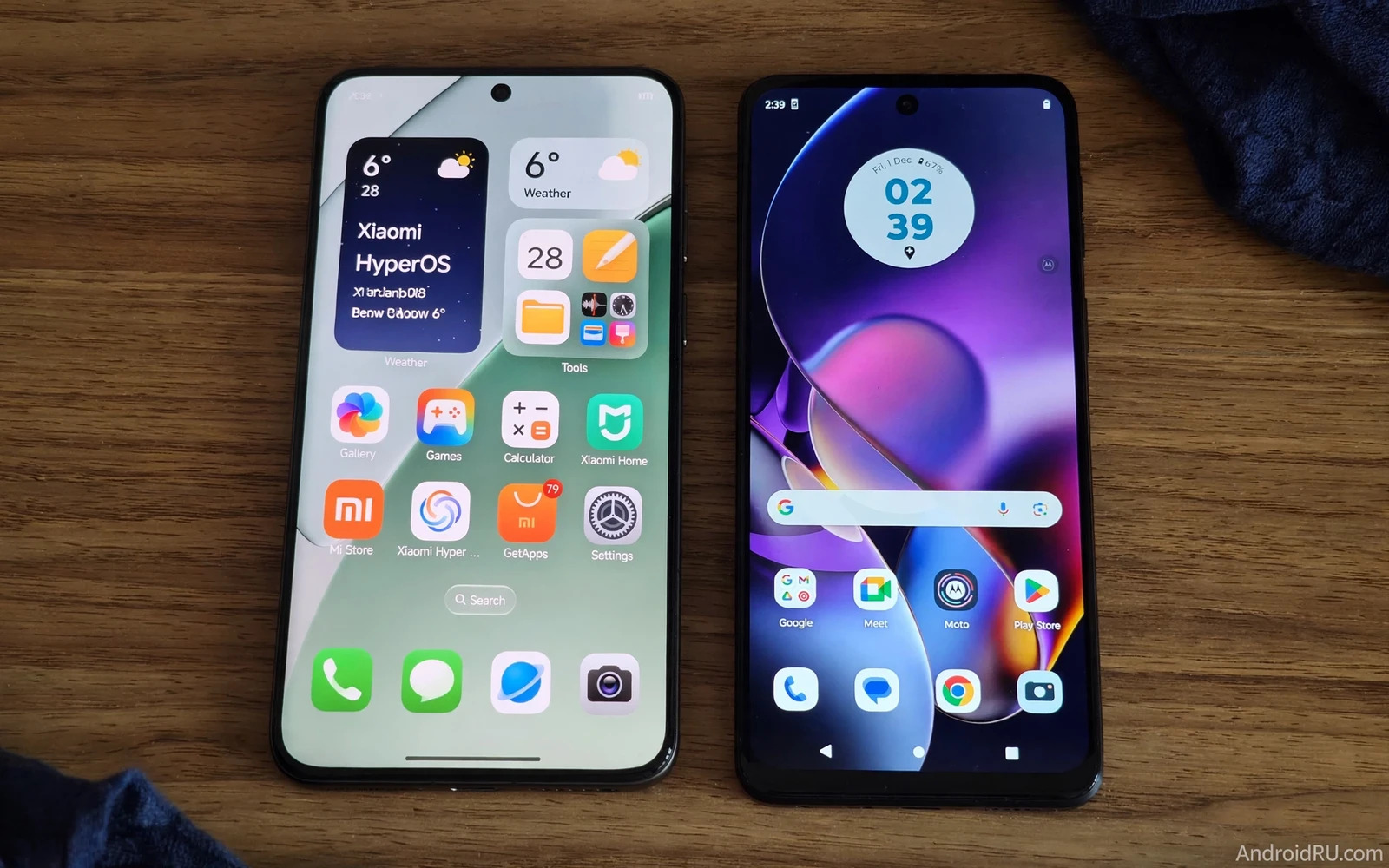
Xiaomi HyperOS and Motorola Hello UI take opposite paths to Android. HyperOS adds a deep ecosystem and many features. Hello UI stays close to stock Android with light touches. Both phones run Android apps well. Both support Google services fully. The daily difference lies in clutter and control and ecosystem links. This test compares the skins on real use rather than on feature counts alone.
Skin choice affects every tap on the phone. It affects the home screen and the settings menu. It affects notifications and multitasking. It affects battery behavior and update timing. A heavy skin can add useful tools. A light skin can feel faster and calmer. Neither style wins for every user. Your tolerance for extras decides the winner.
Design And Home Screen Feel
HyperOS offers a polished and colorful design. Icons look rounded and modern. Widgets offer rich layouts and sizes. The control center groups toggles and media in one panel. Lock screen options allow deep styling. Hello UI offers a quieter and cleaner design. Icons stay close to stock Android shapes. Widgets stay simple and consistent. The home screen feels calm from first boot. A user who loves visual flair will enjoy HyperOS. A user who loves calm will enjoy Hello UI.
Animation quality differs in feel rather than in speed alone. HyperOS animations look layered and smooth on strong hardware. Hello UI animations look light and direct. Both skins support gesture navigation well. Both skins support app drawers and folders. HyperOS gives more layout options for grid and icon size. Hello UI gives fewer options but keeps the layout tidy. The design winner depends on whether you tweak often or set once and forget.
Preinstalled Apps And Bloat
Preinstalled apps form the sharpest contrast between these skins. HyperOS ships with many Xiaomi apps and partner apps. Some add real value for notes and files and security. Others duplicate Google apps and add clutter. Hello UI ships with far fewer extra apps. Most core tasks use Google apps by default. That lightness frees storage and reduces duplicate notifications. A user who hates duplicate apps will prefer Hello UI clearly.
Bloat can be reduced on both skins with effort. HyperOS lets you uninstall or disable many extra apps. The process takes time and care. Some system apps can only be disabled rather than removed. Hello UI needs little cleanup at first boot. That saving matters for a new phone setup. It also matters for long term storage. Check the app list on the exact model before you buy. Preinstalled apps vary by region and by carrier and by model tier.
Features Ecosystem And Extras
HyperOS leads on ecosystem features. It connects Xiaomi phones with tablets and watches and home devices. It offers shared clipboard and file transfer across Xiaomi devices. It offers deep theming and always-on display options. It offers game tools and floating windows. Hello UI leads on simplicity rather than on ecosystem depth. It offers clean Moto gestures for camera and flashlight. It offers a ready-for desktop mode on some models. It offers thoughtful touches without a large ecosystem lock-in.
Feature value depends on the devices you already own. A Xiaomi household gains more from HyperOS links. A mixed-device household gains less from those links. Moto gestures help every day without ecosystem demands. A chop gesture for flashlight feels natural fast. A twist gesture for camera saves precious seconds. HyperOS extras help power users who explore menus. Hello UI extras help casual users without a learning curve. Rank extras by daily use rather than by total count.
Performance Battery And Updates
Performance feels close on comparable hardware. Hello UI lightness can make a mid-range chip feel quicker. HyperOS richness can feel heavier on weaker hardware. On flagship hardware both skins feel smooth. Battery behavior follows a similar pattern. Hello UI background management stays close to stock Android. HyperOS background management can be stricter for rarely used apps. Strict control can extend standby time. It can also delay a notification until you open the app. Check notification behavior for your most important apps after setup.
Update timing varies by model and region for both brands. Xiaomi updates HyperOS across a huge model range. That range can slow updates for older or cheaper models. Motorola has improved update promises for many models. Flagship Motorola models get stronger promises than budget models. Check the exact model promise before you buy. Do not judge update speed by brand alone. The model and the region shape the real update story.
Privacy Settings And Daily Control
Privacy controls exist on both skins in clear settings menus. HyperOS offers permission controls and app behavior records. It offers second space features for separate profiles on some models. It offers app lock options for sensitive apps. Hello UI offers stock Android permission controls with little extra layering. That simplicity helps users who want a quick review. HyperOS depth helps users who want granular control. Both skins support screen lock and biometric options well.
Daily control also covers notifications and digital wellbeing. HyperOS groups notifications with rich management options. Hello UI keeps notification grouping close to stock behavior. Both skins offer focus modes and bedtime modes. Both skins show screen time and app usage. A user who manages many work apps may prefer HyperOS grouping. A user who wants a quiet phone may prefer Hello UI calm. Test notification handling with your real apps when possible.
Which Skin Fits You Best
Choose HyperOS if you own Xiaomi devices and value ecosystem links. Choose HyperOS if you enjoy theming and deep options. Choose HyperOS if you want many built-in tools in one place. Choose Hello UI if you want a clean phone with little cleanup. Choose Hello UI if you value stock Android feel and speed. Choose Hello UI if duplicate apps annoy you daily. Both skins serve Android well in different ways.
A hands-on comparison helps more than a spec table here. Open the settings app on each phone. Count the preinstalled apps on the home screen. Change the wallpaper and the icon style. Send a message and check notification grouping. The skin that feels obvious in that short test is the right pick. A related software face-off between Samsung One UI and Pixel UI features shows how much personality varies inside Android. The same lesson applies to this pair. Pick the skin you will enjoy living with each day.
Test Verdict
HyperOS wins on features and ecosystem and visual richness. Hello UI wins on cleanliness and simplicity and low bloat. Neither skin wins every test. The test winner for you depends on your device household and your tolerance for extras. A power user gains more from HyperOS depth. A calm user gains more from Hello UI lightness. Both phones can serve well for years with the right model choice.
Model choice matters as much as skin choice. A strong chip lifts either skin. A weak chip exposes HyperOS weight sooner. A good update promise protects either skin longer. Check the model page for chip and memory and update length. Then place the skin in the wider choice between Android flexibility and iOS simplicity and between Android ecosystem benefits and Apple ecosystem limits for your household. The skin is the daily surface of a much larger decision. Choose the surface that feels like home.
Daily Software Habits
Daily software habits reveal skin differences faster than feature lists. A HyperOS user may open the theme store often. A Hello UI user may rarely open theme settings. A HyperOS user may use floating windows for multitasking. A Hello UI user may use simple split screen on occasion. Neither habit is better in the abstract. The better habit is the one you actually repeat. Count your repeated tasks before you rank skins.
Notification habits also differ by skin. HyperOS offers rich grouping and management depth. Hello UI offers calm stock grouping. A user with many group chats may value HyperOS controls. A user with few chats may value Hello UI calm. Silence noisy apps in the first week on either skin. A quiet phone feels faster even when chip speed stays the same. Notification discipline beats skin choice for daily calm.
Search and assistant habits shape skin feel too. Both skins support Google search and voice well. HyperOS adds its own assistant options in some regions. Hello UI keeps Google assistant central. A user who lives inside Google services will feel at home on Hello UI. A user who explores maker services may enjoy HyperOS extras. Check assistant behavior in your region before you decide. Regional differences can change the assistant picture greatly.
Model And Region Variations
Skin experience changes across models inside each brand. A flagship Xiaomi phone runs HyperOS with full features. A budget Xiaomi phone may miss some features or run a lighter variant. A flagship Motorola phone runs Hello UI with fuller support. A budget Motorola phone may receive fewer updates. Read the exact model specifications. Ask about update length for that model. Brand promises often describe flagship models rather than every model.
Regional variants add another layer of difference. Preinstalled apps vary by market. Some features launch in one region before others. Carrier models may add extra apps or delay updates. Check the variant sold in your country. Read local user reviews for that variant. Local reviews reveal regional quirks that global reviews miss. A skin that shines globally may frustrate locally through missing features.
Long term skin satisfaction depends on update quality. Updates can add features and fix bugs. Updates can also change familiar menus. A maker with careful updates earns trust over time. A maker with buggy updates erodes trust fast. Read update feedback for the exact model before purchase. A stable update history predicts a calmer ownership period. A troubled history warns of future frustration.
Cleaning Up Either Skin
Clean up HyperOS in the first hour for a calmer start. Uninstall duplicate apps that mirror Google apps. Disable apps you will never open. Organize remaining apps into folders by task. A clean home screen makes a heavy skin feel light. Repeat the cleanup after major updates that may restore apps.
Clean up Hello UI lightly since little bloat exists at start. Focus on notification settings rather than app removal. Silence noisy apps in the first week. Set up Moto gestures that save time daily. A light cleanup keeps the stock feel intact. Over-tweaking a clean skin can add clutter that was never there.
Back up your home screen layout after cleanup on either skin. A backup restores your layout after a reset. Note your widget choices and folder names in a simple list. That list speeds up setup on a future phone. Good organization travels across phones when you record it. A little documentation saves a long setup later.

