

How Google’s Project Mainline Is Changing Android Updates
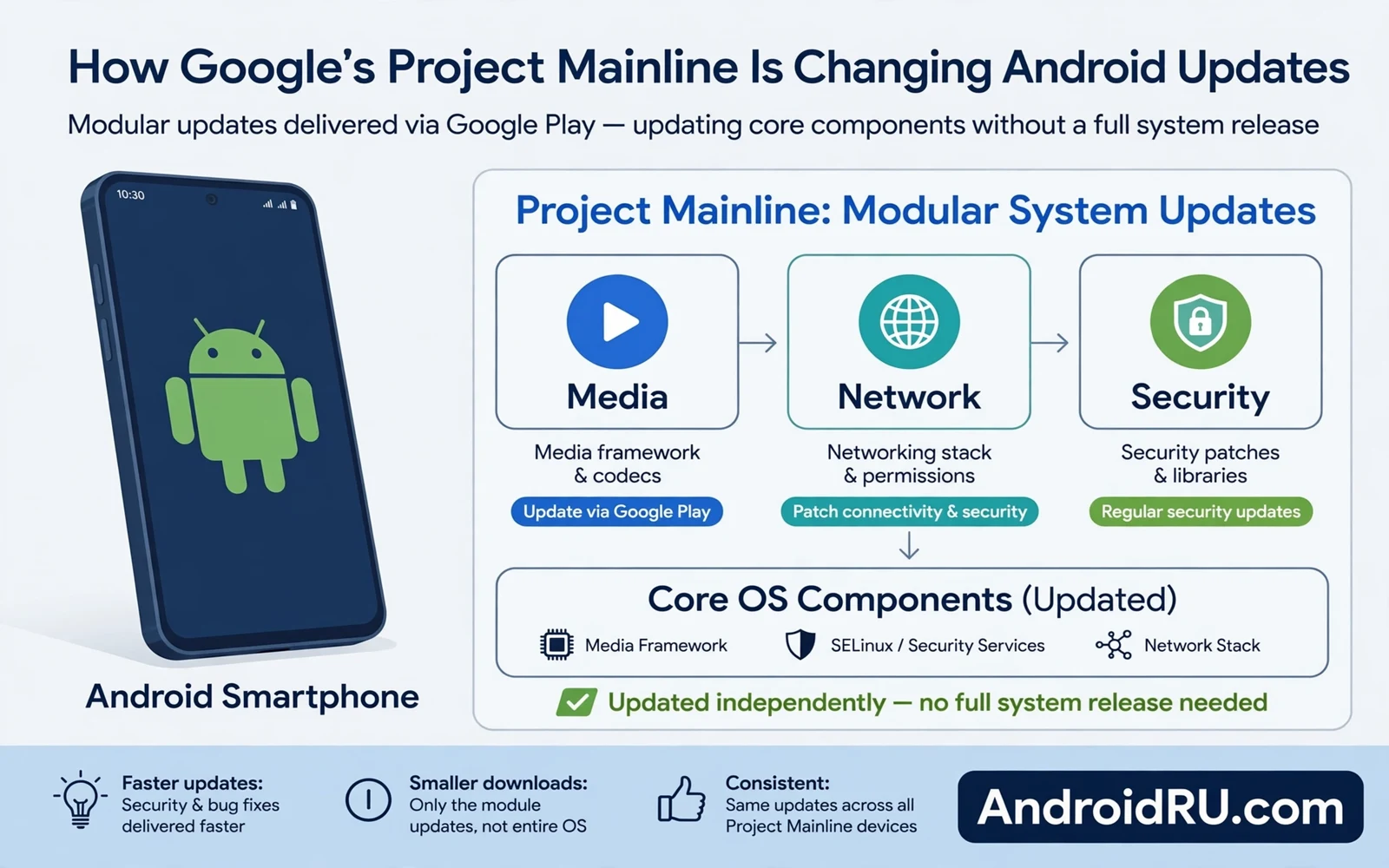
Android updates used to wait for the phone maker. A system fix needed a full maker release with testing, carrier checks, and a large download. That process took time, and it left many phones on old system parts for months. Project Mainline changes that pattern by splitting core system parts into modules. Modules can update through a store style path without a full system release, so core parts can now move faster on their own.
The phone still needs maker updates for many parts, and Mainline does not make every phone update instantly. This guide explains Mainline in plain language: what a module is and what it is not, how module updates reach your phone, what still needs a full maker update, and the limits and risks in honest terms. By the end, you will know how to read the two update dates on your phone and judge how current it really is.
Why Full Updates Were So Slow
Full system updates involve many parties. Google builds the core system. The chip maker adapts drivers for the hardware. The phone maker adapts the system for its layer and apps. A carrier may test the update for its network. Each step adds time, and each step can add a delay when a test fails. A phone at the end of this chain may wait months for a fix that was ready early.
Full updates also carry risk, because they touch many parts at once. A change in one area can break another area in testing, and a large update needs broad testing across models and regions. Broad testing takes time and resources, and makers prioritise flagship models in that testing. Budget models may wait longer for the same update. Mainline reduces this burden for core parts by narrowing the scope of each update.
Old phones suffered most from slow full updates
A maker may end full support for an old model while core flaws still appear. Users of old models faced a hard choice between an unsafe phone and a new purchase. Mainline helps by keeping some core parts updated even when full system versions stop. Mainline does not extend full support forever, but it does extend protection for the parts it covers, and that partial protection is valuable for phones that still work fine in every other way.
Fragmentation made the problem worse
Different makers used different layers and different timelines, and different regions received updates at different times. Users could not tell why one phone updated fast and another waited. Mainline gives core parts a more uniform path. A uniform path does not erase maker differences, but it narrows the gap for the parts that matter most for safety.
What a Mainline Module Really Is
A module is a package of system code for one area. Media code is one module area. Network code is another module area. Permission and security services form other module areas. Each module has a clear boundary and a clear job, and a module update changes only that area. A module update does not rewrite the whole system, and a narrow change is easier to test and easier to roll back if a problem appears.
Modules update through the system update path that Google controls for those parts. The update may appear as a Play system update in settings. It may download in the background, and it may need a restart for some parts, while other parts can update without a restart. The exact behaviour depends on the module and the phone, so check settings for Play system update status when you want to see module progress.
Modules are not apps, and you cannot treat them like apps
You cannot install a module from a store search like a normal app. You cannot remove a core module safely. You cannot replace a module with an unofficial file without risk. Treat modules as system parts with a faster delivery path. The faster path is a benefit, and it does not make modules optional or user replaceable.
Two dates tell the real story of your phone
Module versions have their own dates and levels. A Play system update date may differ from the monthly patch level date, and both dates matter. The monthly patch level shows maker patch progress, while the Play system update date shows module progress. Check both dates in settings when you judge how current your phone is, because a phone can be current on modules and behind on maker patches, or the reverse.
How Mainline Changes Security Updates
Security fixes for module areas can reach phones faster than before. A media flaw can be fixed in a media module without waiting for a full release, and a network flaw can be fixed in a network module on a similar path. Faster delivery shrinks the window when a known flaw stays open, and a smaller window gives attackers less time to build an attack from public patch details.
Mainline also helps older phones that still receive module updates. A phone that no longer receives full version upgrades may still receive module fixes for core areas. That protection is partial but valuable, because it covers media, network, and permission areas that attackers target often. It does not cover driver flaws or kernel flaws that sit outside modules, so full maker support still matters for those areas.
Narrow testing, faster delivery, real limits
Testing for module updates is narrower and faster, because a module change affects one area rather than the whole system. Narrow testing can still miss interactions with maker layers, and a module update can still cause an app problem in rare cases. Report a problem after a module update through official feedback when you can, because a clear report helps Google and makers fix the interaction faster.
Monthly patches still matter beside modules
Module updates do not remove the need for monthly patches. Monthly patches cover kernel, driver, and maker parts that modules do not cover, and they also cover flaws that need a full system change. Think of Mainline as an extra fast lane for core parts, and monthly patches as the main road for the rest of the system. Both lanes need to stay open for full protection, and what a monthly Android security patch fixes covers kernel flaws that no module touches.
What Mainline Does Not Fix
Mainline does not fix driver flaws on its own. Drivers come from chip makers and phone makers, and a driver flaw needs a maker update. A driver flaw in modem, camera, or sensor code stays open until that maker update arrives, and Mainline cannot push a driver fix through a module path. Check maker patch dates for driver progress.
Mainline does not fix kernel flaws on its own. The kernel sits at the heart of the system and it changes with full updates. A kernel flaw needs a full patch path, and a kernel flaw can be serious because it breaks app separation. Do not assume that a fresh module date means the kernel is current. Check the monthly patch level for kernel progress.
Mainline does not extend support forever
Mainline does not force makers to support a phone forever. Makers still decide the support window for full updates, and they still decide which models receive which versions. Mainline extends useful protection inside that window and a little beyond it for covered parts, but it does not create a new support promise by itself. Support promises still come from the maker for your exact model.
Mainline does not make all phones equal
A flagship phone may receive module updates and maker patches promptly. A budget phone may receive module updates promptly but maker patches slowly. A very old phone may stop receiving both paths. Compare both dates when you judge a phone, because a single date can hide a gap in the other path.
How to Check Mainline Updates on Your Phone
Open settings and look for the system update area. Look for a Play system update entry beside the monthly patch entry. Tap that entry to see the module update date, and tap the check option when you want to look for a fresh module update. A fresh date means that modules are current. An old date means that you should check your network and storage and try again later.
Install module updates on stable Wi-Fi when you can. Module updates are usually smaller than full updates, but a stable connection still helps, because an interrupted download can need a retry. Charge the phone to a comfortable level before a restart type module update, because a restart type update needs stable power through the restart.
Test core apps after a module update
After a module update, test core apps that use the updated area. A media module update calls for a test of camera, gallery, and video apps. A network module update calls for a test of browsing, messaging, and calls. A permission module update calls for a test of apps that use camera, microphone, and location. A quick test catches a rare interaction problem early.
What to do when a module update fails
If a module update fails, restart the phone and check again. Free storage if the updater warns about space. Connect to stable Wi-Fi and try the check once more. Contact official support if the date stays old after several tries. Do not install module files from unofficial uploaders, because unofficial module files can hide harmful code and can break future official updates.
Mainline and App Developers
Developers benefit from more uniform core behaviour across phones. A media module that updates widely gives apps a more consistent media path. A network module that updates widely gives apps a more consistent network path. Consistency reduces the need for maker specific workarounds, and it helps developers test apps on fewer device variants with more confidence.
Developers still face maker differences outside modules. Camera drivers and maker layers still vary by model, and display and sensor behaviour still varies by hardware. Developers must still test on real devices from major makers. Mainline narrows the variation for core parts, but it does not erase hardware variation that comes from different chips and sensors.
Why developers can adopt new core features sooner
App compatibility improves when core security rules update widely. An app that relies on a modern permission rule can trust that rule on more phones. An app that relies on a modern media format can trust that format on more phones. Wide module adoption helps new apps reach more users without old system gaps, and apps can drop old workarounds sooner. Fewer workarounds mean cleaner apps and fewer bugs, and cleaner apps mean a smoother phone for users who never think about modules at all.
What Mainline Means for Your Next Phone
When you buy a phone, ask about both update paths. Ask about the monthly patch window, and ask about Play system update support. A phone with a long patch window and current modules is a strong choice. A phone with a long patch window but stale modules is weaker than it looks. A phone with fresh modules but a short patch window is also weaker than it looks. Both paths matter together.
Budget phones gain real value from Mainline. A budget phone may receive full version upgrades slowly, while module updates can still keep core media and network parts current. That current core makes a budget phone safer for longer, although a budget phone is not equal to a flagship phone in support. A budget phone with Mainline is safer than a budget phone without it.
Old phone owners should check module dates first
Old phone owners should check module dates before deciding to keep a phone. A phone with current modules and a recent patch level can serve low risk tasks for a while longer. A phone with stale modules and an old patch level should move to low risk use only. A phone with no updates at all should not run banking or work apps. Use module dates as one signal in that decision rather than the only signal.
The shared base that makes Mainline possible
Core code can be shared and updated across makers because the Android open source foundation gives every maker the same starting material. Mainline builds on that shared base by packaging core parts for faster delivery. A shared base makes a faster path possible, and a faster path makes a shared base more valuable in return. A modern release gathers privacy, focus, and personalisation around a stronger update base, and new Android 15 features for your phone shows that gathering in daily use. Mainline is part of that base even when it is invisible, and an invisible improvement that closes flaws faster is still an improvement worth understanding.
Frequently Asked Questions About Project Mainline
What is the difference between a Play system update and a monthly security patch?
A Play system update delivers Mainline module fixes for core areas like media, network, and permissions through a Google controlled path. A monthly security patch comes through the maker and covers kernel, drivers, and maker parts. Both dates matter, and a phone needs both paths current for full protection.
Can I install Mainline modules myself?
No. Modules are system parts, not apps. You cannot install them from a store search, and you should never install module files from unofficial uploaders. Use the Play system update entry in settings and let the official path deliver them.
Does Mainline mean my old phone gets Android version upgrades?
No. Mainline updates core modules, not the Android version. Your phone can receive module fixes long after its last version upgrade, but new Android versions still need a full maker update.
Why is my Play system update date older than my patch level?
The two paths update on different schedules and through different parties. An old module date with a fresh patch level means the maker path is current while the module path is behind. Check your network and storage, then tap the check option again.
Quick Checklist: Check Both Update Dates Today
Open settings and check the Play system update date, then check the monthly patch level date beside it. Install module updates on stable Wi-Fi, test media, network, and permission apps after an update, and never install module files from unofficial uploaders. Ask about both update paths before buying your next phone, move banking off a phone with stale updates, and report a module problem through official feedback.
Project Mainline will not appear on a spec sheet, and it will not show up in a camera test. Its work is quiet: a media flaw closed in weeks instead of months, a network fix reaching a budget phone that stopped getting version upgrades, a permission rule that behaves the same on two very different phones. Check both dates on your phone today, and you will know more about its real safety than any single version number can tell you.

