

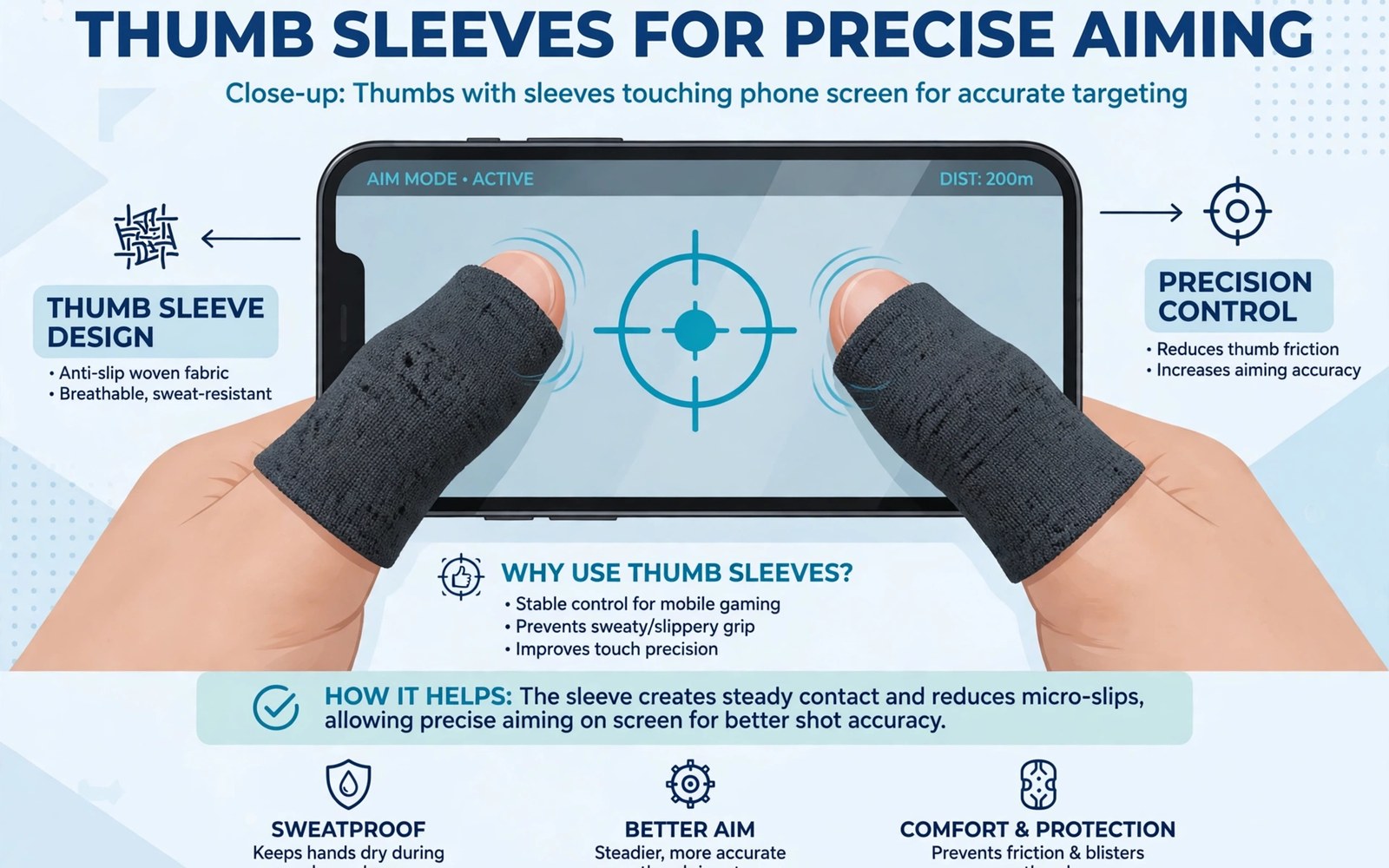
Thumb sleeves touchscreen accessories precision aim tools cover thumbs with a thin smooth fabric. Sweat makes bare thumbs stick to glass during intense play. Sticky thumbs slow swipes and ruin aim adjustments. Sleeves restore smooth glide even when hands sweat.
Sleeve material decides glide quality and durability. Thin conductive fabric preserves touch sensitivity well. Thick fabric may dull taps and slow reactions. Fit matters too since loose sleeves bunch and tight sleeves tire thumbs. A good sleeve feels like a second skin rather than a glove.
This article compares materials and fit and care for thumb sleeves. You will learn how to choose sleeves for your games. You will learn practice habits that build aim with sleeves. You will also learn when sleeves help most and when bare thumbs work fine.
Why thumbs stick and how sleeves help
Glass screens grip sweaty skin through friction and moisture. That grip interrupts smooth camera swipes in shooters. Aim jumps instead of gliding across targets. Sleeves place a low friction layer between skin and glass. That layer keeps swipes smooth through long heated matches.
Sleeves also absorb light sweat before it reaches the screen. Dry screens respond more consistently to taps. Consistent response builds muscle memory faster. Players notice smoother tracking within a few matches. That quick benefit explains sleeve popularity in competitive mobile play.
Materials and sensitivity trade offs
Silver fibre sleeves offer strong conductivity and smooth glide. They cost more but last longer with care. Nylon blends cost less and feel soft but may wear faster. Carbon fibre blends balance conductivity and durability for many players. Test sensitivity in practice mode after switching materials.
Thickness affects tap feel more than marketing suggests. Ultra thin sleeves preserve light tap response best. Thicker sleeves cushion thumbs but may miss light taps. Shooter players usually prefer thin sleeves for fast fire taps. Try one pair of each thickness before buying in bulk.
Fit sizing and comfort checks
Measure thumb width rather than guessing sleeve size. Sleeves sized too large slide and bunch during swipes. Sleeves sized too small cut circulation and tire thumbs. A correct sleeve stays put without pressure marks. Check fit after thirty minutes of play since fabric stretches slightly with heat.
Sleeves pair well with trigger accessories for claw players. Triggers handle fire while sleeves smooth thumb movement. Learn trigger setup in gaming triggers for 4 finger shooting and combine both tools for a complete shooter kit.
Care washing and replacement timing
Wash sleeves gently by hand with mild soap after heavy use. Machine washing can stretch fabric and damage conductive fibres. Air dry sleeves flat away from direct heat. Heat degrades elastic and shortens sleeve life. Clean sleeves glide better and smell fresher during long sessions.
Replace sleeves when glide fades or seams fray. Worn sleeves grip unevenly and hurt aim consistency. Keep a spare pair in your gaming pouch for travel. A fresh pair costs little compared with ranked frustration from worn gear. Replace early rather than tolerating gradual decline.
Accessories that pair well with this setup
A screen guard with a smooth finish pairs well with thumb sleeves for aim. Rough guards increase friction even under sleeves. Smooth guards preserve glide for fast swipes. Test guard and sleeve combinations in practice mode. That pairing test reveals friction problems before ranked matches expose them at costly moments.
A spare pair of sleeves in the gaming pouch prevents worn sleeve emergencies. Sleeves wear gradually and fail during travel at awkward times. A spare pair costs little and restores glide instantly. Keep spares sealed to avoid dust buildup. That backup habit keeps aim consistent across tournaments and travel days alike.
Native pad games offer a different aim path for players tired of touch sleeves. Pads provide sticks for camera control without thumb friction. The genre picture is clear in games with native controller support for players weighing pads against sleeves. That comparison helps aim focused players choose the input style that suits their games best.
A weekly routine that keeps everything working
Wash sleeves weekly by hand to maintain glide and hygiene. Sweat buildup stiffens fabric and dulls touch response over time. Mild soap and air drying preserve conductive fibres best. Avoid machine heat that degrades elastic quickly. That weekly wash keeps sleeves feeling fresh across long competitive seasons and daily practice alike.
Measure thumb size monthly since weight changes can alter sleeve fit. A loose sleeve bunches and a tight sleeve tires thumbs fast. Recheck fit after noticeable weight changes. Order correct sizes promptly when fit drifts. That monthly check keeps aim tools matched to hands rather than old size guesses alone.
Review button mapping monthly for games that lack native pad support. Mapping plus sleeves together can improve touch games a lot. The mapping method is clear in button mapping for unsupported games for players expanding control options. Monthly review matches control tools to current game libraries as titles change over time.
How this plays out in real life
A shooter player in a humid climate relies on sleeves for every ranked match. Sweat makes bare thumbs stick to glass within minutes. Sleeves restore smooth camera swipes through long heated matches. That climate driven need makes sleeves essential rather than optional. Humid players gain the most from sleeve investments of all mobile gamers.
A casual puzzle gamer tries sleeves and notices little difference for slow games. Puzzle swipes rarely demand fast camera control. That gamer returns sleeves for other accessories instead. Honest need assessment prevents wasted purchases for slow paced titles. Sleeves suit fast action games far better than relaxed puzzle sessions overall.
A tournament player keeps spare sleeves in a pouch for match days. Worn sleeves fail at awkward moments during competitions. Spares restore glide instantly between matches. That preparation habit reflects professional attention to detail. Tournament readiness includes backup gear for every critical accessory without exception at all.
A student with a small phone finds sleeves improve thumb reach slightly. Smooth glide helps small screen camera control during shooters. That student pairs sleeves with a comfortable grip case. Combined tools improve small phone gaming noticeably. Small phones benefit from every friction reduction available during fast action games.
A new shooter fan learns sleeves change aim timing initially. Practice mode drills adapt muscle memory within days. That fan avoids ranked matches until sleeve timing feels natural. Patient adaptation prevents rank losses from new gear. That disciplined approach applies to every new accessory introduction for competitive players wisely.
A practical check you can run
You can check touch sensitivity and display settings that affect swipe feel. Run the checks below on a computer linked to the phone. The output shows pointer speed and display settings.
adb shell settings get system pointer_speed
adb shell wm size
adb shell dumpsys input
The commands above are adapted from public platform documentation for Android developer tools. They are included here as a teaching example for checking device behaviour and not as copied product code.
Common mistakes
A common mistake is buying bulk sleeves before testing fit and material. Wrong size or thick fabric ruins aim instead of improving it. Buy one pair first and test for a week. Order more only after fit and glide prove good in real matches.
Another mistake is wearing sleeves only for ranked matches without practice. New glide feel changes aim timing at first. Practice with sleeves in training mode before ranked play. Muscle memory adapts fast with short daily drills.
A third mistake is neglecting sleeve washing until glide fades. Dirty sleeves grip worse than clean bare thumbs sometimes. Wash sleeves regularly and air dry them flat. Clean gear keeps aim consistent across long gaming weeks.
Frequently asked questions
Do thumb sleeves work on all phones?
Sleeves work on most capacitive touchscreens used by Android phones. Very thick screen guards may reduce sensitivity slightly. Test sleeves with your exact guard in practice mode. Most players notice smooth glide despite a standard screen guard.
Will sleeves slow down my taps?
Thin quality sleeves preserve tap speed well for most players. Thick sleeves may dull light taps a little. Choose ultra thin sleeves for fast fire games. Test tap response in training mode before ranked matches with new sleeves.
How often should I replace thumb sleeves?
Replace sleeves when glide fades or seams fray or fit loosens. Heavy daily players may replace pairs every few weeks. Casual players may use one pair for months. Keep spares ready so worn sleeves never force a ranked session with poor glide.
Conclusion
Thumb sleeves offer a cheap and effective aim upgrade for sweaty hands. Thin conductive fabric and correct fit matter most. Wash sleeves regularly and replace them when glide fades. Practice with sleeves before ranked play to adapt timing.
Your next step is a one pair trial this week. Buy a single thin pair in your measured size. Run daily practice drills for fifteen minutes. Keep the sleeves only if aim feels smoother after three practice days.
Plan your first sleeve week around fit tests and practice adaptation. Measure thumb width on day one and order the correct size without guessing. Test glide on day two in practice mode with your usual screen guard. Drill aim for fifteen minutes on day three to adapt timing to new glide. Play casual matches on day four and note swipe consistency honestly. Wash sleeves on day five and note glide changes after cleaning. Compare thin versus thicker sleeves on day six if both types are available. Decide on day seven whether sleeves earn a permanent place in your kit. A tested week proves sleeve value for your hands and games before bulk buying.
Keep sleeve care simple with a weekly wash and a spare pair ready always. Clean sleeves glide better and last longer than neglected sleeves by months. Spares prevent worn sleeve emergencies during tournaments and travel days. That simple care routine costs minutes weekly and saves ranked frustration repeatedly. Good sleeve habits protect aim consistency across entire competitive seasons without extra spending. That consistency rewards patient players every match.

