

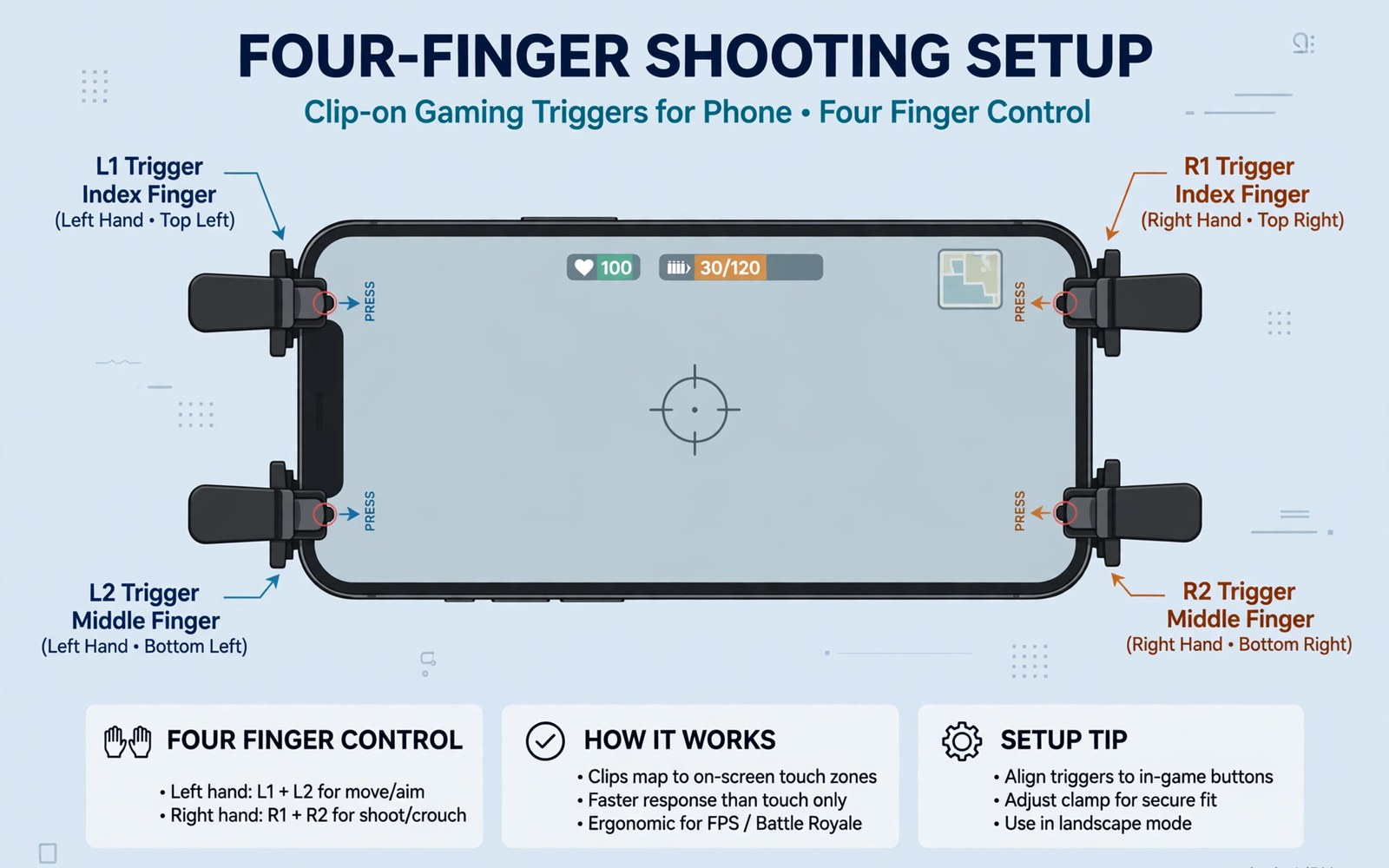
Gaming trigger accessories 4 finger shooting setups add physical buttons to phone edges. Clip triggers press screen spots when you squeeze them. That design frees thumbs for movement and aim. Four fingers then control fire and aim and movement at once.
The claw style suits competitive shooters where speed decides fights. Two thumbs alone cannot aim and fire and move simultaneously. Triggers add index finger actions without covering the screen. Players gain faster reactions in close fights. Practice turns the new layout into muscle memory within days.
This article covers trigger types and setup and practice drills. You will learn how to place triggers for your hand size. You will learn how to avoid screen damage from clips. You will also learn drills that build claw skill safely without ranked pressure.
How clip triggers work on phones
Clip triggers clamp over phone edges with a small conductive pad over a screen button. Squeezing the trigger presses that screen spot. The game sees a normal touch tap at that location. That simple mechanism works without Bluetooth or batteries. Mechanical triggers suit any shooter with fixed fire buttons.
Trigger quality varies in click feel and clamp strength. Cheap triggers feel mushy and slip during intense fights. Solid triggers click crisply and hold position for hours. Read owner reports for slip complaints before buying. A trigger that moves mid fight costs more fights than it wins.
Setting up a 4 finger layout
Place the left trigger over the fire button area for your main weapon. Place the right trigger over aim or scope controls. Keep thumbs on movement stick and camera areas. That layout splits work across four fingers evenly. Start with fire only on triggers and add scope later once fire feels natural.
Adjust trigger positions in small steps during practice mode. A few millimetres change comfort and accuracy a lot. Note the best positions with a photo for reference. Recheck positions after changing cases since case thickness shifts clip fit. Consistent placement builds reliable muscle memory faster.
Practice drills for claw play
Practice in training mode before ranked matches with new triggers. Run movement drills that combine strafing and firing. Add target switching drills once movement feels smooth. Keep sessions short at first to avoid hand strain. Fifteen minute drills daily beat one exhausting weekend session for skill growth.
Comfort aids also help claw players during long practice. Finger sleeves reduce friction for thumb movement. Learn about them in thumb sleeves for precision aim and pair sleeves with triggers for a smoother claw setup.
Protecting your phone from clip damage
Clips can scratch phone edges or screen guards over time. Use triggers with rubber pads on contact points. Check pads monthly for wear and grit. Clean clips before attaching them after dusty travel. A gritty clip scratches faster than a clean clip during long sessions.
Remove triggers after play rather than leaving them clamped for days. Constant pressure can mark cases and screen guards. Store triggers in a small pouch away from keys. Inspect phone edges weekly for early marks. Early care keeps both phone and triggers in good shape.
Accessories that pair well with this setup
A pair of thumb sleeves completes most trigger kits for shooter players. Sleeves smooth thumb swipes while triggers handle fire actions. That combination covers movement and shooting with dedicated tools. Choose thin sleeves to preserve tap sensitivity. Test sleeves plus triggers together in practice mode before ranked matches begin.
A phone case with grippy edges helps claw players hold phones securely. Claw grips shift phone balance during intense fights. Grippy edges reduce slips without adding bulk. Choose cases that leave trigger clamp areas clear. That fit detail matters since cases can block trigger placement on some phone models.
Native pad games offer an alternative path for shooter players who dislike claw grips. Pads provide sticks and buttons without screen clips. The genre picture is clear in games with native controller support for players weighing pads against triggers. That comparison helps shooter fans pick the input style that matches their favourite titles best.
A weekly routine that keeps everything working
Inspect trigger pads weekly for wear and trapped grit. Worn pads slip and scratch screens over time. Clean pads gently before each ranked session. Replace pads at the first sign of hardening or cracking. That weekly care protects screens worth far more than trigger replacement costs over a gaming year.
Practice claw drills in short daily sessions rather than long weekend marathons. Short drills build muscle memory without hand strain. Fifteen minutes daily beats two exhausting hours weekly for skill growth. Track drill comfort in a simple log. That log reveals progress and warns early when strain needs rest days.
Review budget pad options monthly if claw fatigue grows over time. Pads may suit long sessions better than claw grips for some hands. The value options are clear in cheap Bluetooth gamepads for players considering a switch. Monthly review keeps input style matched to hand comfort rather than sunk cost in trigger gear alone.
How this plays out in real life
A ranked shooter player adopts claw triggers after plateauing with two thumbs. Four finger control enables simultaneous movement and firing during fights. That speed advantage shows within weeks of daily practice. Ranked performance climbs steadily as muscle memory forms. That competitive journey rewards patient drill work over instant results for dedicated players.
A casual shooter fan tries triggers for weekend matches with friends. Triggers add fun without serious competitive pressure. Friends notice faster reactions during casual squad play. That social enjoyment matters more than ranked gains for this player. Casual triggers deliver entertainment value even without mastery or tournament ambitions at all.
A player with large hands finds claw grips uncomfortable after long sessions. Finger strain appears within an hour of trigger play. That player switches to a pad for longer comfort instead. Listening to hand signals prevents injury and preserves enjoyment. No accessory deserves loyalty when it causes pain during play sessions regularly.
A student practices claw drills in short bursts between study sessions. Fifteen minute drills fit study breaks perfectly. That spaced practice builds skill faster than weekend marathons. Exam periods still allow brief gaming refreshment. That balanced routine shows gaming skill growth coexists with academic responsibilities quite well.
A mobile esports hopeful treats triggers as essential competitive equipment. Tournament rules allow mechanical triggers for most mobile shooters. That hopeful trains daily with triggers as primary controls. Sponsors and teams notice consistent trigger performance over time. That professional path turns a simple accessory into a career tool for ambitious players.
A practical check you can run
You can check touch and display settings that affect trigger placement accuracy. Run the checks below on a computer linked to the phone. The output shows display size and input status for calibration checks.
adb shell wm size
adb shell wm density
adb shell dumpsys input
The commands above are adapted from public platform documentation for Android developer tools. They are included here as a teaching example for checking device behaviour and not as copied product code.
Common mistakes
A common mistake is adding all triggers at once before learning any of them. A full claw layout overwhelms new players fast. Start with one trigger for fire only. Add the second trigger after fire feels automatic. Gradual growth builds skill without frustration.
Another mistake is placing triggers without practice mode testing. Ranked matches punish untested layouts harshly. Test every position in training mode first. Fix slips and misfires before competitive play. Practice protects both rank and confidence.
A third mistake is ignoring hand strain from long claw sessions. Claw grips tire fingers faster than normal grips. Take breaks and stretch fingers between matches. Stop if pain appears rather than pushing through it. Healthy hands matter more than any single ranked win.
Frequently asked questions
Do gaming triggers work on all shooter games?
Triggers work on shooters with fixed fire and aim buttons on screen. Games with moving buttons suit triggers poorly. Check button positions in your game before buying triggers. Fixed layouts give triggers a stable target to press reliably.
Will triggers scratch my phone screen?
Triggers with clean rubber pads rarely scratch screens or guards. Grit trapped in pads causes most scratches over time. Clean pads before each session and inspect them monthly. Remove triggers after play to avoid constant pressure marks.
How long does it take to learn 4 finger claw play?
Most players feel basic comfort within a week of short daily practice. Full fluency takes several weeks of regular drills. Start with one trigger and add complexity slowly. Patient practice beats rushed ranked attempts for lasting skill.
Conclusion
Trigger accessories give shooter players faster and more flexible control. Mechanical triggers work simply and need no charging. Careful placement and gradual practice build real skill. Phone protection habits keep the setup safe for daily use.
Your next step is a practice plan for this week. Attach one trigger for fire and run fifteen minute drills daily. Add the second trigger only when fire feels automatic. Enter ranked matches only after training mode feels smooth.
Plan your first trigger week around gradual claw learning and hand care. Attach one trigger for fire on day one and drill fifteen minutes in practice. Add movement coordination drills on day two combining strafing with firing. Introduce the second trigger on day three only after fire feels automatic. Practise target switching on day four with both triggers active. Play casual matches on day five to test triggers under mild pressure. Rest hands on day six and note any strain signs honestly. Decide on day seven whether claw play suits your hands for ranked use. A gradual week builds skill safely without injury or ranked frustration for new claw players.
Keep trigger practice enjoyable by mixing drills with casual matches daily. Pure drills bore players fast and kill motivation within weeks. Casual matches apply drill skills in real fights enjoyably. That balance sustains long term improvement better than drill only routines. Enjoyment plus discipline together build claw skill that lasts across many gaming seasons.

