

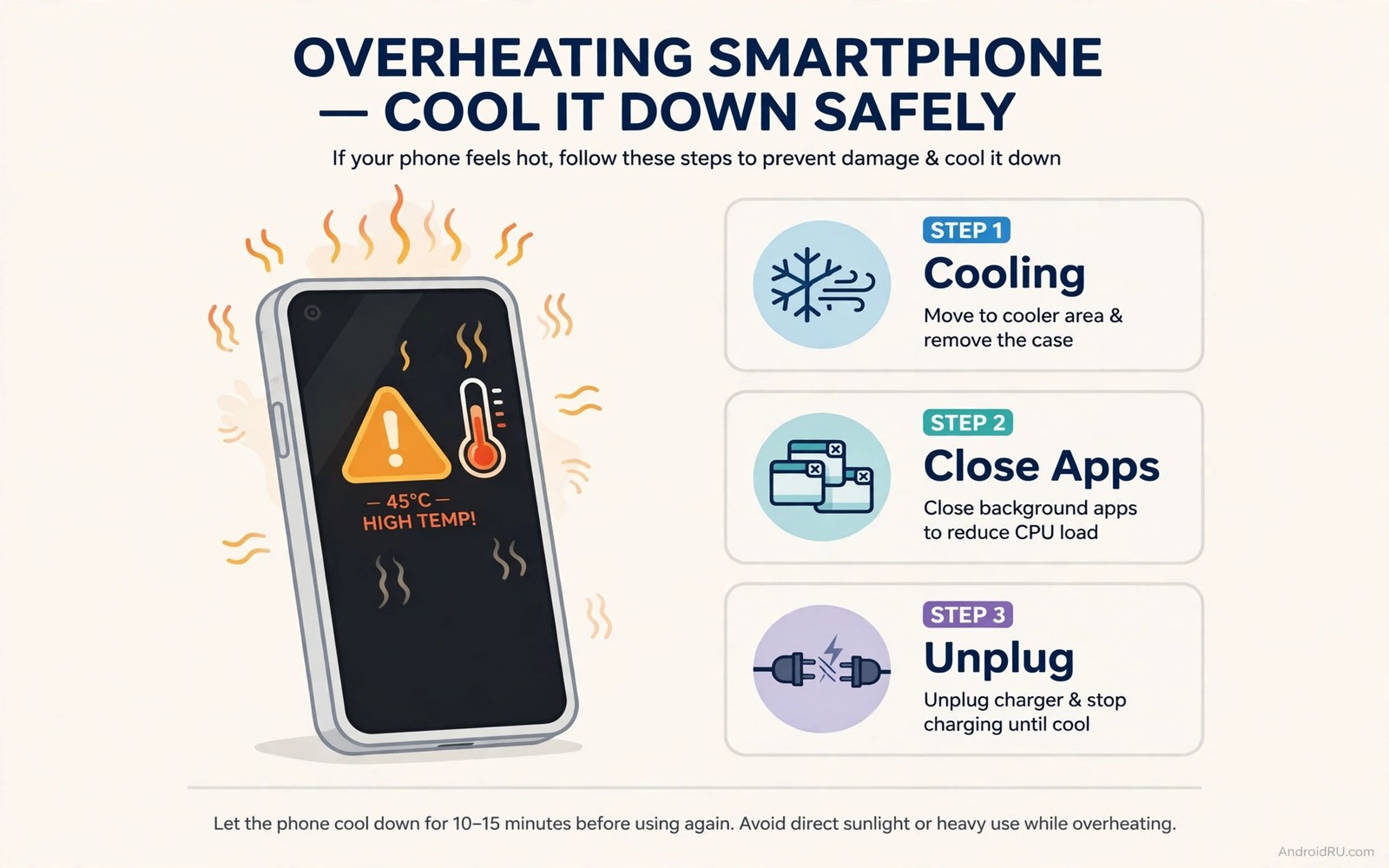
An overheating warning is not a suggestion. It is a safety signal. The phone detected temperature beyond safe limits. It may throttle performance. It may pause charging. It may shut down. Those actions protect the battery and circuits. Ignoring the warning risks permanent damage. It risks data loss from sudden shutdown. In rare cases it risks battery swelling. Many owners dismiss the warning and keep gaming. Many keep charging in sunlight. Many restart immediately and repeat the same load. That response worsens the problem. This guide gives three urgent steps. They work in order. They cool the phone safely. They also reveal whether the problem is a one-time spike or a deeper fault.
Step one: stop load and remove heat sources immediately
Close the demanding app at once when a warning appears. Do not finish the game level. Do not finish the video export. Close the app fully. A paused app may still hold resources. A closed app releases them. Turn off mobile data if you are not using it for an emergency. Radio work adds heat. Turn off location if navigation is not essential. Location fixes add processor and radio load. Lower screen brightness to minimum comfortable level. The screen generates heat at high brightness. A dim screen cools faster. Move the phone out of sunlight immediately. Move it off a warm car seat. Move it off a laptop. Place it on a hard cool surface. A tile floor or a metal table dissipates heat well. A bed or sofa insulates heat. Avoid soft surfaces during cooling.
Unplug the charger if charging. Charging adds heat to an already hot phone. Unplugging removes that heat source instantly. Do not plug back in until the phone feels cool to the touch. A cool back panel signals safe temperature. A warm back panel signals continued caution. Wait for cool before resuming normal use. That wait may take ten to twenty minutes. Patience is the fix. Rushing back to heavy use reheats the phone immediately. The warning will return. Repeated warnings in one day signal a deeper problem. Note how many warnings occur. One warning after gaming in sun is understandable. Three warnings during light use is not. Count warnings as data. Data guides the next steps.
Remove a thick case if the phone feels hot. A case insulates the back. Removing it lets heat escape faster. Do not put the phone in a fridge or freezer. Rapid cooling causes condensation. Condensation risks circuit damage. Natural cooling in shade is safest. It is slower but it protects components. Do not blow compressed air into ports to cool. Compressed air can push dust deeper. It can also cool unevenly and cause condensation in humid air. Let airflow do the work. A room fan aimed at the phone helps. Moving air carries heat away steadily. That steady cooling is ideal. It avoids thermal shock from extreme cold.
Step two: cool down and check for damage signs
Let the phone cool completely before heavy use. Cool means back panel at room temperature. It should not feel warm in any spot. Check for hot spots after cooling. A single hot spot that remains warm may signal a failing component. A uniformly cool phone signals a general heat event. Check the screen for discoloration after cooling. Heat can damage display layers in extreme cases. Check the back for bulging. Press gently on a flat table. Note any rocking. A rocking phone may have a swollen battery. Swelling after a heat event is urgent. Stop using that phone. Seek repair at once. Do not charge a swollen phone further. Swelling plus heat is a safety combination. Treat it seriously.
Check battery percent after cooling. A large drop during the heat event may signal cell stress. Note the drop. A phone that lost 20 percent during a short heat spike suffered high load. A phone that lost little percent but still warned may have a sensor or cooling issue. Both need attention. Check for a sweet chemical smell. That smell signals cell damage. Stop using a phone with that smell. Seek repair immediately. Do not attempt to open it yourself. Lithium-ion damage needs professional handling. Most heat events show no physical damage. Checking still matters. Early detection prevents a minor heat event from becoming a safety incident later.
Restart the phone only after it cools fully. A restart on a hot phone adds processor load during boot. Boot load heats further. Wait for cool then restart. A restart clears stuck processes that may have caused heat. A runaway app can loop the processor at full speed. That loop generates heat continuously. Restart breaks the loop. After restart check Battery Usage. Look for an app with high background time during the heat period. That app may be the culprit. Restrict or update it. If no app stands out then the heat source was environmental. Sun or charging or gaming explains it. Environmental causes need habit changes. App causes need restriction or removal.
Step three: fix the cause and test safely
Identify the cause before resuming normal use. Was the phone in sunlight. Was it charging while gaming. Was it navigating in a hot car. Was a new app running. Each cause has a different fix. Sunlight needs shade and a vent mount. Charging while gaming needs separation of those activities. Hot car navigation needs airflow and lower brightness. A new app needs restriction or deletion. Fix the specific cause. Do not just cool and repeat. Repeating the same cause will trigger the warning again. Repeated warnings accelerate battery aging. They also risk eventual hardware damage. A cause fixed once prevents many future warnings.
Test with light use after cooling and fixing. Browse for ten minutes. Note temperature by touch. Note battery drop. Light use should keep the phone cool. If light use reheats the phone quickly then a deeper fault exists. A faulty battery or a failing component can generate heat at idle. That fault needs professional diagnosis. Do not keep testing with heavy use if light use already overheats. Light use overheating is a red flag. It means the phone cannot handle normal load safely. Back up data while the phone is cool. Seek repair promptly. Data backup before repair is essential. A shop may need to replace parts. Replacement may erase data in some cases. Back up first.
Update software if a known heat bug exists. System updates often fix thermal management. App updates often fix runaway loops. Check for updates after cooling. Install them on a cool phone connected to Wi-Fi. Do not install updates on a hot phone. Update installation adds processor load. It can push a hot phone over the limit again. Wait for cool. Install. Restart. Test lightly. That sequence is safe. It also ensures the update actually addresses heat rather than adding to it. If updates do not help and light use still overheats then hardware diagnosis is next. Do not delay that step. Persistent overheating is not normal. It is a fault signal.
One-time spike versus dangerous pattern
Distinguish spikes from patterns. A one-time spike has a clear cause. Gaming in direct sun on a hot day is a clear cause. Charging with a fast charger in a warm room while navigating is a clear cause. A spike resolves after cooling and cause removal. Light use afterwards stays cool. That pattern is understandable. It still deserves habit change. Repeated spikes with the same cause are a habit problem. Fix the habit. A dangerous pattern has no clear cause. Light browsing overheats. Idle phone overheats. Charging slowly overheats. Those patterns point at hardware. A failing battery generates heat internally. A short circuit generates heat locally. Those faults do not resolve with shade. They need repair. Do not treat a pattern as a spike. Patterns escalate.
Frequency matters too. One warning per summer is normal for heavy users. One warning per week during normal use is concerning. One warning per day is urgent. Track warning frequency in a note. Note date and activity and temperature feel. A rising frequency trend signals worsening hardware or a new app problem. A falling frequency after habit fixes signals success. Tracking turns warnings into data. Data prevents dismissal. Dismissal is the danger this guide addresses. Warnings feel annoying. They are actually protective. Respect them as data. Act on patterns early. Early action is cheaper and safer than late repair.
Compare overheating with other heat topics to build a full picture. Gaming heat has specific fixes in thermal tricks for gaming drain. Environmental heat has fixes in how sun and room heat kill batteries. Battery health trends have tracking in monitoring degradation cycles without root. Overheating warnings sit at the intersection of those topics. A warning may involve gaming plus sun plus an aged battery together. Fix all contributing factors. Single factor fixes may not suffice when multiple factors combine.
Emergency actions if the phone is extremely hot or swelling
Extreme heat needs extra caution. If the phone is too hot to hold comfortably then do not handle it extensively. Place it on a non-flammable cool surface. Move it away from bedding and paper. Do not charge it. Do not use it. Let it cool naturally in open air. If swelling is visible then do not press the phone. Do not bend it. Do not puncture it. Move it to a safe location if you can do so safely. Keep it away from flammable materials. Seek professional advice promptly. If smoke or a strong chemical smell appears then move away and seek emergency guidance according to local safety rules. Those extreme cases are rare. Knowing the response in advance prevents panic. Panic causes mistakes like putting a hot phone in water. Water plus a damaged battery is dangerous. Never put a hot or damaged phone in water.
Do not attempt to open a hot or swollen phone at home. Opening risks puncturing the cell. Puncture can cause fire. Professional repair shops have tools and safety procedures for damaged batteries. They can dispose of a failed cell safely. Home opening also voids warranties and risks injury. The cost of professional handling is small compared with injury risk. Back up data only if the phone is cool and stable. Do not prioritize data over safety in an extreme case. Data can often be recovered later by professionals. Safety cannot be recovered after an incident. Put safety first in every extreme heat decision.
A warning response log
Log each warning with cause and action. That log reveals patterns. It also proves to a repair shop that the problem is real and frequent. A shop takes a logged pattern seriously. It also helps warranty claims. A single verbal complaint is easy to dismiss. A dated log is evidence. Record date and activity and location and action taken. Record whether light use afterwards stayed cool. That outcome separates spikes from patterns. Review the log monthly in summer. Fix the top cause. That review prevents repeated warnings from becoming normal. Warnings should never become normal. Normalizing warnings is the mistake this guide warns against.
Overheating warning log
Date: 2026-07-28  Activity: gaming in sun, charging
Action: closed game, unplugged, shade, case off
Cool time: 18 min  Light use after: cool, normal
Reading: environmental spike, habit fix needed
The log above follows a simple incident tracking pattern used by many Android power users to separate spikes from patterns without any paid tool. It records only cause and action and outcome. Cause shows what triggered heat. Action shows response quality. Outcome shows whether the phone recovered normally. A normal outcome after cause removal means a spike. An abnormal outcome after cause removal means a pattern. Use the log to decide between habit change and repair. Habit change fixes spikes. Repair fixes patterns. Confusing them wastes time and risks safety.
Common mistakes
Many owners ignore warnings and keep gaming. That habit accelerates damage. Many owners put a hot phone in a fridge. Rapid cooling causes condensation. Many owners restart a hot phone immediately. Boot load adds heat. Many owners charge a hot phone to keep using it. Charging adds heat to an already hot cell. Many owners dismiss warnings as software bugs. Warnings reflect real temperature sensors. Trust sensors. Many owners open a swollen phone at home. Opening risks puncture and fire. Many owners keep using a phone that overheats during light use. Light use overheating is a fault signal. Seek repair. Many owners blame the warning itself for interrupting use. The warning protects the phone. The heat is the problem. The warning is the messenger.
Another mistake is fixing only cooling without fixing cause. Cooling treats the symptom. Cause removal prevents recurrence. Do both. Cool first. Fix cause second. Test lightly third. That order is safe and effective. The key is action not reading. Read once. Act every time a warning appears. That discipline protects battery and safety for years.
FAQ
What should I do first when an overheating warning appears? Stop heavy use at once. Unplug the charger. Move the phone out of sunlight onto a cool hard surface. Remove a thick case. Let it cool naturally before resuming use.
Is it safe to put a hot phone in the fridge? No. Rapid cooling causes condensation inside the phone. Condensation risks circuit damage. Cool naturally in shade with airflow instead. Natural cooling is slower and safer.
When does overheating need professional repair? When light use overheats the phone or when warnings occur daily without a clear cause. Swelling or a chemical smell needs immediate professional attention. Do not delay those cases.
Conclusion
Overheating warnings demand three urgent steps. Stop load and remove heat sources. Cool down and check for swelling or smell. Fix the specific cause and test with light use. Distinguish one-time spikes from dangerous patterns. Spikes need habit changes. Patterns need repair. Log each warning with cause and outcome. Act on patterns early. Never put a hot phone in a fridge or water. Never open a swollen phone at home. Apply step one the next time a warning appears. That immediate response protects your phone and your safety.

