

A degraded battery feels like a sentence. Screen time shrinks month by month. The phone dies at twenty percent. Replacement sounds like the only answer. Replacement helps truly worn cells. Many phones labelled degraded suffer from fixable problems instead. A miscalibrated meter and hidden drain and bad habits mimic chemical wear convincingly.
This guide separates real wear from fake wear. You will recalibrate the battery meter correctly. You will cut the hidden drains that exaggerate degradation. You will rebuild charging habits that recover usable hours. You will learn the test that proves whether replacement is truly needed.
Work through the steps in order over one week. Recalibration first. Drain removal second. Habit rebuild third. Measurement throughout. A week of discipline beats a rushed repair bill when the cell still has life left.
Recalibrate the battery meter safely
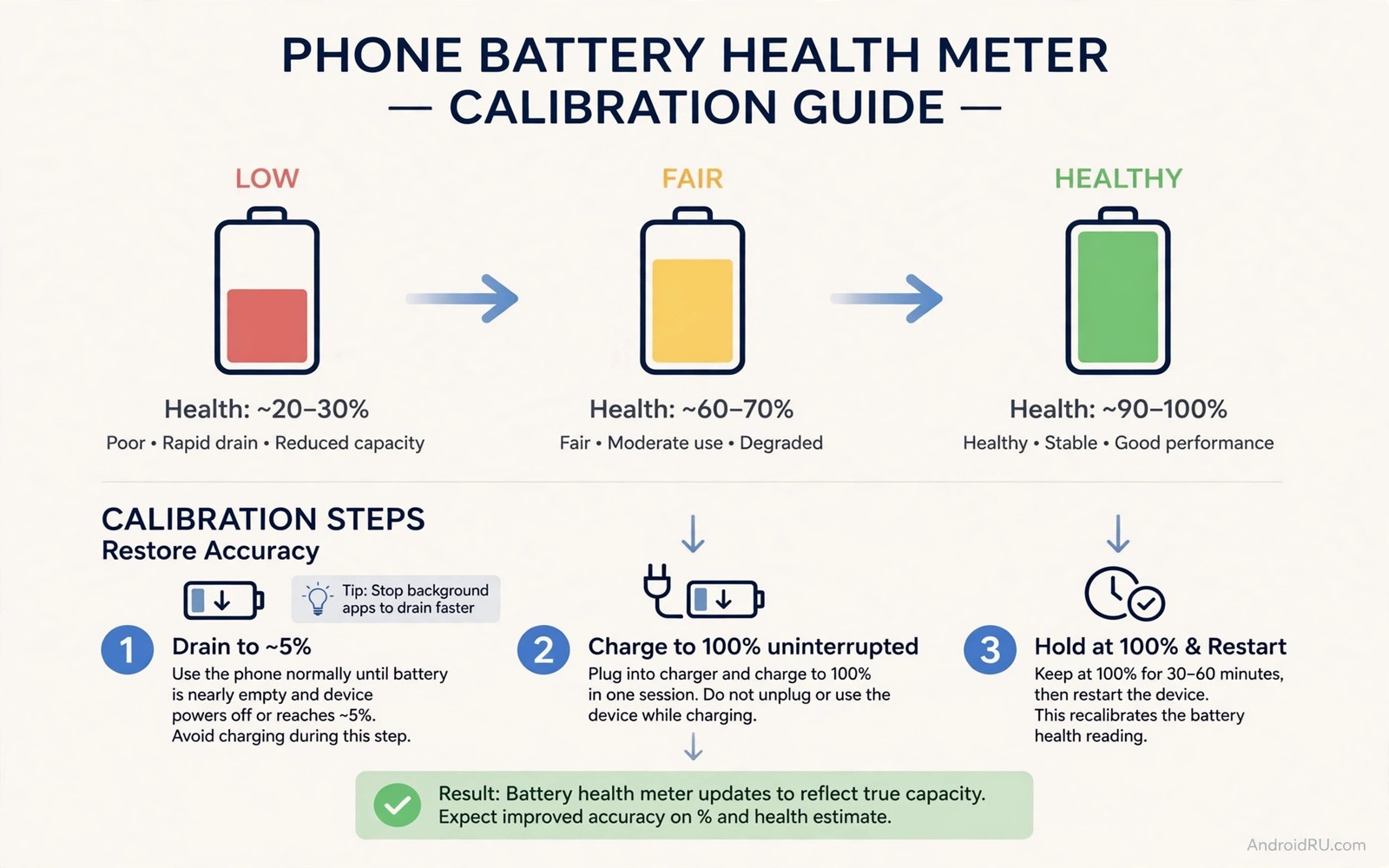
The battery meter estimates charge from voltage and usage history. The estimate drifts after months of partial charges. A drifted meter shows sudden drops and early shutdowns. Recalibration teaches the system the true full and empty points again. The process uses one full cycle and no special tools.
Charge the phone to full without interruption. Use it normally until it shuts down on its own. Leave it off for thirty minutes. Charge it to full again without interruption. The meter now maps the real capacity range. Repeat calibration at most once every few months. Frequent full cycles wear the cell more than they help the meter.
Remove the drains that exaggerate degradation
Open battery settings and rank apps by usage. Restrict background activity for the top non-essential apps. Change always location to while using the app. Disable auto-play video in social apps. Each fix returns minutes that looked like lost capacity. A phone with clean settings shows its true battery health clearly.
Check for a runaway app after every system update. Updates sometimes reset background permissions. A reset permission can revive a drainer you tamed months ago. Recheck permissions after major updates. Two minutes of review protects the whole recovery effort.
Rebuild charging habits around the middle range
Lithium cells age slowest in the middle charge range. Daily use between twenty and eighty percent stresses the cell least. Charge to eighty for normal days. Reserve full charges for travel days. Avoid regular drops to zero because deep discharge stresses the cell from the other end.
Keep the phone cool during charging. Remove thick cases when the phone feels warm. Avoid charging in direct sun. Cool charging preserves capacity that heat would otherwise erase. Temperature control is the cheapest battery life extension available.
Use battery health reports with scepticism
Battery health percentages are estimates rather than laboratory measurements. Different apps report different numbers for the same phone. A health app reading eighty five percent does not condemn the battery. Real world screen time matters more than any single percentage.
Measure screen time over three normal days after calibration and drain fixes. Compare the result against the phone first year performance. A modest gap means the battery still serves daily life. A huge gap under light use means chemical wear dominates. Measurement beats app percentages every time.
Decide replacement on evidence rather than fear
Replace the battery when shutdowns persist after calibration and drain fixes. Replace it when the back panel bulges or the screen lifts. Replace it when screen time stays unusable under light use. These three signs together make replacement clearly worthwhile.
Choose a reputable repair service with a warranty on the new cell. Cheap cells with unknown origins degrade fast. A quality replacement restores the phone for years. A bad replacement repeats the whole saga within months. Pay for the cell quality your phone deserves.
Build a weekly battery care routine
A weekly routine prevents slow decline from going unnoticed. Check battery usage every Sunday. Check free storage in the same session. Check for app updates that reset permissions. Three checks take five minutes together.
Charge to eighty percent as the weekly default target. Reserve full charges for the week travel day if any. A week of eighty percent charges ages the cell gently. A week of full charges ages it noticeably faster. Defaults compound across months.
Clean the charging port gently every month with a wooden pick. Lint in the port causes loose connections and heat. A clean port charges efficiently and safely. Avoid metal tools that damage contacts. Gentle cleaning preserves the port for years.
Review the routine itself every three months. New apps and new habits change drain patterns. A routine from three months ago may miss new culprits. Quarterly reviews keep care current. Care routines need maintenance like everything else.
Test a replacement decision honestly
A replacement decision needs a fair test week. Apply efficient settings for seven days first. Measure screen time daily across that week. A phone failing the test week despite clean settings likely needs a new cell. A phone passing the test week needs no replacement.
Compare test week screen time against manufacturer expectations realistically. A three year old phone need not match launch day endurance. Seventy percent of original endurance still serves daily life well. Perfection is the wrong standard for an ageing device.
Get a repair quote before deciding on a new phone. Battery replacement costs a fraction of a new device. A quoted price makes the comparison concrete. Emotional frustration inflates replacement desire. A concrete quote restores proportion.
Choose replacement when the test week fails and the quote is reasonable. Delaying a needed replacement wastes daily time on chargers. A new cell restores freedom from outlets. Timely replacement beats months of charger hunting.
Maintain a battery after recovery
Recovery gains fade without maintenance habits to protect them. A recovered battery still ages through normal cycles and heat exposure. Monthly permission audits prevent drainers from returning after updates. Quarterly calibration checks catch meter drift before it exaggerates wear again. Maintenance preserves recovery results that one-time fixes cannot sustain alone.
Keep charging habits consistent after recovery rather than drifting back to old routines. Old overnight full charge habits return easily without conscious attention. A written charging routine on the nightstand reinforces the new habit daily. Visible reminders beat willpower for long term habit maintenance. Consistency is the real secret behind lasting battery health.
Monitor screen time monthly as a recovery health indicator. Stable screen time across months confirms the battery holds its recovered performance. Declining screen time signals new drain or advancing wear early. Early signals allow timely intervention before problems become severe. Monthly monitoring catches decline while fixes remain cheap.
Replace accessories that degrade after recovery to avoid new stress sources. Worn cables cause inefficient charging and excess heat. Ageing chargers deliver unstable power that stresses cells. Fresh certified accessories protect a recovered battery properly. Accessory quality is part of battery maintenance rather than a separate concern.
Plan for eventual replacement realistically even after successful recovery. Recovery extends useful life but cannot stop chemical ageing forever. A realistic replacement timeline prevents panic when decline eventually resumes. Planning turns an eventual expense into a budgeted decision. Realistic expectations complete any honest battery recovery story.
adb shell dumpsys battery | grep -i capacity
adb shell dumpsys batterystats --reset
adb shell settings get global battery_health
The commands above are a generic illustration for reading battery capacity estimates from a computer. They show the kind of values a technician reviews during a health assessment. Everyday users should use the on-screen battery settings instead.
Fast charging facts matter during recovery because heat erases calibration gains. Overnight charging routines shape long term health more than any single full cycle. Faster charging setups need cool conditions to protect a recovering cell.
Common mistakes
The worst mistake is calibrating with repeated full cycles. One full cycle teaches the meter. Ten full cycles wear the cell for no benefit. Calibrate once and then return to partial charging habits. Discipline after calibration matters more than calibration itself.
Another mistake is trusting a single health app number. Apps estimate health from different signals. Two apps can disagree by ten points on the same phone. Judge health by measured screen time across several days instead.
A third mistake is ignoring heat while chasing capacity. A hot phone loses capacity faster than a cool phone with worse habits. Fix temperature first. Then fix charge range. Then judge the result.
FAQ
Does calibration restore lost capacity?
No and calibration restores meter accuracy rather than chemical capacity. A miscalibrated meter hides usable charge behind false readings. Calibration reveals that hidden charge. Truly lost capacity returns only with a replacement cell.
How often should I fully charge for calibration?
Calibrate at most once every few months and only when readings look erratic. Daily partial charging suits lithium cells better. Full cycles are a diagnostic tool rather than a daily habit.
Can software really make a degraded battery feel new?
Software cannot reverse chemical wear. Software can remove drain and fix meter errors that exaggerate wear. Many phones feel dramatically better after those two fixes. The remaining gap shows the true chemical state honestly.
Conclusion
Run the calibration cycle this weekend when you can watch the full charge. Apply the drain fixes on Monday morning. Measure screen time across three normal days. Compare the result against your recent worst days.
You may find the battery had life left all along. Drain and meter errors hid it behind alarming numbers. Recovery through measurement beats replacement through panic. When replacement truly proves necessary you will know it with evidence.

