

What Safe Purchasing Really Means
Safe purchasing means that a user pays once for the exact item that was promised and that the app unlocks that item only after the payment is proven. It also means that a refund or a cancellation returns the app to the correct state. It means that a purchase cannot be faked by editing local data. It means that a subscription renewal and a subscription expiry are both handled without manual work from the user. Safety is a property of the whole flow rather than a single check in one screen.
Many purchase bugs come from trusting the device too much. A device can be modified. A local file can be edited. A network response can be replayed. A secure design therefore treats the device as untrusted for entitlement decisions. The device asks for a purchase and it displays the result. A trusted server verifies the receipt and records the entitlement. The app then reads the entitlement from that trusted record. That separation is the core of safe billing.
Users also need clarity before they pay. The price and the billing period and the renewal behaviour and the cancellation path should be visible before the purchase button is pressed. A one time purchase should say clearly that it is one time. A subscription should say clearly when it renews and how it can be cancelled. Clear presentation reduces refunds and reduces support messages and builds trust that keeps users subscribed longer.
Product Types and Their Rules
A one time product is bought once and it stays owned until it is consumed or until the user asks for a refund. A consumable product can be bought again after it is used. Examples include in game currency and extra lives and single use credits. A non consumable product can be bought once and it stays owned. Examples include a permanent feature unlock and a premium theme pack. The app must consume a consumable only after the benefit has been granted.
A subscription gives access for a period and it renews until the user cancels. The app must check the current subscription state on every launch rather than caching an old state forever. A subscription may have a trial period and an introductory price and a grace period after a failed payment. Each of those states changes what the user can access. The app should map each state to a clear access rule and it should test each rule separately.
Product identifiers must stay stable across app updates. Changing an identifier breaks the link between an old purchase and a new build. A new identifier should be treated as a new product rather than as a rename of an old product. The product catalogue should be reviewed before each release. A missing product in the catalogue will block purchases even when the code is correct.
The Purchase Flow Step by Step
The flow starts when the user selects a product and the app asks the billing service for the product details. The app shows the price and the description returned by the service rather than a hardcoded price in the code. That rule prevents a mismatch between the displayed price and the charged price. The app then launches the purchase flow for the selected product. The system handles payment authentication and it returns a result to the app.
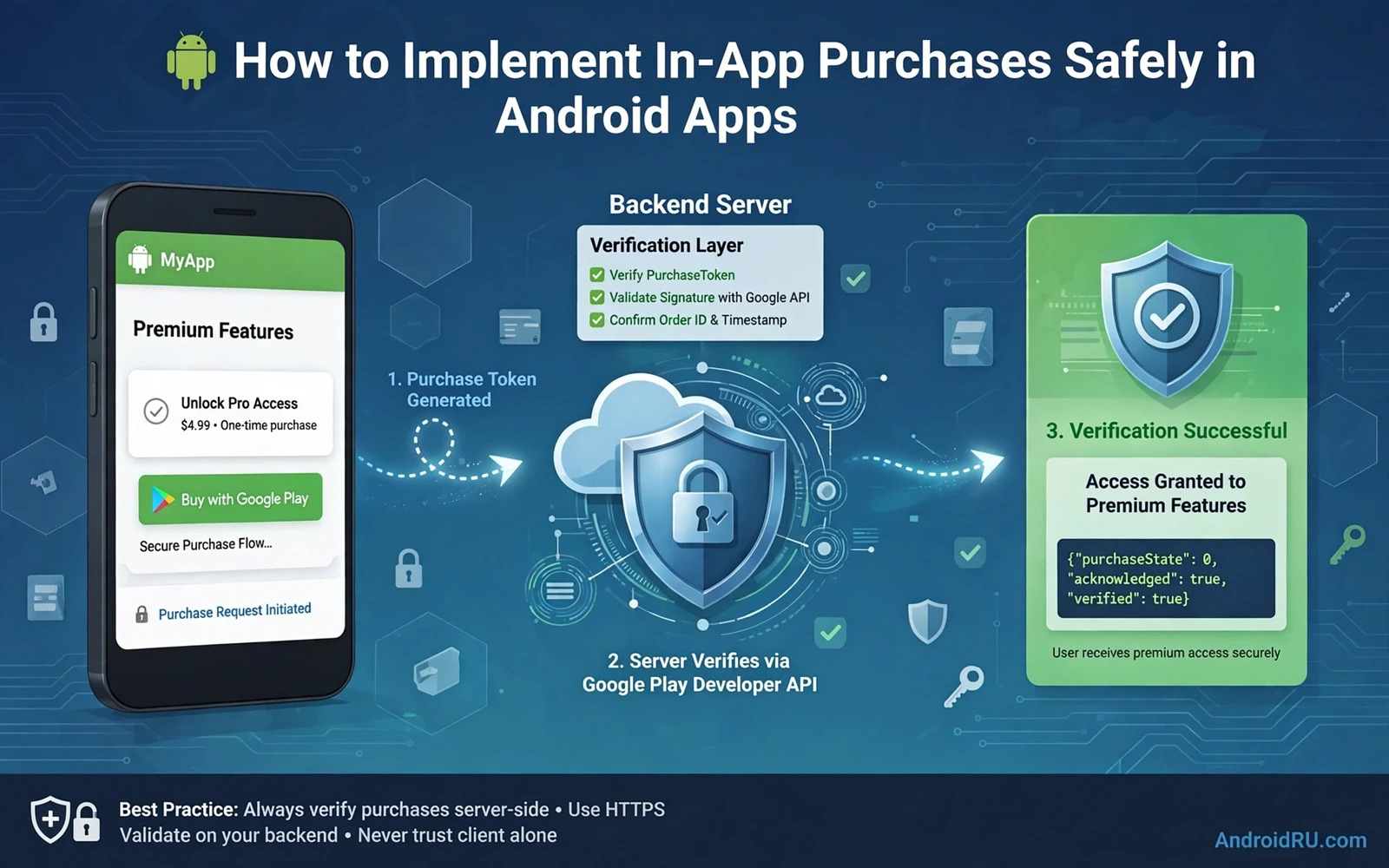
On success the app receives a purchase record with a token and a state and a product identifier. The app must not unlock content at this point based only on the device record. The app sends the token to its server for verification. The server checks the token with the billing service and records the entitlement. The app then acknowledges the purchase to the billing service. Acknowledgement tells the system that the purchase was delivered. An unacknowledged purchase is refunded automatically after a short period.
On failure the app must show a clear message and it must leave the user in the state that existed before the purchase attempt. A cancelled purchase is not an error and it should not show an alarming message. A network failure should offer a retry without charging twice. A pending purchase should be handled as pending rather than as success or failure. The app should query pending purchases on launch and complete them when they become successful.
Server Verification and Entitlements
Server verification is the strongest defence against fake purchases. The server receives the purchase token and it asks the billing service whether that token is valid and whether it belongs to the expected product and the expected user. The server stores the result with the user identifier and the expiry time. The app asks the server for the current entitlement whenever it needs to decide access. The device never decides access from a local flag alone.
Real time notifications from the billing service help the server stay current. A renewal and a cancellation and a refund and a payment failure can all arrive as notifications. The server updates the entitlement when a notification arrives. The app then sees the new state on its next check. Without notifications the server must poll for changes and it may serve stale access for too long. Polling also wastes resources when nothing has changed.
Entitlement records should include the product identifier and the purchase token and the start time and the expiry time and the current state. The record should be updated rather than duplicated on renewal. Duplicated records make it hard to answer the simple question of whether a user currently has access. A single current record per user per product keeps that question easy to answer and easy to audit.
Handling Subscriptions With Care
Subscription handling needs a state machine rather than a single boolean flag. States include active and in trial and in grace period and on hold and paused and cancelled and expired. Each state maps to an access decision. A user in grace period may keep access while payment is retried. A user on hold may lose access until payment resumes. A user who cancelled but has time left keeps access until the period ends. The app should display the correct message for each state.
Upgrades and downgrades add another layer. A user may move from a monthly plan to a yearly plan or from a basic plan to a premium plan. The billing service offers replacement modes that control when the new plan starts and how the remaining time is handled. The app should explain the chosen mode before the change is confirmed. A silent change that surprises the user will generate a refund request even when the change was technically correct.
Restore behaviour matters for subscriptions as well. A user who reinstalls the app or moves to a new device should recover access without buying again. The app should query the billing service for active purchases on first launch after install. The server should link those purchases to the signed in user account. Account based restore is more reliable than device based restore because it survives device changes.
Security Threats and Practical Defences
Fake purchase tools try to trick an app into unlocking content without payment. They may intercept billing calls or modify local storage or replay old purchase records. Server verification blocks most of these attacks because a fake token will fail verification. Obfuscation of billing code adds friction but it does not replace verification. The server remains the trusted judge.
Replay attacks reuse a valid token from an earlier purchase. The server should mark each token as used after it has been acknowledged and granted. A second use of the same token should be rejected. The server should also check that the token belongs to the user who presents it. A token from another account should never unlock content for a different account.
Refund abuse is a business risk rather than a pure code risk. A user may buy a consumable and use it and then request a refund. The app should delay granting high value consumables until verification completes. The server should revoke consumable credit when a refund notification arrives if the credit has not yet been spent. Clear refund rules in the app description reduce disputes. A fair refund process protects honest users without rewarding abuse.
Testing Before Release
Test purchases with licensed test accounts before release. Test accounts can buy products without real charges. Test each product type and each subscription state. Test cancellation during a trial. Test a failed payment and a grace period. Test a purchase on one device and a restore on another device. Test a pending purchase that completes later. Each scenario should end in the correct access state.
Test the unhappy paths as well as the happy path. Kill the app during a purchase and relaunch it. The app should query outstanding purchases and complete the pending flow. Lose network during verification and restore network later. The app should retry verification without duplicating the grant. Rotate the device during the purchase flow. The purchase result should still reach the correct handler.
Publishing knowledge helps a team avoid policy mistakes that can block a billing release and a thoughtful look at publishing apps on alternative Android stores shows how store rules differ and why billing rules must be checked for each store. Asset and interface work also connects to purchasing because a purchase screen must look trustworthy on every screen size and the guide to responsive layouts in Jetpack Compose helps a team build that screen well. Visual clarity on a purchase screen depends on sharp icons and clean art and the comparison of vector drawables versus bitmap assets helps a team choose art that stays crisp when a user must trust a payment screen.
Common Mistakes to Avoid
One common mistake is unlocking content before server verification completes. The unlock may happen quickly but it creates a window for fake purchases. Another mistake is forgetting to acknowledge a purchase. The purchase will be refunded and the user will lose access through no fault of their own. A third mistake is caching subscription state forever. The app will keep serving expired access or it will block renewed access.
Another mistake is hardcoding prices in the app. Prices change by region and by promotion. A hardcoded price will mismatch the charged price and users will complain. A further mistake is using the same product identifier for different benefits. The identifier should map to one benefit only. Changing the benefit behind an identifier confuses existing owners and breaks restore logic.
A final mistake is showing a generic error for every billing failure. Users need to know whether they were charged and whether they should retry and whether they should contact support. A clear message for cancellation and a clear message for network failure and a clear message for unavailable product each reduce support load. Billing errors are stressful for users and clear language lowers that stress.
// Billing flow sketch in Kotlin
// billingClient.launchBillingFlow(activity, params)
// onPurchasesUpdated(result, purchases) {
//     purchases?.forEach { sendTokenToServer(it.purchaseToken) }
// }

