

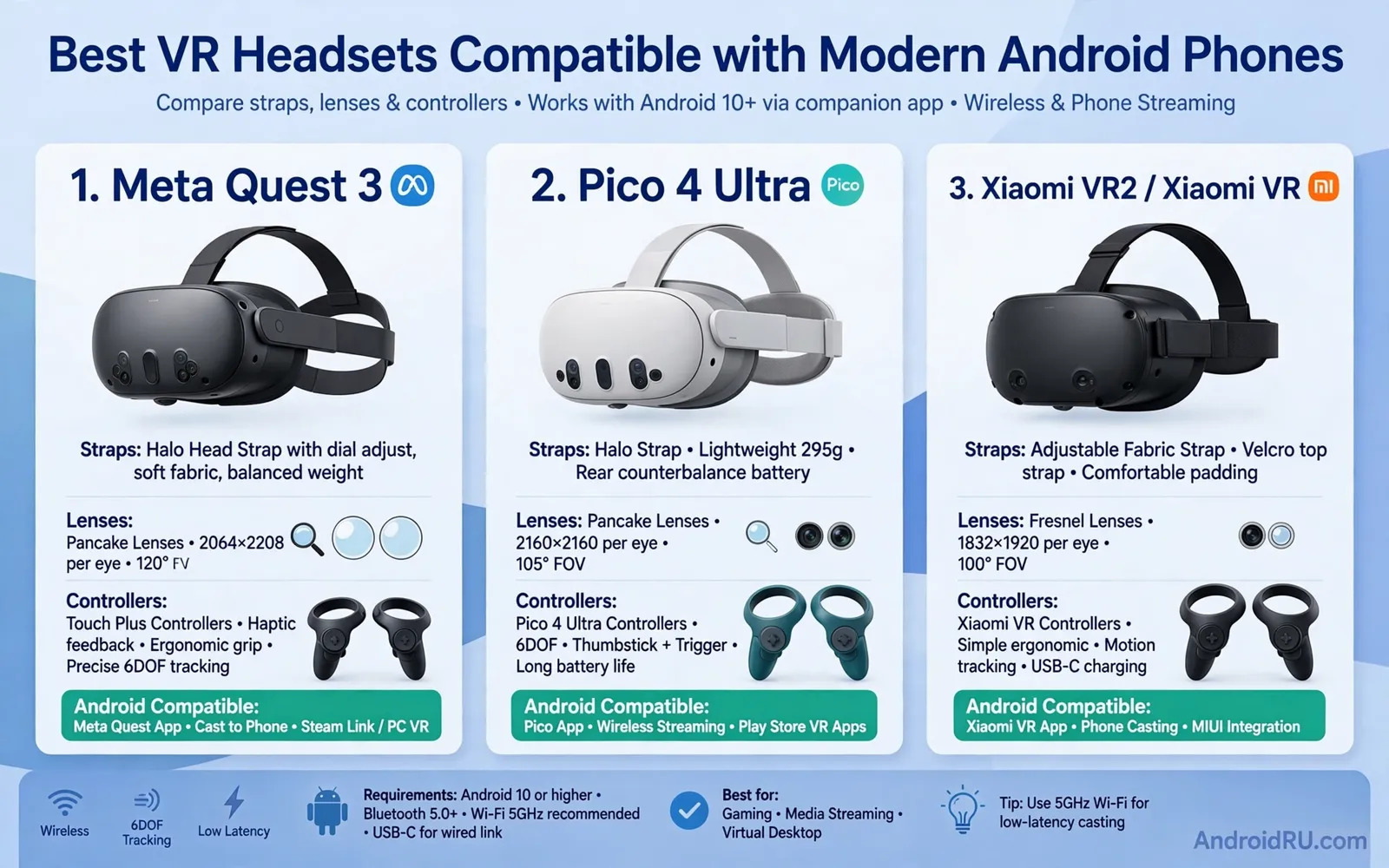
VR headsets bring immersive worlds to Android phones in two broad styles. Phone-based viewers use the phone screen as the display. Standalone headsets run their own system and link to a phone app for setup. Phone-based viewers cost less and travel easily. Standalone headsets offer stronger tracking and freer movement. This guide explains how each style works with modern Android phones. It also explains how to pick a headset that fits your comfort and your games.
Start with comfort before visual specs. A heavy front unit strains the neck during long sessions. A balanced strap spreads weight across the head. A soft face pad prevents pressure marks. Glasses wearers need extra eye room inside the headset. Adjustable lenses help users with different vision needs. Try the fit for at least fifteen minutes when possible. Short shop demos hide neck strain. Long sessions reveal strap problems clearly. Comfort decides whether a headset gathers dust or earns daily use.
Phone Compatibility And Tracking
Phone compatibility starts with screen size and sensor support. A phone viewer needs a phone that fits its tray exactly. A loose phone shifts during head movement. A tight phone risks button presses inside the viewer. A phone app should support the headset sensors you need. Gyroscope quality shapes head tracking smoothness. Poor gyroscope tracking causes drift and nausea. Test slow head turns first. Test fast head turns second. Note any lag between movement and display response. Lag breaks immersion faster than low resolution. Controller support extends VR play beyond head movement and the comparison in Top Mobile Game Controllers: Razer Kishi vs Backbone One helps you understand controller ergonomics that also matter for VR sessions.
Standalone headsets reduce phone dependence but still use Android apps for setup. Setup apps manage accounts and downloads. Setup apps manage guardian boundaries for safe play space. Setup apps manage software updates. A clear play space prevents collisions with furniture. A guardian boundary warns you before you leave the safe zone. Keep the play area free of pets and small children during sessions. Take breaks every half hour. Drink water during breaks. VR fatigue builds quietly and breaks restore comfort and focus.
Content Lenses And Motion Comfort
Content choice shapes first VR impressions strongly. Calm exploration apps suit beginners best. Fast action games suit users with strong VR legs. Video apps offer a gentle entry through immersive cinema views. Social VR apps add shared spaces with friends. Start with short sessions in calm content. Increase session length gradually over days. Stop at the first sign of nausea. Pushing through nausea trains aversion rather than tolerance. Fresh air and a seated rest help recovery. Most users adapt with gradual exposure over time. Cloud play can stream demanding worlds to lighter hardware and the tested overview in Best Gaming Headsets with Low Latency for Mobile Gamers explains streaming trade-offs that also apply to VR content delivery.
Lens care protects image clarity over months. Clean lenses with a soft dry cloth only. Avoid harsh cleaners that damage coatings. Store the headset away from direct sunlight. Sunlight through lenses can damage internal displays. Keep lenses covered during storage. Check for dust before each session. Dust spots distract during dark scenes. Update headset software during calm hours. Test tracking after each update. A short calibration routine after updates prevents drift surprises in the middle of a game.
Cooling Audio And Smart Buying
Long VR sessions generate heat near the face. Phone-based viewers trap phone heat close to the skin. Standalone headsets manage heat with vents and fans. Take breaks when the face area feels warm. Remove the headset and let it cool in open air. Avoid covering vents with hair or straps. Audio matters for immersion too. Built-in speakers offer convenience. Headphones offer deeper isolation. Low latency audio keeps sound aligned with head movement. Cooling discipline during long play has parallels in phone gaming and the cooler guide in Top Cooling Fans and Radiators for Heavy Android Gaming shows how heat management protects sustained performance.
Buy for your real use pattern rather than future dreams. Casual video viewers need a light affordable viewer. Social explorers need good tracking and clear voice chat. Gamers need strong controllers and a wide content library. Check content availability before purchase. Check phone app quality in user reviews. Check return terms for motion sickness problems. Keep packaging until comfort tests pass. A headset that fits well and runs calm content becomes a joy. A headset that strains the neck becomes a shelf item. Choose comfort first. Choose content second. Choose visual hype last.
Social VR on Android phones opens shared spaces for friends. Friends meet as avatars in virtual rooms. Voice chat carries conversation naturally. Gestures add expression beyond voice alone. Shared video rooms let friends watch together remotely. Shared game rooms let friends play together remotely. Start social sessions with familiar friends first. Learn movement controls before joining large public rooms. Set comfort boundaries for stranger interactions. Block and report tools protect social comfort. A welcoming first social session encourages return visits. A hostile first session discourages further exploration.
Fitness VR turns workouts into games on headsets. Boxing routines track punches and dodges. Dance routines track rhythm and movement. Rowing routines track steady pace. Fitness VR suits users who dislike gym routines. Fitness VR needs a clear play space for safety. Fitness VR needs good ventilation for sweat control. Wipe face pads after fitness sessions. Dry straps after fitness sessions. Track heart effort with a wearable if desired. Stop fitness VR at signs of dizziness. Fitness plus VR can motivate movement but safety stays first. A safe fitness routine beats an intense risky routine.
Education VR brings distant places into classrooms and homes. Museum tours let students explore artifacts closely. Science scenes let students inspect structures interactively. History scenes let students walk through past settings. Geography scenes let students visit landscapes remotely. Teachers should preview content for age suitability. Teachers should set session lengths for young learners. Students should discuss scenes after sessions. Discussion turns novelty into learning. Discussion also reveals motion comfort problems early. Education VR works best as a supplement to lessons. A supplement enriches teaching without replacing teacher guidance.
Accessibility in VR deserves attention from buyers and developers. Seated play modes help users with limited mobility. One-handed control modes help users with limited hand function. Text size options help users with low vision. Audio descriptions help users who cannot see scenes fully. Subtitle options help users who cannot hear dialogue fully. Test accessibility options before purchase when possible. Ask makers about planned accessibility updates. A headset that welcomes more users serves households better. A headset that ignores accessibility limits its audience. Inclusive design benefits every user over time.
Privacy in VR includes movement and voice data. Headsets track head movement continuously. Headsets may track hand movement continuously. Microphones capture voice during social sessions. Cameras may map room layouts for boundaries. Review privacy settings before first use. Limit data sharing to needed features only. Delete stored room maps when moving house. Review voice data retention options regularly. Explain VR privacy to household members clearly. Children need extra privacy supervision in VR. Thoughtful privacy settings keep immersive fun from becoming surveillance worry.
Future VR on phones may blur phone and standalone lines. Phones may act as controllers for standalone headsets. Phones may act as second screens for VR sessions. Phones may stream content to headsets over local networks. Wireless links will shape that future strongly. Battery life will shape session lengths strongly. Lens comfort will shape adoption strongly. Buyers should not wait forever for future promises. Buyers should buy for content available today. Today content plus comfort decides value. Future features can arrive as pleasant bonuses later.
Remote workers who use VR for virtual meetings should test headset comfort for meeting lengths rather than for short demos because a headset that feels fine for ten minutes can press painfully after an hour-long meeting while a well balanced headset with soft padding lets a worker stay present through a full workday of virtual collaboration.
Travelers who want VR entertainment on long flights should check airline rules and seat space before packing a headset because a bulky headset can disturb neighbors in tight seats while a compact viewer plus a phone can still deliver immersive video without taking over shared cabin space or blocking aisle movement.
Developers who build VR content for Android phones should test their apps on both low-end and high-end phones because an app that runs smoothly on a flagship can stutter badly on a mid-range phone while an app tuned for a wide range of devices reaches far more users and earns better reviews across the whole Android ecosystem.
Families sharing one headset should create separate user profiles and hygiene routines because shared face pads collect sweat and skin oils quickly while separate profiles keep game progress and comfort settings distinct and a simple wipe routine between users keeps shared VR pleasant for everyone in the household.
Set a comfortable VR session timer before every play session. Start with twenty minute sessions for beginners. Extend sessions gradually over several weeks. Stop immediately when dizziness appears. Stop immediately when eye strain appears too. Rest eyes by looking at distant objects. Drink water during every break. Ventilate the play room between sessions. A timer habit prevents marathon fatigue effectively. A timer habit also protects neck comfort long term. Timed sessions keep VR enjoyable rather than exhausting.
Clean VR lenses and face pads after every shared session. Use a dry microfiber cloth for lenses only. Avoid paper towels that scratch lens coatings. Wipe face pads with a damp cloth lightly. Dry face pads fully before storage. Check straps for sweat stiffness weekly. Wash removable pads following maker guidance. Replace worn pads promptly when padding flattens. Flat padding presses harder on the face. Harder pressure causes discomfort faster. Clean gear feels fresh for every user. Clean gear also lasts longer overall.
Organize VR content into beginner and advanced folders in the app library. Place calm exploration apps in the beginner folder. Place gentle video apps in the beginner folder too. Place fast action games in the advanced folder. Place intense social rooms in the advanced folder too. Beginners start only in the beginner folder. Advancement happens after comfort grows steadily. Folder organization prevents accidental intense first sessions. Accidental intense sessions cause nausea and aversion. Gradual folders build VR confidence safely.

