

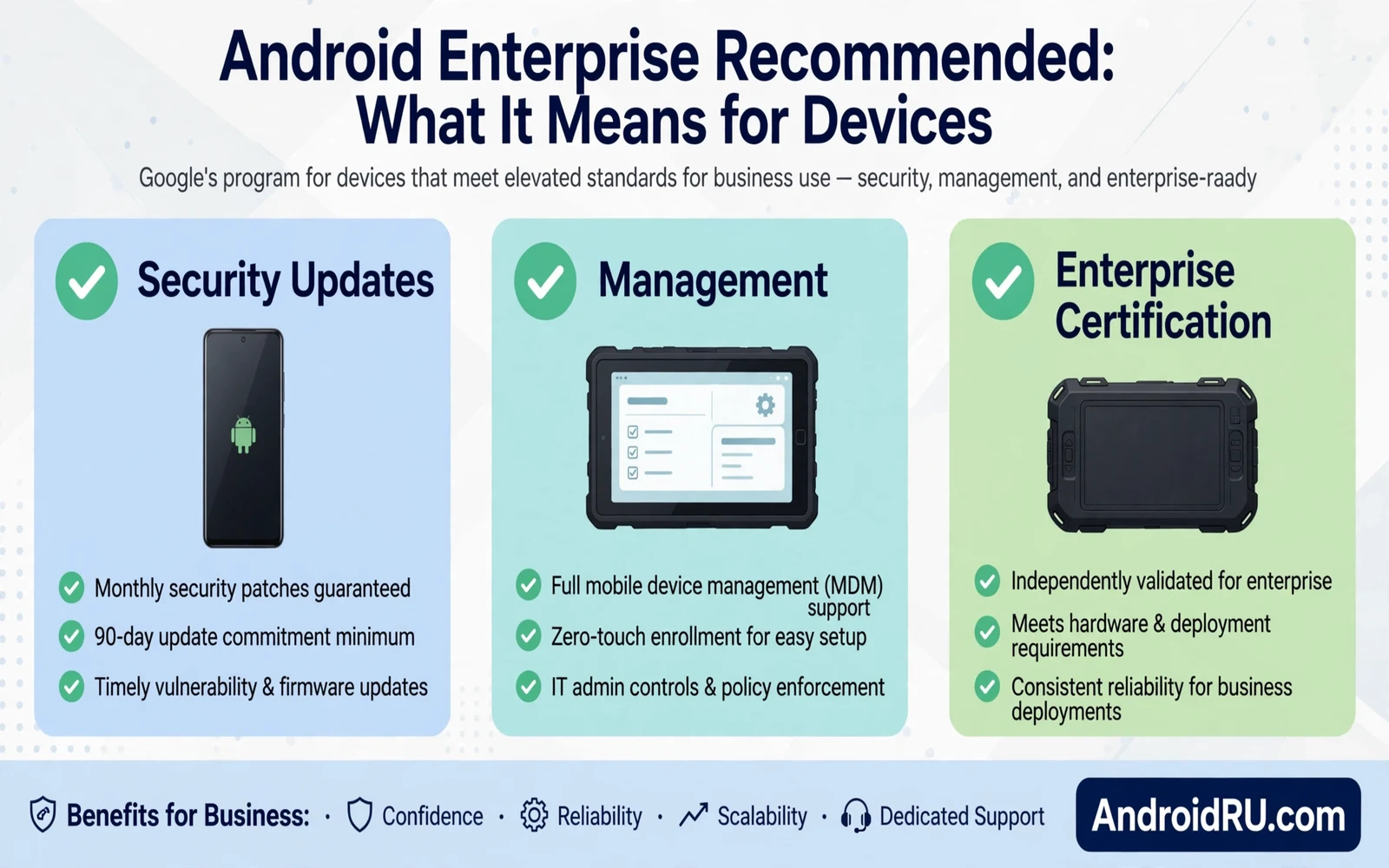
What the Label Means in Plain Words
Android Enterprise Recommended is a label for devices that meet a set of business readiness rules. The rules cover update speed and security patch length and hardware features that business management needs. A phone with the label has passed checks that go beyond basic consumer tests. The label helps a business buyer choose a phone without reading a full technical sheet for every model.
The label is not a promise that one phone fits every business. A warehouse team and an office team and a field team have different needs. The label gives a baseline that a buyer can trust and then the buyer must still check screen size and battery and rugged build and accessory support. Think of the label as a floor for quality rather than as a full buying decision.
Updates and Security Behind the Label
Devices in the program must receive security updates on a regular cadence for a set support period. That cadence matters because business phones often hold mail and documents and internal apps. A phone that misses patches for months becomes a weak point in a company network. The program also expects major version updates for a defined period so business apps do not get stuck on an old platform.
Security hardware also matters. Business phones need a trusted boot chain and a hardware backed key store for work credentials. Those features protect work data when a phone is lost or stolen. A phone without them can still serve personal use well but it is a weaker choice for managed work. The label signals that those building blocks are present and tested.
Update delivery shapes business planning too and how Android system updates work behind the scenes explains why staged rollout and safety checks affect when a fleet receives a new build.
Management Features That Businesses Need
Managed phones need zero touch enrolment or a simple enrolment flow that an admin can control at scale. Zero touch lets a new phone configure itself when it first connects. The admin sets policies once and each phone applies them without manual setup per device. That flow saves hours when a company deploys dozens or hundreds of phones.
Work profiles separate work apps and work data from personal apps and personal data on the same phone. An admin can wipe work data without wiping personal photos. That separation protects the worker and the company at the same time. Devices in the program must support work profiles cleanly and must handle managed app installs without constant errors.
What Buyers Should Check Beyond the Label
Check the support end date for the exact model before you buy in bulk. Two phones with the same label can have different support lengths because support is tied to launch date and maker policy. A phone near the end of support may be a poor bulk buy even with the label. Ask the seller for the support window in writing and compare it across shortlisted models.
Check accessory and repair support for the work setting. A field phone needs cases and screen protectors and spare batteries or fast repair. An office phone needs docks and headsets that work with its ports. A phone that passes lab tests but lacks field accessories will fail in daily use. Visit a test unit in the real work setting before a large order when possible.
Private areas can interact with managed rules and Android Private Space feature complete setup guide shows how a personal hidden area differs from a managed work profile on a business phone.
How It Helps Small Businesses Too
Small businesses gain from the label even without a large IT team. The label points to phones that receive patches on time and that support simple management tools. A small shop can enrol a handful of phones with a basic management app and can enforce a screen lock and a work profile without deep expertise. That baseline security is far stronger than buying the cheapest phone with no update plan.
Small teams should still keep a simple device list. Record model and purchase date and support end date and assigned worker for each phone. That list makes replacement planning easy and it prevents a surprise when a phone stops receiving patches. A small spreadsheet with those four facts is enough for a team of ten and it scales well as the team grows.
Limits of the Program
The label does not test every app that a business uses. A line of business app may still need testing on the chosen model. The label does not guarantee rugged build or long battery life or camera quality. Those traits need separate checks for the work role. A phone can meet business software rules while still being a poor fit for outdoor work or for long shifts.
The label also changes over time as rules tighten. A phone that earned the label at launch may sit under older rules than a newer phone. Buyers should check the current program page for the model rather than trusting an old badge on a box. A current check takes minutes and it avoids a bulk buy based on stale claims.
Security settings remain a daily duty even on labelled phones and essential system settings you should change on new Android phones gives a practical checklist for locks and permissions and updates that every worker should apply.
A Practical Buying Checklist
Shortlist phones with the label and then test work apps on each one. Check enrolment time per phone and check work profile separation and check patch history for the model. Check battery life on a real shift and check screen readability outdoors when the job needs it. A short field test with two workers reveals more than a long spec sheet.
Plan replacement before support ends. Budget for new phones in the year when patches stop rather than waiting for a security incident. Retire old phones from work use even when they still power on. An old phone with no patches should not hold work mail or work documents even as a backup device.
Market context helps a buyer time a fleet purchase and the future of Android predictions for the next five years outlines platform trends that can affect support length and device choice for a business fleet.
How Admins Enrol and Manage a Fleet
Enrolment starts when an admin creates a policy in a management console and links it to a set of devices. A new phone that powers on for the first time can pull that policy during setup when zero touch enrolment is configured. The phone installs work apps and applies lock rules and sets network settings without manual steps per phone. An admin who enrols ten phones by hand wastes hours that zero touch saves. A company that skips zero touch should still use a written setup checklist so every phone leaves setup in the same state.
Policy updates flow to enrolled phones over the air. An admin can change a password rule or add a work app and the fleet applies the change at the next check. Phones that stay offline for weeks will apply the change when they reconnect. Admins should track which phones have applied a critical policy and which phones lag behind. A policy that half the fleet ignores is a weak policy no matter how well it reads on paper.
Costs Beyond the Phone Price
Fleet cost includes management licences and accessories and repair and replacement as well as the phone price. A phone with a low sticker price but short support can cost more over three years than a labelled phone with a longer plan. Repair cost matters too. A phone with cheap screens and fast local repair beats a phone with rare parts that wait weeks for service. Buyers should model total cost over the support life rather than comparing launch prices alone.
Training cost also counts. Workers need a short guide for work profiles and for lock rules and for reporting a lost phone. A one page guide with clear steps saves support calls and it reduces risky workarounds. Workers who understand why a rule exists follow it more willingly than workers who see only a locked settings screen. Invest an hour in training for each fleet rollout and the support load will fall.
How to Retire a Business Phone Safely
Retiring a business phone starts with a work data wipe through the management console. The admin removes the work profile and its apps and its data while leaving personal data untouched on a personal device. On a company owned device the admin wipes the whole phone to factory state. The worker should confirm that personal photos are backed up before a full wipe because a full wipe cannot be undone. A written retirement checklist prevents the common error of wiping a phone that still holds the only copy of a personal file.
Retirement also includes account and accessory steps. Remove the phone from the management console so it no longer receives policies. Remove work accounts from the phone when the wipe leaves any residue. Return cases and chargers that belong to the company fleet. Record the retirement date and the reason so the fleet list stays accurate. A clean retirement record helps the next audit and it prevents a retired phone from reappearing as an active device in reports.
How Labelled Phones Handle App Updates
Managed app updates follow admin policy rather than user habit on labelled business phones. An admin can force an update for a work app when a security fix matters and can delay a feature update when it might break a work flow. Workers see work apps update on a schedule that the company controls while personal apps follow normal store rules. That split keeps work tools current without forcing personal apps into the same cycle. Admins should test forced updates on a pilot group first because a forced update that breaks a work app affects the whole fleet at once.
- Confirm the label for the exact model and storage variant
- Check security update cadence and support end date
- Test zero touch enrolment and work profile separation
- Test work apps on a real unit before bulk purchase
- Check accessories and repair paths for the work setting
- Plan replacement before patch support ends
Warning: Do not buy business phones on price alone. A cheap phone with short patch support can cost more in risk and in early replacement than a labelled phone with a longer plan. Do not enrol personal phones for work without a clear work profile policy because mixing work and personal data without separation creates privacy and legal risk for both sides.

