

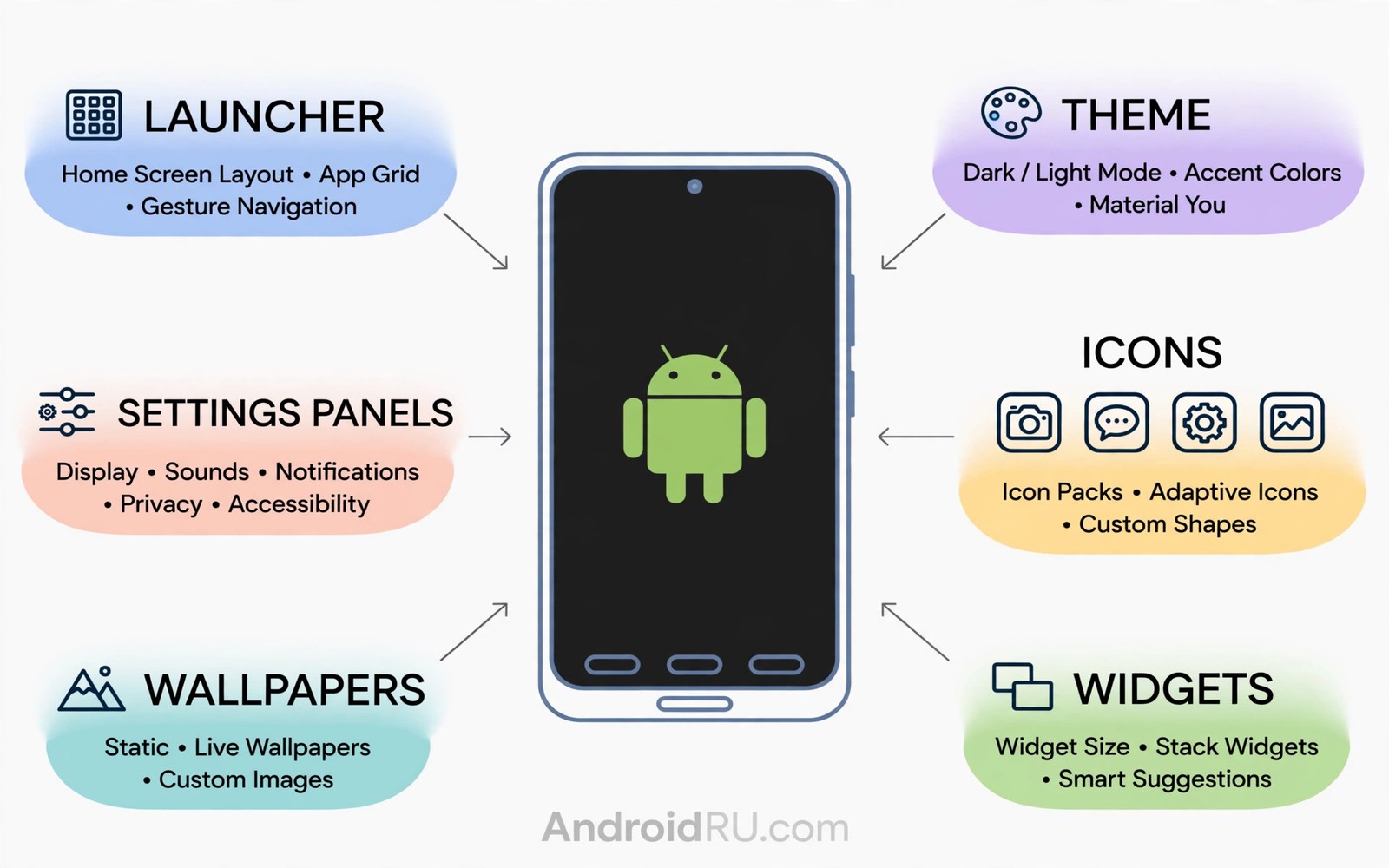
System customization without bootloader unlocking proves how far stock Android can go. Launchers reshape the home screen and themes reshape color. Automation reshapes behavior and ADB tweaks reshape animation speed. None of these need an unlocked bootloader or root access. The phone stays secure and warrantied while it still feels personal.
This guide collects advanced stock customization tips that stay inside safe boundaries. You will learn launcher power and ADB basics and automation recipes. You will also learn which tempting tweaks to avoid because they risk stability. If you want the theme foundation first then read about theme customization steps before you add the advanced layers here.
Safe customization respects the boundary between user settings and system integrity. User settings change experience without touching security partitions. Unlocking crosses that boundary and it trades warranty and safety for deeper control. Most daily personalization lives comfortably on the safe side.
Layers of safe customization
Launcher customization is the deepest safe layer because the launcher owns the home experience. Grid size and gestures and icon packs and widget padding all live there. A strong launcher can make a stock phone feel like a different device. Launcher changes also revert cleanly by switching the default home app.
Theme and display customization is the second layer and it covers palette and fonts and display size. These settings shape color and type across the system. They cost no security and they survive updates well. A theme plus a font choice plus a display size together create a distinct device character.
Automation is the third layer and it changes behavior by context without code. A routine can silence the phone at work and restore sound at home. A routine can open a transit app when you leave home. Automation feels like intelligence and it needs no unlock at all. Start with two routines and expand only when they prove reliable.
Apply advanced stock tweaks safely
Back up before each layer so any experiment reverts in minutes.
- Back up launcher layout and note current theme and font settings.
- Install a reputable launcher and rebuild one home screen page as a test.
- Set theme palette and font size and display size to your comfort values.
- Create one automation routine for work hours silence with a location trigger.
- Create a second routine for bedtime dimming and Do Not Disturb.
- Enable developer options only to adjust animation scales if you want faster motion.
- Use ADB animation scale tweaks from a trusted computer and record original values.
- Test all routines for three days before adding more automation or tweaks.
Practical tips for staying safe
Prefer Play Store tools with clear privacy policies for launcher and automation needs. A tool that requests broad permissions for a simple job deserves skepticism. Check permission lists before install and deny anything unrelated to the job. You can also explore gesture navigation choices because navigation tuning is another safe layer that shapes daily speed.
Record every ADB change in a note with the original value beside the new value. A note turns a mysterious future bug into a five minute revert. Without a note you may factory reset to fix a tweak you forgot. Documentation is the cheapest insurance in advanced customization.
Avoid sideloaded system mods that promise root features without root. Many such mods abuse accessibility services or device admin rights. A mod that needs device admin for a theme is a red flag. Stay with official settings and reputable Play tools for safety.
# Safe ADB tweaks (no unlock needed)
adb shell settings put global animator_duration_scale 0.5
adb shell settings put global window_animation_scale 0.5
adb shell settings put global transition_animation_scale 0.5
# These scale animation speeds; values restore via Settings.
The snippet above follows the pattern shown in the official Android developer documentation for device settings and in the Material Design guidelines for motion timing. It shows safe animation scale tweaks and you should record original values before you change any setting through ADB.
Common mistakes
Safe customization turns risky when users chase root results through unsafe shortcuts.
- Granting device admin casually. Device admin is a powerful right for a theme tool. Deny it unless the job truly requires it and you trust the developer.
- Changing ADB values blindly. Random ADB commands can break settings silently. Use only documented settings and record originals first.
- Stacking automation conflicts. Two routines fighting over volume create chaos. Review routines together and remove overlaps.
- Skipping backups before experiments. A launcher experiment without backup costs hours. Back up layout before every major change.
- Trusting sideloaded system mods. Mods outside the store bypass review and they can harvest data. Prefer store tools with clear policies.
FAQ
Can I get root features without unlocking?
No true root features need root access. Stock tools cover most daily personalization without crossing that boundary.
Is ADB safe for beginners?
ADB is safe when you run only documented settings commands and record originals. Avoid scripts you cannot read line by line.
Will customization void my warranty?
Stock settings and Play Store launchers do not void warranty. Unlocking the bootloader may affect warranty depending on maker policy.
A seven day routine
Safe customization grows through layers added slowly with backups between each layer.
- Day one: back up launcher layout and note theme and font settings.
- Day two: rebuild one home screen page in a reputable launcher.
- Day three: set palette and font and display size to comfort values.
- Day four: create a work hours silence routine with a location trigger.
- Day five: create a bedtime dimming and Do Not Disturb routine.
- Day six: adjust animation scales only with original values recorded.
- Day seven: test all routines for reliability before adding more.
Troubleshooting quick answers
Safe customization turns risky when permissions or undocumented commands enter the picture.
- Tool requests device admin. A theme tool rarely needs that power. Deny it and find a reputable alternative tool.
- ADB tweak breaks setting. An undocumented command may change unknown values. Restore the recorded original value immediately.
- Routines conflict. Two routines fighting over volume create chaos. Review routines together and remove overlaps.
- Launcher backup fails. Backup formats differ across versions. Test export and restore before committing a layout.
Putting it all together
Stock customization covers most daily desires without security tradeoffs. Launchers and themes and automation together reshape the experience deeply. Unlocking remains for specialists with specific needs beyond that trio. Most users never need to cross that boundary.
Documentation is the habit that separates safe experimenters from future reset victims. A note with original values turns any mistake into a short revert. Without notes a forgotten tweak can force a factory reset. Write the note before running the command every time.
Start small and expand slowly because each layer needs a reliability verdict. Two routines proven across a week beat ten routines that misfire. Reliability compounds into trust and trust lets the phone fade into the background. That quiet reliability is the true goal of customization.
Real world scenarios
A cautious user customizes deeply without unlocking and keeps warranty intact. Launcher plus theme plus automation reshape the phone completely. Friends assume the phone is rooted until told otherwise. Stock tools prove surprisingly powerful.
A new employee sets work and bedtime routines on a company phone. Company policy forbids unlocking so stock automation is the only path. Routines silence work hours and dim bedtime automatically. Policy compliance and personalization coexist peacefully.
A tinkerer records every ADB animation tweak with original values noted. A future glitch traces to one tweak in minutes via the note. The revert takes seconds and the phone returns to normal. Documentation turns risky feeling tweaks into safe experiments.
Checklist before you finish
Safe customization is complete when these safeguards are in place.
- Launcher layout backup was exported before major changes.
- Theme and font settings were noted before experimenting.
- Work routine and bedtime routine were tested for three days.
- ADB original values were recorded beside every changed value.
- Tools used come from reputable sources with clear privacy policies.
- No tool was granted device admin without a genuine need.
- Sideloaded system mods promising root features were avoided.
- Routines were reviewed together for conflicts before adding more.
What changes after a month
After a month stock customization proves deep enough for most daily desires. Launchers and themes and automation cover the practical spectrum. Unlocking feels unnecessary for users who never missed root features. The safe path satisfies completely.
Routines mature through reliability testing across varied weeks. Work routines handle holidays and travel exceptions gracefully after tuning. Bedtime routines adapt to seasonal sunset shifts. Mature routines feel intelligent without any risky modification.
Documentation habits compound because every tweak note speeds future troubleshooting. A year of notes becomes a personal customization manual. New phones inherit the manual and setup takes hours less. The manual is an asset built from minutes of notes.
Caution remains wise because tempting mods appear regularly with bold promises. Sideloaded system tools offer root features without root costs. The hidden costs arrive as privacy risks or instability later. Staying with reputable tools protects the phone long term.
Looking further ahead
Customization culture sometimes glorifies unlocking and rooting as the only serious path to personalization. That glorification overlooks the depth of stock tools available today. Launchers and themes and automation and ADB tweaks cover most desires safely. Serious customization means achieving a personal device reliably rather than collecting risky modifications. Reliability is a serious goal that stock tools serve best for most users.
Security boundaries exist to protect users from malicious apps as much as from their own mistakes. Unlocking removes protections that guard banking and payment data daily. The tradeoff deserves careful thought before crossing it for cosmetic gains. Most cosmetic gains are available without crossing at all. Users who understand the boundary make better decisions about when crossing truly justifies its costs.
Conclusion
Stock Android already offers deep personalization through launchers and themes and automation. Those layers cover most daily desires without security tradeoffs. Unlocking remains an option for specialists and not a requirement for a personal phone. You may also enjoy themed icons across the drawer when you want another angle on the same theme.
Your next step is concrete and safe. Back up your launcher today and build one work routine and one bedtime routine this week. Test both for three days and keep the ones that genuinely improve your day.

