

Acer Liquid E600 Review: Audio, Durability and Everyday Use
The Acer Liquid E600 is a phone from another era of Android, and that is exactly why it is still worth talking about. Announced at the end of May 2014 and released in August 2014, it arrived when 5-inch screens were becoming normal, 4G was still a selling point rather than a given, and a 2500 mAh battery was considered generous for a mid-range handset. This Acer Liquid E600 review audio durability everyday use guide looks at the phone as a classic device: what it did well in 2014, where it struggled even then, and what a collector or curious buyer should expect from a surviving unit now. There is no pretence here of a fresh test on a brand-new unit, and there is no new Acer Liquid E600 hands-on here either; it is a careful retrospective built from the verified specifications and the way phones of this class actually behaved.
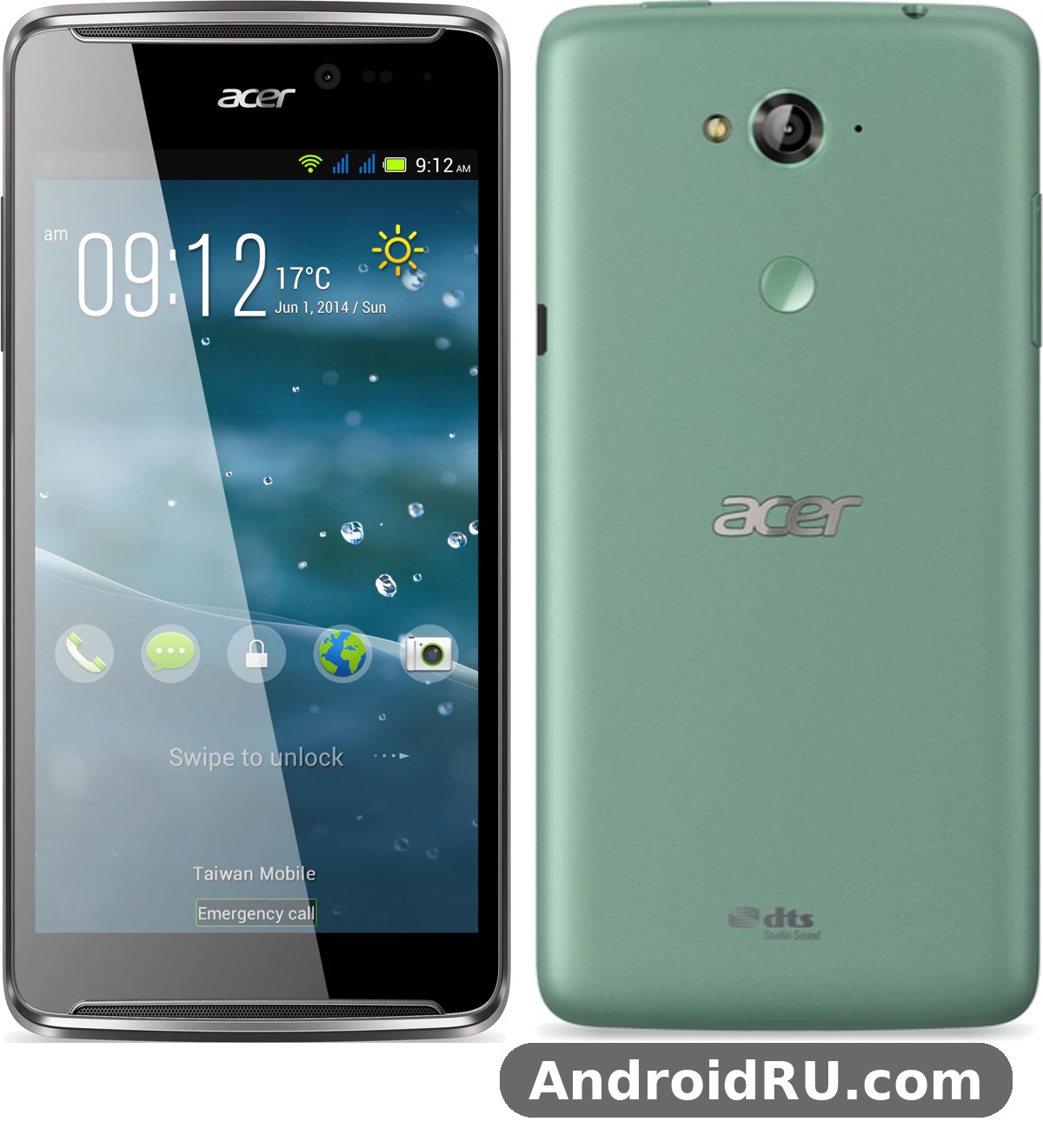
Acer launched the E600 alongside a whole family of Liquid phones in the run-up to Computex 2014, and the family resemblance is easy to see. The range-topping sibling of the moment is covered in The Complete Acer Liquid X1 Review: Specs, Software and Verdict, while the E600 sat a step below it as the affordable LTE option. That position shaped everything about it: a modest screen resolution, a modest amount of memory, and a sensible price of about 199 euros at launch in Europe. The Acer Liquid E600 price in 2014 at European launch put it in reach of buyers who wanted 4G without paying flagship money, and that value-first idea runs through the whole design.
To set expectations plainly, keep expectations modest if you pick one up now. The Acer Liquid E600 specifications Snapdragon 400 1GB RAM combination was ordinary even in 2014, and the software it shipped with, Android 4.4 KitKat, belongs to a time before modern app requirements. What the phone still offers is a clear picture of how Acer balanced cost, size, and connectivity in the middle of the last decade, and for a collector that picture is genuinely interesting.
Design and Build: A Practical 2014 Handset
The E600 is a plain, rounded slab of plastic, and Acer made no attempt to hide that. At 147 mm tall, 72.6 mm wide, and 9.4 mm thick, with a weight of about 155 grams, it feels substantial in the hand without being heavy, and the curved back helps it sit comfortably during a long call. The Acer Liquid E600 durability build quality plastic body story is a familiar one for the period: the plastic shell flexes a little if you squeeze it, the back cover can pick up fine scratches, and the phone will show wear on its corners after years in a pocket, but the basic structure is tough enough to survive ordinary knocks. There is no metal frame, no glass back, and no water resistance rating, so this was never a rugged phone, only a practical one.
Plastic body, rounded edges and pocket fit
Buttons sit on the right edge, the micro USB port sits at the bottom, and the 3.5 mm headphone jack sits on top, which was the standard layout of the time. The power key and volume rocker are easy to find by touch, and the removable back cover gives access to the SIM slots and the microSD slot. Colours were black, green, and dark red, with the dark red version standing out in a market full of black slabs. The Acer Liquid E600 SIM card dual SIM setup instructions matter here because some markets received a dual-SIM version alongside the single-SIM model, so a buyer checking a used unit should confirm which variant is in hand before assuming anything about the second slot. A case and a screen guard were always a good idea, and the Acer Liquid E600 screen protector case accessories where to buy question now has a simple answer: generic 5-inch accessories and second-hand listings are the only realistic sources, since dedicated stock dried up years ago.
Compared with its closest sibling, the Acer Liquid E600 vs Acer Liquid E700 comparison is instructive. The E700 had a sharper 720p screen, 2 GB of RAM, and a much larger 3500 mAh battery, but it lacked LTE. The E600 traded screen sharpness and battery size for 4G connectivity, which tells you exactly who Acer had in mind: a buyer who cared more about mobile data speed than about pixel density. If you want the full story of that sibling, read The Acer Liquid E700, Reviewed in Detail: Specs, Charging Speed and More and compare the two spec sheets side by side.
Display and Everyday Viewing
The screen is a 5 inch IPS panel with a resolution of 480 by 854 pixels, which works out to roughly 196 pixels per inch. By the standards of 2014 that was on the low side for a 5-inch phone, and by modern standards it is plainly coarse, with text edges that look soft and icons that lack crispness. The Acer Liquid E600 display 5 inch IPS screen review verdict is therefore mixed: colours are reasonably natural for an IPS panel of the period, viewing angles are decent, and the screen is bright enough for indoor use, but fine text is never sharp and small interface elements can look rough.
How the 5-inch panel holds up in sunlight
Outdoors, the panel washes out in strong sun, as most mid-range LCDs of the time did. Raising brightness to the maximum helps, but it also drains the battery faster, and there is no high-brightness outdoor mode to rescue it. For reading a message or checking a map in shade it is fine; for reading a long article under a midday sun it is a strain. The Acer Liquid E600 screen itself is protected by a flat sheet of glass with no mention of a hardened coating in the launch material, so scratches accumulate over time and a protector is worth fitting on any unit that still has a clean panel.
Reading, video and everyday viewing
For video, the 854 by 480 resolution means most clips play at a modest quality, and the 16:9 shape suits widescreen content. Colours stay stable when the phone is tilted, which is a genuine strength of the IPS technology Acer chose, and black levels are acceptable for a budget LCD rather than deep. The larger-screen tablet from the same launch family is a useful contrast, and Acer Iconia Tab 8 A1-840FHD Review and Full Specifications: Everything You Should Know shows how much sharper Acer could make a display when the budget allowed. On the E600, the screen is good enough for calls, messages, maps, and short videos, and that was the job it was built to do.
Audio: Speaker, Headphones and Calls
Audio is the first word in the title of this review for a reason, because the way a phone sounds matters every day in a way that a benchmark number never does. The Acer Liquid E600 sound quality speaker headphone jack setup is simple: a single loudspeaker, a standard 3.5 mm jack, and the usual microphone arrangement for calls. There is no stereo pair, no dedicated audio chip to boast about, and no noise-cancelling microphone array, so the phone leans on honest, basic engineering rather than on extra hardware.
Speaker loudness in a noisy room
The Acer Liquid E600 speaker is loud enough for ringtones and notification sounds in a quiet room, and it carries a voice call on speakerphone without falling apart, but it is thin and a little harsh when pushed to full volume. Music through the speaker sounds small, with almost no bass and a bright top end that can turn sharp on cymbals and high voices. The Acer Liquid E600 FM radio speaker loudness outdoor test picture is similar: the radio plays clearly enough for news and talk, yet in a noisy street or on a bus the little driver struggles to cut through background noise. For alarms, calls, and spoken content it does the job; for music, headphones are the better choice, as they were on almost every phone of this class.
Headphone listening and the 3.5 mm jack
Through the headphone jack, the E600 sounds noticeably better. Voices are clear, volume is adequate for ordinary earphones, and there is no obvious hiss at normal listening levels. The jack sits on the top edge, which some people liked and others found awkward in a pocket, but it is a standard analogue connection, so any ordinary wired earphones of the period work without an adapter. There is no high-resolution audio support to discuss, and no surround mode worth naming, which is fine: the phone delivers clean, uncoloured stereo for music and podcasts, and that is what most owners used it for.
Call quality and the microphone
The Acer Liquid E600 call quality microphone noise reduction test picture, drawn from the period, is one of a capable voice phone. The Acer Liquid E600 microphone picks up speech clearly at normal distance, the earpiece is loud enough for a busy street, and callers generally report a natural, if slightly thin, voice. There is some background noise in windy conditions, and the single microphone cannot work miracles, but for everyday calls the E600 was a reliable communicator. The Acer Liquid E600 audio experience as a whole, then, is best described as solid for calls and headphones, modest through the speaker, and honest about its limits.
Performance and Software
The Acer Liquid E600 performance everyday apps multitasking test starts with the chipset, and the chipset is confirmed: a Qualcomm MSM8926 Snapdragon 400, built on a 28 nm process, with a quad-core 1.2 GHz Cortex-A7 processor and an Adreno 305 graphics unit. That was a popular mid-range platform in 2014, used across many brands, and it gave the E600 enough power for the Android of its day. The Acer Liquid E600 chipset is not a speed demon, and it was never meant to be; it is a balanced, efficient chip that trades peak speed for steady behaviour and low heat.
With 1 GB of RAM, multitasking is the tightest limit. Two or three light apps can sit in memory together, but opening a heavy browser tab or a map alongside a messenger often forces the phone to reload one of them. The Acer Liquid E600 RAM limit also means modern apps, where they install at all, will feel cramped, and the 4 GB of built-in memory leaves very little room once the system is accounted for. This is where the Acer Liquid E600 storage microSD card expansion guide becomes essential: a microSD card of up to 32 GB takes photos, music, and offline maps, while the internal memory is best kept free for apps and system data. Moving media to the card is not optional on this phone; it is the only way to live with 4 GB.
Everyday apps and multitasking
For the tasks of 2014, the phone was smooth enough: dialling, texting, email, light browsing, and social apps of the period ran without drama, and the interface responded promptly to taps and swipes. Waiting a beat for an app to open was normal, and owners learned to close apps they were not using. The Acer Liquid E600 Android KitKat software experience today is a different matter, because Android 4.4.2 KitKat, the version the phone shipped with, no longer receives updates and many current apps require newer versions. The Acer Liquid E600 software update Android version support history is therefore short: KitKat at launch, no major upgrade path of note, and a long tail of life as a secondary device, a media player, or a collector piece rather than a primary phone.
Gaming on the Adreno 305
The Acer Liquid E600 gaming performance casual games frame rate picture is kind to light games and unkind to heavy ones. Simple puzzle games, card games, and 2D titles run well, and the 5-inch screen is a comfortable size for them. Demanding 3D games of the period ran at reduced settings, with frame drops in busy scenes, and the phone could grow warm during a long session, though it rarely became uncomfortable. The Acer Liquid E600 overheating issue during charging fix question deserves a calm answer: mild warmth while charging and using the phone at the same time was common, and the sensible fix was to let the phone charge undisturbed, use the original-style charger, and keep it out of direct sun, rather than to expect a software cure.
The Acer Liquid E600 hidden features tips and tricks KitKat list is short but useful for anyone still running one: the Swype-style keyboard that Acer later preloaded on its Liquid phones, the quick settings in the notification shade, the ability to move media to the microSD card, and the simple power-saving habits of dimming the screen and limiting background sync. None of these turns the phone into a modern device, but they make a surviving unit more pleasant to use.
Camera: Photos, Video and Selfies
The rear camera is an 8 megapixel unit with autofocus and an LED flash, and the Acer Liquid E600 camera quality 8 megapixel rear camera assessment depends heavily on light. In bright daylight, photos are usable and pleasant: colours are natural, detail is reasonable for the sensor size, and the autofocus locks on without much hunting. Indoors, noise creeps in quickly, and in low light the small sensor and modest flash produce soft, grainy images. The Acer Liquid E600 camera is therefore a fair-weather camera, good for snapshots in the sun and for recording what you saw, rather than a tool for careful photography.
Daylight photos from the 8 MP camera
Daylight shots hold up best when the subject is still and the light is even. Landscapes, street scenes, and group photos come out with acceptable sharpness at the centre of the frame, while edges soften a little. The camera app is simple, with scene modes and a panorama option, and shutter lag is noticeable but not frustrating once you learn to hold still for a beat after tapping. Compared with the sharper 13 MP camera on the Jade from the same launch, the E600 is a step down, and Acer Liquid Jade Tested: Review, Everyday Performance and Detailed Specifications makes that gap clear. Even so, for a phone of its price in 2014, the rear camera was competitive.
Video, selfies and video calls
Video recording reaches 1080p, and clips are steady enough for casual use, though fast movement shows the limits of the electronic stabilisation of the period. The Acer Liquid E600 front camera selfie video calling quality is modest: a 2 MP front camera that produces soft selfies and serviceable video calls in good light, and little more than a blur in a dim room. For a video call with family in daylight it works; for a flattering portrait it does not. Photos and video are best kept on the microSD card, since the internal memory fills up after a surprisingly small number of clips.
Battery Life and Charging
The Acer Liquid E600 battery life 2500 mAh daily use story is one of the stronger parts of this phone. A 2500 mAh non-removable lithium-ion battery, paired with a low-resolution screen and an efficient Snapdragon 400, gave the E600 a full day of ordinary use in 2014: calls, messages, some browsing on LTE, and a little music, with charge left in the evening. Heavy LTE use and long screen-on sessions shortened that day, as they did on every phone, but the balance of screen, chip, and cell was sensible, and the Acer Liquid E600 battery earned its reputation as a reliable all-day companion rather than a phone that needed a midday top-up.
How long the 2500 mAh cell lasts
Standby time was good, talk time was quoted at around six hours on 3G in period material, and video playback lasted several hours, which was respectable for the class. The Acer Liquid E600 battery today is a different question, because any surviving original cell is more than a decade old and will hold far less charge than it did when new. The Acer Liquid E600 replacement battery repair options explained briefly are: a replacement cell fitted by a repair shop that still handles old Acer models, or a careful DIY swap for an experienced owner, with the warning that the battery is non-removable by design and the back cover and connectors need a gentle hand. A fresh cell transforms a tired unit, and it is the single most useful repair for a collector who wants the phone to run for more than an hour.
Charging with micro USB
Charging is by micro USB, and the Acer Liquid E600 charging time micro USB port durability picture is typical of the connector: a full charge took a few hours with the charger of the period, and the port itself can become loose after years of plugging and unplugging. There is no fast charging standard to discuss, and no wireless charging, so patience is part of the deal, and patience is part of the deal for anyone using the phone now. Keeping the port clean, using a cable that fits snugly, and avoiding yanking the cable sideways will extend its life, and a loose port is one of the first things to check when buying a used example.
Full Specifications
The table below gathers the verified details of the Acer Liquid E600 in one place. The Acer Liquid E600 specs are drawn from the launch record and the specification listings of the period, and they describe the phone as it shipped in August 2014.
| Feature | Acer Liquid E600 |
|---|---|
| Launch | Announced 30 May 2014; released August 2014 |
| Display | 5.0-inch IPS LCD, 480 x 854 pixels, about 196 ppi |
| Chipset | Qualcomm MSM8926 Snapdragon 400, 28 nm |
| CPU | Quad-core 1.2 GHz Cortex-A7 |
| GPU | Adreno 305 |
| RAM | 1 GB |
| Storage | 4 GB internal, microSD up to 32 GB |
| Rear camera | 8 MP, autofocus, LED flash, 1080p video |
| Front camera | 2 MP |
| Battery | 2500 mAh, non-removable Li-Ion |
| Operating system | Android 4.4.2 KitKat at launch |
| Connectivity | 4G LTE, 3G, Wi-Fi 802.11 b/g/n, Bluetooth 4.0, GPS, FM radio, micro USB, 3.5 mm jack |
| SIM | Single SIM and dual-SIM versions by market |
| Dimensions | 147 x 72.6 x 9.4 mm |
| Weight | About 155 g |
| Colours | Black, green, dark red |
| Price at launch | About 199 EUR in Europe |
The Acer Liquid E600 release date August 2014 announcement timing is worth repeating because it explains the phone so well: announced just before Computex 2014, sold from the third quarter of that year, and aimed squarely at buyers who wanted LTE at a mid-range price. The Acer Liquid E600 release is therefore a marker of a moment when 4G moved from flagship phones into the middle of the market, and the E600 was one of the devices that carried it there.
Connectivity, location and everyday practicalities
This section is short because the phone’s connectivity is simple, but the details matter to anyone who still switches one on. The Acer Liquid E600 LTE connectivity 4G speed test results of the period showed downloads of up to 150 Mbps on a good LTE network, which felt fast in 2014 and still feels adequate for light browsing now, where networks still allow the device. The Acer Liquid E600 LTE support covers the bands of its launch markets, so a buyer should check band compatibility before assuming a modern SIM will connect at 4G speeds.
The Acer Liquid E600 GPS navigation accuracy offline maps test picture is encouraging for a phone of its age: the GPS locks on in reasonable time outdoors, and with maps saved offline on the microSD card it can still guide a walk or a drive without mobile data. The Acer Liquid E600 WiFi Bluetooth connectivity problems fix checklist is equally practical: forget and rejoin a troublesome network, restart the phone, check that the router is using a 2.4 GHz band the phone understands, and keep the software free of clutter. The Acer Liquid E600 WiFi and Acer Liquid E600 Bluetooth radios are both of their time, which means 2.4 GHz Wi-Fi only and Bluetooth 4.0, and both still work for basic tasks such as syncing a headset or sharing a file.
Pros and Cons
Pros and cons at a glance
Strengths
The strengths are clear: 4G LTE at a mid-range price, a comfortable 5-inch IPS screen, a full day of battery life when the cell was fresh, a usable 8 MP daylight camera, and a practical plastic body that was easy to hold and easy to repair. The microSD slot and the removable back cover made the phone forgiving to live with, and the Snapdragon 400 kept everyday tasks running smoothly for its time.
Weaknesses
The weaknesses are equally clear: a low-resolution screen, only 1 GB of RAM, only 4 GB of internal memory, an outdated KitKat system with no modern app support, a modest speaker, and a battery that is now old in every surviving unit. The Acer Liquid E600 problems that owners reported most often were the tight memory, the soft low-light camera, and the slow feeling that crept in as apps grew heavier, and those are the same issues a buyer will meet now.
Verdict: Who Should Still Care
The Acer Liquid E600 verdict is a kind one, provided it is aimed at the right reader. As a daily phone in 2026 it is not a realistic choice for most people, because the software is too old and the memory too small for the apps of today. As a collector piece, a second phone for calls and offline maps, or a way to understand the mid-range market of 2014, it is a fair classic, and a fair classic, not a daily driver for most people is the honest summary. The Acer Liquid E600 for elderly users simple phone setup idea has some truth in it as well: large icons, a simple launcher, and a phone used mainly for calls can still work, as long as the owner understands the limits and keeps the software as it is.
Who should still care about this phone
Collectors of Acer Liquid phones, buyers who enjoy restoring old Android devices, and readers tracing how LTE reached the mid-range will get the most from an E600. The Acer Liquid E600 second hand buying guide for collectors is short: check the screen for dead pixels and scratches, test the micro USB port for looseness, confirm the SIM variant, ask about the battery, and check that the rear camera focuses. The Acer Liquid E600 hard reset factory reset without computer steps are the usual KitKat recovery combination of power and volume keys, and a reset is worth doing on any used unit before setting it up. For a simpler sibling from the same launch, the smaller and cheaper option is covered in Is the Acer Liquid Z200 Worth It? Review, Specs and Verdict, and the Acer Liquid E600 alternatives worth considering are the E700 for battery and screen, the Jade for camera, and the X1 for a larger display.
The Acer Liquid E600 unboxing experience in 2014 would have shown a simple box with the phone, a charger, a cable, and a quick start guide, and the Acer Liquid E600 teardown view shows a straightforward interior with a replaceable-by-technician battery and a single-board layout that repair shops of the period knew well. The Acer Liquid E600 accessories that still matter are a case, a screen protector, a microSD card, and a good micro USB cable, and the Acer Liquid E600 cases that fit are generic 5-inch pouches rather than model-specific shells. In the end, the E600 earns its place as a competent, affordable LTE phone of 2014, and this review leaves it there: a well-judged classic that did its job, showed its limits honestly, and still tells a clear story about the year it was made.
FAQ
Is the Acer Liquid E600 still usable in 2026?
It can still make calls, send messages, play music, and run offline maps on a fresh battery, but it is not a practical daily phone for most people because Android 4.4 KitKat no longer supports many current apps. It works best as a secondary device or a collector piece, and the Acer Liquid E600 durability of its plastic body means surviving units often still feel solid, even when the software feels old.
Does the Acer Liquid E600 support 4G LTE?
Yes, LTE was one of its main selling points, with download speeds of up to 150 Mbps on a suitable network in 2014. Band support depends on the market version, so a buyer should check the bands for their carrier before relying on 4G, and the phone also falls back to 3G where LTE is unavailable.
How much storage does the Acer Liquid E600 have?
It has 4 GB of internal memory, of which only a part is free for the user, and a microSD slot that accepts cards of up to 32 GB. Photos, music, and offline maps should live on the card, and the Acer Liquid E600 storage limit is the single most important thing to understand before buying one, because the internal memory fills up quickly.
Can the Acer Liquid E600 battery be replaced?
The battery is non-removable by design, but it can be replaced by a repair shop or by an experienced owner who opens the back cover and disconnects the cell with care. A fresh battery is the most useful repair for a surviving unit, and the Acer Liquid E600 overheating that some owners noticed while charging is usually eased by charging the phone undisturbed and keeping it out of direct sun.

