

Redmi 9A Review: Daily Use, Software and Battery Life
The Redmi 9A arrived in July 2020 as one of the cheapest phones Xiaomi ever sold, and that simple fact still shapes every Redmi 9A review written about it years later. It was never built to impress on a spec sheet. It was built to give people a big screen, a huge battery and a working Android phone for very little money. This Redmi 9A review daily use software and battery life guide looks at the phone the way its owners actually live with it: as a daily driver for calls, chats, video, light apps and long days away from a charger. After years on the market, the interesting question is no longer how it compares with flagships, but whether such a basic phone still holds up as a second phone, a first phone for a teenager, or a backup device for someone who just needs the essentials to work.
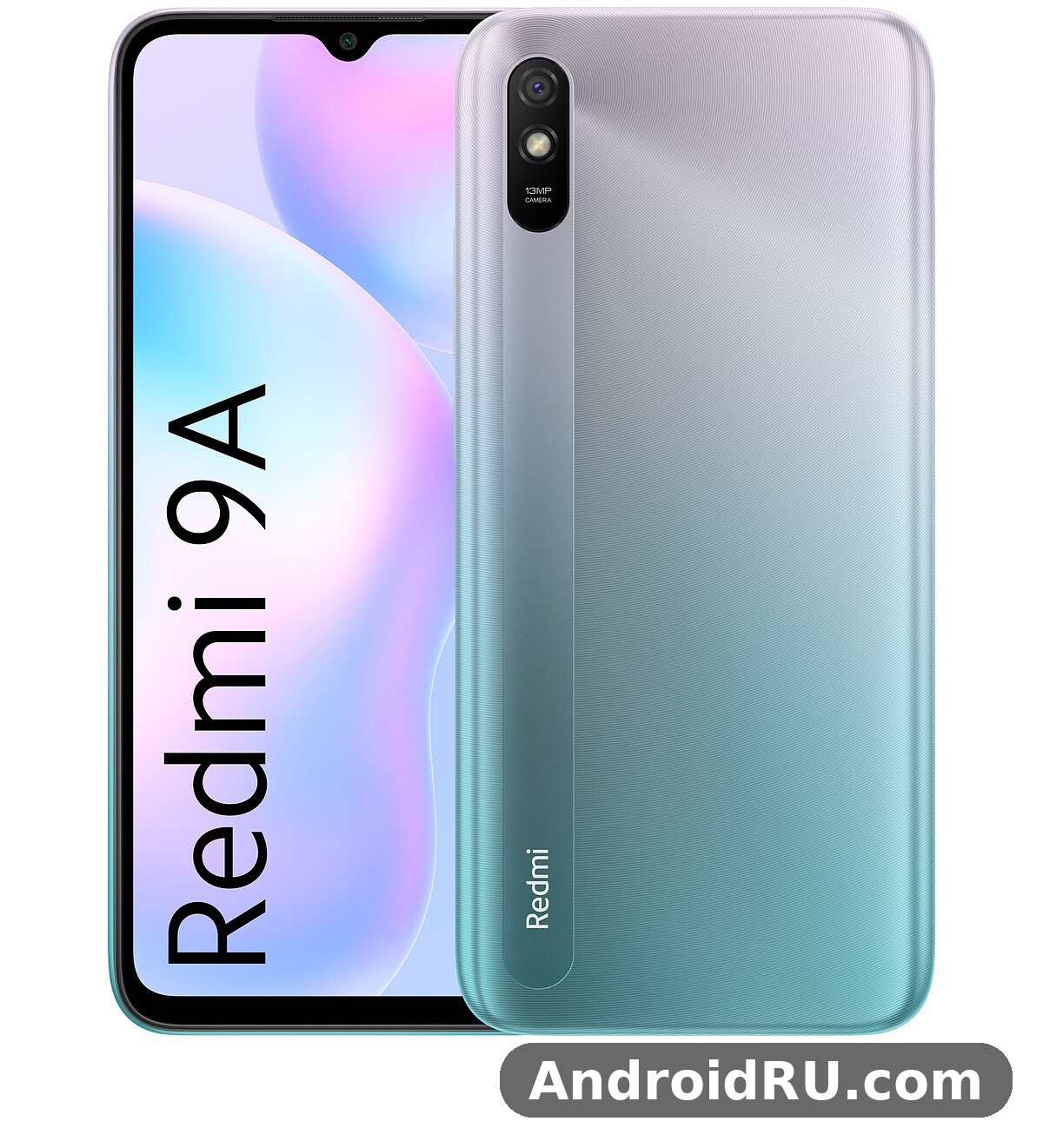
On paper the Redmi 9A specs are modest. A MediaTek Helio G25 chipset, 2GB of RAM in the base model, 32GB of storage, a single 13MP rear camera and a 6.53-inch HD display do not sound exciting. Yet the Redmi 9A battery is a genuine 5000mAh cell, the screen is large enough for comfortable video, and the software is the same MIUI family found on far more expensive Xiaomi phones. That combination is why the phone sold in huge numbers across Asia, Europe and other markets, and why so many units are still in daily use today. This Redmi 9A long term review after three years of use angle matters, because a budget phone that survives three or four years of daily use has already proved something that a flashy launch cannot.
Redmi 9A Design, Build and First Impressions
Open the Redmi 9A unboxing experience and you find a phone that feels honest about its price. The box holds the phone, a 10W charger, a micro USB cable and a basic clear case in some regions. The Redmi 9A charger in the box and cable type micro USB detail already tells you this is a phone from 2020, before USB-C reached the cheapest tier. The phone itself is all plastic, with a textured back that resists fingerprints better than glossy glass and a camera module that sits almost flush with the body. It does not feel premium, but it feels solid, and the plastic body is one reason the phone survives drops that would crack a glass phone.
The Redmi 9A colors at launch were Carbon Gray, Sky Blue and Ocean Green. Gray looks plain and businesslike, blue is the most eye-catching of the three, and green sits somewhere in between. All three share the same speckled texture on the back, which hides small scratches well. The Redmi 9A dimensions are 164.9 x 77.1 x 9.0 mm, and the Redmi 9A weight is 194 grams. Those numbers make it a large phone, but the curved back and the 20:9 screen shape keep it manageable in one hand for most people. It is not a small phone, and anyone coming from a compact device will feel the size for the first few days.
In the Hand and in the Pocket
At 194 grams the Redmi 9A is not light, but the weight is spread evenly and the phone does not feel top-heavy. The textured plastic gives your fingers something to grip, which matters on a phone this size. In a pocket it is tall rather than thick, so it slides in and out easily, though it will fill a small jeans pocket completely. The power button and volume rocker sit on the right edge where your thumb falls naturally, and both have a firm click with no wobble. There is no fingerprint sensor anywhere on the body, which is one of the first things you notice when you pick the phone up and your finger searches the back for one that is not there.
Ports, Buttons and the Missing Fingerprint Sensor
The Redmi 9A fingerprint sensor and face unlock missing features story is simple: this phone has face unlock and nothing else for biometrics. Face unlock works with the 5MP front camera and is fast enough in good light, though it struggles in the dark and is not as secure as a fingerprint reader. There is no fingerprint reader on the back, on the side, or under the display. That is a real daily inconvenience, because unlocking with a PIN every time gets old quickly, and face unlock fails when you wear a mask or hold the phone at a low angle. On the plus side, the phone keeps the 3.5mm headphone jack on top, a micro USB port on the bottom, and a dedicated microSD slot. The Redmi 9A dual SIM and dedicated microSD slot explained in one line: you can use two SIM cards and a memory card at the same time, with no shared slot forcing you to choose.
Redmi 9A Display Quality in Everyday Use
The Redmi 9A display is a 6.53-inch IPS LCD panel with a 720 x 1600 resolution, a waterdrop notch for the selfie camera, and a tall 20:9 aspect ratio. The Redmi 9A display quality 6.53 inch HD screen review verdict is that it is good enough for its price and nothing more. Text is readable, video looks fine, and colours are natural rather than punchy. The 720p resolution on a screen this size means you can see slight softness if you look closely at small text, but in normal use at arm’s length it is not a problem. The panel is protected by a flat sheet of glass with a pre-applied screen protector in many regions, which is a nice touch on a phone this cheap.
Size, Resolution and Outdoor Visibility
Big screens are the Redmi 9A screen biggest strength for media. Watching video, reading long articles and following maps all benefit from the 6.53-inch size, and the waterdrop notch is small enough to ignore after a day. The weak point is brightness. The Redmi 9A screen brightness outdoors under direct sunlight is only just adequate, with a peak around 400 nits, so the display washes out on a bright sunny day and you will find yourself shading it with your hand. Indoors and in the shade it is perfectly fine. The screen has a standard 60Hz refresh rate, so scrolling is not as smooth as on newer 90Hz budget phones, but it is consistent and free of the stutter that a faster panel on a weak chip might show.
Colours, Viewing Angles and Eye Comfort
Colours on the Redmi 9A display are restrained. Reds and greens look natural rather than saturated, and white balance leans slightly cool out of the box. MIUI lets you adjust colour temperature and switch on reading mode, which warms the screen and cuts blue light for night reading. Viewing angles are good for an IPS panel, with only a small loss of contrast when you tilt the phone sharply. There is no HDR support, so video from streaming apps plays in standard dynamic range, which is expected at this price. For a phone that spends most of its life showing chats, video and web pages, the display does its job without fuss.
Redmi 9A Performance with the Helio G25
The Redmi 9A Helio G25 is a 12nm octa-core chip with eight Cortex-A53 cores running at up to 2.0GHz and a PowerVR GE8320 GPU. The Redmi 9A Helio G25 performance for everyday apps is acceptable, and that word is doing a lot of work. Calls, messaging, web browsing, email and video playback all run fine. The phone opens apps a beat slower than a mid-range device, and switching between several heavy apps takes a moment, but nothing in basic use feels broken. The chip was designed for efficiency rather than speed, which is exactly the right trade for a phone whose main selling point is battery life.
Everyday Apps, Scrolling and Multitasking
Redmi 9A performance in daily use depends heavily on which variant you own. The Redmi 9A 2GB RAM variant lag and multitasking problems are real: with only 2GB of memory, the phone keeps very few apps in the background, so returning to a browser or a chat app often means a full reload. The Redmi 9A 4GB RAM version is noticeably smoother, holds more apps in memory, and is the variant to buy if you can find it at a small premium. Redmi 9A RAM management in MIUI is aggressive by default, closing background apps to save memory, which helps the phone feel responsive in the foreground but hurts multitasking. Light apps such as messaging, maps and music run well; heavy social apps with endless feeds are where the chip starts to show its limits, with occasional pauses while images load.
Why is my Redmi 9A slow and how to speed it up is one of the most common questions owners ask, and the answer is usually a mix of full storage and too many background apps. Clearing cached data, removing apps you do not use, turning off auto-start for apps that do not need it, and keeping the home screen simple all help. How to free up storage space on Redmi 9A is part of the same fix: move photos and video to the microSD card, delete old downloads, and uninstall the preloaded apps you never open. A phone with 32GB of internal storage fills up fast, and a nearly full phone always feels slower than one with room to breathe.
Gaming on the Redmi 9A
Redmi 9A gaming is possible, but only with the right expectations. Casual games, puzzle games and older 2D titles run well. Demanding 3D games run, but only on low settings, and that is the honest limit of the Helio G25. The Redmi 9A gaming performance PUBG Mobile and Free Fire question comes up constantly, and the answer is that both games launch and are playable on low graphics with smooth frame rate settings. Free Fire runs better than PUBG Mobile, as it is lighter, while PUBG Mobile needs the lowest settings and still drops frames in busy scenes with many players on screen.
PUBG Mobile and Free Fire on Low Settings
On low settings, PUBG Mobile on the Redmi 9A holds a playable frame rate in most situations, though smoke, explosions and close-quarters fights cause visible dips. Free Fire is smoother and feels more at home on this hardware. Neither game will give you a competitive edge, and long sessions drain the battery faster than any other activity, but for casual play the phone is usable. Keep the graphics low, close other apps before you play, and the experience is acceptable for a phone that cost less than a hundred dollars at launch.
Heating and Throttling During Long Sessions
The Redmi 9A heating issue during gaming and charging is mild rather than severe. The plastic body warms up around the upper back after 20 to 30 minutes of gaming, and the Redmi 9A overheating complaints you see online mostly come from people playing demanding games while charging at the same time. The chip throttles gently instead of getting very hot, which protects the phone but costs a few frames. Charging also warms the phone slightly, which is normal for any device. The phone never gets uncomfortably hot in normal use, and it cools down quickly once you stop gaming.
Redmi 9A Software: MIUI 12 and Daily Life
The Redmi 9A Android 10 software launched with MIUI 12 on top, and the Redmi 9A MIUI 12 experience is familiar to anyone who has used a Xiaomi phone. The interface is colourful, full of options, and packed with features, from a second space for a separate profile to a built-in screen recorder and a scrolling screenshot tool. How to take a screenshot on Redmi 9A with buttons is simple: press the power button and volume down together, or swipe down with three fingers if you enable the gesture. MIUI gives you several ways to do the same job, which is either generous or confusing depending on your taste.
What MIUI 12 Feels Like on 2GB of RAM
MIUI is a heavy skin, and on the base model it shows. Animations are kept short to hide loading times, and the home screen redraws itself after you return from a heavy app. The Redmi 9A update path improved things a little over time: the Redmi 9A MIUI 12 software update to Android 11 arrived for many regions as MIUI 12.5, bringing a lighter system, better memory handling and fewer background processes. Even so, the 2GB model always feels like it is working hard, while the 3GB and 4GB models breathe more easily. If you buy this phone today, check which software version it runs and install the available updates before you judge its speed.
Updates, Ads and Bloatware
Software support is the weakest part of the Redmi 9A story. Security updates slowed down as the phone aged, and there is no path to a modern Android version through official channels. The Redmi 9A problems owners report most often are not bugs but the slowdown that comes with age, full storage and newer, heavier app versions. MIUI also shows ads in some system apps, such as the file manager and the installer screen, which feels wrong on a phone you already paid for. Most ads can be turned off in the settings, app by app, and doing so is one of the first things any new owner should do. The preloaded apps include a few you will never use, and removing or disabling them frees both space and memory.
Useful MIUI Features Worth Keeping
Not everything about MIUI is a drawback. The built-in cleaner, the app lock, dual apps for running two accounts of the same app, and the one-handed mode are all genuinely useful on a large budget phone. The control centre gives quick access to the torch, hotspot and data saver, and the Redmi 9A WiFi hotspot and Bluetooth connection problems fix is usually a simple restart of the hotspot or forgetting and re-pairing the Bluetooth device. The Redmi 9A WiFi hotspot works well for sharing a connection with a laptop, and Bluetooth pairing with earbuds and speakers is stable once connected. The IR blaster found on some Redmi phones is absent here, so you cannot use the Redmi 9A as a TV remote.
Redmi 9A Battery Life and Charging
The Redmi 9A 5000mAh battery is the single best reason to buy this phone. A big battery plus a power-efficient chip and a 720p screen is a recipe for long life, and the Redmi 9A delivers exactly that. The Redmi 9A battery life how long does it last question has a reassuring answer: two days of light use, and a full day of heavy use with charge to spare. The Redmi 9A battery easily outlasts phones that cost three times as much, because those phones have faster chips, brighter screens and higher resolutions that all drink power faster.
How Long the 5000mAh Battery Really Lasts
In real daily use, the Redmi 9A battery gives around 10 to 12 hours of screen-on time spread across two days for a light user who mainly chats, browses and watches some video. A heavy user who streams video for hours, plays games and keeps mobile data on all day will still get through a full day and into the next morning. Standby drain is low, so the phone loses only a few percent overnight. How to improve Redmi 9A battery life and performance is straightforward: keep brightness moderate, turn off the always-on features you do not use, restrict background data for greedy apps, and use Wi-Fi instead of mobile data when you can. The phone also has a battery saver mode that stretches the last 10 percent much further, which is handy on a long trip.
One honest note: after three or four years, any battery loses capacity. A Redmi 9A that once lasted two days may now last a day and a half, which is still good. If your phone suddenly drains fast, check which app is using the most power in the battery settings before blaming the hardware. In most cases a single misbehaving app is the cause, not the battery itself.
Charging Time with the 10W Charger
Does the Redmi 9A support fast charging or not is a question with a short answer: no, not really. The Redmi 9A 5000mAh battery charging time with 10W charger is around three hours from empty to full, and there is no way to speed that up, because the phone only supports 10W wired charging. The Redmi 9A charging experience is slow by modern standards, and it is the price you pay for the huge battery. Overnight charging is the sensible routine: plug it in before bed and it is full in the morning. There is no wireless charging, which is expected at this price, and the micro USB port means you need to keep the right cable around.
Tips to Improve Battery Life
Small habits make the big battery last even longer. Use dark wallpaper and the system dark mode, keep the screen timeout short, turn off GPS when you do not need it, and let MIUI put rarely used apps to sleep. The Redmi 9A storage situation also matters: a phone with almost no free space works harder and uses more power, so keeping 15 to 20 percent free helps both speed and battery. The Redmi 9A microSD card slot expandable storage up to 512GB is the easiest way to keep the internal storage free, because photos, video and music can live on the card instead of filling the phone.
Redmi 9A Camera Quality in Daylight and Low Light
The Redmi 9A camera setup is as simple as it gets: one 13MP rear camera with an f/2.2 lens and autofocus, plus a 5MP front camera. There is no ultrawide, no macro and no depth sensor, so the Redmi 9A camera has exactly one job and it does it adequately. The Redmi 9A camera quality in daylight and low light splits into two very different stories. In good light, photos are sharp, colours are pleasant, and the AI scene mode adds a little punch to skies and greenery. In low light, the small sensor struggles, noise appears quickly, and detail melts away.
Rear Camera: 13MP in Good Light
Outdoors in daylight, the 13MP rear camera takes photos that look good on a phone screen and fine on social media. Detail is decent in the centre of the frame, the autofocus is reliable, and HDR mode helps when the scene has both bright sky and dark shadows. The Redmi 9A night mode camera sample and video recording limits show the other side: night mode exists but does little, because the sensor simply cannot gather enough light, and long exposures turn moving subjects into blurs. Video tops out at 1080p at 30 frames per second with no stabilisation, so footage is shaky if you walk while filming. For still photos of family, food and scenery in daylight, the camera is enough. For anything ambitious, it is not.
Selfies and Video Recording
The Redmi 9A front camera selfie quality in indoor light is soft but usable. The Redmi 9A selfie camera takes 5MP photos that look fine for video calls and profile pictures, especially outdoors, but indoor shots lose detail and pick up noise. The Redmi 9A video from the front camera is 1080p at 30 frames per second, which is fine for calls. Face unlock uses this same camera, and it works best in good light. The Redmi 9A speaker and microphone are worth a mention here too: the Redmi 9A call quality speaker volume and microphone test verdict is that calls are clear, the earpiece is loud enough, and the single loudspeaker on the bottom is adequate for ringtones and short video, though it distorts at maximum volume and has almost no bass.
Full Specifications of the Redmi 9A
The Redmi 9A specs below are the official specifications for the global model, verified against the GSMArena listing. The phone was announced on 30 June 2020 and released on 7 July 2020, and regional variants differ mainly in RAM and storage combinations. The Redmi 9A 32GB base model with 2GB of RAM is the most common, but 3GB, 4GB and 6GB versions with 64GB or 128GB of storage exist in some markets.
| Specification | Redmi 9A |
|---|---|
| Display | 6.53-inch IPS LCD, 720 x 1600, 20:9, 269 ppi, waterdrop notch |
| Chipset | MediaTek Helio G25 (MT6762G), 12nm, octa-core 2.0GHz Cortex-A53 |
| GPU | PowerVR GE8320 |
| RAM | 2GB, 3GB, 4GB or 6GB depending on region |
| Storage | 32GB, 64GB or 128GB, expandable with microSD up to 512GB |
| Rear camera | 13MP, f/2.2, PDAF, LED flash, 1080p video at 30fps |
| Front camera | 5MP, f/2.2, 1080p video at 30fps |
| Battery | 5000mAh, non-removable, 10W wired charging, micro USB |
| Operating system | Android 10 with MIUI 12, updatable to MIUI 12.5 on Android 11 in most regions |
| Dimensions and weight | 164.9 x 77.1 x 9.0 mm, 194 grams |
| SIM | Dual Nano-SIM plus dedicated microSD slot |
| Connectivity | 4G LTE, Wi-Fi 802.11 b/g/n, Bluetooth 5.0, GPS, micro USB, 3.5mm jack |
| Sensors | Accelerometer, proximity, compass; face unlock, no fingerprint sensor |
| Colours | Carbon Gray, Sky Blue, Ocean Green |
| Launch price | About 85 dollars in Malaysia at launch, around 100 euros in Europe |
Redmi 9A vs Redmi 9C and Redmi 9
The Redmi 9A vs Redmi 9C which budget phone is better question has a clear answer for most people: the 9C is the better phone if the price gap is small, because it adds a fingerprint sensor, a second rear camera and a slightly faster Helio G35 chip, while keeping the same 5000mAh battery and 6.53-inch screen. The Redmi 9A vs Redmi 9C comparison still favours the 9A when the 9A is much cheaper, because the day-to-day experience is very similar for basic use. Readers comparing the two should read the Redmi 9C Review: Build Quality, Battery and Daily Use next to the Redmi 9 Review: Build Quality, Battery and Daily Use, since the Redmi 9 adds a Full HD display, a fingerprint sensor and a Helio G80 chip for a step up in speed and screen quality.
The wider Redmi family gives useful context too. The Redmi 10A Review: Daily Use, Software and Battery Life covers the later successor with a similar spirit and a fingerprint sensor, while the Redmi 9T Review: Everyday Speed, Cameras and Value shows what a little more money bought in the same series, with a faster chip and a bigger feature set. For a different branch of the family, the Redmi 10C Review: App Performance and Camera Quality is worth a look if you want a newer budget Redmi with a stronger processor. The Redmi 9A price in India and global markets today is now a second-hand matter in most places, since the phone is discontinued, and the Redmi 9A second hand price and resale value in 2026 is low, which is good news for buyers and bad news for sellers.
Redmi 9A Price, Value and Final Verdict
The Redmi 9A price was its whole argument at launch, and value is still its strongest card today. As a new phone it is gone from most shops, but as a used phone it is one of the cheapest working Android devices you can buy, and the huge battery means even an older unit still lasts a full day. The best Redmi 9A case and screen protector for daily use is a simple soft case and a tempered glass protector, both cheap and widely available, and they make sense because the phone is worth protecting as a daily tool rather than as a collector item. For a first phone, a backup phone, or a device for someone who only needs calls, chats and video, the Redmi 9A remains a sensible choice.
Pros of the Redmi 9A
- Two days of light use from the 5000mAh battery, which is the best feature of the phone by a wide margin.
- Large 6.53-inch screen that is comfortable for video, reading and maps.
- Dedicated microSD slot alongside dual SIM, so storage never forces a compromise.
- Headphone jack and a clean, simple plastic build that survives drops well.
- Very low second-hand price in 2026, making it a cheap backup or first phone.
Cons of the Redmi 9A
- 10W charging over micro USB is slow, taking around three hours for a full charge.
- No fingerprint sensor on this phone, leaving face unlock or a PIN as the only options.
- 720p display with modest brightness that struggles in direct sunlight.
- 2GB base model is slow at multitasking and fills its 32GB storage quickly.
- Single rear camera with weak low-light photos and shaky 1080p video.
Who Should Buy It
Buy the Redmi 9A if you need a cheap, reliable phone with a huge battery and a big screen, and you are happy with basic apps, calls, chats and video. It suits a first phone for a young user, a backup phone that lives in a drawer until it is needed, and a work phone for calls and messaging. The 6.53-inch HD display is big enough for comfortable reading, and the battery means you can stop thinking about chargers during the day.
Who Should Skip It
Skip the Redmi 9A if you play demanding games, take a lot of photos in low light, or need a phone that will receive software updates for years. Heavy multitaskers should look at a phone with at least 4GB of RAM, and anyone who unlocks their phone dozens of times a day will miss a fingerprint sensor more than they expect. The Redmi 9A review verdict is simple: it is a good cheap phone, not a cheap good phone, and knowing which one you need is the whole decision.
Frequently Asked Questions About the Redmi 9A
Is the Redmi 9A still worth buying in 2026?
Yes, as a second-hand phone for basic use. Is the Redmi 9A still worth buying in 2026 depends on the price and the condition of the battery, but for calls, chats, video and light apps it still works well, and the 5000mAh battery is a genuine advantage over newer budget phones with smaller cells. Do not buy it as a main phone for gaming or heavy multitasking, and check the battery health before you pay.
How long does the Redmi 9A battery last?
The Redmi 9A battery lasts around two days with light use and a full day with heavy use, giving roughly 10 to 12 hours of screen-on time for a light user. The 5000mAh cell, the efficient Helio G25 chip and the 720p screen all help, and standby drain overnight is only a few percent. Older batteries lose some capacity, so a used phone may last a little less.
Does the Redmi 9A support fast charging?
No. The phone supports only 10W wired charging over micro USB, and a full charge takes around three hours. There is no wireless charging. Overnight charging is the practical routine for this phone.
Does the Redmi 9A have a fingerprint sensor?
No, the Redmi 9A has no fingerprint sensor. Unlocking is by face unlock, PIN, pattern or password. Face unlock works well in good light and struggles in the dark, so most owners end up using a PIN most of the time.
Which Redmi 9A variant should I buy?
Buy the 4GB RAM version with 64GB of storage if you can find it, because it multitasks far better than the 2GB base model. The 2GB model with 32GB of storage is only worth it if the price is very low and you use few apps. Whatever variant you choose, add a microSD card for photos and media.

