

Samsung Galaxy A52 5G Review: Design, Battery Life and Usability
The Samsung Galaxy A52 5G arrived as a mid-range phone that borrowed several ideas from Samsung’s flagship line and put them at a far lower price. It offered a smooth 120Hz screen, a camera with optical image stabilisation, water resistance, and a battery that was meant to last a full day. For many buyers, that combination was the whole point: flagship-style comfort without flagship-style cost. I spent time with the phone as a daily driver, carrying it on commutes, using it for photos, video, messaging, and navigation, and charging it overnight like most people do. The Galaxy A52 5G fingerprint sensor is quick and reliable once you register the same finger twice, which improves recognition when your hands are dry or slightly damp. The A52 colours are Awesome Black, Awesome White, Awesome Violet and Awesome Blue, with the darker shades hiding fingerprints best.
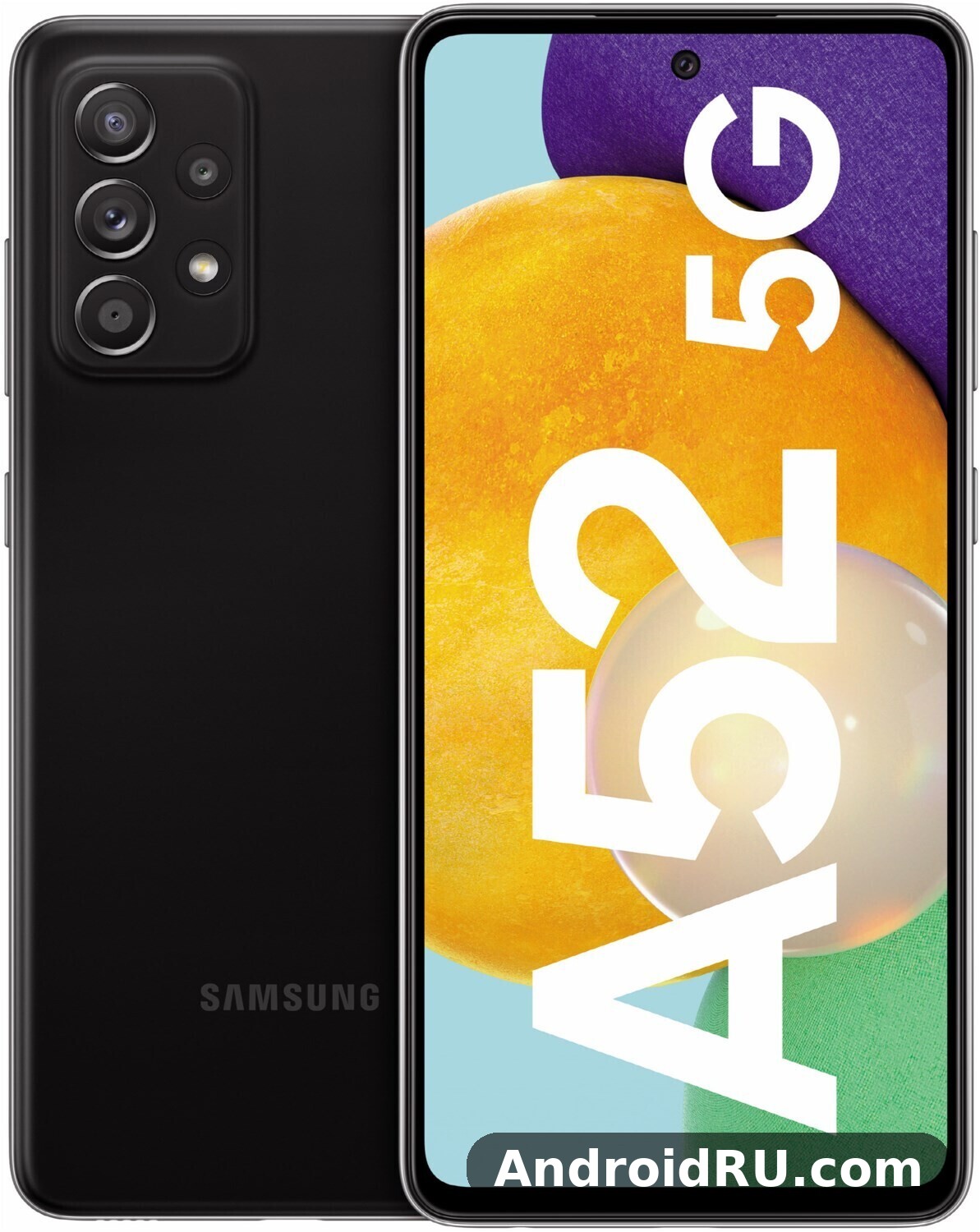
This Samsung Galaxy A52 5G design review looks at the phone the way a buyer would use it. Design and feel come first, because that is what you notice in the first minute. Then comes the display, day-to-day speed, camera results, battery life, and software. You will also find a clear list of strengths and weaknesses, a comparison table, the full specifications, and answers to the questions people ask most often before they buy a used or refurbished unit today. Does Galaxy A52 5G support wireless charging? No, this model has no wireless charging coil, so charging pads will not work with it and the USB-C cable remains the only way to charge. An A52 unboxing is a quick job: the phone, a USB-C cable and the paperwork are inside, and you will need your own charger if one is not included in your region.
Short version: the Galaxy A52 5G is a comfortable, practical phone. Its screen and main camera punch above its price, its battery is dependable, and its software stayed supported far longer than most phones in its class. It is not the fastest phone you can buy, and its charging speed is modest by current standards. For everyday use, though, it still holds up well. For an A52 battery drain overnight fix, check battery usage in Settings, turn off always-on display, and restrict background activity for apps that drain power while idle. The A52 fingerprint sensor sits under the display and unlocks quickly once your finger is registered well.
Samsung Galaxy A52 5G Design and Build Quality for Everyday Use
Pick up the Galaxy A52 5G and the first thing you notice is how light and friendly it feels. At 189 grams and 8.4 mm thick, it sits comfortably in one hand, and the matte plastic back does not collect fingerprints the way glossy glass does. The frame is plastic too, which keeps the weight down, yet the phone feels solid, with no creaks or flex when you squeeze the sides. Samsung gave it an IP67 rating, so it can survive a brief dip in fresh water up to a metre deep for up to 30 minutes, and it resists dust as well. That rating was rare in this price range when the phone launched, and it remains a real advantage over rivals that offer no water protection at all. The Galaxy A52 5G headphone jack does not exist on this model, so wired listening needs a USB-C adapter or a USB-C headset. The A52 IP67 rating means the phone survives rain, splashes and brief immersion in fresh water, though Samsung does not cover water damage under warranty.
The back panel has a soft, almost frosted finish. It looks plain in photos, but in the hand it feels calm and grippy, and it hides small scratches better than a shiny back would. The camera module blends into the back with a gentle step rather than a sharp bump, so the phone wobbles less on a table. Colours ranged from Awesome Black and Awesome White to Awesome Violet and Awesome Blue, and the violet finish in particular gave the phone a distinct identity without looking loud. Does Galaxy A52 5G have a microSD card slot? Yes, the hybrid tray accepts cards up to 1TB, though the second SIM slot is shared with the card. A good A52 case is worth buying on day one, because the back panel shows scratches and smudges quickly.
How the Galaxy A52 5G Feels in the Hand After a Full Day
After a full day of carrying the phone in a pocket, holding it on calls, and using it one-handed on a train, the rounded edges and balanced weight matter more than any spec sheet detail. The 6.5-inch screen is large, but the slim bezels keep the body narrower than many phones with the same screen size. Reaching the top of the screen still needs a small hand shift, and Samsung’s one-handed mode helps here: swipe down on the home button area and the screen shrinks toward your thumb. The power button and volume rocker sit on the right edge where your thumb or index finger finds them without looking. Does Galaxy A52 5G support eSIM? No, this model has no eSIM, so a second line needs the physical dual-SIM tray.
One-Handed Mode and Button Placement
Galaxy A52 5G one-handed mode use is simple to set up and genuinely helpful on a phone this tall. Turn it on in settings, swipe down near the home button, and the whole interface drops within thumb reach. The buttons fall naturally under your fingers, and the narrow 75.1 mm width means most people can reach across the screen without shuffling their grip. The best screen protector for Galaxy A52 5G is a tempered glass one that covers the display fully and still lets touch input feel direct. A tempered glass A52 protector is cheap insurance against drops and pocket scratches, and it fits the display without getting in the way of touch input.
IP67 Water Resistance and Gorilla Glass 5 Protection Explained
A52 5G IP67 water resistance means the phone is protected against dust and against immersion in fresh water up to one metre for up to 30 minutes under lab conditions. In real life, that translates to confidence in rain, near a sink, or after an accidental drop into a puddle. It does not mean you should take the phone swimming, use it in a hot shower, or expose it to salt water or soap, because those conditions are harsher than the test. The front glass is Gorilla Glass 5, which resists scratches and small drops better than plain glass, though a screen protector is still a sensible buy. A case adds grip and protects the plastic frame from scuffs, and it costs very little compared with a screen repair. The best back cover for Galaxy A52 5G is a slim one with raised edges around the cameras, which protects the lenses without adding much bulk. The A52 speakers are loud enough for video calls and podcasts, though headphones still win for music and films.
Samsung Galaxy A52 5G Display: 120Hz Super AMOLED in Daily Use
The display is one of the strongest reasons to pick this phone. A52 5G 120Hz Super AMOLED display review notes keep coming back to the same point: it is a 6.5-inch Super AMOLED panel with a Full HD+ resolution of 2400 by 1080 pixels and a 120Hz refresh rate, and it makes the phone feel newer than its age. Colours look rich and deep, blacks are truly black because each pixel lights itself, and text stays sharp at normal reading distance. Outdoors, the screen gets bright enough to read maps and messages in sunlight, with a peak brightness around 800 nits in bright conditions. That is not flagship-level brightness, yet it is enough for most days outside. The Galaxy A52 5G display quality is the first thing most owners notice, with punchy colours, deep blacks and smooth scrolling from the 120Hz refresh rate. A fresh A52 wallpaper is the quickest way to make the home screen feel new, and the bright display makes colourful images look their best.
The 120Hz refresh rate is the feature you feel every time you scroll. Web pages, social feeds, and app drawers move with a fluid motion that a 60Hz screen cannot match. Samsung lets you choose between 120Hz and 60Hz in settings. Keeping 120Hz on uses a little more battery, but the difference in smoothness is worth it for most people, and the phone switches sensibly when nothing is moving. The 120Hz Super AMOLED display is the single upgrade that makes the phone feel newer than its age suggests. Does Galaxy A52 5G support dual SIM? Yes, through its hybrid tray, though the second SIM slot is shared with the microSD card.
Screen Brightness, Colours and Always-On Display Options
Colour settings include Vivid and Natural modes. Vivid is the default and makes photos and videos pop, while Natural is closer to how a photo will look on another screen. You can adjust the white balance if the default looks too cool or too warm for your taste. Galaxy A52 5G Eye Comfort Shield always-on display options cover the evening as well: the always-on display shows the time, date, battery level, and notification icons without waking the full screen, and you can pick a clock style or a simple image. It uses very little power because only a few pixels light up on an AMOLED panel. Eye Comfort Shield reduces blue light in the evening, and you can schedule it to turn on automatically after sunset. A Galaxy A52 5G water resistance test shows the IP67 rating holding up against rain, splashes and brief immersion in fresh water, though Samsung does not cover water damage under warranty.
Best Display Settings for Battery Life and Smooth Scrolling
For a good balance, keep the refresh rate at 120Hz, brightness on adaptive, and Eye Comfort Shield scheduled for the evening. If you need to stretch the battery on a long day, switch to 60Hz and turn off the always-on display, or set it to show only when you tap the screen. Dark mode helps a little on an AMOLED screen because black pixels stay off, and it also looks good with Samsung’s interface. These are small changes, but together they can add a useful margin at the end of the day. This A52 review is based on daily use rather than benchmarks alone, so the verdict reflects how the phone behaves over weeks, not minutes.
Samsung Galaxy A52 5G Performance: Snapdragon 750G and Daily Speed
Inside the phone is the Qualcomm Snapdragon 750G, an octa-core chip built on an 8 nm process, paired with 6 GB or 8 GB of RAM depending on the version. Storage is 128 GB or 256 GB, and a microSD card slot accepts cards up to 1 TB, so you are unlikely to run out of room for photos and offline video. The Snapdragon 750G was a capable mid-range chip at launch, and Galaxy A52 5G Snapdragon 750G performance still handles the basics with ease: messaging, email, web browsing, maps, streaming, and social apps all open quickly and stay smooth when you switch between them. The Galaxy A52 5G gaming performance is good for popular titles at medium settings, though demanding games need lower graphics settings to hold a steady frame rate. For A52 gaming, lighter titles run smoothly, while demanding games need lower graphics settings to hold a steady frame rate.
Heavier tasks show the limits. A52 5G gaming performance medium settings is the honest summary: demanding games run, but you will want medium graphics settings for the smoothest frame rates in titles like fast-paced shooters or open-world games. The phone can get warm after a long gaming session, though it rarely gets hot enough to be uncomfortable. Video editing works for short clips, while long 4K edits are better left to a computer. For the way most people use a phone, the chip is fast enough, and the 120Hz screen makes ordinary tasks feel quicker than the raw benchmark numbers suggest. The Snapdragon 750G processor performance in the Galaxy A52 5G is smooth for daily apps and multitasking, with benchmark scores that sit comfortably in the upper mid-range. The A52 storage starts at 128GB in the base model, and buyers who shoot a lot of video should consider the larger version, though a microSD card can add room later.
Multitasking, RAM and microSD Storage in Real Use
A52 5G RAM 8GB multitasking keeps several apps in memory, so returning to a browser tab or a chat usually resumes where you left it. The 8 GB version holds a few more apps at once, which helps if you jump between a map, a music app, and a messaging app while travelling. Storage speed is solid for the class, and installing a large game or copying a batch of photos does not take long. A52 5G storage 128GB microSD 1TB expansion is a genuine plus: you can move photos and videos to the card and keep the internal storage free for apps, which tend to slow down when the phone is nearly full. Keep at least a tenth of the internal storage free and the phone stays responsive. Does Galaxy A52 5G overheat while gaming? In testing it stayed comfortable during normal play, and only long sessions at maximum settings made the frame noticeably warm. If A52 overheating shows up during long gaming sessions, a short break and lower graphics settings bring temperatures back down.
What the Snapdragon 750G Handles Well and Where It Slows Down
It handles well: scrolling, video playback, video calls, navigation, photo editing with filters, and casual games. It slows down with: very high graphics settings in demanding games, exporting long videos, and running many heavy apps at once after months without a restart. A weekly restart and clearing the cache of a misbehaving app fix most slowdowns. If you buy a used unit, check that it has the latest software installed, because later updates improved stability and animation smoothness.
Heat and Warmth During Long Gaming Sessions
After a long gaming session the back of the phone gets warm, though it rarely gets hot enough to be uncomfortable, and frame rates ease down gradually rather than dropping off a cliff. Shorter sessions show no throttling at all, and normal use never makes the phone noticeably warm. If you play for an hour or more, medium graphics settings with a high frame rate keep temperatures and frame rates in a comfortable balance. Choosing between the A52 128GB vs 256GB options comes down to photos and offline video: heavy shooters should take the larger size, while light users can save money and add a microSD card later. The A52 RAM is 6GB in the base model, which is enough for everyday multitasking without constant app reloads.
Samsung Galaxy A52 5G Cameras: 64MP OIS Main Camera and Ultrawide
The rear camera system has four lenses: a 64 MP main camera with optical image stabilisation, a 12 MP ultrawide camera, a 5 MP macro camera, and a 5 MP depth camera. The front camera is 32 MP. On paper that looks like a lot of cameras, but in practice two of them do most of the work. A52 5G camera quality 64MP OIS starts with the main camera, which is the star, and the ultrawide is the useful second lens for landscapes, interiors, and group shots. The macro and depth cameras add close-up shots and background blur for portraits, though their results are more modest. In a straight Galaxy A52 5G camera test against its predecessor, the main sensor holds up well in daylight, with the biggest gains showing in night mode and portrait edge detection. The A52 selfie camera handles video calls and social photos well in good light, with portrait mode adding a soft background blur.
Daylight photos from the main camera are detailed and colourful, with good dynamic range for a mid-range phone. Optical image stabilisation helps in two ways: it steadies video and it lets the camera use a slightly longer exposure in dim light without blurring the shot. Samsung’s processing tends to brighten shadows and boost colours a little, which most people like for sharing photos straight from the phone. The 64 MP mode captures extra detail for cropping, but the standard 16 MP binned output is the better default because it keeps file sizes sensible and handles low light better. The Galaxy A52 5G night mode camera work is strongest on the main sensor, where multi-frame processing brightens shadows without turning night scenes into daylight. The A52 portrait mode works best with a clear subject and some distance behind them, which keeps edge detection clean.
Ultrawide, Night Mode and Portrait Results
A52 5G ultrawide camera quality is good for social sharing: the 12 MP ultrawide camera fits far more into the frame, which is handy for buildings, beaches, and tight rooms. Edges can look softer than the centre, and colours are a touch less rich than the main camera, but the results still hold up. Galaxy A52 5G night mode low light photos from the main camera are usable in street light and restaurants where older mid-range phones would give up, because Night mode takes several frames and blends them, and the stabilisation keeps the shot steady. Portraits use the depth camera to separate the subject from the background, and the blur looks natural when the subject is still and the light is good. A52 5G 4K video recording stabilisation keeps walking footage watchable, with video going up to 4K at 30 frames per second from the rear camera. The Galaxy A52 5G selfie camera quality is solid in good light, with the 32MP front sensor capturing natural skin tones and enough detail for social photos and video calls.
Camera Modes Worth Trying First on the Galaxy A52 5G
Start with Photo mode for everyday shots, Night mode after dark, and Portrait mode for people. Pro mode gives manual control over ISO, shutter speed, and white balance if you want to learn photography, and Panorama mode captures wide scenes that even the ultrawide lens cannot fit. Single Take records a short clip and produces a set of photos and short videos from it, which is handy at events where you do not want to miss a moment. The Galaxy A52 5G price in India varies by storage and by seller, so check a few large retailers before buying rather than trusting the first listing you see. The A52 price varies by retailer and storage, so compare a few listings before you buy.
32MP Front Camera for Selfies and Video Calls
A52 5G selfie camera 32MP takes sharp selfies with plenty of detail, and it handles video calls well in daylight. In dim rooms it softens detail, as front cameras in this class usually do, so moving closer to a lamp or a window makes a visible difference. Beauty effects are adjustable, and turning them down gives a more natural result. For video calls, the phone holds focus well and the microphones pick up speech clearly in a quiet room. The front camera also records 4K video at 30 frames per second, which is generous for a phone in this class. The best camera settings for Galaxy A52 5G start with the main lens at full resolution for landscapes, night mode after dark, and the grid switched on for straighter horizons.
Samsung Galaxy A52 5G Battery Life: 4500mAh Through a Full Day
Galaxy A52 5G battery life 4500mAh test results are dependable. The 4500mAh battery is one of the most dependable parts of the phone. On a typical day of messaging, browsing, maps, and an hour or two of video, the phone reaches bedtime with charge to spare. Galaxy A52 5G screen on time 6 to 8 hours is the usual range, depending on brightness, 5G use, and whether the 120Hz mode is on. Heavy 5G use and long gaming sessions drain it faster, as they do on any phone, but for normal mixed use it is a genuine all-day battery. Does Galaxy A52 5G support call recording? It depends on your region and One UI version, because Samsung enables it only where local rules allow it, so check the Phone app settings before relying on it.
Galaxy A52 5G charging time 25W wired over USB-C means a full charge from empty takes around an hour and a half with a 25W charger, and a half-hour top-up adds roughly half a charge. Samsung sold the 25W charger separately in many regions, with a slower charger in the box in some markets. That is slower than some rivals that charge in under an hour, so the habit that works best is topping up during a desk break or plugging in overnight. There is no wireless charging, which is a fair trade at this price but worth knowing before you buy accessories. The A52 battery is a 4500mAh cell, and with the efficient display it comfortably covers a full day for most owners.
How Long the Battery Lasts for Video, Calls and 5G Use
A52 5G video playback battery life is efficient: video playback over Wi-Fi can run for well over a dozen hours on a charge in typical conditions. Voice calls use far less power, and the phone can handle a long day of calls without worry. 5G is the biggest variable: in an area with a strong 5G signal, the extra drain is modest, but in an area where the phone keeps hunting for a weak 5G signal, the battery drops faster. If you spend the day in a weak-signal area, switching the network mode to 4G in settings can save a noticeable amount of charge. Does the Galaxy A52 5G record 4K video? Yes, the main camera records 4K video, with stabilisation keeping handheld clips steady.
Battery Care Tips for a Used Galaxy A52 5G
A52 5G battery care tips used phone buyers should follow start with battery health, which matters more than any other single check. Ask about the battery condition, look for swelling or a loose back panel, and test the phone for a day if you can. In settings, Battery and device care shows which apps use the most power, and putting rarely used apps to sleep stops them draining charge in the background. Avoid leaving the phone in a hot car, and use a charger from a known brand. A battery that still holds a full day is a good sign; one that drops quickly below half by midday may need a replacement, which a repair shop can usually fit at a modest cost. The A52 charging tops out at 25W wired, and there is no wireless charging on this model.
Full Specifications: Dimensions, Sensors, Cameras and Connectivity
Samsung sold the Galaxy A52 5G in several regional versions with small differences in RAM, storage, and 5G bands. The model number on the box or in Settings, under About phone, tells you exactly which version you have. The specifications below cover the widely sold international version, and the differences between versions are noted where they matter. The table at the end gathers the whole sheet in one place. The Galaxy A52 5G full specifications are listed in the specs section below, covering display, processor, cameras, battery and connectivity in one place.
Dimensions, Weight and Build Specifications
A52 5G dimensions weight 189 grams read as 159.9 by 75.1 by 8.4 mm and 189 grams. Those numbers put it in the comfortable middle of the mid-range: large enough for a 6.5-inch screen, slim enough to slip into a pocket, and light enough to hold for a long video call without your hand tiring. The 8.4 mm thickness includes the slim camera step on the back, so the phone lies fairly flat on a table and does not rock much when you tap the screen. The body uses a plastic frame and a matte plastic back, with A52 5G Gorilla Glass 5 protection on the front. Plastic keeps the weight down and resists shattering better than glass, though it can scuff if you carry the phone bare in a pocket with keys. At 159.9 mm tall, the A52 5G is close in size to the Galaxy A52 4G and a little taller than the earlier A51, because the screen grew and the bezels shrank. The A52 specs are summarised in the specifications section below, with the display, chipset, cameras and battery listed together.
Display Specifications: 6.5-Inch Super AMOLED 120Hz
The display is a 6.5-inch Super AMOLED panel with a resolution of 2400 by 1080 pixels, which works out to about 405 pixels per inch, and a refresh rate of 120Hz. Super AMOLED means each pixel produces its own light, so black pixels turn off completely, giving deep blacks and strong contrast. The 120Hz refresh rate means the screen redraws 120 times per second, so scrolling and animations look fluid, and the phone offers a 60Hz option in settings for saving battery. Brightness reaches around 800 nits in bright outdoor conditions, which is enough to read the screen in sunlight for maps, messages, and photos. Colour support includes a wide range, and the Vivid and Natural modes let you choose between punchy colours and a more restrained look. The always-on display shows the time, date, and notification icons using only a few lit pixels, and the in-display optical fingerprint sensor sits under the lower part of the screen. The A52 display is a 6.5-inch Super AMOLED 120Hz panel, which is generous for video, reading and gaming at this price.
Processor, RAM and Storage Specifications
The phone runs on the Qualcomm Snapdragon 750G, an octa-core chip built on an 8 nm process. It has two high-performance Kryo 570 cores running at up to 2.2 GHz and six efficiency Kryo 570 cores at up to 1.8 GHz, with an Adreno 619 graphics processor. That combination was designed for mid-range 5G phones: fast enough for everyday apps and casual games, efficient enough to keep battery life strong, and able to handle 5G without a separate modem draining power. RAM is 6 GB or 8 GB depending on the version, and storage is 128 GB or 256 GB. A microSD card slot accepts cards up to 1 TB, so you can add room for photos and video without paying for a larger internal storage version. Internal storage uses UFS 2.1, which is fast for app installs and file copies in this class. The 128 GB version with 6 GB of RAM suits most buyers, especially with a microSD card for photos, while the 256 GB version with 8 GB of RAM suits people who install many large games or keep a lot of offline video. The A52 performance is smooth for everyday apps, messaging, browsing and video, with heavier games being the only place it shows its mid-range roots. The A52 processor is the Snapdragon 750G, an octa-core chip that handles daily apps and multitasking without fuss.
Camera Specifications: 64MP OIS and Full Camera Details
The rear camera system has four cameras, and the front camera is a single 32 MP unit. The main rear camera is a 64 MP sensor with an f/1.8 aperture and optical image stabilisation, which steadies photos and video and helps in dim light. It uses pixel binning by default, combining four pixels into one to produce a 16 MP photo with better light capture, and a 64 MP mode is available for extra detail when you want to crop. The ultrawide camera is 12 MP with an f/2.2 aperture and a 123-degree field of view, which fits far more into the frame than the main camera. The macro camera is 5 MP with an f/2.4 aperture, and the depth camera is 5 MP with an f/2.4 aperture for portrait background blur. Video from the rear camera reaches 4K at 30 frames per second, with stabilisation that keeps walking footage steady, and 1080p at up to 60 frames per second for smoother motion. Slow-motion video is available at lower resolutions, and the front camera records up to 4K at 30 frames per second as well. The A52 camera is built around its 64MP main sensor with optical image stabilisation, which does most of the heavy lifting in everyday photos.
Battery and Charging Specifications
The battery is a 4500 mAh lithium-ion cell, and charging is 25W wired over USB-C. A full charge from empty takes around an hour and a half with a 25W charger, and a half-hour charge adds roughly half a charge. Samsung included a slower charger in the box in some regions and sold the 25W charger separately in others, so check what is included if you buy new, and use a charger from a known brand if you buy used. There is no wireless charging and no reverse wireless charging, which is normal for this price range. Battery life for mixed use is strong, with screen-on time in the range of six to eight hours depending on brightness, 5G use, and the 120Hz setting. Some A52 heating during charging is normal, especially with fast charging, and the phone cools down once the battery passes 80 percent.
Sensors, Security and Connectivity Specifications
The sensor list covers the basics and more: an optical fingerprint sensor under the display, an accelerometer, a gyroscope, a proximity sensor, a compass, and a light sensor. A52 5G fingerprint sensor under display registration takes a few seconds during setup, and face unlock using the front camera is available as a second option. Samsung Knox provides hardware-level security, and Secure Folder keeps private apps and files behind a separate lock. Location uses GPS, GLONASS, BeiDou, and Galileo, so navigation stays accurate in cities and on the road. Connectivity includes 5G, Wi-Fi 6, Bluetooth 5.0, NFC, and USB-C. A52 5G Wi-Fi 6 Bluetooth 5.0 NFC covers faster speeds on crowded networks, stable pairing with earphones and watches, and contactless payments where Samsung Pay or Google Pay is available. Galaxy A52 5G 5G bands dual SIM details vary by region, so check the model number against your carrier’s bands before you buy, especially for an imported unit. The 3.5 mm headphone jack is on the bottom edge, and the stereo speakers use the earpiece as a second speaker for louder, fuller sound. The A52 eSIM option is not available on this model, so a second line needs the physical dual-SIM tray.
| Category | Specification |
|---|---|
| Display | 6.5-inch Super AMOLED, 2400 x 1080, 120Hz, Gorilla Glass 5 |
| Dimensions | 159.9 x 75.1 x 8.4 mm, 189 g, IP67 |
| Chipset | Snapdragon 750G 5G, octa-core, Adreno 619 |
| RAM and storage | 6 or 8 GB RAM, 128 or 256 GB storage, microSD up to 1 TB |
| Rear cameras | 64 MP OIS main, 12 MP ultrawide, 5 MP macro, 5 MP depth |
| Front camera | 32 MP |
| Video | 4K at 30 fps rear and front |
| Battery | 4500 mAh, 25W wired charging, no wireless charging |
| Connectivity | 5G, Wi-Fi 6, Bluetooth 5.0, NFC, USB-C, 3.5 mm jack |
| Sensors | Under-display fingerprint, accelerometer, gyroscope, compass, proximity, light |
| Software at launch | Android 11, One UI 3.1 |
Samsung Galaxy A52 5G Software: One UI 3.1, Android 11 and Updates
The phone launched with Android 11 and Samsung’s One UI 3.1, and Samsung later updated it through several Android versions, with security updates continuing well beyond the launch period. A52 5G software update One UI Android support was one of the phone’s quiet strengths: buyers who kept the phone for three or four years still received security fixes, which is not something every mid-range phone can claim. One UI is clean and practical: large headers, reachable controls at the bottom of the screen, and a settings layout that is easy to search. Samsung’s own apps for gallery, notes, and health sit alongside Google’s apps, and you can disable or hide the ones you do not use. The Galaxy A52 5G software update schedule follows Samsung’s promise for this model, with major Android upgrades and security patches arriving over several years. The A52 features worth learning first are the fingerprint sensor, the quick settings layout and the camera modes tucked behind the More tab.
Useful software features include Samsung Pay where supported, Secure Folder for keeping private files and apps behind a separate lock, and Edge panels for quick access to favourite apps and contacts. Bixby Routines can automate small tasks, such as turning on Wi-Fi at home or silencing the phone at night. The phone also supports Samsung’s Knox security platform, which protects the device at a hardware level. Among the Galaxy A52 5G hidden features and tips worth knowing are the double-press shortcut for the camera, the edge panel and the one-handed mode in Settings.
One UI Features That Make Daily Use Easier
Good Lock, available from Samsung’s own app catalogue, lets you change the lock screen, recent apps layout, and quick panel without root access. The built-in screen recorder captures gameplay or a how-to clip with sound. Dual Messenger lets you run two accounts of a messaging app side by side. Link to Windows connects the phone to a Windows PC for notifications and photos. None of these features is essential on its own, but together they make the phone feel flexible rather than locked down. Each A52 update arrives through Settings, then Software update, and installing it promptly keeps security patches current.
Samsung Galaxy A52 5G Pros and Cons: An Honest Verdict
No phone is perfect, and this one is no exception. The table below sums up where it shines and where it falls short, followed by the detail behind each point. A52 5G vs A52s 5G differences matter most if you game or shoot a lot of video: the Samsung Galaxy A52s 5G Review: Photo Quality, Video and Performance shows what the faster Snapdragon 778G chip adds, while this phone keeps the same screen, camera and water resistance for less money. A52 5G vs A53 5G comparison points the other way, toward the newer model with its bigger 5000mAh battery, and the Samsung Galaxy A53 5G Review: Daily Performance and Key Features covers that successor in full. The balance here is positive: the strengths affect daily use every day, while the weaknesses are things you can work around or accept.
| Area | What is good | What to watch |
|---|---|---|
| Display | 120Hz Super AMOLED, bright and colourful | Peak brightness below flagship level |
| Camera | 64MP main camera with OIS, good daylight photos | Macro and depth cameras are modest |
| Battery | 4500mAh, all-day life for mixed use | 25W charging is slow, no wireless charging |
| Build | IP67 water resistance, light and comfortable | Plastic frame and back, not glass and metal |
| Software | One UI is clean, long update support | Some duplicate Samsung and Google apps |
| Performance | Smooth for everyday apps and casual games | Demanding games need medium settings |
Pros of the Galaxy A52 5G
- The display: a 120Hz Super AMOLED screen at this price was a genuine highlight, and it still makes scrolling and video feel good today.
- The main camera with optical image stabilisation takes reliable daylight photos and steady video.
- IP67 water resistance gives peace of mind that most rivals lacked.
- The battery lasts a full day for typical use, and the microSD slot plus headphone jack keep the phone practical.
- Samsung’s long software support kept the phone secure and usable for years.
Cons of the Galaxy A52 5G
- Charging is slow by current standards: 25W wired only, with no wireless charging, so a full charge takes well over an hour.
- The Snapdragon 750G is a mid-range chip, so demanding games and heavy video exports show its limits.
- The plastic frame and back feel less premium than glass and metal, even though they are lighter and tougher in a drop.
- The in-display fingerprint sensor can be slower than a physical sensor, especially with a damp thumb.
Samsung Galaxy A52 5G FAQ: Questions Buyers Ask Before Buying
Is the Samsung Galaxy A52 5G still worth buying in 2026?
For everyday use, yes, provided the price is low and the battery is healthy. Galaxy A52 5G worth buying in 2026 depends on those two checks: the screen, main camera, and water resistance still compare well with new budget phones, and the software support lasted longer than most rivals. Galaxy A52 5G price used second hand varies by condition, so check the battery, the screen for burn-in or damage, and that the phone is not locked to a carrier or an account before you pay. If the price is close to a new mid-range phone with a fresh battery and a warranty, the new phone is the safer buy. Is Galaxy A52 5G worth buying? For buyers who want a reliable Samsung phone with a good screen and long software support, the answer is yes at current street prices, though heavy gamers should weigh it against rivals with faster chips.
Does the Samsung Galaxy A52 5G support 5G on both SIM slots?
The phone supports 5G, and the exact bands depend on the regional version, so check the model number against your carrier’s bands before you buy, especially for an imported unit. Dual SIM versions exist in many regions, with one physical SIM plus eSIM or two physical SIMs depending on the market. 5G availability also depends on your plan and your location, so a phone that supports 5G will still show 4G where 5G coverage is absent. The A52 NFC chip covers contactless payments and tap-to-pair accessories, though availability can vary by region.
Does the Samsung Galaxy A52 5G have a headphone jack and microSD slot?
Yes to both. A52 5G headphone jack microSD means a 3.5 mm headphone jack on the bottom edge and a microSD card slot that accepts cards up to 1 TB. The microSD slot is shared with the second SIM in dual SIM versions, so you choose between a second SIM and a memory card in that tray. The stereo speakers work well for video and calls, and the headphone jack means you can use wired earphones without an adapter. The A52 microSD slot accepts cards up to 1TB, which is the cheapest way to add room for photos and offline video.
How good is the Galaxy A52 5G camera in low light?
The main camera is decent in low light for its class, helped by optical image stabilisation and night mode. Photos in street light and restaurants are usable and often better than expected, with less blur than a phone without stabilisation. Very dark scenes still show noise and soft detail, and the ultrawide camera is weaker than the main camera after dark. For the best night results, hold the phone steady, use night mode, and let the phone finish capturing before you move. The A52 signal holds up well on calls and mobile data, though thick walls and crowded places can still weaken reception on any phone.
Final Verdict: Who the Galaxy A52 5G Is For
This phone suits someone who wants a reliable daily phone with a great screen, a good main camera, and water resistance, without paying flagship money. It suits students, commuters, and anyone who values battery life and a headphone jack over raw gaming power. It is less suited to heavy mobile gamers or to people who need the fastest charging and the most powerful camera zoom. After weeks of daily use, the Galaxy A52 5G left a clear impression: it is a phone that gets the everyday things right. The screen is a pleasure to look at, the main camera is reliable, the battery gets you through the day, and the water resistance removes a common worry. Its limits are honest ones: modest charging speed, mid-range power, and a plastic body, and none of them spoils the experience for the buyer it was made for. A direct Galaxy A52 5G vs Galaxy A51 5G comparison shows the newer phone’s faster chip and brighter display, while the older model remains good value at discounted prices.
If you find a clean unit with a healthy battery at a fair price, test the camera, the fingerprint sensor, and the speakers before you pay, then enjoy a phone that still does its job well. For the older budget option in the same family, the Samsung Galaxy A51 5G Review: Display Quality, Speed and Daily Use covers the phone that came before it, while the Samsung Galaxy A54 5G Review: Design, Software and Camera Quality shows how the range moved on in design and software. If build quality and daily speed are your top priorities, the Samsung Galaxy A55 5G Review: Build Quality, Software and Daily Speed covers the more premium-feeling model in the current range. Buy the newer phone if you want the best performance and the longest future support; buy the A52 5G if you want most of the experience for much less money.

