

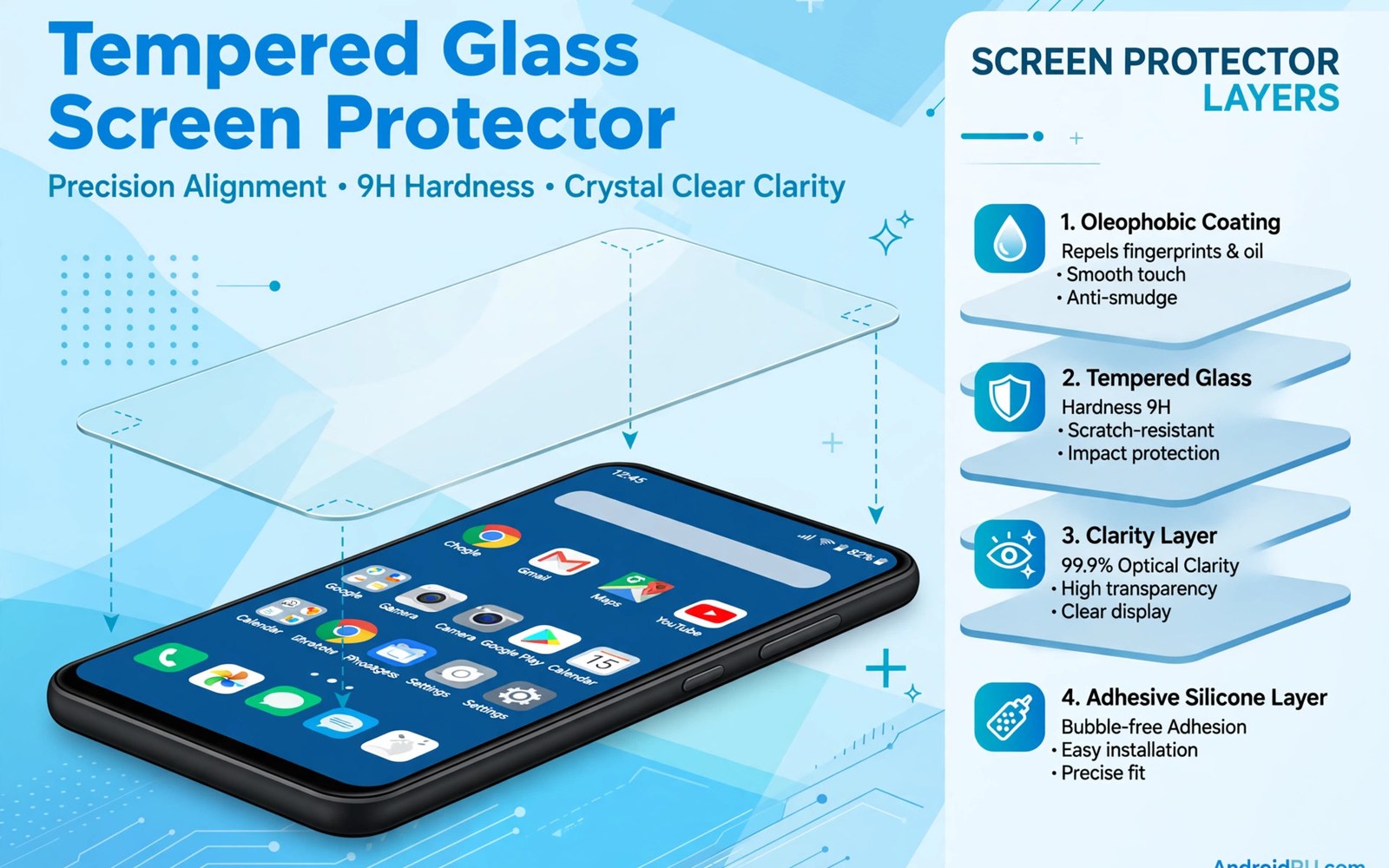
A screen protector looks simple until you try to buy one that fits your phone and your daily life. Shops sell glass in many thicknesses and hardness ratings and coatings that all sound impressive on the box. A protector that is too thick can dull touch response and a protector that is too soft can scratch in a pocket within days. A protector with a weak edge can lift after a case presses against it. The right choice balances screen feel and drop protection and ease of fitting. This guide walks through that choice in plain steps so you can buy once and fit it well. You will learn what the numbers on the box mean and which details matter for your phone model.
Start by matching the protector to your exact phone model rather than to a screen size alone. Two phones can share a similar screen size yet differ in camera cutout and sensor placement and edge curve. A protector cut for a different model may cover a proximity sensor or leave a gap near the front camera. That gap can collect dust and it can change how calls behave when the phone sits near your ear. Check the model name on the box and check the cutout shape in a product photo before you order. A protector made for your model will align with the earpiece and the camera hole without blocking a sensor. That fit is more important than any extra feature printed on the packaging.
Glass thickness and hardness shape how the protector feels under your finger. A thin glass layer keeps touch fast and keeps the fingerprint reader responsive on many phones. A thicker layer can absorb more impact but it can also make taps feel slightly dull. Hardness ratings describe scratch resistance rather than shatter proofing. A hard surface resists keys and coins in a pocket but it can still crack when a phone drops onto a hard corner. Think of the protector as a sacrificial layer that cracks so the real screen does not. That idea helps you judge value without expecting a miracle from any single sheet of glass.
Understand Hardness Coating And Edge Shape
Hardness is often shown as a number followed by the letter H on the box. A higher number suggests stronger scratch resistance against everyday objects. The number alone does not tell you how the glass handles a sharp drop onto concrete. Edge shape matters just as much for daily comfort. A flat protector with sharp edges can feel rough when you swipe from the screen edge. A protector with rounded edges feels smoother and it is less likely to catch on a pocket seam. Rounded edges also sit better under some cases because the case lip does not push directly against a sharp corner.
Coating affects fingerprints and glare and cleaning. An oleophobic coating repels skin oil and it helps fingerprints wipe away with a cloth. That coating wears down over months of wiping and the screen may start to show smudges more often. A matte coating cuts glare in bright light but it can soften fine detail in photos and text. A clear glossy coating keeps colours vivid but it shows reflections outdoors. Choose a coating for the light where you use the phone most. If you work outdoors then glare control may matter more than perfect colour. If you edit photos on the phone then a clear coating will suit you better.
Match The Protector To Your Case And Fingerprint Reader
A case and a screen protector must work as a pair rather than as rivals. A case with a raised lip can lift a protector edge if the protector extends too close to the phone frame. A case friendly protector leaves a small gap around the edge so the case lip can sit without pressing on the glass. Measure that gap in product photos or read reviews that mention your exact case. If you already own a favourite case then search for protectors that mention case friendly fit for your model. A protector that lifts at one corner will collect dust under the glass and it will look worse each week.
Fingerprint readers add another fit problem on many Android phones. An ultrasonic reader under the screen may need a thinner glass layer to read a print reliably. An optical reader may work through a wider range of glass but it can still fail if the protector has a thick adhesive layer. Some protectors include a special adhesive or a cutout area for the reader. Test the reader right after fitting and re-register your fingerprints if the phone offers that option. Re-registering after fitting often improves accuracy because the phone learns the print through the new glass layer. If the reader still fails often then try a thinner protector rather than forcing the phone to accept a poor match.
Fit The Protector Without Dust Or Bubbles
Fitting works best in a clean room with still air and good light. A bathroom after a hot shower can help because steam settles dust in the air. Clean the phone screen with the wipe in the kit and then use a dust sticker to lift any last specks. Align the protector using the earpiece and the camera cutout as guides rather than guessing from the phone edge alone. Lower one edge slowly and let the adhesive spread across the screen by itself. Pressing hard in the centre too early can trap air at the edges. A slow and steady lower gives a cleaner result than a fast drop.
Small bubbles near the edge often disappear within a day as the adhesive settles. Large bubbles in the centre usually mean a dust speck sits under the glass. Lift the nearest corner gently with a thin card and use a dust sticker to remove the speck. Do not lift the whole protector repeatedly because each lift weakens the adhesive and invites more dust. If the protector cracks during fitting then discard it rather than keeping a cracked sheet on the phone. A cracked protector can hide a real screen crack and it can cut a finger during a swipe. Keep a spare protector at home so a failed fit does not leave the phone bare for days.
Check Screen Size And Fit With Simple Commands
A computer check can confirm the display size and density that a protector must match. Use these display checks on a computer that already trusts the phone. They report the display size without changing any setting. Compare that size with the protector description for your model and look for any mismatch in cutout placement. This check is useful when two similar models share a name but differ in display shape.
adb shell wm size
adb shell wm density
Attribution: This code sample is an original example written for this article. It shows standard display commands that help a reader confirm screen size before buying a protector. It does not modify the device and it does not come from any outside guide.
If the reported size differs from the box description then double check the exact model name in the phone settings. A protector for a close model may still fit but a sensor cutout could sit in the wrong place. When in doubt choose a protector from a seller that lists your full model code and shows a clear photo of the cutouts. A good seller also states the glass thickness and the coating type. Those two details let you compare protectors fairly instead of relying on vague claims about strength alone. For extra drop safety then rated smartphone cases can pair with a thin protector. A strong case plus a thin glass layer often beats a thick protector on a bare phone. For outdoor use then outdoor drop protection accessories show how a case and a protector work together. If you want a slim but strong case then heavy duty cases without bulk offer a useful middle ground.
Think about daily glare before you pick a finish for the protector. A glossy protector can turn into a mirror under a bright office light or on a sunny street. An anti glare finish softens that mirror effect but it can also soften small text at the edge of the screen. Try to view a sample in a shop under bright light if you can. If no sample is available then read reviews from users who mention outdoor use rather than reviews that only praise the box. Your daily light matters more than a marketing claim about clarity.
Common Mistakes
One common mistake is choosing a protector by price alone without checking the model cutouts. A cheap protector for the wrong model can block a sensor and cause strange call behaviour. Another mistake is fitting a protector over a dirty screen in a dusty room. Dust under glass creates bubbles that never settle and the protector looks poor from day one. A third mistake is ignoring case fit until the case lifts a corner. A protector that lifts invites dust and moisture under the glass. Test the case right after fitting and replace the protector if the case keeps pushing it up.
Some buyers also keep a cracked protector on the phone for months because the crack looks small. A crack weakens the whole sheet and it can spread after a minor knock. Replace a cracked protector promptly so the next drop hits a fresh layer. Another error is cleaning a coated protector with harsh chemicals that strip the oil repellent layer. A soft cloth with a little water keeps the coating alive longer. Avoid abrasive pads that scratch the glass and create a hazy patch in the centre of the screen.
Frequently Asked Questions
Does a tempered glass protector affect touch sensitivity?
A thin quality protector has little effect on touch for most users. A thick protector or a poor adhesive layer can make taps feel less responsive. If touch feels dull after fitting then check the thickness rating and try a thinner glass. Re-registering fingerprints can also help on phones with under screen readers.
How often should I replace a screen protector?
Replace a protector when it cracks or when its coating wears so badly that smudges no longer wipe away. Many users replace a protector once or twice a year depending on pocket use and drops. A protector with lifted edges should be replaced sooner because dust under the edge can scratch the real screen.
Is a thicker protector always safer in a drop?
A thicker protector can absorb more impact but it is not always safer in every drop. Edge shape and case fit and adhesive quality also decide the result. A thin protector paired with a good case often protects better than a thick protector on a bare phone. Judge the whole setup rather than thickness alone.
Conclusion
The perfect tempered glass protector is the one that fits your exact model and your case and your fingerprint reader. Check cutouts first and then choose thickness and coating for your daily light and touch needs. Fit in clean air and test the case and the reader right away. Replace cracked glass promptly and clean with a soft cloth. Your concrete next step is simple. Tonight check your exact model code in settings and order a case friendly protector with rounded edges that matches that code.

