

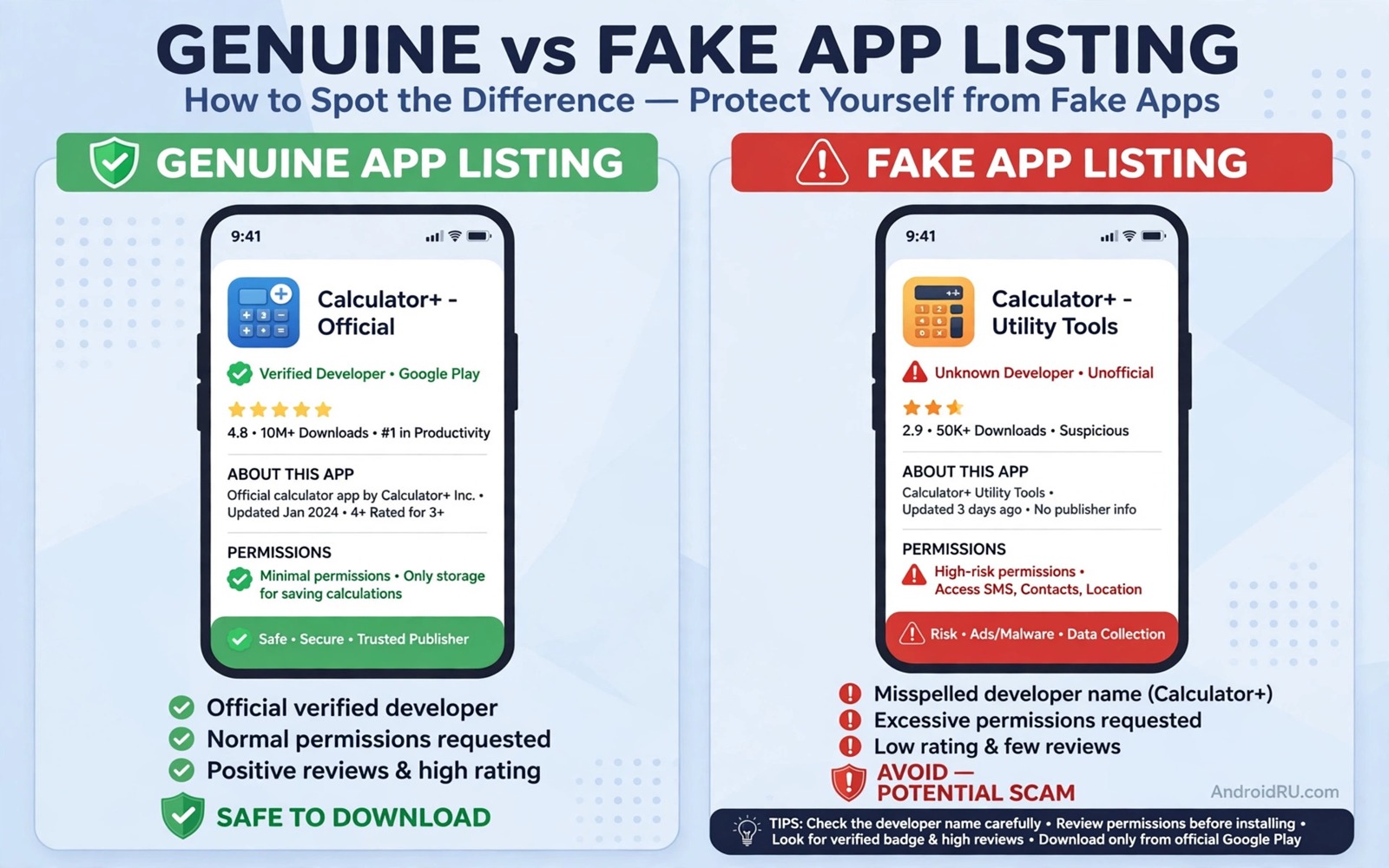
Fake apps that steal credentials do not look fake at first glance. They copy the icon and name and screenshots of a trusted app. They may even function well enough to pass a quick test. The theft happens quietly when you enter a username or password or payment detail into a fake login screen. By the time the theft is clear the credentials are already gone.
This guide teaches you to spot fakes before you install them. Developer history and install counts and review patterns and permission requests each reveal clues. No single clue proves a fake. A pattern of clues together should stop an install. The checks take two minutes and they can save an account.
Start by slowing down before every install. A fake app relies on speed and familiarity. A user who taps install from an ad or a search result without checking the listing is the ideal victim. A user who pauses to verify the developer and the listing details breaks the attack.
Verify the developer and listing details
Open the app listing and check the developer name carefully. A trusted app usually comes from a known company with a clear name and a contact page. A fake app may use a similar name with a small spelling change or an extra word. That small change is easy to miss during a fast scroll.
Check the install count and the release history. A popular banking app should show a large install count and a long update history. A clone with a low install count and a recent first release deserves doubt. A new app that claims to be a famous service yet shows few installs is a strong fake signal.
Read the description for vague language and grammar errors. A trusted developer writes a clear description with specific features. A fake listing often uses generic promises and copied text that does not match the screenshots. A description that avoids naming real features while promising free rewards is a warning sign.
Read reviews with a critical eye
Reviews can reveal a fake yet they can also be faked. Look for a pattern of short generic praise posted on the same dates. A flood of five star reviews with little detail often comes from paid accounts. Real reviews mention specific features and specific problems in varied language.
Sort reviews by most recent and read the low ratings first. A fake app may hide behind an inflated average while recent low reviews describe login failures or stolen accounts. A sudden drop in recent ratings after a long quiet period can mark a takeover of a once trusted listing. That pattern deserves a pause.
Check whether the developer replies to reviews. A trusted developer often replies to bug reports with a real support path. A fake developer rarely replies or replies with generic text that ignores the complaint. Silence is not proof of a fake yet it adds weight to other warning signs. For malware removal read which malware apps to delete from your smartphone immediately and compare its patterns with any suspect listing.
Check permissions before install
Permission requests on the listing page preview the access that the app will demand. A wallpaper app that needs SMS access and contact access is suspicious. A game that needs accessibility access is suspicious. A finance app clone that needs device admin access is highly suspicious. Match each permission to a real feature before you install.
After install check the actual grants in Permission manager. A fake app may request extra permissions after the first open through a prompt that the listing did not show. Deny any grant that does not match the app job. A fake login app does not need to read your messages to show a balance.
Watch the first open behaviour closely. A trusted app usually shows a branded onboarding flow with clear terms. A fake app may jump straight to a login form without branding or terms. A login form that appears before any app introduction should raise doubt. Close the app and verify the developer again before you enter any credential.
A simple fake app checklist
The checklist below gives a repeatable routine for any app that handles credentials. Work through it before you tap install. A single failed check is a reason to pause. Two failed checks are a reason to skip the app entirely and find the trusted version through an official website link.
1. Verify developer name spelling and contact page
2. Check install count and update history length
3. Read recent low reviews for login complaints
4. Match permission requests to real app features
5. Test first open behaviour before entering credentials
6. Install only after all checks pass cleanly
This checklist follows the standard controls built into Android and it uses only the listing details that ship with the store. No extra tool is required to complete the six steps. The order matters because developer verification comes first and credential entry comes last.
Recover quickly after a fake app install
A fake app install is not the end of the story when recovery starts fast. Uninstall the app at once from settings and change passwords for every account that you entered into the fake app. Start with email because email recovery controls many other accounts. Then change banking and social passwords in order of value. A fast password change within an hour of discovery limits the window during which stolen credentials remain useful. That speed matters more than a perfect investigation of how the fake app worked.
Check account activity after the password changes for logins from unknown devices. Revoke unknown sessions at once and enable two factor authentication where it was missing. A session that stays active after a password change can still access an account in some services. Session revocation forces a fresh login with the new password and it closes that gap. That session check should happen on the same day as the password change rather than a week later.
Report the fake app through the store reporting option after removal. A report helps the store remove the clone before it targets other users. Include the developer name and the listing details that marked it as fake in your report. A detailed report helps reviewers act faster than a vague complaint. That reporting step turns a personal recovery into protection for the next user who searches for the same trusted app.
Review other apps from the same developer after a fake install. A fake developer often publishes several clones under similar names. Open the developer page in the store and check every app listed there. Uninstall any app from that developer that you installed around the same time. That developer wide review catches partner clones that a single app removal would miss. A clean phone after a fake install requires a developer level check rather than a single app check.
Verify apps through official channels only
Official channels provide the most reliable path to a trusted app version. A bank website link to its store listing is more reliable than a search ad for the same bank app. A company support page link is more reliable than a social media post that claims to offer the app. Use official website links for every credential app that you install. That habit removes search ads and social links from the install path entirely. An install that starts from an official website is far less likely to land on a clone.
Bookmark official app pages for services that you use often. A bookmarked listing allows a fast reinstall without a new search that could surface a clone. A bookmark also helps after a phone reset when many apps need reinstalling quickly. That bookmark list acts as a trusted install catalogue that you control. A catalogue built from official links beats a fresh search under time pressure every time.
Check official channels after a security incident involving a clone. A bank that suffered a clone attack may publish a warning with the correct listing details on its website. That warning helps users distinguish the real app from the clone that caused the incident. Reading that warning before reinstalling prevents a second install of the same clone. That post incident check turns a scary event into a learning moment for future installs.
Common mistakes
One mistake is installing from a search ad without checking the listing. Ads can promote a clone above the trusted app in search results. Scroll past ads to find the verified listing or open the store listing from the official website of the service. An ad position is not a trust signal.
Another mistake is reusing the same password across apps. A fake app that steals one password can then access every account that shares it. Use unique passwords and a password manager with autofill. Autofill also helps because it will not fill credentials into a fake app with a mismatched identity.
A third mistake is ignoring a login failure after entering credentials into a new app. A fake app may show a fake error after capturing the password. Change the password from a trusted device at once when a new app login fails oddly. If you need a device wide check read the five signs that show a phone has been hacked and run its checks after the password change.
Frequently asked questions
Can fake apps appear in the official store?
Yes and clones can slip past store checks for a time. Store presence alone is not proof of trust. Developer history and reviews and permissions remain necessary checks even for store listings.
What should I do if I entered credentials into a fake app?
Change the password at once from a trusted device and enable two factor authentication. Check account activity for unknown logins. Uninstall the fake app and review permissions for other apps from the same developer.
Does a high rating prove an app is safe?
No and ratings can be inflated by fake reviews. A high average with generic praise is less trustworthy than a moderate average with detailed real reviews. Read recent low reviews before you trust any rating.
Conclusion
Fake credential apps succeed through speed and familiarity. Developer checks and review checks and permission checks together break that speed. A two minute pause before install can protect accounts that took years to build. Treat every credential app as unproven until its listing passes cleanly.
Your concrete next step is to verify the developer name and install count for the next credential app that you install. Do not enter a password until those checks pass. For phishing protection read how to auto filter suspicious SMS phishing scams and apply its filtering habits to fake app links as well.

