

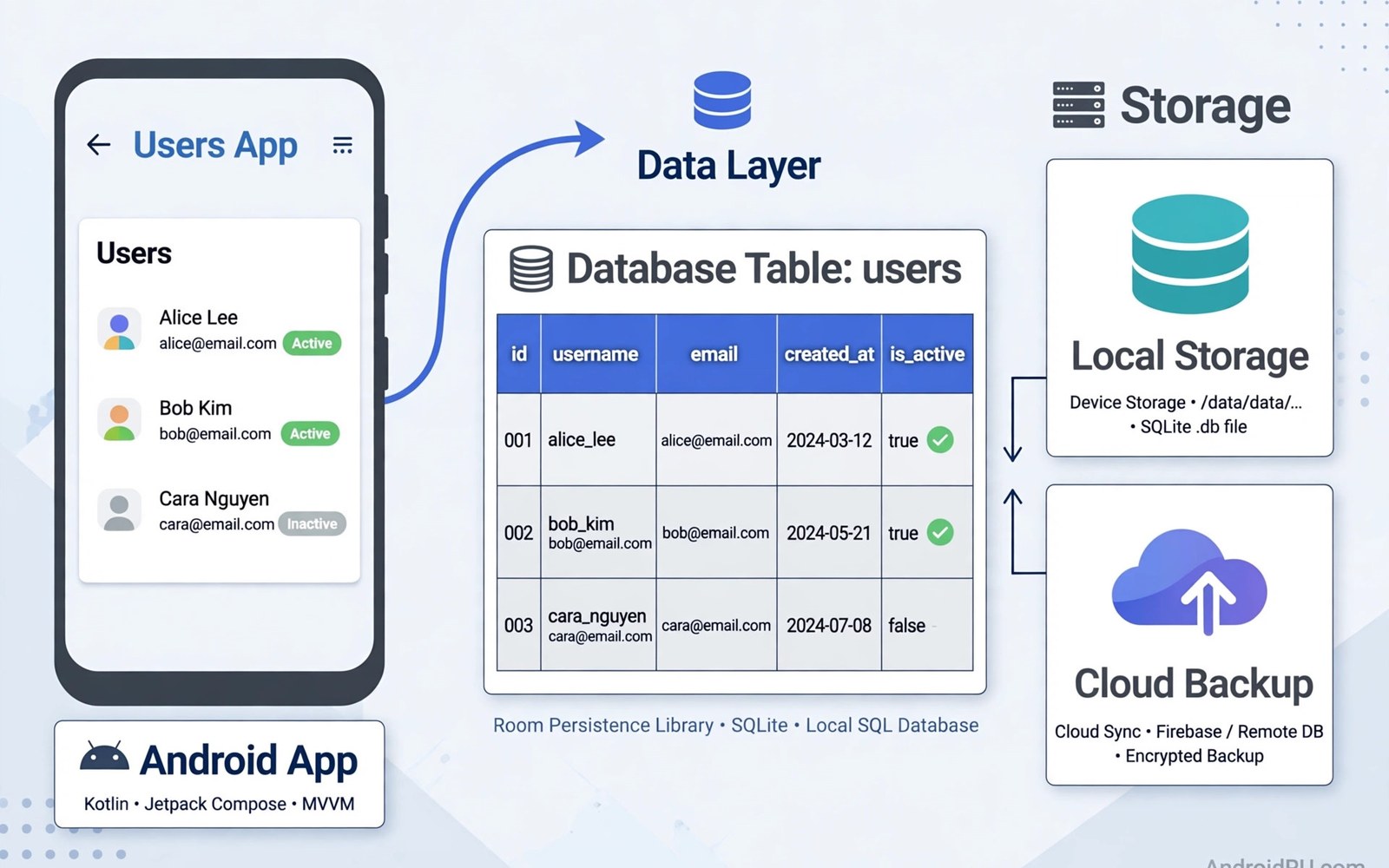
Room is the recommended persistence library for Android and it provides a clean layer over SQLite that lets you store structured data locally with compile time checks that catch errors early. Direct SQLite code requires manual SQL strings and cursor handling that is verbose and easy to get wrong when a column name changes or a query returns an unexpected type. Room replaces much of that manual work with entities and data access objects and a database class that the compiler verifies against your schema. The result is local storage that feels like ordinary Kotlin code while still giving you full SQL power when a complex query needs it. This guide explains entities and DAOs and migrations in practical terms for apps that need reliable offline data.
Local storage matters because users expect apps to work without a perfect connection and to remember their content across restarts and device reboots without delay. A well designed local database serves as a single source of truth for a screen so the interface shows cached data immediately while fresh network data loads in the background. That pattern improves perceived speed and it reduces data use because repeated screen visits do not need a full network download for unchanged content. Room integrates with flows so screens observe database changes automatically and update without manual refresh code after every write. Learning Room well is therefore a core skill for any Android developer who builds apps with real user data.
Entities Tables and Primary Keys
An entity is a Kotlin data class that Room maps to a table and each field becomes a column with a type that Room can store in SQLite directly or through a converter. Choose a primary key that uniquely identifies each row and prefer a stable identifier from your domain when one exists rather than inventing a random key for every table. Auto generated keys work well for local only rows such as notes created on the device while server identifiers work better for synced rows that must match remote records. Column names should be clear and consistent because they appear in queries and in migration scripts that future developers must understand without guessing. Keep entities focused on storage and map them to domain models when the interface needs a different shape than the stored row.
Relationships between entities use foreign keys and embedded objects and relation annotations that let Room load connected data in a structured way without manual joins in every query. A one to many relationship such as a playlist with many songs can be modelled with a parent entity and a child entity linked by a foreign key that Room understands. Indexes on foreign keys and on columns used in frequent queries improve lookup speed but they also increase write cost and storage size so add them where they help real queries. Room validates your schema at compile time and it generates code that matches the declared entities so mismatches surface during build rather than at runtime on a user device. That early feedback is one of the strongest reasons to prefer Room over raw SQLite code in a modern app.
- Define one entity per table with a clear and stable primary key for each row.
- Use foreign keys to model relationships between parent and child tables cleanly.
- Add indexes only on columns used in frequent lookups or joins in real queries.
- Keep entities focused on storage and map them to domain models for the interface.
- Let Room validate the schema at compile time to catch errors before release.
DAOs Queries and Flows
A data access object is an interface that declares methods for inserting and updating and deleting and querying rows with annotations that Room turns into efficient database code. Simple operations use convenience annotations while complex reads use SQL queries written in the annotation so you keep full control over filtering and sorting and joining. Return types matter because a query can return a single object or a list or a flow that emits new results whenever the underlying tables change during use. Flows are powerful for screens because the interface observes the database and updates automatically after a background sync writes new rows without any manual refresh trigger. Suspend functions suit one time operations such as inserting a row after a user action because they integrate cleanly with coroutines and background threads.
Query design should match screen needs because a screen that shows a sorted list benefits from an ordered query while a detail screen benefits from a query that selects one row by its identifier. Avoid selecting all columns when a screen needs only a few fields because a lean query reduces memory use and speeds up large tables on low end devices. Transactions group several operations into an atomic unit so a multi step update either completes fully or rolls back cleanly without leaving partial data behind. Room supports transactions through annotations and through explicit transaction methods for complex cases that span several DAOs in one operation. Well written DAOs read like a clear contract for data access and they make the rest of the app easier to test and maintain over time.
Migrations and Schema Evolution
Apps evolve and tables need new columns and new tables as features grow so Room migrations describe how to move an existing database from one version to the next without losing user data. A migration is a set of SQL statements that alter tables in a controlled way and Room runs them in order when it opens a database with an older version number. Always test migrations with a real database file from an older app version because a migration that works on an empty database may fail on a database with real rows and constraints. Destructive fallback that deletes and recreates the database should be a last resort for development only because it erases user data that cannot be recovered after release. A careful migration plan protects users who update from any older version and not just from the most recent release.
Auto migration can handle simple changes such as adding a column or adding a table when you declare the change clearly and let Room generate the required statements. Complex changes such as renaming a column or changing a type still need a manual migration where you create a new table and copy data and drop the old table in a safe sequence. Version numbers must increase with every schema change and you should keep a test that opens each older version and migrates it to the current version successfully. Document schema changes in release notes for the team so support staff understand why a database version changed and what data moved during an update. Migration discipline is a sign of respect for user data and it prevents update failures that are hard to fix after distribution.
Database Class Repositories and Threading
The database class ties entities and DAOs together and it provides access to each DAO through a method that the rest of the app can call through a repository. Build the database once as a singleton because multiple database instances waste resources and can cause inconsistent views of the same underlying file. A repository sits above the database and exposes flows and suspend functions that screens and view models can use without knowing SQL details or table names. That layer also handles mapping between entities and domain models and it coordinates database writes with network sync when an app works offline first. Keeping database access behind a repository makes testing easier because tests can use an in memory database without touching a real device file system.
Threading rules matter because Room forbids main thread database access by default and that protection prevents interface freezes from slow queries on large tables. Use coroutines and dispatchers for database work so queries run on a background thread and results return to the interface safely through flows. Long running writes should use transactions and batch inserts where possible because many small writes in a loop are slower than one batched operation. You can learn background patterns in coroutines and Flow for background tasks because Room flows and coroutines work together naturally. You can also study network caching in efficient API networking with Retrofit and OkHttp when you combine local storage with server data in an offline first design.
Testing and Practical Tips
Testing Room code works well with an in memory database that behaves like a real database but disappears when the test finishes so tests stay isolated and fast. Write tests for DAOs that insert rows and query them back with filters and sorting that match real screen requirements rather than testing trivial operations only. Test migrations with schema files exported during builds so every version transition gets verified before release to users who may skip several updates. Keep database size in mind because large images and blobs in tables can slow queries and increase backup size so store large files in app storage and keep only paths in the database. Regular maintenance such as clearing old cache rows keeps the database lean and responsive over months of daily use.
Choose Room when your data is structured and relational and when screens benefit from observing changes automatically as data updates in the background. Choose a simpler key value store for tiny settings and preferences that do not need queries or relationships between records. Document your schema decisions for future developers because a table that looks obvious today may seem mysterious after a year of feature changes and team turnover. You can strengthen overall app quality with testing Android apps with unit and Espresso tests for database and repository tests. With entities and DAOs and migrations handled carefully Room gives Android apps a reliable local foundation that users can trust every day.
A final habit keeps local storage healthy because you should review query performance and database size after adding a new table or a new relationship to an existing schema. That review catches missing indexes early and it prevents a small feature from slowing a large table that users rely upon every day. Test migrations with a database file from an older version so an update from a skipped release still moves user data safely to the new schema. With that discipline Room remains a reliable foundation and users can trust that their content survives updates and restarts without loss.
@Entity(tableName = "notes")
data class Note(
    @PrimaryKey(autoGenerate = true) val id: Int = 0,
    val title: String,
    val body: String
)

@Dao
interface NoteDao {
    @Query("SELECT * FROM notes ORDER BY id DESC")
    fun getAll(): Flow>
}
The steps above follow the approach described in the official developer documentation for this platform and reflect common practice used by experienced developers when they build and test Android apps in a careful and organised way.

