

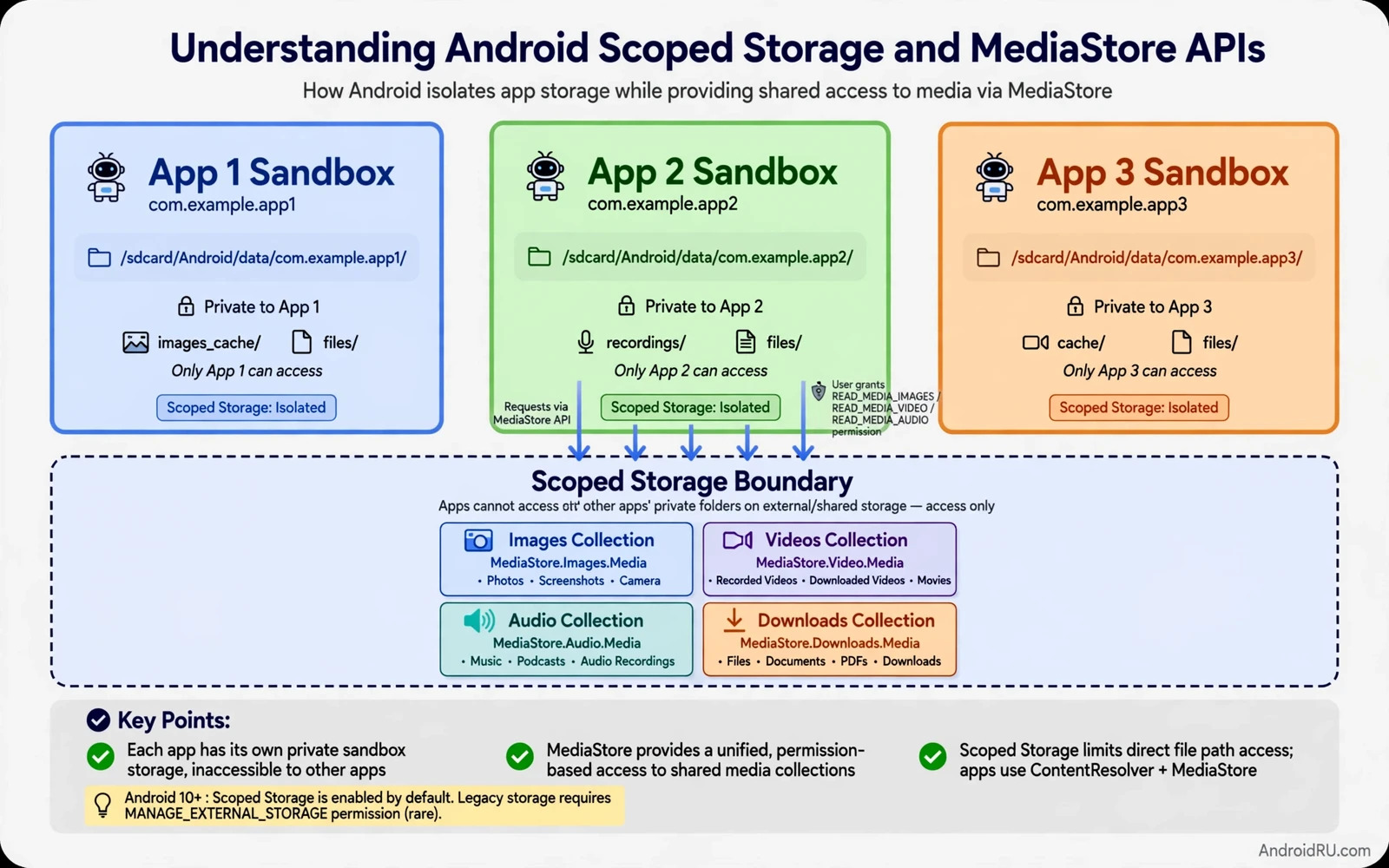
Scoped storage changed how Android apps reach files on shared storage. An app now gets its own private area by default. It can also reach shared media collections through a system managed interface. It cannot freely browse every folder on the device as older apps once did. This model protects user files from apps that request broad access without need. It also changes how developers design saving and sharing and backup features.
MediaStore is the system catalogue for shared media files. It organises images and videos and audio files into collections. An app inserts a new media item through MediaStore and the system places the file in the right collection. An app queries MediaStore to find media that the user can share. The app does not need a raw path to every file on the device. It works with a content URI that the system controls and can revoke.
This guide explains the model in plain terms and then in developer terms. You will learn the difference between app private storage and shared media storage. You will learn which permissions still matter and which requests the system now denies. You will also learn how to migrate an older file workflow without breaking user data. The goal is an app that stores media correctly and asks for only the access it truly needs.
val values = ContentValues().apply {
    put(MediaStore.Images.Media.DISPLAY_NAME, "edited_photo.jpg")
    put(MediaStore.Images.Media.MIME_TYPE, "image/jpeg")
    put(MediaStore.Images.Media.RELATIVE_PATH, "Pictures/MyApp")
}
val uri = contentResolver.insert(MediaStore.Images.Media.EXTERNAL_CONTENT_URI, values)
App private storage first
Every app owns a private directory that other apps cannot read. Files in that directory disappear when the user uninstalls the app. This area suits caches and drafts and internal databases and files that only the app needs. No special permission is required to use it. Use it for any file that has no value outside the app. Keeping private files private reduces both privacy risk and accidental deletion by other apps.
Private storage is not a place for user creations that should survive uninstall. A photo that the user edited and expects to keep belongs in a shared media collection. A document that the user may open in another app belongs in a user chosen location. Design the save flow around the life of the file. Ask whether the file should outlive the app. If the answer is yes then private storage is the wrong home for it.
Cache files deserve special care inside private storage. The system may clear the cache when storage runs low. Never store the only copy of user work in a cache folder. Store user work in a durable location and use the cache only for derived data that can be rebuilt. A thumbnail cache and a preview cache are good cache citizens. An edited photo stored only as a cache file is a data loss risk.
Shared media through MediaStore
MediaStore collections cover images and video and audio on shared storage. An app creates a media entry with a display name and a media type and a relative path inside the collection. The system returns a content URI for the new entry. The app writes bytes through that URI. Other apps that can see the collection can then find the file. The user keeps control because the file lives in shared media space rather than inside one app folder.
Reading media also goes through MediaStore queries. An app queries for items it needs and receives URIs and metadata such as size and date and duration. On newer system versions an app may need permission to read media by type. Image access and video access and audio access can be granted separately. Request only the types your feature uses. A photo editor has no need to request audio access and a music player has no need to request image access.
Deleting or editing media owned by another app needs extra care. The system may ask the user to confirm the change. That confirmation protects the user from an app that quietly deletes photos. Design the delete flow to explain why the change is needed before the system dialog appears. A user who understands the reason is more likely to approve a legitimate edit. A silent delete attempt that triggers a surprise dialog feels like a bug even when the code is correct.
Permissions and user choice
Broad file access is no longer the default path for most apps. The system reserves all files access for a narrow set of use cases such as file managers and backup tools. A media app or a social app should not request it. Stores and system policy may reject an app that requests broad access without a matching core function. Build the feature with MediaStore first and treat broad access as an exception that needs strong justification.
The document picker gives another user controlled path. A user picks a file or a folder and grants access to that specific choice. The app receives a URI for the chosen item only. This path suits import and export flows where the user knows exactly which file matters. It avoids a standing permission for the whole device. Use the picker when the user initiates the action and use MediaStore when the app creates new media.
Permission requests should arrive at the moment of need. Ask for image access when the user opens the gallery picker. Ask for audio access when the user opens the music browser. A request at first launch with no context feels invasive and invites a denial. Explain the feature in one short sentence inside the app before the system dialog appears. A clear in app explanation raises grant rates and reduces support questions.
Migrating older file code
Older code that writes directly to shared folders by path will fail under scoped storage rules. Replace direct path writes with MediaStore inserts for media files. Replace direct path reads with MediaStore queries or picker URIs. Keep a migration step that moves user files from an old private location to a shared collection when the user updates. Test migration on a device with real user data patterns such as many photos and duplicate names.
File names need handling during migration. Two files can share a display name in different folders. MediaStore may rename a file to avoid a clash inside one collection. Store the returned URI after the insert instead of assuming the requested name survived. Show the user the final name when the name matters for later retrieval. A migration that silently renames files without recording the result creates confusion later.
Tools that fetch files from outside the device face a related question. A downloader that saves to a server folder does not face scoped storage at all. A companion app that saves onto the phone does face it. Readers who build fetch tools can pair this guide with the piece on building an APK downloader tool with Python and keep the server stage separate from the on device save stage. That separation keeps each stage simple and testable.
Practical design rules
Choose the storage home by file life and by sharing need. Private storage suits internal data. MediaStore suits photos and videos and audio that the user may share. The picker suits user chosen documents. A backup feature suits a user chosen folder with a clear export step. Write the choice down in the feature spec so later developers do not move files casually between homes.
Test with scoped storage limits on every supported system version. Behaviour changed across releases and an app that works on one version may fail on another. Test fresh install and update install separately. Test with no permission and with partial permission. Test with a full shared collection and with an empty collection. These cases reveal assumptions that a happy path test hides.
Watch memory and storage behaviour while testing media flows. Loading full size images into memory for a thumbnail grid wastes RAM and slows scrolling. Load scaled versions that match the display size. Release bitmaps when a screen closes. Readers who chase a growth pattern in this area can continue with the piece on finding and fixing Android memory leaks and check whether a media cache holds references longer than needed.
Distribution and format awareness
Storage design interacts with app distribution. An app delivered as a bundle may split resources by device and by language. A media feature that assumes one large asset pack may behave differently under a split install. Readers who plan distribution can continue with the piece on app bundles versus traditional APK files and check how delivery affects the assets their storage code expects. Test media flows on a bundle install and not only on a local debug install.
Privacy review should cover every media flow before release. List each collection the app reads and each collection it writes. List each permission and the feature that needs it. Remove any collection or permission without a live feature behind it. A lean permission list builds user trust and reduces store review friction. It also limits damage if a future bug exposes more data than intended.
Scoped storage is not a barrier to good apps. It is a clearer contract between the app and the user. The app states what it needs and the system enforces that boundary. Apps that respect the boundary feel safer and behave more predictably across devices. Design with the boundary from the start and storage becomes a feature rather than a late release problem.
Testing storage on real devices
Storage behaviour varies by vendor and by system version. One vendor may show a permission dialog with different wording. Another vendor may add its own gallery app with its own quirks. Test storage flows on several vendor devices rather than on one flagship alone. Record vendor differences in the test report so the team does not rediscover them on every release. Vendor diversity is a test requirement for storage features.
Test storage flows with a full device and with a nearly empty device. A full device reveals error handling for failed writes. An empty device reveals first run behaviour with no existing media. Test with a device that holds thousands of photos because query performance changes with collection size. A query that runs instantly on an empty collection may lag on a large collection. Pagination and limits keep large collection queries responsive.
Test permission revocation during use. Grant media access and then revoke it in system settings while the app runs in the background. Return to the app and confirm it handles the loss gracefully. A media browser that crashes on revoked permission fails a basic robustness test. A browser that shows an empty state with a regrant action passes. Revocation testing belongs in every storage test plan.
Review storage code for data loss risks before release. Ask what happens when a write fails halfway through. Ask what happens when the user deletes the app and reinstalls it. Ask what happens when a migration step crashes midway. Answers to those questions shape backup and recovery design. Storage code that answers them well protects user creations that cannot be recreated.

