

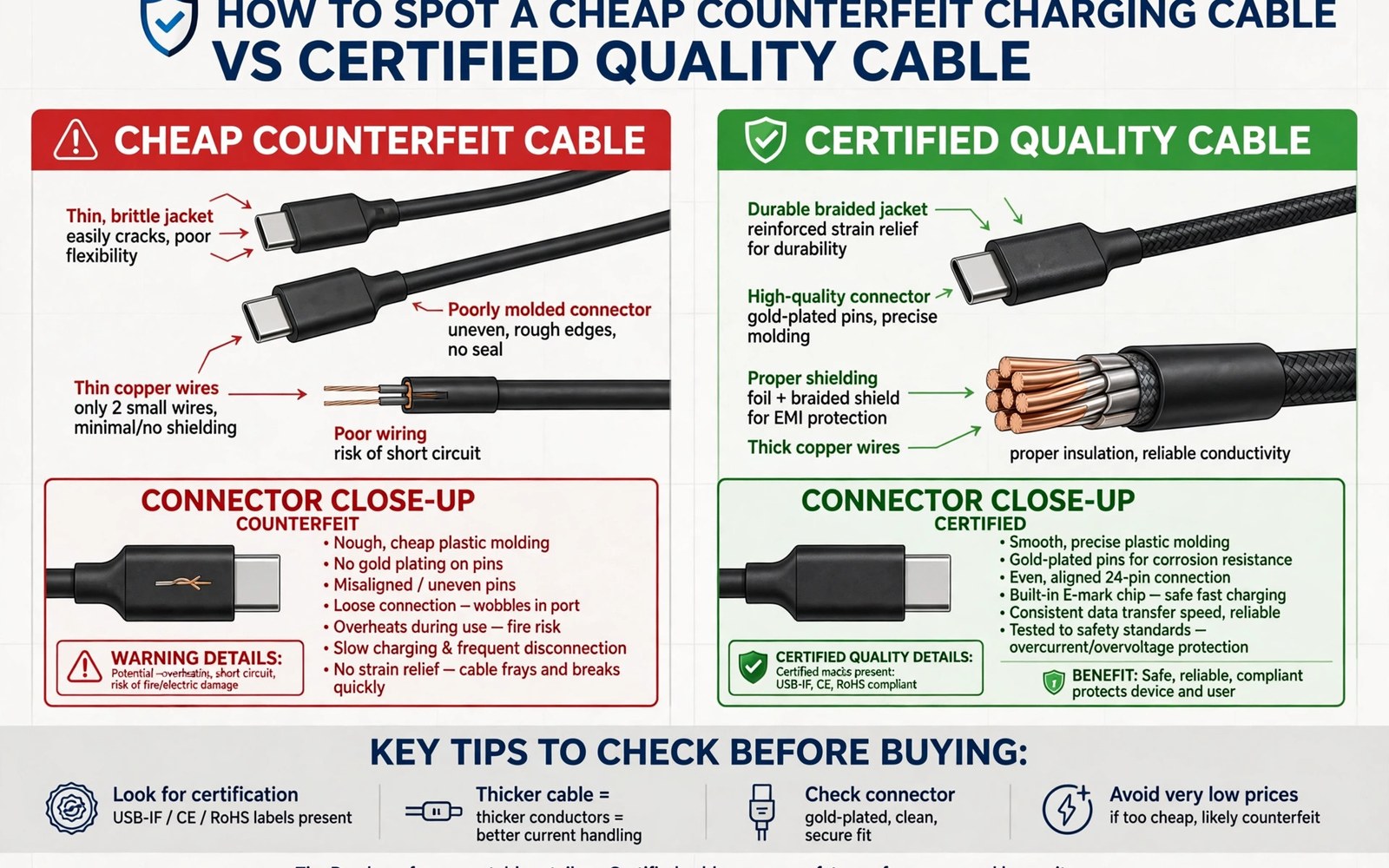
Counterfeit cables look like quality cables. They cost far less. They often fail sooner. They can also damage a phone port. A damaged port costs much more than a saved cable price. A counterfeit cable may use thin wires. It may use poor metal contacts. It may lack a proper marker chip. It may claim a rating it cannot meet. Those flaws create heat and slow charging. They can also short a port in rare cases. This guide shows how to spot fakes before use. It covers packaging and build clues. It covers simple tests. It helps you protect your phone.
Counterfeits thrive on bargain listings. A listing with a very low price attracts buyers. The photos look professional. The description copies a genuine product. The cable arrives in a plain bag. The buyer may not notice the difference at first. The cable charges the phone. It may charge slowly. The user blames the charger. The cable quietly stresses the port. Months later the port loosens. The user faces a repair bill. That slow damage is the real danger. A fake cable rarely fails dramatically at once. It fails gradually through poor materials. Early detection prevents that slow harm.
Packaging and Listing Warning Signs
Genuine cables ship in branded packaging with clear specs. The packaging lists watt rating and data speed. It lists cable length and certification marks. It includes a maker name and a support contact. Counterfeit packaging often lacks those details. It may use vague words like fast charging without numbers. It may show certification marks that look blurry or wrong. It may misspell brand names. It may lack a support contact entirely. A listing with vague specs deserves doubt. A listing with no maker name deserves doubt. A listing with stock photos only deserves doubt. Real makers show real product photos.
Price is a strong clue when combined with claims. A cable claiming a high rating at a tiny price is suspicious. High rated cables need thick copper and a marker chip. Those materials cost money. A price far below the market range cannot cover them. The seller must cut corners somewhere. The corners cut are usually wire thickness and chip quality. A fair price does not guarantee genuineness. A tiny price with a huge claim almost guarantees a fake. Compare prices across several trusted sellers. A price close to the trusted range is plausible. A price far below it is a warning. Treat that warning seriously.
Reviews can reveal counterfeits when read carefully. Fake listings often have generic reviews. The reviews praise fast shipping rather than cable quality. They lack detail about charging speed. They lack photos from buyers. Genuine listings have detailed reviews. Buyers mention charging times. Buyers mention cable feel and durability. Buyers post photos of packaging. A listing with only short generic reviews deserves caution. A listing with many reviews posted on the same day deserves caution. That pattern suggests manipulated reviews. Read the negative reviews first. Negative reviews often mention heat and loose plugs. Those mentions signal fake stock.
Build Quality Checks in Hand
Hold the cable and feel the plug housing. A genuine plug feels solid and smooth. Seams align neatly. The housing has no sharp edges. A counterfeit plug may feel light and hollow. Seams may misalign. Sharp plastic edges may catch a finger. The plug may wobble in the phone port. A wobbling plug signals poor metal work. The metal contacts may be thin or uneven. Look at the contacts under good light. Genuine contacts look clean and even. Counterfeit contacts may look dull or uneven. One contact may sit higher than others. Uneven contacts cause intermittent charging. They also cause heat at the contact point.
Flex the cable gently near the plug. A genuine cable bends smoothly with a long strain relief. The relief tapers gradually. A counterfeit cable may have a short stiff relief. It may have no relief at all. Bending near a poor relief feels abrupt. The cable may kink at one point. A kink point will break first. Check the cable sheath thickness by touch. A genuine cable feels solid along its length. A counterfeit cable may feel hollow or uneven. Thin spots signal thin wires inside. Thin wires overheat under fast charging. A cable that feels uneven deserves rejection. Return it before use when possible.
Check the cable weight against a known good cable. A high rated cable needs copper weight. A counterfeit cable with thin wires feels lighter. Weight alone does not prove genuineness. A heavy cable can still be fake. A light cable claiming a high rating is suspicious. Compare cables of the same length and rating. A large weight gap points to thinner wires. A modest gap may reflect different covers. Braided covers add weight. Rubber covers weigh less. Compare like with like. A braided fake may still feel light for its type. Use weight as one clue among several. No single clue proves a fake alone.
Electrical Tests You Can Do Safely
Test charging speed with a known good charger. Note the time to gain a fixed percentage. A genuine cable should reach near expected speed. A counterfeit cable often charges far slower. The slowdown comes from thin wires or a missing chip. Test with another known good cable for comparison. The comparison reveals the gap clearly. A cable that charges at half speed is suspect. A cable that charges at near speed passes this test. Speed alone does not prove safety. A fake cable can charge fast for a short time. It may still overheat later. Combine speed testing with heat testing.
Check plug temperature after ten minutes of charging. Touch the plug housing carefully. Warm is normal for fast charging. Hot to the touch is not normal. A hot plug signals poor contacts or thin wires. Stop using a hot cable at once. Try the same charger with a known good cable. A cool result with the good cable points to the suspect cable. A hot result with both cables points to the charger. That comparison isolates the fault. Never ignore a hot plug. Heat is the clearest warning of a failing cable. A cable that runs hot will damage the port over time. It may also melt its own housing.
Test data transfer when the cable claims data support. Copy a large file and time it. A cable claiming fast data should copy quickly. A counterfeit cable may copy very slowly. It may fail to transfer data at all. A charge only fake may claim data support falsely. The file test reveals that lie. A cable that fails data but charges well may still be useful for charging only. Label it as charge only. Do not use it for important file transfers. A cable that fails both charging and data deserves disposal. Do not keep a failing cable as a spare. A spare that damages a port is worse than no spare.
Port Damage Signs to Watch For
A loose port is an early sign of cable damage. A plug that once clicked firmly now wobbles. A plug that falls out with slight movement signals wear. Wear may come from poor plug dimensions. A plug slightly too large stresses the port. A plug slightly too small wobbles and arcs. Arcing creates tiny sparks at contacts. Sparks pit the metal over time. Pitted contacts charge intermittently. Intermittent charging frustrates users. It also heats the port. Stop using a cable that causes wobble. Try a known good cable. A firm fit with the good cable points to the suspect cable. A wobble with every cable points to port wear already done.
Discolouration around the port signals heat damage. Look at the port rim under good light. Dark marks suggest overheating. A melted plastic smell during charging is a serious warning. Stop charging at once if you smell melting plastic. Disconnect the cable carefully. Do not touch a very hot plug with bare skin. Let it cool before handling. Inspect the port for debris and damage. A damaged port needs professional repair. Continuing to use it risks further damage. A repair costs more than any cable saving. Early action limits the damage. A quick stop can save the phone.
Intermittent charging that follows one cable is a clear clue. The phone charges when the cable sits at one angle. It stops when the cable moves slightly. That behaviour points to poor contacts in the cable or the port. Test with a known good cable at several angles. A stable result with the good cable points to the suspect cable. An unstable result with every cable points to the port. Note the pattern before seeking repair. A clear pattern helps a technician diagnose quickly. It also prevents a needless cable purchase. For port cleaning guidance see USB-C connector wear and cleaning dust from device charging ports for safe steps.
Safe Buying Habits
Buy cables from trusted sellers with clear specs. A trusted seller lists watt rating and data speed. It lists length and certification. It provides a maker name and support contact. It offers a return policy. A return policy matters for testing. Test every new cable on arrival. Keep packaging until tests pass. A seller who refuses returns deserves avoidance. A seller with only bargain listings deserves caution. A mix of fair prices and detailed specs signals a serious seller. Loyalty to a trusted seller saves time. It also reduces fake risk greatly. A known good seller is worth a small price premium.
Keep one known good cable as a reference. Use it to compare new cables. A reference cable gives a baseline for speed and heat. A new cable that matches the reference passes basic tests. A new cable that lags far behind fails. The reference cable need not be expensive. It must be genuine and tested. Label it clearly to avoid confusion. Store it separately from daily cables. A reference cable used daily wears out. A worn reference gives a false baseline. Keep it for testing only. That discipline preserves its value. It also speeds future cable checks.
- Reject listings with vague specs and tiny prices for high claims.
- Inspect plug seams and contact evenness before first use.
- Test charging speed against a known good cable.
- Check plug heat after ten minutes of charging.
- Stop using any cable that runs hot or wobbles.
Counterfeit cable checklist:
1. Packaging: clear specs and maker name
2. Price: near trusted seller range
3. Plug feel: solid seams and even contacts
4. Speed test: near expected charging speed
5. Heat test: warm is fine and hot is a fail
6. Data test: matches claimed data speed
7. Port check: firm fit without wobble
What to Do with a Suspect Cable
Stop using a suspect cable for important devices. A suspect cable may still serve a low value device. That use still risks port damage. Safer disposal is usually better. Cut the cable before disposal to prevent reuse by others. A cut cable cannot damage another phone. Dispose of it with electronic waste when possible. Electronic waste handling keeps metals out of landfill. It also prevents a discarded fake from re-entering use. A fake cable in a donation bin harms the next user. Disposal with a cut prevents that harm. It costs nothing beyond a moment.
Report a counterfeit listing to the marketplace. A report helps other buyers avoid the same fake. Include photos of packaging and plug details. Mention speed and heat test results. A detailed report carries more weight than a vague complaint. The marketplace may remove the listing. Removal protects future buyers. It also pressures sellers to stock genuine cables. A single report may seem small. Many reports together change seller behaviour. Honest sellers benefit from fake removal too. Their genuine cables compete fairly. Reporting is a community service.
Seek port repair promptly when damage is confirmed. A loose or discoloured port will not heal itself. Continued use worsens it. A technician can replace a port module on many phones. The repair cost varies by model. A repair quote helps decide between repair and replacement. Back up the phone before repair. Repair shops may reset the device. A backup protects photos and data. For magnetic accessory risks see magnetic USB-C adapters and potential short-circuit risks for related safety habits. A repaired port deserves a genuine cable afterwards. A fake cable would damage it again.
Final Thoughts on Counterfeit Cables
Counterfeit cables save money at first and cost money later. They hide poor materials behind copied looks. They charge slowly and run hot. They loosen ports over time. Packaging clues and build checks reveal many fakes before use. Speed and heat tests reveal the rest. A trusted seller and a reference cable make testing easy. A suspect cable deserves disposal rather than continued use. A damaged port deserves prompt repair. Those habits protect the phone that a cable serves.
Readers may also find braided nylon cables versus rubber cables for durability and tangle resistance useful for a related setup.
Test every new cable on arrival with speed and heat checks. Keep packaging until tests pass. Buy from sellers with clear specs and fair prices. The steps above follow the approach described in the official developer documentation for accessory safety and power handling. That approach stresses verifying ratings and heat before trusting any accessory. Follow it and your phone port will stay firm and safe for years.

