

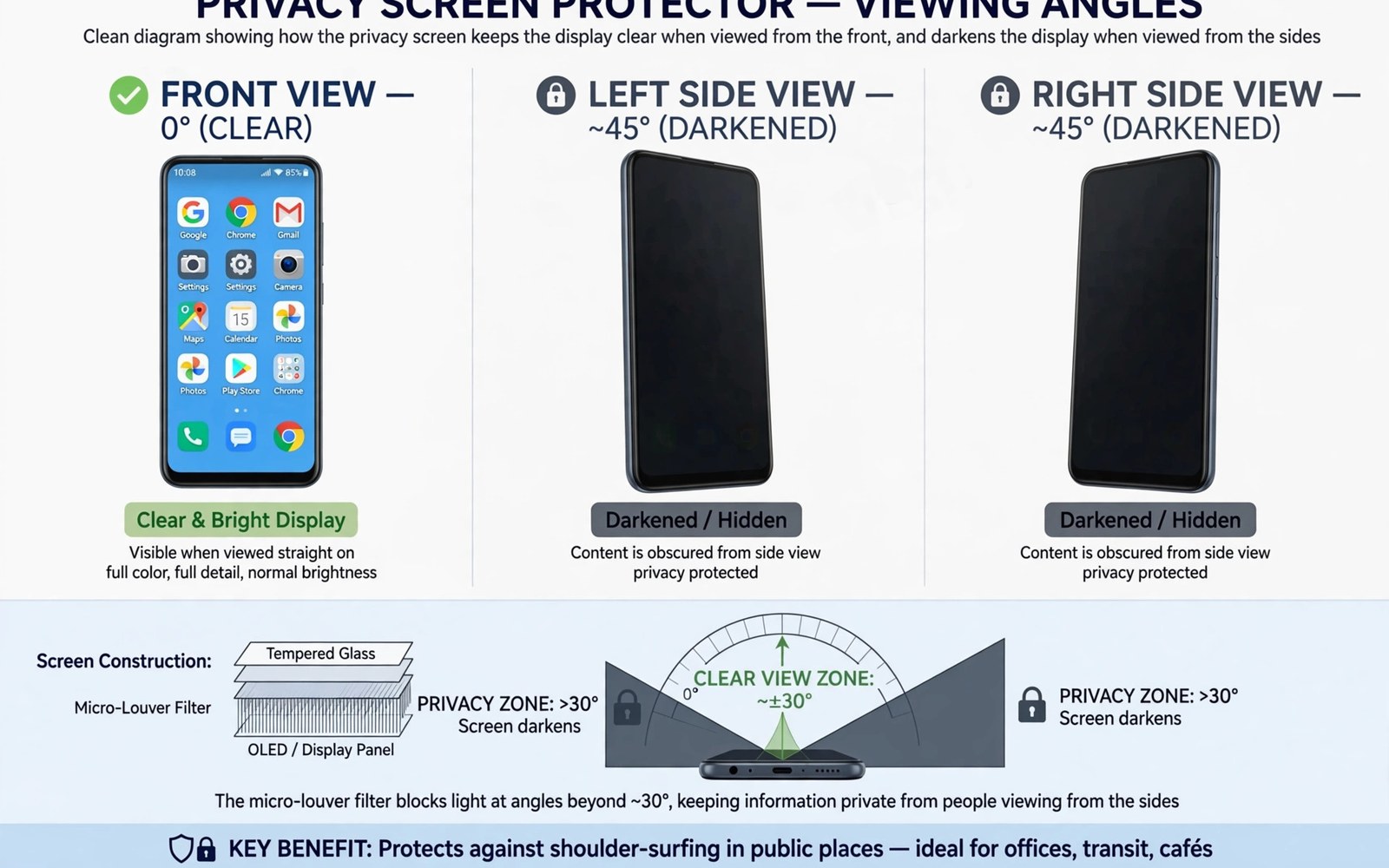
Public screens invite public eyes. A neighbour on a train can read messages over your shoulder. A stranger in a queue can watch a banking app. A privacy screen protector narrows the viewing angle. It keeps the screen clear from the front. It darkens the screen from the sides.
The effect comes from tiny vertical blinds inside the protector layer. Light passes straight through to the viewer in front. Light at an angle gets blocked by the blinds. The result is a screen that fades to black from the side. It feels like magic the first time you see it. The physics is simple and it works well within limits.
This guide explains those limits honestly. It covers viewing angles and brightness loss. It covers touch and sensor effects. It also covers when a privacy protector is the wrong choice. For basic material choice, compare tempered glass compared with TPU film first.
How Side Angle Blocking Works
Privacy layers use microscopic louvres like window blinds. Straight light passes between the louvres. Angled light hits a louvre wall and stops. The blocking angle usually starts around thirty degrees from centre. A viewer at forty five degrees sees a dark screen. A viewer directly behind you still sees the screen clearly.
Two way privacy blocks left and right views. Four way privacy blocks top and bottom views too. Four way layers block more light overall. They also dim the screen more from the front. Two way privacy suits most commuters. Four way privacy suits users who face crowds on all sides.
Blocking is gradual rather than instant. A side viewer sees a dimming screen first. The screen then fades toward black as the angle grows. Bright content fades slower than dark content. White screens stay readable further to the side. Dark mode helps privacy because dark pixels fade faster.
Brightness And Clarity Trade Offs
Privacy layers reduce front brightness noticeably. Expect a dimmer screen at the same brightness setting. Most users raise brightness to compensate. Higher brightness drains battery faster. Outdoor use suffers most. Sunlight plus a privacy layer can make a screen hard to read.
Clarity also drops slightly from the front. Fine text looks a little softer through the louvre layer. Photos lose a touch of sparkle. Most users adapt within days. Users who edit photos or read tiny text may dislike the softness. A plain protector suits colour critical work better.
Viewing with another person becomes awkward. Sharing a video with a friend beside you fails. The friend sees a dark screen. Privacy protectors suit solo use only. Remove the trade off by choosing privacy only when you truly need it. A second phone or a plain protector suits shared viewing days.
Touch Fingerprint And Face Unlock
Touch response stays good with quality privacy glass. Cheap privacy film can feel draggy. The louvre layer adds slight texture in some films. Glass versions feel smoother than film versions. Test swipes right after fitting. A draggy feel rarely improves with time.
Fingerprint sensors need care with privacy layers. The layer can dim optical sensor light. Ultrasonic sensors cope better with thin privacy glass. Re-register prints after fitting any privacy protector. That step restores most lost speed. Sensor detail is covered in how protectors interact with fingerprint scanners for scanner trouble.
Face unlock usually works fine through privacy glass. The front camera sits in a cutout or a clear zone. A privacy layer over the camera hole would harm recognition. Good protectors leave the camera zone clear. Check the cutout alignment after fitting. A misaligned protector can cover the sensor zone.
Real World Privacy Limits
Privacy protectors stop casual glances only. A determined watcher behind you still sees the screen. A watcher with a long lens defeats the layer easily. Reflections in windows can reveal screen content. Privacy layers raise the effort needed to snoop. They do not make a screen secret against a focused observer.
Shoulder surfing from directly behind remains possible. Trains and queues put watchers behind you often. Angle your body to block the rear view. Cup a hand around the screen for sensitive tasks. Combine the protector with posture habits for real privacy. Technology plus behaviour beats technology alone.
Screen brightness undermines privacy at night. A bright screen in a dark train draws eyes. Lower brightness helps the privacy layer work. Dark mode plus low brightness gives the strongest effect. A dim screen fades to black at smaller side angles. That combination suits night commutes best.
Choosing The Right Privacy Level
Choose two way privacy for trains and offices. It blocks neighbours on either side. It keeps brightness loss moderate. It suits daily commuting well. Most buyers should start with two way. It balances privacy and usability for solo use.
Choose four way privacy for crowded events and conferences. It blocks views from all sides. It costs more brightness and clarity. It suits users handling sensitive data in crowds. Test four way in a shop if possible. The dimming surprises some buyers on first use.
Consider a removable privacy filter for occasional need. Magnetic or clip filters attach for a journey. They remove for home viewing. They cost more than a fixed protector. They suit users who need privacy only sometimes. A fixed protector suits users who need privacy daily.
- Choose two way privacy for commuting and office use.
- Use dark mode and lower brightness for stronger privacy.
- Re-register fingerprints after fitting a privacy layer.
- Expect higher battery use from raised brightness.
- Block rear views with body angle for sensitive tasks.
- Share videos on a plain screen instead of a privacy screen.
Fitting And Daily Care
Fitting a privacy protector follows standard glass steps. Alignment matters more because louvres must sit straight. A crooked privacy layer looks striped from the front. Use an alignment frame where possible. Check the screen from the front after fitting. Straight lines mean correct alignment.
Clean privacy glass with a soft cloth only. Harsh cleaners can damage the louvre layer. A damp microfibre cloth handles smudges well. Dry the surface right after cleaning. Avoid pressing hard on the layer. Pressure can distort louvres over time.
Replace a privacy protector once side blocking weakens. Scratches in the louvre layer leak side light. A scratched privacy layer guards less than a fresh one. Check side blocking monthly with a friend. A quick side check reveals fading protection early. Fitting skill is covered in the bubble-free screen protector application guide for a clean first fit.
Workplace Privacy And Sensitive Data
Workplaces expose screens to colleagues constantly. Open offices place neighbours within side viewing range. A privacy protector guards work documents from casual glances. It guards client data during meetings. It also guards salary and HR screens from nearby eyes. Many workplaces now recommend privacy screens for sensitive roles. A protector is cheaper than a data incident. It is also easier than angling a phone away constantly.
Privacy protectors suit finance and health workers especially. Those roles handle regulated data daily. A side glance at a patient record can breach policy. A side glance at a client account can breach trust. A privacy layer reduces that risk sharply. It does not replace data handling rules. It adds a physical layer to policy layers. Combined layers satisfy auditors better than policy alone. A protector is visible proof of care with sensitive data.
Meeting rooms pose a special privacy challenge. Colleagues sit on both sides during meetings. Two way privacy blocks both neighbours. It also blocks the user sharing a screen with a neighbour. Presenters should remove privacy concerns by sharing from a larger screen. A phone screen is a poor sharing tool anyway. Use a laptop or a cast display for group viewing. Keep the phone private and the shared screen public.
Children Screens And Family Privacy
Parents often hand phones to children for videos. A privacy protector frustrates shared viewing with a child. The child beside the parent sees a dark screen. That frustration leads many parents to remove privacy layers. A removable privacy filter suits families better. Attach it for commutes and remove it at home. Removable filters cost more but they adapt to family life. Fixed privacy suits solo adults best. Family users should weigh sharing needs before choosing fixed privacy.
Teenagers value privacy from siblings and friends. A privacy protector guards messages from nearby eyes. It also guards photos during school breaks. Parents should discuss privacy rather than rely on a filter alone. A filter stops glances but it does not teach safe sharing. Conversations about data safety matter more than any layer. Combine a filter with honest family rules for best results.
Elderly users may dislike privacy dimming. Dim screens strain ageing eyes. Brightness boosts drain battery faster. A privacy layer can make reading harder for grandparents. Clear protectors suit elderly readers better. Privacy needs vary by age and eyesight. Choose clarity for users who read with difficulty. Choose privacy for users who commute with sensitive data. One household may need different protectors per person.
Banking apps deserve privacy protection most. Account balances and transactions attract snoops. A privacy protector guards banking screens on trains. It also guards payment screens in queues. Combine a protector with quick app locking. Lock banking apps after each use. A locked app plus a dark side view gives strong protection. A protector alone cannot guard an unlocked app handed to another person. Physical control remains the first security layer.
Public transport etiquette also favours privacy layers. Bright screens disturb fellow passengers at night. A privacy layer dims side spill light. Neighbours notice less glare from your screen. Lower brightness helps etiquette further. A dim private screen is polite on night trains. It also saves battery during long journeys. Courtesy and privacy align nicely here. Both improve with the same habits.
Privacy setup checklist:
- Type: two way for commuting, four way for crowds
- Brightness: raise slightly, expect battery cost
- Mode: dark mode for strongest side fade
- Sensor: re-register fingerprints after fitting
- Posture: angle body to block rear view
- Monthly check: side view test with a friend
The steps above follow the approach described in the official developer documentation for device care and accessory testing. The guidance draws on standard privacy filter behaviour and everyday public use. A privacy protector stops casual glances well. It works best combined with low brightness and smart posture.

