

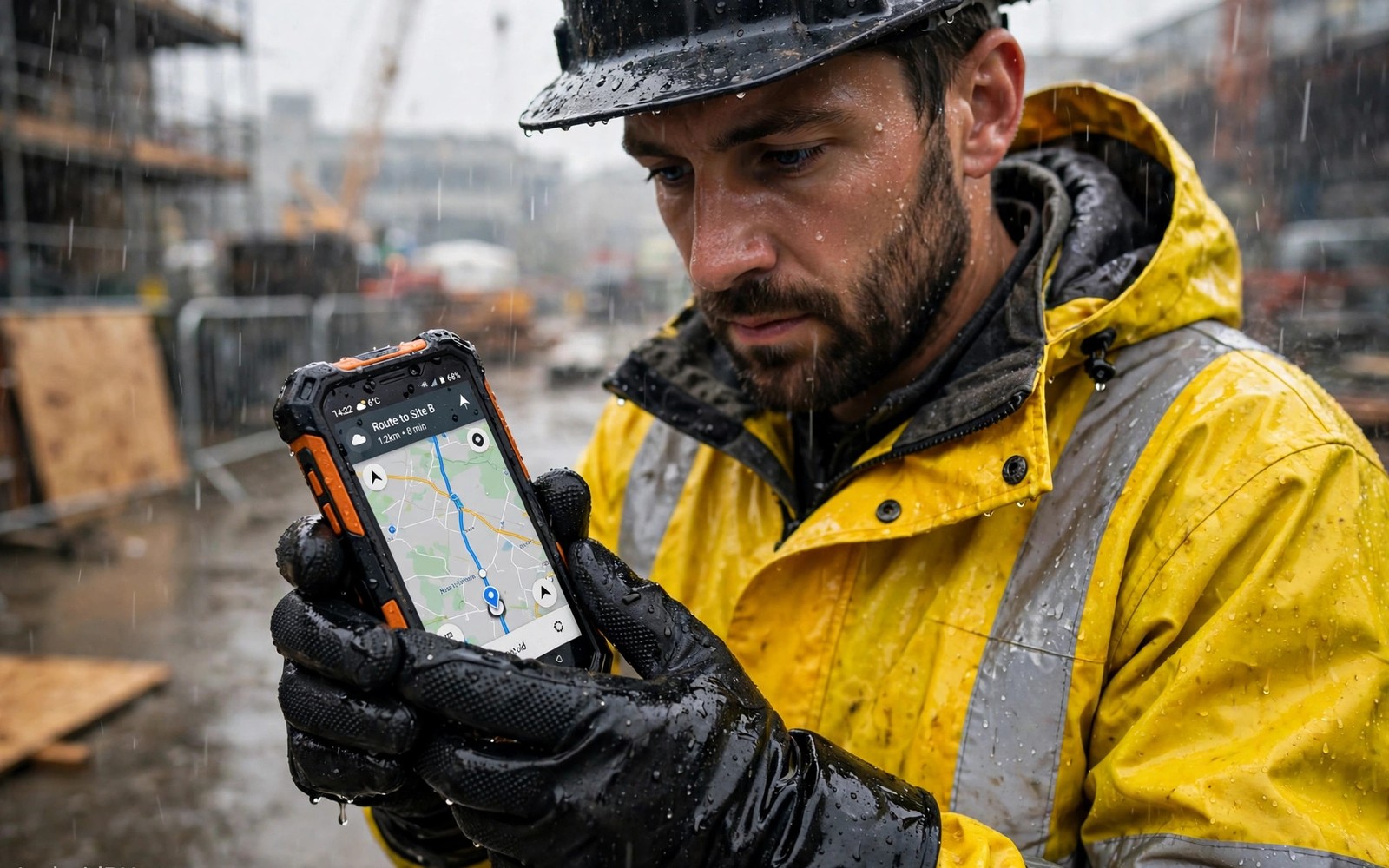
Wet finger and glove touch screens solve a daily frustration for outdoor workers. A normal phone screen fails when rain covers it. It fails again when a worker wears thick gloves. A rugged screen uses stronger touch sensing and smarter software to keep working in both cases. This guide explains how that technology works and how to test it before you buy.
Capacitive screens sense the tiny electrical charge in a finger. Water spreads that charge and confuses the sensor. Gloves block the charge almost completely. Rugged screens raise sensor sensitivity and use algorithms to ignore rain drops. Glove mode boosts sensitivity further so a signal can pass through fabric. The rugged phones for construction and hiking often list glove mode as a headline feature. Test it with your own gloves because results vary a great deal.
Touch screens also face challenges from sweat and sunscreen and mud. Sweat changes skin conductivity and confuses touch sensors. Sunscreen leaves a film that smears across glass. Mud dries into a layer that blocks touch signals. Field workers face all three in one shift. A rugged screen must handle dirty hands as well as wet hands. Cleaning habits matter as much as sensor design for daily reliability.
How capacitive touch sensing works
A capacitive screen holds a grid of electrodes under the glass. Your finger changes the charge at the nearest grid point. The controller measures that change and maps it to a touch position. Dry bare fingers give a clean strong signal. Water gives many weak signals across the grid. The controller must decide which signal is a real touch and which is rain.
Rugged controllers sample the grid faster and with higher sensitivity. They compare patterns over time rather than single samples. A rain drop appears as a static blob. A finger press appears as a growing signal with a clear centre. Software can reject static blobs and accept growing presses. That logic works well for light rain. Heavy rain still overwhelms many screens. No software can fully separate a soaked screen from a finger in every case.
Glove mode and its real limits
Glove mode raises the sensitivity threshold so weaker signals count as touches. Thin nitrile gloves usually work well. Medium work gloves often work with some missed taps. Heavy leather gloves with thick insulation often fail. The fabric thickness and the moisture inside the glove both change the signal. A sweaty glove conducts better than a dry leather glove.
Some phones add a dedicated glove setting with two or three levels. Try each level with your actual gloves. A very high sensitivity level may cause false taps from rain. A low level may miss glove taps. Find the level that balances both problems for your job. Keep a stylus tethered to your kit as backup. A capacitive stylus works through gloves and rain when fingers fail.
Wet rejection algorithms in practice
Wet rejection uses palm rejection and water pattern filtering together. The phone learns the shape of a palm resting on the edge. It ignores that shape during typing. It also ignores small round signals that match rain drops. The system works best when rain is light and the screen is wiped often. A screen covered in running water will still misbehave.
Screen coatings help water bead and roll off. A hydrophobic coating makes drops sit as beads rather than sheets. Beads are easier for software to ignore. Coatings wear with cleaning and use. Reapply a coating spray made for screens when beading stops. Avoid abrasive cloths that strip coatings faster. Small coating care keeps wet performance strong for months.
adb shell settings get system touch_sensitivity 2>/dev/null || echo touch-setting-not-exposed
adb shell settings put system screen_brightness_mode 0
adb shell dumpsys input 2>/dev/null | grep -i -m 3 'Touch\|touch'
Attribution: the snippet above is an original example prepared for this article. It follows a standard public pattern for Android device checks and it does not copy code from any vendor site.
Brightness readability and screen size
A screen that accepts wet touches is useless when you cannot read it in sun. Look for brightness above 500 nits for outdoor work. A matte screen protector can cut glare but it may reduce touch sensitivity. Test the combination of protector and glove mode together. A protector that works bare handed may fail with gloves.
Screen size affects glove accuracy. Larger buttons and larger keyboards help gloved fingers hit targets. Set your launcher to large icons for field use. Increase keyboard key height in settings. Turn on high contrast text for sun reading. These settings cost nothing and they improve field accuracy more than a small hardware gain.
Testing a screen before you commit
Test in conditions that match your job. Wet your hands and try to open maps and type a message. Wear your heaviest gloves and repeat the test. Try the test in rain if you can. Try it with the screen protector fitted. A phone that passes all four tests is a strong candidate. A phone that passes only dry bare hand tests is not a field phone.
Also test multi touch with gloves. Pinch to zoom on a map with gloved fingers. Swipe through photos with wet hands. Try the emergency call screen with gloves on. Emergency access matters most when conditions are worst. If emergency dialling fails with gloves then the phone fails a safety test regardless of other features.
Settings and habits that improve field touch
Enable glove mode before you head out. Do not wait until rain starts. Set touch sensitivity to high in display settings when your model offers it. Turn off accidental touch protection that may block glove taps. Keep the screen clean and dry it with a sleeve wipe between tasks. A quick wipe restores accuracy faster than any setting change.
Use voice commands for simple tasks in heavy rain. Voice dialling and voice notes avoid screen struggles. Keep shortcuts on the home screen for maps and camera and radio apps. Fewer taps mean fewer failures. Train yourself to use hardware buttons for camera and torch. Physical buttons work in any weather and they never need touch calibration.
Dirty hands sweat sunscreen and screen care
Sweat helps touch sensing in small amounts because it conducts electricity. Heavy sweat creates a wet film that mimics rain on the screen. The controller may register false touches from sweat pools. Wipe the screen with a sleeve or cloth between tasks. A quick wipe restores clean touch faster than any setting change.
Sunscreen and insect repellent leave oily films on glass. Oily films reduce touch accuracy and attract dust. Clean the screen with a damp microfibre cloth at breaks. Avoid harsh cleaners that strip coatings. A clean screen responds better to gloves and wet fingers alike. Screen hygiene is a field skill worth building.
Mud and concrete dust dry into hard layers on screens. Never scrape dried mud off with a hard tool. Soften it with a damp cloth first and wipe gently. Scraping scratches glass and coatings permanently. A scratched screen loses touch accuracy in the scratched area. Gentle cleaning preserves the screen for years.
Screen protectors take daily abuse instead of the glass itself. A film protector can be replaced when it clouds or scratches. A glass protector resists scratches better but may reduce glove sensitivity. Choose the protector type that matches your dirt and glove needs. Replace protectors promptly when they degrade. A worn protector hurts touch more than no protector at all.
Voice control and hardware shortcuts reduce touch dependence in dirty conditions. Set voice commands for calls and messages before work. Map hardware buttons to camera and torch functions. Fewer screen touches mean fewer failures when hands are dirty. A field phone should work through buttons and voice as well as through touch.
Touch settings that help in rain and cold
Touch sensitivity settings vary by brand and by model in ways that confuse buyers. Some phones hide glove mode under display settings. Others place it under advanced features or accessibility menus. Search settings for glove or touch sensitivity before field use. Enable the setting and test it with your exact gloves and protector fitted. A setting that stays off during a rainy shift helps nobody. A five minute setup at home prevents a frustrating day on site.
Display timeout settings also affect field usability in wet conditions. A short timeout forces repeated unlocking with wet hands. A longer timeout keeps the screen ready between tasks. Balance timeout length against battery drain and security needs. A two minute timeout suits most field work well. Shorter timeouts suit sensitive data work. Longer timeouts suit navigation heavy tasks where the screen must stay visible. Choose timeout by task rather than leaving the factory default.
Common mistakes
The biggest mistake is testing glove mode with thin gloves only. Heavy gloves behave very differently. Another mistake is fitting a thick glass protector without retesting touch. The protector can cancel the glove mode gain completely.
A third mistake is relying on wet touch during a storm. Even good wet rejection fails under running water. Shelter the phone briefly and wipe the screen. A ten second wipe saves minutes of false taps and wrong messages.
A fourth mistake is cleaning a dirty screen with a dry rough cloth. Dry wiping drags grit across glass and scratches it. Dampen the cloth first and lift dirt gently. A damp clean preserves coatings and touch accuracy.
Frequently asked questions
Do glove screens work with any gloves?
No. Thin and medium gloves work best. Very thick insulated gloves often fail even in glove mode. Leather gloves vary with thickness and moisture. Test your exact gloves before you buy.
Can I use a wet screen in heavy rain?
Light rain works well on good rugged screens. Heavy rain with running water causes false taps on most phones. Wipe the screen and use hardware buttons or voice commands during downpours.
Does a screen protector hurt glove mode?
It can. Thick glass protectors reduce the touch signal. Thin film protectors usually work better with gloves. Test the exact protector and glove combination before field use.
Conclusion
Wet finger and glove touch screens turn a rugged phone into a real field tool. Strong sensing and smart rejection and glove mode together keep the phone usable in rain and cold. Real testing with your own gloves and your own protector matters more than any spec claim. The push to talk buttons for fast crew calls adds useful context for this choice. The infrared night vision for dark sites adds useful context for this choice.
Your concrete next step is to take your work gloves to a shop or a return window test. Try maps and typing and emergency dialling with wet hands and gloved hands. Keep only a phone that passes both tests without frustration.
Pack a small microfibre cloth in your work kit this week. Use it at every break to wipe the screen. That tiny habit keeps glove mode and wet touch working all shift. Small care routines make expensive screen technology actually pay off.

