

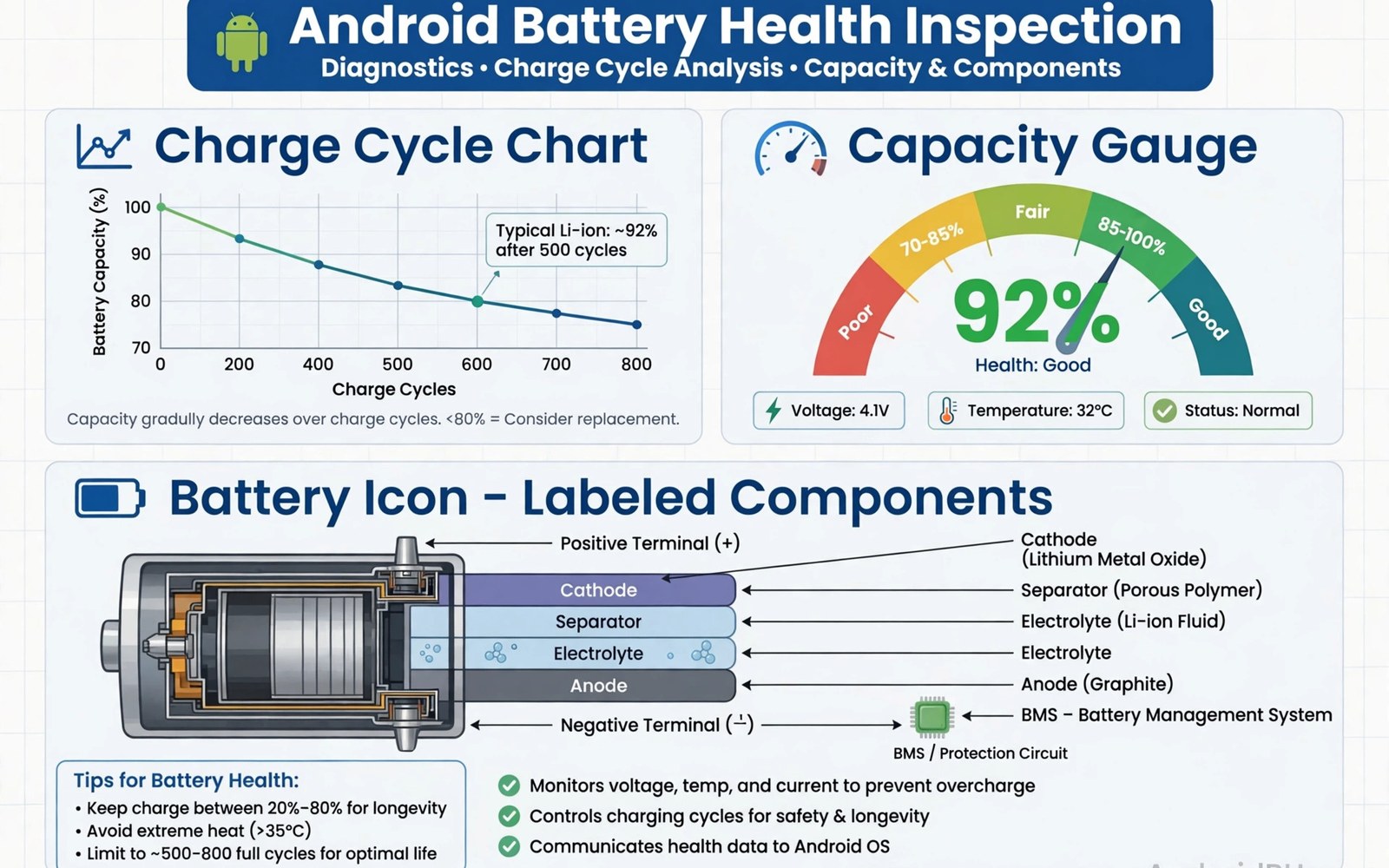
Battery health inspection apps reveal how much life your battery has left. Capacity fades with every charge cycle and heat speeds that fade. A good inspection app tracks cycles and capacity and charging habits so you can act before the battery becomes a daily problem. This guide explains what to measure and how to use the numbers. This article covers battery health inspection apps in plain language for everyday Android users.
Capacity is the headline number. A battery at eighty five percent capacity holds less charge than when new. Cycle count tells you how much use produced that fade. Together they predict how soon replacement makes sense. If you want to benchmark a phone with an aged battery then check health first since a weak battery can cap performance and skew scores.
Capacity and cycle count explained
Capacity compares current full charge to design capacity. A new battery shows near one hundred percent. A battery after two years often shows eighty to ninety percent. Below eighty percent most users notice shorter days and sudden shutdowns.
A cycle counts one full discharge and recharge in total. Partial charges add up to cycles over time. Two fifty percent charges equal one cycle. Heavy users reach hundreds of cycles per year. Light users take far longer to reach the same count.
Why estimates differ between apps
Android does not always expose exact battery data. Some phones report capacity directly. Others force apps to estimate from charge sessions. Estimates need several full charges to stabilize. A fresh install may show a rough number for the first week.
Compare the same app over time instead of comparing apps against each other. One app may estimate eighty seven percent while another says eighty four. The trend matters more than the exact figure. A steady decline signals real wear. A sudden jump signals an estimation error.
Charging habits that slow wear
Heat is the biggest aging factor. Avoid charging in hot cars or in direct sunlight. Fast charging adds heat so use slow charging overnight when time allows. Keep charge between twenty and eighty percent for daily use when you can.
Full charges to one hundred percent are fine before a long day. Daily full charges just add wear faster. Partial top ups during the day are gentler than deep discharges. Small habit changes compound into months of extra battery life over the phone lifespan.
Reading drain data alongside health
Health numbers mean little without drain context. An app that drains power in the background will empty even a healthy battery fast. Check per app usage next to health data. A healthy battery with one rogue app feels like a dying battery.
Screen time and signal strength also shape drain. Weak signal forces the radio to work harder. Long screen on time at high brightness drains any battery. Fix drain first and judge health second. That order avoids replacing a battery that was never the problem.
When replacement beats new habits
Replace when capacity drops below eighty percent and daily life suffers. Replace when the phone shuts down above twenty percent. Replace when the battery swells or the back lifts. These signs mean habits alone cannot restore usability.
Check repair cost against phone value. A cheap battery swap extends a good phone for years. An expensive swap on an old phone may not pay off. Back up data before any repair. A fresh battery with a clean install often feels like a new phone.
Charge cycle counting in practice
Cycle counting confuses many users at first. A cycle is not one plug in event. It is a full one hundred percent of discharge in total. Four twenty five percent top ups equal one cycle. That definition means partial charging does not inflate cycle count unfairly.
Track cycles monthly rather than daily. Monthly counts show trends without noise. A sudden cycle jump signals a change like a new heavy app or a failing battery that drains fast. Monthly tracking catches both causes early enough to act.
Fast charging and long term capacity
Fast charging trades time for heat. Heat ages batteries faster than slow charging. Occasional fast charging barely matters. Daily fast charging to full in warm rooms adds measurable wear over two years. The effect is real but modest for most users.
Balance speed and health by context. Fast charge before travel when time matters. Slow charge overnight when time is plentiful. That split gives you speed when needed and health always. Most phones now offer adaptive charging that learns your schedule and slows overnight charging automatically.
Calibration myths about phone batteries
Full discharge calibration is a myth for modern lithium batteries. Deep discharges harm lithium cells instead of helping them. The battery gauge learns from normal partial cycles. Never drain to zero on purpose for calibration.
If the gauge jumps wildly then a single full charge from low to full can help it relearn. That is a rare fix and not a routine. Do it once when readings look broken. Return to partial charging right after. Routine deep discharges shorten life for no benefit.
Second hand phone battery checks
Battery health decides many used phone purchases. Ask the seller for a health screenshot before meeting. Check capacity and cycle count together. A high cycle count with high capacity suggests a replaced battery. A low cycle count with low capacity suggests heat damage.
Test the phone yourself during inspection. Run a short video and watch drain rate. Check for swelling and back separation. A healthy used battery drains steadily and stays cool under light load. Walk away from swelling or sudden shutdowns at any price.
Battery saver modes that actually work
Real battery savers cut background work and screen power. They limit refresh rate and background sync and location polling. Those cuts save measurable power. Fake savers only show animations and close apps that Android would manage anyway.
Use built in saver modes before third party ones. Built in modes integrate with system power management. Third party savers fight the system and often lose. Enable saver at twenty percent automatically. That threshold gives hours of extra standby when it matters.
Battery health and resale value
Battery health directly affects resale price. Buyers ask for capacity screenshots on used phones now. A phone at ninety percent capacity sells faster than one at seventy eight percent. Keep health logs from early ownership to prove care at sale time. A documented battery history is a selling point that costs nothing to maintain.
Replace the battery before selling when capacity is very low. A fresh battery can raise the sale price more than the repair cost. Disclose the replacement honestly in the listing. Buyers trust disclosed repairs more than hidden wear. Honest battery disclosure builds the trust that closes sales quickly.
Charging accessories and battery wear
Charger quality affects battery wear more than brand debates suggest. Poor chargers deliver unstable voltage that stresses battery management circuits. Certified chargers from reputable makers cost little more and protect the battery better. Avoid ultra cheap chargers with no certification marks for daily use.
Cable quality matters too. Damaged cables cause intermittent charging that heats the port and battery. Replace frayed cables promptly. A good cable plus a certified charger is the cheapest battery protection available. That pair costs less than any battery replacement it helps prevent.
Battery drain detective work
Drain detective work starts with per app usage in battery settings. Sort apps by drain over the last day. An app with high background drain deserves restriction or uninstall. Compare drain against your actual use of each app. An app you barely open should never top the drain list.
System services can also drain heavily after updates. A stuck sync or a location loop drains for hours silently. Restart the phone when drain appears suddenly without a new app install. Check for pending updates since vendors fix drain bugs regularly. Persistent unexplained drain after restarts deserves a deeper log review.
Cold and hot climate battery care
Climate shapes battery aging strongly. Hot climates age batteries fastest year round. Users in hot regions should avoid fast charging in heat and avoid leaving phones in cars. Shade and slow charging matter more where ambient heat is already high.
Cold climates bring temporary capacity loss that recovers indoors. Do not judge battery health from a cold day reading. Test capacity at room temperature for fair numbers. Winter readings understate true health and cause needless worry. Room temperature testing keeps battery decisions grounded.
adb shell dumpsys batterystats --resetThe command above follows the standard syntax for the Android developer bridge and resets battery statistics so a fresh drain measurement starts from a clean baseline.
Common mistakes
The biggest mistake is trusting a capacity number from day one. Estimates need charge sessions to learn. Wait a week of normal charging before you judge the number. Early readings swing widely and cause needless worry.
Another mistake is charging to one hundred percent every night with fast charging. That habit maximizes heat and wear together. Use slow charging overnight and cap daily charge near eighty percent when your phone offers a limit.
People also replace batteries when a rogue app is the true drain. Check per app usage first. A thermal log can also expose heat from background work that masquerades as battery aging. Fix the app and the battery may feel new again.
Frequently asked questions
How accurate are battery health apps?
Moderately accurate on phones that report data directly. Estimates on other phones need a week to settle. Track trends in one app rather than comparing exact numbers across apps.
Does fast charging ruin batteries?
It adds heat and heat ages batteries. Occasional fast charging is fine. Daily fast charging to full in warm rooms shortens lifespan more. Slow overnight charging is the gentler default.
What cycle count is considered worn?
Around five hundred cycles most batteries hold near eighty percent capacity. Heavy users reach that in two years. Light users take longer. Capacity matters more than the raw cycle number.
Conclusion
Battery health apps turn aging into numbers you can track. Watch capacity trend and cycle count and charging heat together. Adjust habits early and replacement becomes a planned choice instead of an emergency.
Your next step is concrete. Install an inspection app and log one full week of charges. Note capacity trend at week end. Then review full hardware specs to see whether the battery or another part limits your phone most.

