

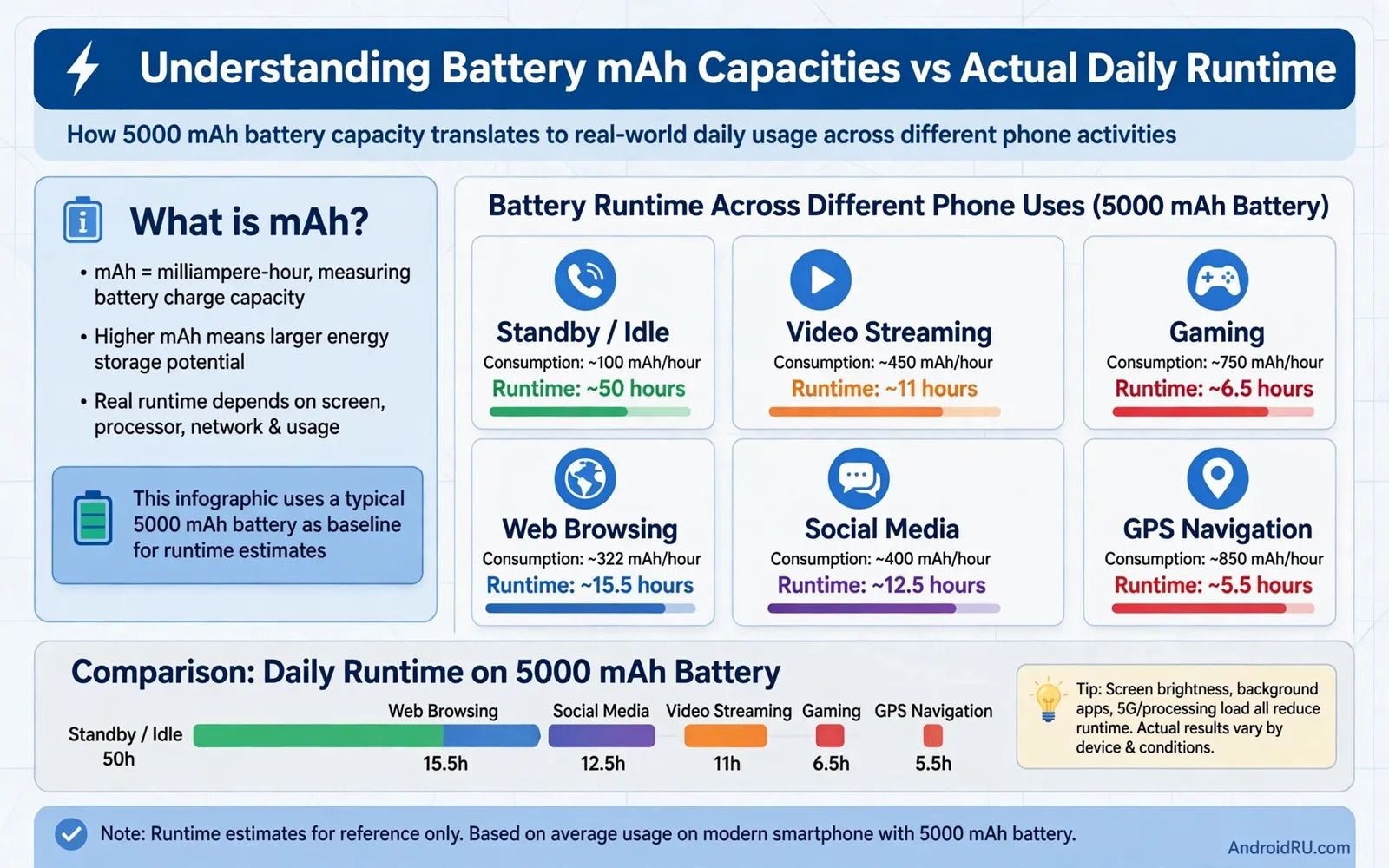
Understanding Battery mAh Capacities vs Actual Daily Runtime
My old phone had a 4,000 mAh battery and died by dinner. My current phone has a 5,000 mAh battery and still has a third left at bedtime, even though I use it more. The capacity number went up by a quarter, but the real difference feels twice as big. That gap between the number on the spec sheet and the day in your hand is what this guide explains.
Milliamp-hours, written as mAh, describe how much charge a battery can hold. They do not describe how fast your phone spends that charge, how bright your screen is, or how good your signal is. Two phones with the same mAh can end the day hours apart. By the end of this article you will know how to read a capacity figure, how to estimate runtime for your own habits, and how to pick a phone that actually lasts through your heaviest day.
What battery mAh capacity actually measures
A milliamp-hour rating describes how much electric charge a battery can store in theory. A larger number means a larger store of charge, in the same way that a larger fuel tank holds more fuel. It does not describe how quickly a phone uses that charge, and it does not describe how efficiently the phone turns charge into useful work. Capacity is a starting point for comparison, not a final verdict on endurance.
To turn mAh into energy, multiply by voltage. Most phone batteries run at around 3.7 to 3.9 volts, so a 5,000 mAh battery holds roughly 18 to 19 watt-hours of energy. That watt-hour figure is the fairer comparison when you compare phones, because it accounts for voltage differences. In practice, most buyers only see mAh, so use it as a rough guide within phones of a similar size and class, and treat it with care across very different devices.
Why mAh alone cannot predict screen-on time
Screen-on time is the hours a display stays lit while you use the phone, and it is the number most people actually feel. A phone with a big battery and a bright, high-refresh screen can post a shorter screen-on time than a phone with a smaller battery and a dimmer, more efficient display. The screen is usually the largest single drain, so a 6.8-inch panel at full brightness can use roughly twice the power of a 6.1-inch panel at moderate brightness showing the same content.
Typical capacities you will see in 2026
Compact phones often ship with 4,000 to 4,500 mAh. Standard flagships usually carry 4,500 to 5,500 mAh. Large flagships and gaming phones range from 5,500 to 6,500 mAh, and a few rugged or gaming models go beyond 7,000 mAh, with some reaching 8,000 mAh or more. A bigger cell adds weight and thickness, so makers balance capacity against size, and a 6,000 mAh phone is not automatically better than a 5,000 mAh phone with a far more efficient chip and screen.
Why two phones with the same battery capacity last different lengths
Screen size and brightness dominate daily energy use for most people. A large, bright, high-refresh display consumes far more power than a smaller, dimmer display, even when both phones show the same video. Processor efficiency matters next, because a modern efficient chip finishes tasks quickly and returns to a low-power state, while an older, hungrier chip stays active longer and runs hotter.
Network conditions matter as well. A phone searching for a weak signal works much harder than a phone on a strong, stable connection, and that extra radio effort runs all day in the background. Location services, background sync, and always-listening features add steady drain that accumulates across a whole day. Software behaviour often explains the largest surprises: one phone may restrict background activity aggressively, while another lets many apps refresh freely.
Real examples make the point concrete. A Samsung Galaxy S24 Ultra carries a 5,000 mAh battery, a Google Pixel 8 Pro carries 5,050 mAh, and an iPhone 15 Pro Max carries around 4,422 mAh, yet independent tests often put their heavy-use endurance within an hour or two of each other, because screens, chips, and software differ. A OnePlus 12 with a 5,400 mAh battery and a Xiaomi 14 Ultra with a 5,000 mAh battery show the same pattern: capacity sets the ceiling, efficiency decides how close you get to it.
Screen brightness, refresh rate, and processor efficiency
Brightness is the fastest way to drain a battery. Moving a screen from comfortable indoor brightness to full outdoor brightness can double its power draw. A 120 Hz refresh rate looks smoother than 60 Hz, but it asks the display and processor to redraw twice as often, so it costs extra energy during scrolling and gaming. Many phones now use an adaptive rate that drops to 10 Hz or 60 Hz on a still page, which recovers much of that cost without you noticing.
How signal strength changes battery drain
In a weak signal area, the radio raises its power to stay connected, retries failed packets, and may switch between 4G and 5G hunting for a better cell. A day of travel through rural areas or a crowded stadium can cost several hours of runtime compared with a day on strong home Wi-Fi. If your battery falls fast on travel days but lasts well at home, signal is the likely cause, not a faulty battery.
How to read battery life claims without being misled
Manufacturers often describe battery life with a single headline figure drawn from a favourable test. That figure may reflect video playback at moderate brightness, mixed use under ideal signal conditions, or a specific power-saving mode. It rarely reflects a heavy day of navigation, photography, gaming, and weak signal combined. Look for the test conditions behind a claim when they are published, and look for independent experiences that match your usage style.
Charging speed claims deserve the same care, because fast-charging numbers often describe a short early phase rather than a full charge from empty to full. A phone that claims a 50 percent charge in 30 minutes may still need well over an hour to reach 100 percent, because charging slows as the battery fills to protect its health. Heat during charging affects long-term battery health, so a balanced approach uses fast charging when time matters and slower charging overnight when time allows. Readers concerned about charging behaviour can review fixing slow battery charging speeds on your smartphone for checks that separate cable and charger problems from normal battery behaviour.
Battery capacity vs actual daily runtime comparison table
The table below gives typical ranges, not promises. Runtime depends on screen size, brightness, chip, signal, and habits, so treat each row as a band you can expect from an efficient modern phone, and a band you might see from a wasteful one. A phone at the top of a band has a dimmer screen, strong signal, and calm background apps; a phone at the bottom has a bright screen, weak signal, and heavy gaming or navigation.
| Battery capacity | Typical phone type | Typical screen-on time | Typical full day |
|---|---|---|---|
| 4,000-4,500 mAh | Compact flagship | 5-7 hours | Moderate use, top-up on heavy days |
| 4,500-5,000 mAh | Standard flagship | 6-8 hours | Full day for most users |
| 5,000-5,500 mAh | Large flagship | 7-9 hours | Full day plus evening reserve |
| 5,500-6,500 mAh | Gaming and large phones | 8-10 hours | Heavy day without a charger |
| 7,000 mAh and above | Rugged and gaming phones | 9-12 hours | Two light days or one very heavy day |
Readers comparing phones on endurance can also explore battery life smartphones tested for heavy usage to see how different models behave under demanding conditions. Independent heavy-use tests are more useful than a headline video-playback figure, because they mix the tasks that actually drain a phone.
How to estimate runtime for your own heaviest day
Start from your heaviest activities rather than from an average user profile. List the hours you spend on video, navigation, gaming, calls, and photography on a demanding day. Video and navigation and gaming drain faster than reading and messaging, so a travel day with three hours of maps and two hours of video is a far tougher test than an office day on Wi-Fi.
Use the first weeks with a new phone as a measurement period. Note the battery level at the same times each day and note which apps appear at the top of battery usage in Settings. That simple habit reveals whether one app or one setting explains most drain. Adjust that app first before blaming capacity. A personal measurement beats a headline number every time, because it reflects your hands, your habits, and your network.
A simple runtime estimate you can do in five minutes
Take your screen-on time from yesterday in battery settings, and divide the percentage used by those hours to get a rough drain per hour. If you used 60 percent for 6 hours of screen time, you drain about 10 percent per screen hour, which points to roughly 10 hours of screen-on time from a full charge. Repeat the check on a heavy day and a light day, and you will have a personal range that no spec sheet can give you.
How to extend battery runtime without losing the features you like
Small changes often recover more runtime than a larger battery would provide. Lowering brightness to a comfortable level, using a standard refresh rate for reading, and limiting background refresh for rarely used apps can extend a day noticeably. Turning off always-on features you never glance at helps too, and location accuracy can be reduced for apps that only need an approximate area. Readers who want a full set of practical steps can explore improving battery life on any Android smartphone alongside this explanation of capacity.
A power bank remains a practical safety net for long days, even on a phone with a large battery. Choose a power bank that matches your charging needs and carry a reliable cable rather than relying on a borrowed cable at a critical moment. A 10,000 mAh power bank typically delivers around 6,000 to 7,000 mAh of usable charge to a phone after conversion losses, which is roughly one full charge for most flagships. Readers weighing charging accessories can review fast chargers comparing GaN chargers and traditional power adapters for background on charging hardware.
Battery ageing, replacement planning, and myths that mislead buyers
Every lithium battery ages through charge cycles, calendar time, and heat exposure. A phone battery that once lasted a full demanding day may last only until afternoon after two or three years of use. That decline is normal chemistry rather than a defect in most cases. Users can slow ageing by avoiding extreme heat and by avoiding constant full charge cycles when a partial charge suffices.
Replacement planning deserves thought before a battery becomes unreliable. Check whether the phone maker or a reputable repair shop offers battery service for the model, and check the cost in advance. Some phones allow easy battery replacement, while others require professional tools and adhesive work. A phone with a fresh battery and current software can serve as a reliable second device even after a newer phone takes over daily duties.
Several myths persist despite years of lithium battery use. One myth claims that a phone must be fully discharged before charging, because older battery chemistries needed that practice. Modern lithium batteries prefer partial cycles and suffer from deep discharges. Another myth claims that overnight charging always damages a battery, because charging continues after full charge. Modern phones stop charging at full and trickle only as needed, although heat during overnight charging still matters. A third myth claims that closing all background apps always saves battery, although reopening apps from cold can consume more energy than leaving them suspended.
Frequently asked questions about battery mAh and daily runtime
What does 5,000 mAh mean for real daily use?
It means the battery holds roughly 18 to 19 watt-hours of energy, which in an efficient modern flagship usually translates to 6 to 9 hours of screen-on time and a full day for most users. In a phone with a very bright large screen, weak signal, and heavy gaming, the same 5,000 mAh can fall to 5 hours of screen time, so the number alone does not fix your day.
How many hours of screen-on time should I expect from a 5,000 mAh battery?
Expect 6 to 8 hours on a standard flagship with mixed use, 7 to 9 hours if you keep brightness moderate and stay on strong Wi-Fi, and 5 to 6 hours on a heavy day with navigation, gaming, and poor signal. Measure your own drain per screen hour in battery settings for a week, and you will have a far more accurate personal figure than any of these bands.
Why does my phone drain faster in cold weather?
Cold slows the chemical reactions inside a lithium battery, so it delivers less usable energy at the same charge level, and the phone may shut down early if the voltage sags under load. Keep the phone in an inside pocket in cold weather, warm it gradually before charging, and avoid leaving it in a cold car overnight. The capacity returns as the battery warms, but repeated cold exposure still adds wear over time.
Can a bigger battery make a slow phone feel premium?
No, not on its own. Some large-battery phones pair a huge cell with a dim screen and a slow processor and feel sluggish despite lasting long. Some smaller-battery phones pair efficient hardware with fast charging and feel premium despite needing a top-up on heavy days. Judge the whole phone, including screen, chip, charging speed, and software, rather than worshipping one number.
Final verdict on battery mAh vs actual daily runtime
Treat mAh as a useful clue within a comparison of similar phones, not as a universal ranking across all phones. A larger battery helps when efficiency and usage are similar, but it cannot rescue a wasteful display, a hungry processor, or a chaotic background workload. Ask how the phone behaves under your heaviest day, how quickly it charges when you need a top-up, and how its battery health is likely to age over years of ownership.
Today, open battery settings, check your screen-on time and your top draining apps, and estimate your own drain per hour. A moderate battery with excellent efficiency often outlasts a huge battery with wasteful habits, and a personal measurement beats any headline capacity figure when you are choosing your next phone. Buy the phone whose total package matches your day, and you will stop watching the percentage by dinner.

