

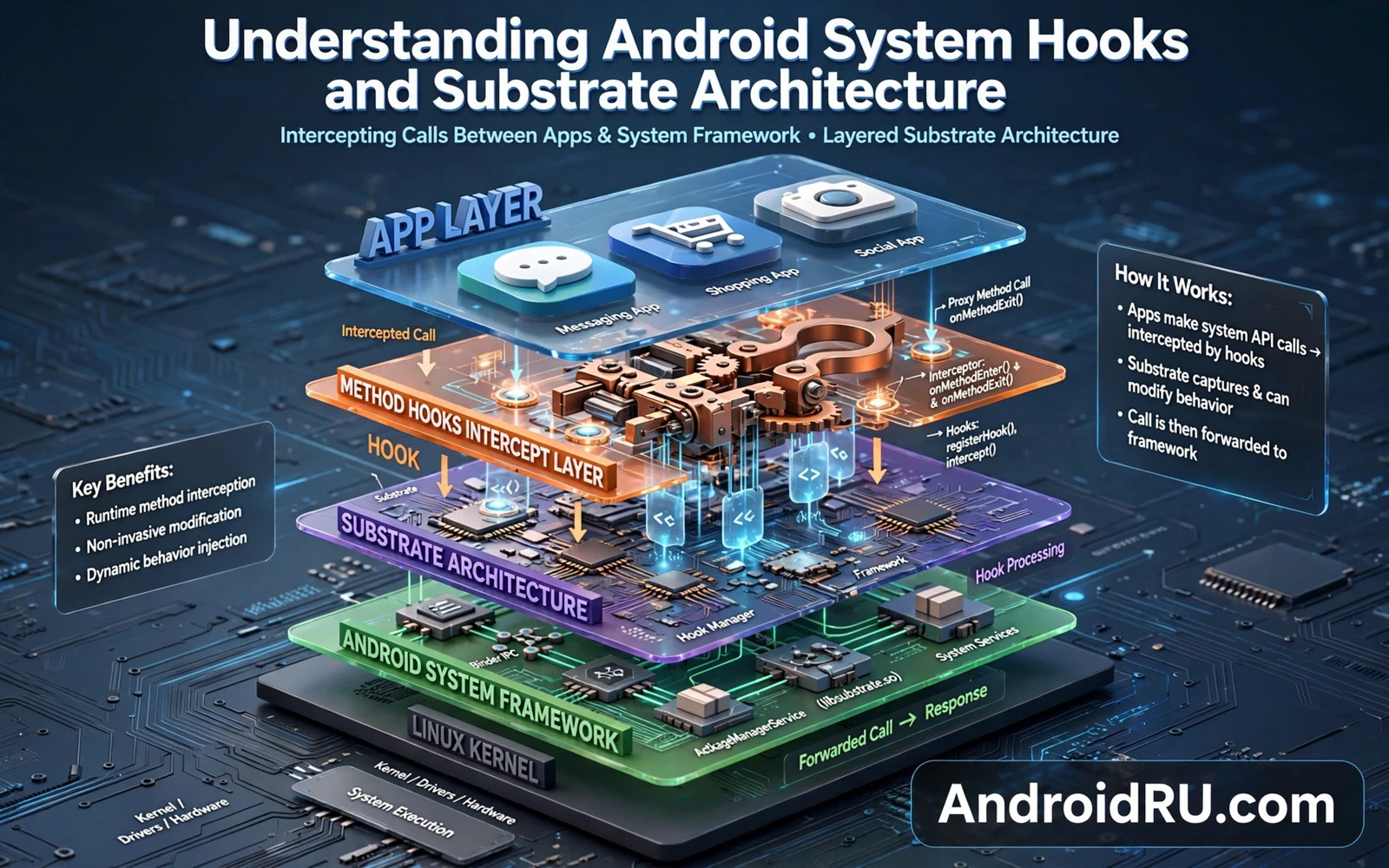
What A Hook Does At The Method Level
A hook intercepts a method call inside an app or inside the system and runs extra code before or after or instead of the original method. The original method may still run with modified arguments or with a modified result. Hooking at this level is powerful because it changes behaviour without changing the app package itself. The app code on disk remains untouched while its runtime behaviour changes.
Hooks differ from patches. A patch edits the app file permanently. A hook leaves the file alone and changes behaviour only while the hooking framework is active. Disabling the framework or disabling the module restores original behaviour. That reversibility is a major safety advantage for experimentation. It also means that a hook must be reapplied on every boot through the framework.
A substrate is the underlying framework that makes hooking possible. It injects code into target processes and provides the application programming interface that modules use to declare hooks. LSPosed is a modern substrate built on a well known hooking runtime. It scopes hooks to specific apps so that a module affects only its intended targets. Scoping reduces unintended side effects across the system.
Hooks operate in the same process as the target app. That shared process space means that a buggy hook can crash the target app. A hook that throws an exception or that blocks for too long can freeze the app interface. Hook authors must therefore write defensive code that handles unexpected arguments and unexpected return values gracefully.
How LSPosed Scopes Hooks To Target Apps
LSPosed lets a module declare which packages it should hook. The framework then injects the module code only into those processes. Other apps run without the module code loaded. Scoping is important because a system wide hook would risk breaking apps that were never intended to be modified. Narrow scoping is a hallmark of a careful module.
System framework hooks are a special case because the system process serves many apps. A hook in the system framework can affect behaviour across the device. Such hooks demand extra care and extra testing. A system framework hook that changes a permission check or a device property can have wide consequences that are hard to predict from a single app test.
Hook activation usually requires a reboot or a process restart for the target app. The framework loads module code when the target process starts. Changing module scope without restarting the target app may leave the old hook active until the process restarts. Owners troubleshooting a hook should force stop the target app or reboot to ensure a clean state.
Module logs help owners understand what a hook did. A good module logs its hook points and its decisions at a level that is useful without flooding the log. Logs are essential when a hook produces a subtle behaviour change. Without logs the owner cannot tell whether the hook ran at all or whether it ran and produced an unexpected result.
Common Hook Patterns And Their Uses
Before hooks run code before the original method and can modify arguments or can skip the original method entirely. After hooks run code after the original method and can modify the result. Replace hooks substitute their own implementation for the original method. Each pattern suits a different goal. Argument modification suits input redirection. Result modification suits output filtering. Replacement suits full behaviour substitution.
Camera and audio hooks use result and argument patterns heavily. A camera hook may replace frame data or may modify capture parameters. An audio hook may replace buffer contents or may modify stream parameters. The pattern choice affects compatibility because some apps validate arguments strictly while others validate results. A hook that passes validation in one app may fail validation in another app.
Property hooks modify the value returned by a system property query. Device identity modules use property hooks to present a different model or a different feature set to an app. Property hooks are deceptively simple because many services cache property values at startup. A hook applied after caching may have no effect until the service restarts. Timing matters as much as the hook code itself.
UI hooks modify interface behaviour such as layout or animation or menu contents. UI hooks are visible and therefore easy to test. A UI hook that breaks layout is immediately obvious. A data hook that silently changes a value is harder to notice. Owners should test data hooks with explicit checks rather than relying on visual impressions alone.
Risks Security And Responsible Hooking
Hooking frameworks require root or a privileged environment. That privilege means that a malicious module could intercept sensitive data such as passwords or tokens inside a target app. Install modules only from developers with a transparent track record. Read module source code where available. A closed module that hooks a banking app or a messaging app deserves particular scepticism.
Integrity checks in some apps detect hooking frameworks and refuse to run. That refusal is a security feature from the app perspective. Owners cannot expect every app to work under a hooking framework. Banking apps and payment apps and some games are the most likely to refuse. Test critical apps after installing a framework before relying on the device for daily use.
Hooking can also break after a system update because method signatures change. An update that renames a method or changes its parameters can leave a hook pointing at a method that no longer exists. The module may fail silently or may crash the target app. Module maintainers must update hooks for new system versions. Owners should check module compatibility after every major update.
Responsible hooking starts with a single purpose and a narrow scope and a tested disable path. The camera guide that explains how to redirect camera input to gallery videos using hooking shows a camera hook in practice. The audio guide that explains how to extract audio streams from system apps via hooking shows the parallel audio case. The startup guide that explains how to run custom scripts on Android system startup shows how boot time changes interact with hooks. Together they illustrate why hooks must be understood as a system rather than as isolated tricks.
Hook Lifecycle From Process Start To Exit
Hook lifecycle begins when the target process starts because the substrate injects module code at process creation. Early process stages have limited services available. A hook that runs too early may encounter uninitialised objects. Module authors should defer heavy work until the target is ready. Deferral avoids crashes that look like hook bugs but are actually timing bugs.
Hook registration order matters when multiple modules hook the same method. The order determines which hook runs first and which result wins when hooks conflict. Owners with multiple modules hooking the same target should understand registration order or should avoid overlapping hooks entirely. Overlap is the hardest hook problem to diagnose because each module works alone but fails together.
Process death ends hook life for that instance. A new process start reloads hooks fresh. That fresh reload means that hook state does not persist across process restarts unless the module stores state externally. Owners troubleshooting a hook should restart the target process to obtain a clean hook state. A stale process with old hook state can mislead diagnosis.
System updates can change method signatures and break hook registration silently. A hook that points to a renamed method simply never runs. The module appears enabled but has no effect. Owners should verify hook effect after updates rather than assuming continued function. A simple functional test after an update reveals silent hook failure quickly.
Hook removal requires process restart in most substrates. Disabling a module in the manager does not immediately unload its code from a running process. Owners who disable a module and immediately test the target app may still see hook effects from the old process. Force stopping the target app or rebooting ensures a clean test. Clean testing avoids false conclusions about module disable behaviour.
Logging hook lifecycle events helps authors and owners alike. A log that records hook registration and first invocation and errors gives a timeline. Timeline logs turn vague reports into specific reports. Specific reports lead to faster fixes. Owners should enable module logging during troubleshooting and disable verbose logging during normal use to avoid log flooding.
Choosing Between Hooking And Other Methods
Hooking is not always the best method for a goal. A settings change through an official API is safer than a hook that forces the same setting. A dedicated app feature is safer than a hook that simulates that feature. Owners should choose the least privileged method that achieves the goal. Hooking should be reserved for goals that no official method can achieve.
ADB commands can achieve many system tweaks without a persistent hook. An ADB command runs once and its effect may persist without code running in every target process. Persistent hooks consume memory and add crash risk in every process they touch. One time ADB changes avoid that ongoing risk. Method choice should consider ongoing cost as well as initial effort.
Module based system changes through overlays can achieve file level changes without method hooks. An overlay that replaces a configuration file is simpler to understand than a hook that intercepts a method returning that configuration. Simpler methods are easier to audit. Auditability matters for privileged changes because hidden behaviour is a security risk.
App patching through file modification is another alternative but it breaks app signatures and update paths. Hooking preserves the app file and therefore preserves update behaviour. File patching versus hooking is a tradeoff between persistence and integrity. Owners should understand that tradeoff before choosing either method for a long term goal.
Network filtering can achieve privacy goals without hooking app internals. A filter blocks connections at the network layer regardless of app code. Hooking app internals to block the same connections is more fragile because app code changes break hooks. Network filtering survives app updates better than hooks in many cases. Robustness favours the higher layer method when it suffices.
The decision framework is simple in principle. Start with official settings. Try ADB or overlay methods next. Try network filtering for privacy goals. Use hooking only when those methods cannot achieve the goal. That hierarchy minimises privilege and maximises stability. Owners who follow the hierarchy will use hooks sparingly and effectively.

