

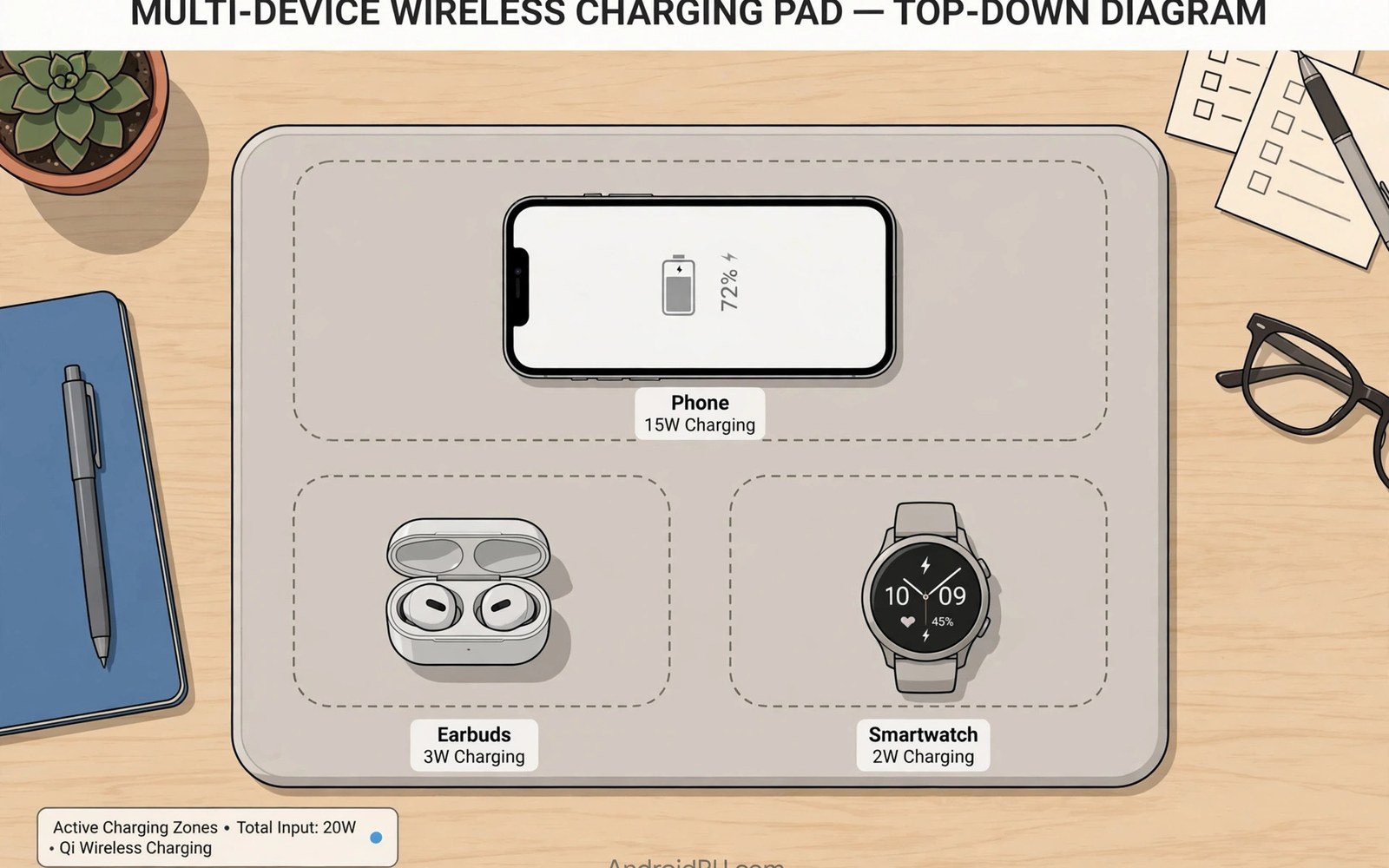
A desk can collect a tangle of cables fast. A phone cable and an earbud cable and a watch cable compete for outlets. A multi-device wireless pad replaces that tangle with one mat. Place each device on its spot and charging starts. The desk looks cleaner and devices stay ready through the day. Power sharing and placement decide whether the pad works well.
Multi-device pads use several coils under one surface. Each coil serves a device spot on the mat. Some pads use a single large charging zone instead. Zone pads let devices sit anywhere but they may share power loosely. Spot pads give each device a defined place with a stronger link. The right layout depends on how many devices you charge daily.
Total power matters more than the pad headline number. A pad may advertise a high total that splits across devices. Two devices charging at once each get less than the total. A watch needs little power so it barely affects the phone share. A phone plus earbuds share is also modest. This guide helps you judge real desk performance.
Pad Layouts Spot Versus Zone
Spot pads mark a place for each device type. A phone spot sits large in the centre or on one side. An earbud spot sits smaller beside it. A watch spot often uses a raised puck for the watch band. Those marks guide placement and they improve alignment. Users learn the spots quickly and charging becomes automatic.
Zone pads offer freedom of placement across a wide area. They use many coils to cover the whole surface. That freedom suits shared desks where devices move around. Zone pads cost more because they need more coils and control circuits. They may also waste more energy when devices sit between coils. Spot pads suit fixed personal desks better for most users.
Hybrid pads mix a phone spot with a free zone for small devices. That mix covers a phone plus earbuds flexibly. Check the pad diagram before buying to see the layout. A diagram reveals whether your devices fit the spots. Measure your phone and case against the phone spot size. A pad that fits poorly will frustrate daily use.
- Check the pad diagram for device spots
- Measure phone size against the phone spot
- Place each device on its marked spot
Power Sharing Across Devices
Power sharing starts with the pad power brick. A weak brick caps total pad output badly. A strong brick lets each device draw its normal rate. Check the brick rating against the pad total rating. Many pads ship without a brick so buyers must supply one. A mismatched brick is the most common multi-device disappointment.
Device demand shapes sharing in practice. Phones draw the most power among desk devices. Earbuds and watches draw far less. A phone plus watch pair therefore shares well. A phone plus tablet pair would strain a pad badly. Wireless pads suit small devices rather than large tablets. Keep tablet charging on a cable for speed.
Heat rises when several devices charge together. A pad under three warm devices can throttle all of them. Good pads use spacing and airflow to limit heat. A hard desk surface helps more than a soft mat below. Remove thick cases to cut heat and improve links. A cool pad keeps all devices charging steadily.
Alignment For Each Device
Each device needs its own alignment on the pad. A phone off centre can steal field strength from a neighbour spot. Earbud cases are small so they drift easily on a flat pad. Watch pucks hold watches in place better than flat spots. Learn each spot with a short test when the pad arrives. Note the position that gives a steady charging icon for each device.
Cases affect alignment for every device on the pad. A thick phone case weakens the phone link most. A case on earbuds adds a small gap too. Test the full desk set together rather than one device alone. A set that works singly may fail when all spots fill. Adjust positions until every icon stays steady together.
Desk Setup And Cable Management
A multi-device pad needs one good cable and one outlet. Route that cable neatly behind the desk to keep the surface clean. A cable clip stops the pad cable from sliding off the desk. Place the pad where devices are easy to grab during the day. A pad at the desk edge suits phones used often. A pad at the back suits devices that sit all day.
Keep the pad surface clean and dry. Dust can tilt small devices and break alignment. A quick wipe each week keeps spots level. Avoid placing metal objects on unused spots. Metal can absorb field energy and heat the pad. A tidy pad surface charges better and it looks better too.
Choosing A Pad For Your Devices
List every device you charge at your desk daily. Note which ones support wireless charging and which need cables. A pad cannot help a device without a wireless coil. Buy a pad with spots for your wireless devices only. Add a small cable hub for the remaining wired devices. That combination clears the desk without forcing wireless on everything.
Check phone wireless input limits before chasing high pad ratings. A pad rated far above the phone limit wastes money. A pad with good cooling and stable spots beats a hotter high watt pad. Read user reports for your exact phone and watch models. Model reports reveal alignment quirks that specs hide. A pad that fits your models is worth more than a generic high rating.
Daily Habits For A Multi-Device Pad
Place devices on the pad when you sit down to work. That habit keeps batteries topped up without thought. Remove devices when they reach full to free spots and cut heat. Charge the phone by cable for urgent top-ups when speed matters. Use the pad for steady daytime top-ups instead. That division gives speed when needed and convenience all day.
Recharge the pad brick setup if charging feels slow. Test the brick rating and the cable quality first. Replace a weak brick before blaming the pad. Check alignment again after any case change. A new case can shift the best spot for a phone. Small checks keep a multi-device pad reliable across device changes.
Multi-Device Pads And Smart Home Desks
Smart home desks increasingly centre on wireless pads. A pad can charge a phone while a smart speaker sits nearby. That central charging spot reduces cable sprawl across a desk. Voice assistants can announce charging status in some setups. A tidy desk with one pad feels calmer than a desk with many cables. Wireless pads suit smart desks built around clean surfaces.
Desk accessories can interfere with pad performance. Metal desk organisers near a pad can absorb field energy. A metal laptop stand beside a pad may distort fields slightly. Keep pads clear of large metal objects for best results. A wooden or plastic desk surface suits pads better than a metal desk. Surface choice is a small factor with real effects.
Lighting and monitor placement interact with pad use too. A pad under a monitor stand may be hard to reach. A pad at the desk front stays reachable during work. Place the pad where the hand naturally rests the phone. That natural placement builds a charging habit without thought. Habit formation matters more than pad specifications for daily use.
Shared home desks need pad etiquette for multiple users. Each user may have different devices and cases. A zone pad suits shared desks better than fixed spots. Users can place devices anywhere on a zone pad. That flexibility prevents arguments about spot ownership. Shared desks benefit from flexible pads over rigid ones.
Multi-Device Pad Safety And Longevity
Pad safety starts with foreign object detection. Keys or coins on a pad can heat up under a magnetic field. Good pads detect metal objects and pause charging. That pause protects the pad and nearby objects. Test foreign object detection with a coin before daily use. A pad that ignores metal objects deserves replacement.
Pad longevity depends on cable and port care. A pad cable bent sharply at the pad edge fails early. Route the cable gently away from the pad. Avoid pulling the pad by its cable across a desk. A pad that slides when pulled may drag devices off spots. Cable care protects both pad and devices daily.
Heat across a multi-device pad ages its electronics over time. A pad charging three devices daily runs warmer than a single pad. Ventilation under the pad helps dissipate that heat. A raised pad base or a hard desk surface improves airflow. Avoid placing pads on soft insulating mats. Good airflow extends pad life across years of use.
Firmware updates can improve pad behaviour over time. Some smart pads receive updates for power sharing logic. Check maker apps or sites for pad firmware updates. Updated logic may improve device compatibility. It may also improve foreign object detection accuracy. Keeping pad firmware current is easy maintenance with real benefits.
List wireless devices for the desk
Match the pad spots to those devices
Use a strong brick for total power
Test all devices charging together
Wipe the pad surface weekly
Readers who want more context on portable power can read Airplane Travel Restrictions for High-Capacity Lithium Power Banks for a related view on the same topic.
Readers who want more context on portable power can read Fast Car Chargers: Powering Phones via Vehicle 12V Accessories for a related view on the same topic.
Readers who want more context on portable power can read How Smart Battery Management Chips Prevent Overcharging Overheating for a related view on the same topic.
The steps above follow the approach described in the official developer documentation and standard industry guidance for safe charging practice.
Multi-device pads succeed when layout and power match real desk use. Spot pads suit fixed desks with known devices. Zone pads suit shared desks with moving devices. Power sharing works well for phones plus small accessories. Heat and alignment remain the limits to manage daily.
Start with a device list and a pad diagram check. Buy a strong brick to feed the whole pad. Test the full set together in the first week. That test reveals sharing and alignment issues early. A well chosen pad turns desk charging into a simple habit. Place devices down and let the pad do the rest.
Smart desks and safety complete the multi-device pad guide. Pads suit clean desk setups and shared home desks well. Metal objects and heat shape real pad performance. Foreign object detection and ventilation protect pad longevity. A well placed pad becomes invisible infrastructure for daily charging.
Place your pad where your hand naturally sets the phone down. Keep metal objects off the pad surface. Check foreign object detection early in ownership. Those steps make multi-device charging effortless. A pad should simplify a desk rather than complicate it. The right pad disappears into routine within a week.
Multi-device pads in bedrooms need night mode consideration. Bright charging lights can disturb sleep. Choose pads with dim or no status lights for bedrooms. A pad with a subtle light suits nightstands better. Light pollution from pads is a small but real sleep factor. Bedroom pads should prioritise darkness alongside charging.
Multi-device pads for children need safety attention too. Children may place toys or metal objects on pads. Foreign object detection becomes essential in family homes. Choose pads with strong detection for shared family areas. Teach children to keep metal away from charging pads. Safety education plus detection protects family charging setups.
Pad placement near water needs caution in bathrooms and kitchens. Water splashes can damage pads and create electrical risks. Keep pads away from sinks and wet counters. A dry location protects pad electronics and users alike. Wireless pads do not make water-adjacent charging safe. Dry placement remains a basic electrical safety rule.

