

vivo Y21 Review: Daily Use, Software and Battery Life
The vivo Y21 arrived as a budget phone with a clear job: cover the basics well, last a long time on one charge, and stay affordable. It was released on 20 August 2021, the same day it was announced, as model V2111, and it sits in the long-running vivo Y series alongside cheaper and newer siblings. This vivo Y21 review looks at the phone the way most people will actually use it: calls and messaging, social apps and video, photos of family and food, a game after work, and a battery that has to survive until bedtime. The vivo Y21 battery life test results shared by owners point in the same direction as the spec sheet, which is good news for anyone who hates carrying a charger. A vivo Y21 daily use experience after one year still comes down to the same three things: the big 5000mAh battery, the simple software, and a screen that is large even if it is not sharp by modern standards.
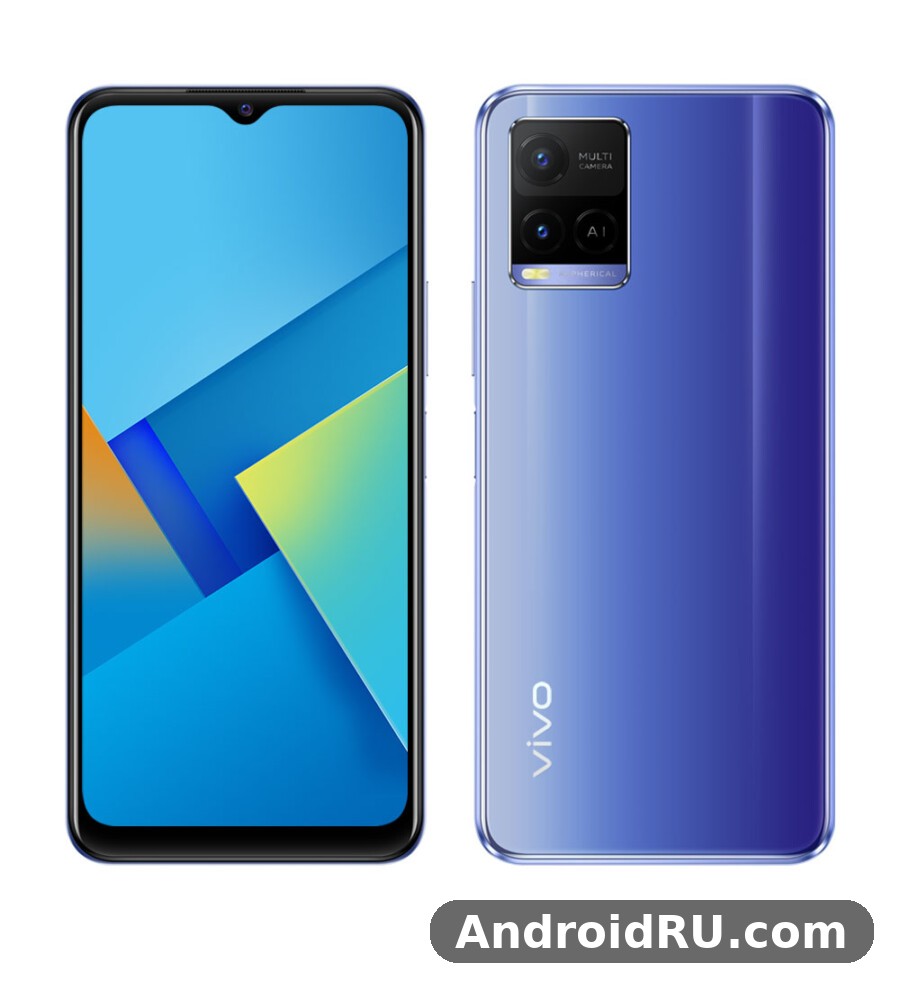
On paper, the vivo Y21 specs describe a modest phone: a MediaTek Helio P35 chipset, 4GB of RAM, 64GB or 128GB of storage, a 6.51-inch HD+ display, and a triple rear camera led by a 13MP sensor. Nothing here chases flagship numbers. The vivo Y21 price in Indonesia 2021 positioned it as an everyday phone for students, first-time smartphone buyers, and anyone who wants a second handset for work. That framing matters, because judging this phone against midrange rivals misses the point. The real question is whether the vivo Y21 value holds up for normal daily tasks, and whether its weak points, such as the HD+ resolution and the slow-feeling 18W charging, are deal-breakers or fair trade-offs at this level.
Design and Build Quality
The vivo Y21 design is simple, slim for a phone with a 5000mAh battery, and easy to hold for long stretches. The plastic back uses a textured finish that hides fingerprints better than glossy glass, and the frame feels solid with no creaks when you squeeze the corners. The vivo Y21 colors are Diamond Glow and Midnight Blue, and the Diamond Glow option shifts between soft blue and silver depending on the light. A vivo Y21 Diamond Glow colour design review would call it the more eye-catching of the two, while Midnight Blue is the safer pick for anyone who wants the phone to look plain at work. The vivo Y21 durability story is ordinary for this class: plastic can scratch and scuff, but it survives drops better than glass, and a cheap case fixes most of the risk.
The vivo Y21 fingerprint sensor side mounted on the power button is fast and easy to reach with a thumb or index finger, and it unlocks the phone without the delay of an older rear sensor. Face unlock is also available for quick access when your hands are busy. The vivo Y21 case question is worth settling on day one, because the glossy camera area and the plastic back pick up fine scratches in a pocket with keys. The vivo Y21 accessories most owners end up buying are a clear case and a screen protector, both cheap and widely available. A vivo Y21 unboxing in most regions includes the phone, a charger, a cable, and a basic case, but you should check the vivo Y21 unboxing contents in your region, because the bundled items can vary by market.
Colours and Finish
Diamond Glow is the colour that gets noticed, with a fine glitter pattern under the surface that catches the light without looking loud. Midnight Blue is darker and more formal, and it shows fewer marks over time. Either way, the finish is plastic, so it will not feel cold or premium like metal or glass, but it also will not shatter from a short fall onto a hard floor. Keep a cloth handy if you use the phone without a case, because the back still collects smudges from hands.
Side Fingerprint and Everyday Durability
The side fingerprint reader doubles as the power button, so unlocking becomes one natural press. It works with dry or slightly damp fingers most of the time, and it is quicker than typing a PIN dozens of times a day. There is no official water resistance rating here, and the vivo Y21 waterproof question has a plain answer: this phone has no IP rating, so it should stay away from rain, splashes, and sinks. Treat it as a normal budget phone, keep it dry, and it will last as long as any other handset in this class.
What the Plastic Build Means in Practice
Plastic keeps the phone light and cheap to repair, and it does not interfere with signal the way metal can. The trade-off is that deep scratches stay visible, and the phone can look tired after a year without a case. That is a fair exchange at this price, and it is one reason the Y21 works well as a first phone for younger users.
Display and Sound
The vivo Y21 display is a 6.51-inch IPS LCD panel with a 720 x 1600 HD+ resolution, a 20:9 shape, and a small waterdrop notch for the selfie camera. The vivo Y21 display quality HD IPS LCD character shows up in daily use: colours look natural rather than punchy, viewing angles are wide enough to share a video with someone sitting next to you, and text is readable even if it is not as crisp as a Full HD panel. The vivo Y21 screen is large enough for reading, maps, and video, and the size is one of the main reasons people pick this phone over smaller budget rivals. The vivo Y21 screen brightness outdoor sunlight visibility is the weak point, because the panel is not very bright, so reading messages in strong daylight takes a moment of shading the screen with your hand.
Sound comes from a single bottom speaker that is loud enough for video calls and alarms but thin for music, and the vivo Y21 speaker quality headphone jack combination is the better route for listening: plug in wired earphones or pair a Bluetooth headset and the sound is clean and clear. The vivo Y21 speaker on its own distorts a little at maximum volume, so keep it one notch below the top for podcasts and video. The vivo Y21 FM radio offline listening feature is a small bonus for anyone who still listens to local radio without using mobile data, and it works with wired earphones acting as the antenna.
HD+ IPS LCD in Daily Use
HD+ on a 6.51-inch screen means about 270 pixels per inch, so fine text has slightly soft edges if you look closely. In normal use, at a normal distance, most owners stop noticing after a day. Video from streaming apps still looks fine, games still look colourful, and the lower resolution helps the modest chipset and the battery, because the phone pushes fewer pixels on every frame. If you read small text for hours, a Full HD phone would be easier on the eyes, but for calls, chats, and video, this panel does the job.
Speakers and Headphone Jack
The 3.5mm headphone jack is a genuine advantage in 2021 budget phones, because it lets you use any cheap wired earphones without a dongle. Calls sound clear through the earpiece, and the microphone picks up voice well enough for voice notes and video calls. If you want to compare screens and sound with a newer sibling, read vivo Y27 4G Review: Display, Cameras and Budget Trade-Offs to see how much the budget class improved in later models.
Audio for Calls, Music, and Video
For calls, the earpiece volume is strong and voices sound natural. For music, wired earphones or a Bluetooth speaker are the way to go, because the single speaker lacks bass. For video, the large screen and the loud-enough speaker make short clips easy to follow, even in a noisy room.
Performance and Gaming
The vivo Y21 performance story starts with the MediaTek Helio P35, a 12nm octa-core chipset built for efficiency rather than speed. The vivo Y21 Helio P35 performance review verdict is consistent: everyday apps open quickly, scrolling through social feeds feels smooth, and switching between a handful of apps works fine with 4GB of RAM. The vivo Y21 processor is not built for heavy multitasking or demanding games, but it handles calls, messaging, browsing, maps, and video playback without drama. The vivo Y21 RAM 4GB multitasking test pattern is simple: keep six or seven light apps open and the phone copes, but open a heavy game and a camera app together and the phone will reload one of them.
The vivo Y21 gaming experience is casual rather than competitive. Light games run well, and the vivo Y21 gaming performance PUBG Mobile result is playable at low graphics settings with smooth frame rates in short sessions, though the phone can stutter in busy scenes. The vivo Y21 heating issue during gaming is mild: the back warms up after twenty or thirty minutes of play, but it does not get uncomfortably hot, and the chipset slows down a little to protect itself. The vivo Y21 overheating worry is therefore smaller than on some rivals, because the efficient 12nm chip and the HD+ screen keep heat down. If you want a stronger gaming phone in the same family, the comparison in vivo Y22 Review: App Performance and Camera Quality shows what a newer budget chipset adds.
Helio P35 in Everyday Apps
Opening the camera, replying to messages, checking email, and watching short video all feel responsive, because the Helio P35 is paired with light software and a low-resolution screen. App installs take a little longer than on a midrange phone, and large updates can make the phone feel busy for a minute, but normal use never feels broken. Storage speed is modest, so moving big files or installing a large game is a good time to put the phone down for a while.
Gaming on the PowerVR GE8320
The PowerVR GE8320 graphics unit handles 2D games and light 3D titles without trouble, and it keeps older popular games running at playable frame rates. Turn the graphics down, close background apps before a long session, and the phone stays stable. Demanding 3D games at high settings are beyond this hardware, and that is an honest limit rather than a fault: the Y21 was never sold as a gaming phone.
Heat and Sustained Performance
After long gaming sessions, the phone throttles gently instead of crashing, so frame rates dip rather than the game closing. Let the phone cool for a few minutes and performance returns. This is the right behaviour for a budget phone, and it protects the battery over the long term.
Cameras
The vivo Y21 camera setup is a triple rear system: a 13MP main camera, a 2MP macro camera, and a 2MP depth sensor, with an 8MP selfie camera in the notch. The vivo Y21 camera quality in daylight is the best part of the system: photos in good light look sharp, colours look natural, and the camera focuses quickly on people, food, and street scenes. The vivo Y21 night mode camera samples tell a different story, because low light brings noise and soft detail, and the night mode helps a little by brightening the scene without fixing the small sensor. The vivo Y21 night mode is still worth trying for still subjects, but moving people in dim rooms will blur.
Portrait shots use the depth sensor to blur the background, and the vivo Y21 13MP camera portrait mode results are decent when the subject is still and the light is good, with clean edges around hair most of the time. The macro camera is fun for close-ups of flowers and small objects, but its 2MP resolution means the results are soft and best viewed on the phone screen rather than printed. The vivo Y21 selfie camera 8MP low light performance is limited, so selfies at night look grainy, while daytime selfies look clear and bright. The vivo Y21 video recording 1080p stabilisation test result is what you would expect at this price: 1080p video looks fine for clips shared with friends, but there is no strong stabilisation, so walking while filming makes the footage shake.
13MP Main Camera in Daylight
In daylight, the main camera produces usable photos for social apps and family albums, with good exposure and honest colours. Tap to focus, let the phone settle for half a second, and you will get sharp results. The camera app is simple, with photo, video, portrait, and night modes easy to find, and the shutter responds quickly in good light.
Night Mode and Portrait Shots
Night mode takes a longer exposure and brightens shadows, which helps for buildings and landscapes after dark. Keep the phone still, lean it on something solid, and the results improve a lot. Portrait mode works best outdoors or near a window, where the light is even and the background blur looks natural rather than painted on.
8MP Selfie Camera and Video
The 8MP selfie camera handles video calls well, with clear skin tones in daylight and a wide enough angle for two people in the frame. Video calls stay smooth on a good connection, and the front camera is fine for the way most owners use it: quick selfies, video chats, and face unlock.
Software and Funtouch OS 11.1
The phone shipped with Android 11 with Funtouch 11.1, vivo’s skin on top of Android, and the vivo Y21 software experience is clean and colourful, with large icons, a simple settings layout, and a control centre that is easy to learn. The vivo Y21 software update Android 12 question comes up often, and the honest answer is to check the update menu on the phone itself, because availability varied by region and the phone was sold as an Android 11 device. The vivo Y21 update path beyond the launch software was short, so buyers should judge the phone on what it shipped with rather than on promised upgrades. The vivo Y21 Funtouch OS 11 bloatware apps include a few preinstalled vivo apps and third-party apps that can mostly be uninstalled or disabled, and clearing them out on day one makes the home screen tidier and frees a little storage.
Everyday software features cover the basics well: dark mode, a simple one-handed mode, app cloning for two accounts, and a game mode that blocks notifications while you play. The vivo Y21 multitasking split screen Funtouch OS feature lets you watch a video while replying to messages, which is handy on the large display, though the 4GB of RAM means the second app can reload if you switch away for too long. If you want to see how the software story continued on the older sibling in this series, read vivo Y19 Review: Daily Use, Software and Battery Life for a useful comparison of two generations of budget vivo software.
Daily Software Experience
Daily use feels straightforward: the launcher is simple, notifications are easy to manage, and the settings search finds what you need without digging through menus. The phone ships with Google apps and the Play services most owners expect, and the interface stays fast because the animations are light. Turn off the extra app suggestions and the phone feels calmer within minutes.
Battery Life and 18W Charging
The battery is the strongest reason to buy this phone. The vivo Y21 battery is a 5000mAh cell, and the vivo Y21 5000mAh battery drain test pattern is consistent: light users reach two days, and heavy users reach the end of a long day with charge to spare. The vivo Y21 two day battery life real world use case is real for calls, messaging, browsing, and a few hours of video, because the efficient chipset, the HD+ screen, and the large cell work together. The vivo Y21 charging story is slower: 18W wired charging fills the big battery steadily rather than quickly, and the vivo Y21 18W fast charging time from empty is a couple of hours, so overnight charging is the sensible habit. The vivo Y21 charging from zero to full time is long enough that you should plug in before bed rather than expecting a quick top-up before leaving the house.
The vivo Y21 reverse wired charging other phones feature lets the Y21 share power with another device over a cable, which is handy in an emergency when a friend’s phone is about to die. The vivo Y21 Bluetooth 5.0 wireless earbuds pairing is quick and stable, so the phone works well with cheap wireless earbuds for music and calls, and the connection holds across a room. For a look at how an older sibling handled the same battery-first idea, read vivo Y20 Review: Build Quality, Battery and Daily Use, which shows the same priorities in an earlier Y series phone.
Two Days of Real Use
Two days of real use means two mornings of alarms, two days of chats and calls, an evening of video, and still enough charge left on the second night to order a ride home. Heavy gaming or all-day video will cut that to a single long day, which is still good for a budget phone. Battery saver mode stretches things further by limiting background activity, and it is worth turning on when you know you will be away from a charger.
Full Specifications
| Feature | vivo Y21 |
|---|---|
| Model | V2111 |
| Announced | 20 August 2021 |
| Released | 20 August 2021 |
| Display | 6.51-inch IPS LCD, 720 x 1600 pixels, about 270 ppi, 20:9 |
| Chipset | MediaTek Helio P35 (MT6765, 12nm) |
| CPU | Octa-core: 4×2.35 GHz Cortex-A53 and 4×1.8 GHz Cortex-A53 |
| GPU | PowerVR GE8320 |
| RAM | 4GB |
| Storage | 64GB or 128GB, plus microSDXC dedicated slot |
| Rear camera | 13MP main, 2MP macro, 2MP depth |
| Selfie camera | 8MP |
| Video | 1080p video recording |
| Battery | 5000mAh, 18W wired charging, reverse wired charging |
| Operating system | Android 11, Funtouch 11.1 |
| Fingerprint | Side-mounted fingerprint sensor |
| SIM | Dual Nano-SIM with dedicated microSD slot |
| Bluetooth | Bluetooth 5.0 |
| Radio | FM radio |
| Audio | 3.5mm headphone jack, single speaker |
| Colours | Diamond Glow, Midnight Blue |
| Network | 4G LTE, no 5G |
The vivo Y21 microSD card dedicated slot matters because it means you do not have to give up the second SIM to add storage, and the vivo Y21 storage 128GB variant price difference over the 64GB model was modest at launch, so the bigger model is the better buy if you keep a lot of photos and video. The table above is the full picture: a large screen, a large battery, a modest chipset, and a simple camera set, all wrapped in a phone that was built to be affordable and easy to live with.
Pros and Cons
Pros
- 5000mAh battery that lasts up to two days in light use
- Large 6.51-inch display for video, reading, and maps
- Side fingerprint sensor that is fast and easy to reach
- Dedicated microSD slot plus dual SIM
- Headphone jack, FM radio, and Bluetooth 5.0
- Simple Android 11 software with Funtouch 11.1
Cons
- HD+ resolution only, with modest outdoor brightness
- 18W charging is slow for a 5000mAh battery
- Helio P35 struggles with heavy games and multitasking
- No 5G and no official water resistance rating
- Low-light camera results are noisy and soft
- Short software update runway beyond Android 11
Frequently Asked Questions
Is the vivo Y21 a 5G phone?
No. The vivo Y21 is a 4G LTE phone, and it does not support 5G networks. It covers the 4G bands most owners need for calls, messaging, and mobile data, but anyone who wants 5G should look at a newer model.
When was the vivo Y21 released?
The vivo Y21 was announced and released on 20 August 2021 as model V2111. It is the 2021 Y21, not the older Y21 from 2020 and not the Y21s or Y21e, which are different models with different hardware.
How long does the vivo Y21 battery last?
The 5000mAh battery lasts up to two days with light use, such as calls, messaging, and browsing, and a full long day with heavy use, such as video and gaming. Charging is 18W wired, so a full charge takes a couple of hours and overnight charging works best.
Does the vivo Y21 have a fingerprint sensor and a microSD slot?
Yes. The fingerprint sensor is side-mounted on the power button, and the phone has a dedicated microSDXC slot, so you can add storage without giving up the second SIM. It also has a 3.5mm headphone jack and an FM radio.
Is the vivo Y21 good for gaming?
It is good for casual gaming and light 3D games at low settings, including PUBG Mobile at low graphics, but it is not a gaming phone. Heavy 3D titles at high settings will stutter, and the phone warms up mildly during long sessions.
Verdict: Who Should Buy the vivo Y21
The vivo Y21 is a sensible buy for anyone who wants a big screen, a two-day battery, and simple software without paying midrange money. The vivo Y21 problems most owners report are the same ones this review found: a soft HD+ display, slow charging, and a chipset that asks you to keep your expectations modest. None of those are hidden faults, and none of them matter much if you use the phone for calls, chats, video, and photos in good light. The vivo Y21 alternatives worth a look are the newer budget models in the same family, and the comparison in vivo Y28 4G Review: Everyday Speed, Cameras and Value shows how much extra speed and camera quality a later Y series phone offers. A vivo Y21 vs vivo Y20 comparison shows the Y21 as the newer and slightly more polished of the two, with a bigger battery focus and a cleaner design, while the Y20 remains a fair second-hand option. If the price is right and the battery matters most to you, the vivo Y21 is an easy phone to recommend for everyday life.

