

vivo X80 Pro Review: Design, Software and Camera Quality
The vivo X80 Pro arrived as vivo’s camera-first flagship for 2022, and this vivo X80 Pro review looks at what the phone actually offered once it reached buyers. It was announced on 25 April 2022 and released on 29 April 2022, which makes the vivo X80 Pro release date easy to pin down: the phone went on sale only four days after its announcement. The vivo X80 Pro price and specifications in 2022 placed it firmly in the premium tier, competing with the best camera phones of its year rather than with mid-range devices. A vivo X80 Pro unboxing typically included the phone, an 80W charger, a cable, a case and a pre-applied screen protector, so buyers had most of what they needed in the box.
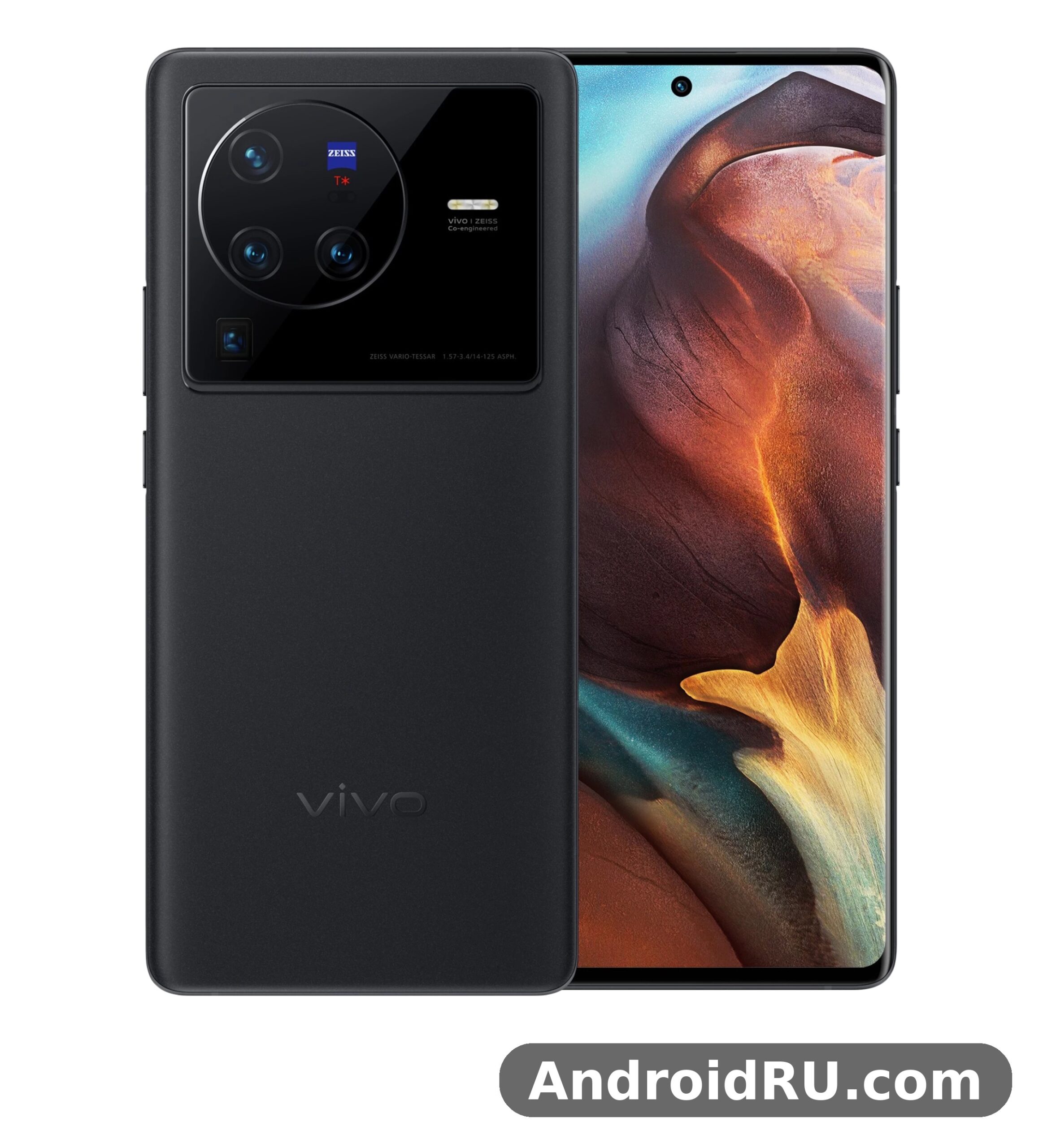
This article covers the vivo X80 Pro design, the vivo X80 Pro display, the vivo X80 Pro software, the vivo X80 Pro camera system, the vivo X80 Pro performance and the vivo X80 Pro battery, with the full vivo X80 Pro specs in a table near the end. The phone came in two chipset versions: the global model used the Snapdragon 8 Gen 1, while the China model used the Dimensity 9000. Both versions shared the same ZEISS camera hardware, the same 6.78 inch LTPO2 AMOLED screen and the same 4700mAh battery, so the choice of chipset was the main difference between regions. The standard model is covered separately in vivo X80 Review: Daily Performance and Key Features, and the newer generation is worth a look in vivo X90 Review: Build Quality, Software and Daily Speed.
Design and Build Quality
The vivo X80 Pro design is built around a large camera module and a curved glass back. The rear panel uses frosted glass with a ceramic-like finish on some versions, and the square camera island on the upper left carries the ZEISS branding. The frame is metal, the front is curved glass, and the phone feels dense and solid in the hand. The vivo X80 Pro colors at launch were Cosmic Black and Urban Blue, with the blue version using a vegan leather style back that gripped better than the glossy black glass. The vivo X80 Pro durability benefits from an IP68 rating, which is covered in detail below, and from Gorilla Glass on the front.
First impressions and materials
At first touch the phone feels like a proper flagship. The glass back is smooth, the metal frame is cool to the touch, and the camera module sits proud of the body without making the phone rock badly on a table. The vivo X80 Pro waterproof rating is IP68, which means the phone is protected against dust and can survive immersion in fresh water up to 1.5 metres for 30 minutes under test conditions. The vivo X80 Pro IP68 water resistance rating explained in plain terms is simple: rain, splashes and an accidental drop in a sink should not end the life of the phone, but swimming with it or exposing it to soapy water is still a bad idea. Third party vivo X80 Pro cases and vivo X80 Pro accessories were widely available, including clear cases that show off the back panel and wallet cases for buyers who wanted more protection.
Size, weight and handling
The phone measures 164.6 x 75.2 x 9.1 mm and weighs 215 grams for the glass version and 219 grams for the leather version. It is 9.1mm thick, which is chunky by modern standards, and the weight sits mostly toward the camera end, so the balance takes a little getting used to. The vivo X80 Pro weight 215 grams daily handling comfort question has a mixed answer: the phone is comfortable for short sessions and for two-handed use, but one-handed use over a long period can tire the hand, and the curved edges can make the grip feel slippery without a case. The vivo X80 Pro fingerprint sensor sits under the display and uses an ultrasonic reader. The vivo X80 Pro fingerprint sensor under display speed is good in daily use, with fast recognition once the finger is registered twice, and it works even with slightly damp hands, though very wet fingers still cause misses.
Display and Sound
The vivo X80 Pro display is one of the strongest parts of the phone. It is a 6.78 inch LTPO2 AMOLED panel with a QHD+ resolution of 3200 x 1440 pixels, a 120Hz refresh rate and support for HDR10+. This vivo X80 Pro LTPO AMOLED display 120Hz review finds the screen sharp, bright and smooth, with deep blacks and vivid colours that suit video and games. The LTPO2 backplane lets the refresh rate drop as low as 1Hz for static content, which saves battery when the screen shows a photo or an always-on clock. The vivo X80 Pro QHD Plus screen resolution and brightness combination is strong on paper and in practice: text is crisp at any size, and the panel reaches high brightness outdoors.
LTPO2 AMOLED panel
The panel supports a 120Hz adaptive refresh rate, a 240Hz touch sampling rate and 10-bit colour. Colours look rich by default, and the display settings let the user switch between vivid, standard and professional colour modes. The curved edges give the phone a premium look, though they can cause accidental touches at the sides when the phone is held tightly. The screen is protected by a pre-applied film, and the under-display fingerprint reader sits near the bottom edge, in a natural spot for the thumb.
Brightness, refresh rate and sound
Peak brightness is rated at 1500 nits, which keeps the screen readable in direct sunlight. The 120Hz mode makes scrolling and animations look fluid, and the adaptive rate drops to 60Hz or lower when nothing moves, which helps battery life. The vivo X80 Pro speakers are a stereo pair, with one speaker at the bottom and the earpiece acting as the second channel. The vivo X80 Pro stereo speakers sound quality review verdict is positive for a phone: the sound is loud and clear, with decent separation for video and games, though bass is limited, as it is on almost every phone. There is no 3.5mm headphone jack, so wired audio needs a USB-C adapter or a USB-C headset.
Outdoor visibility and eye comfort
Outdoors, the screen stays readable even under a bright sky, and the auto-brightness reacts quickly when moving between shade and sun. For night use, the display offers a low brightness floor and a dark mode that pairs well with the AMOLED panel, since black pixels stay off. Eye comfort settings reduce blue light in the evening, and the adaptive refresh rate keeps static reading pages at a low rate, which trims power use during long reading sessions.
Software and Daily Experience
The vivo X80 Pro software story depends on the region. The global version shipped with Android 12 and Funtouch OS 12, while the China version shipped with Android 12 and OriginOS Ocean. The vivo X80 Pro Funtouch OS 14 software experience came later through updates, and the vivo X80 Pro Android 12 update to Funtouch 14 brought a cleaner visual style, better privacy controls and smoother animations. The vivo X80 Pro OriginOS Ocean China version differences are worth knowing for import buyers: OriginOS has a different home screen layout, different built-in apps and different services from the global Funtouch build, and Google services are not preloaded on the China version. The vivo X80 Pro update path in later years added newer Android versions, and each vivo X80 Pro update also carried security patches.
Funtouch 14 and OriginOS Ocean
Funtouch 14 is a clean and fast skin with a large set of custom options for the always-on display, the lock screen and the home screen. It keeps the app drawer, adds a smart sidebar for quick tools, and offers a one-handed mode that pulls the screen down for easier reach. The software is mostly free of heavy ads on the global version, and the preloaded apps can mostly be removed. OriginOS Ocean on the China model looks quite different, with larger widgets and a different control centre, but the core camera and system apps behave in the same way. Buyers who import the China model should check the language and service support before paying, since the vivo X80 Pro features can differ by region even when the hardware looks the same.
Everyday apps and multitasking
In daily use the phone is fast. Apps open quickly, the recent apps view is smooth, and switching between a browser, a messenger and the camera rarely causes a reload. The vivo X80 Pro 8GB RAM multitasking performance test result is that the 8GB version holds around ten to twelve apps in memory without trouble, while the 12GB version holds more and is the better pick for heavy multitaskers. The vivo X80 Pro features for daily life include split-screen multitasking, a floating window mode, screen recording, a game mode that blocks notifications during play, and a children mode that limits app access. The software also includes a digital wellbeing dashboard and a battery care mode that slows charging overnight to protect the cell.
Camera Quality
The vivo X80 Pro camera system is the reason most buyers chose this phone. It has four rear cameras: a 50MP main camera with a Samsung GNV sensor and gimbal optical image stabilisation, a 48MP ultrawide camera, a 12MP telephoto camera with 2x optical zoom, and an 8MP periscope camera with 5x optical zoom. The vivo X80 Pro ZEISS camera system explained in simple terms means that ZEISS supplied the T* lens coating, which cuts flare and ghosting, and co-developed the portrait styles and colour tuning. The vivo X80 Pro ZEISS partnership shows up in the camera app as ZEISS portrait modes, a ZEISS natural colour mode and a ZEISS lens package with effects such as Biotar and Sonnar bokeh. The vivo X80 Pro 50MP main camera sample photos show strong detail in daylight, natural skin tones and good dynamic range.
The predecessor is worth comparing for camera fans, and the earlier flagship is covered in vivo X70 Pro+ Review: Photo Quality, Video and Performance. The newer generation raised the bar again, as described in vivo X90 Pro Review: Cameras, Performance and Battery Life. The vivo X80 Pro gimbal hardware is a real mechanical gimbal for the main camera, not just electronic stabilisation, and it keeps the sensor steady during handheld video and low light photos.
Main camera and gimbal stabilization
The 50MP main camera uses a large Samsung GNV sensor with an f/1.6 aperture and gimbal stabilisation. In daylight it captures sharp photos with accurate colours and plenty of detail for cropping. The gimbal helps most in video and in dim light, where it keeps the shutter open longer without blur. A vivo X80 Pro gimbal stabilization video recording test shows smooth footage while walking, with far less shake than a phone that relies on electronic stabilisation alone. The camera app offers night mode, a pro mode with manual controls, a long exposure mode, a supermoon mode and a document mode, so the vivo X80 Pro camera app modes and manual controls cover both casual shooters and users who like to set ISO, shutter speed and focus by hand.
Low light and night mode
The vivo X80 Pro camera quality in low light stands out as one of the best of its year. Night mode stacks several frames, lifts shadow detail and keeps highlights under control, and the gimbal lets the phone use longer exposures without a tripod. Street scenes keep their colour and mood instead of turning into a flat orange wash, and neon signs stay readable. The vivo X80 Pro ultrawide camera night mode results are also good, though not as clean as the main camera: the ultrawide keeps its wide field of view and holds detail in the centre of the frame, while the corners soften and noise appears in very dark areas. For the best low light results, the main camera is the right tool, with the ultrawide as a useful second choice.
Ultrawide, telephoto and periscope zoom
The 48MP ultrawide camera covers a 114 degree field of view and doubles as a macro camera, focusing as close as a few centimetres. It is a good lens for landscapes, interiors and group photos, and its colours match the main camera closely. The vivo X80 Pro 12MP telephoto lens 2x zoom quality is strong for portraits and for subjects that are too far for the main camera: the 2x zoom keeps detail and natural depth of field, and the gimbal helps keep the frame steady. The vivo X80 Pro zoom range extends to 5x through the periscope lens, and the vivo X80 Pro periscope zoom camera 5x optical reach is genuinely useful for distant subjects such as signs, wildlife and stage performances. Digital zoom goes to 60x, but quality falls off quickly past 10x, so the periscope is best used at or near 5x.
Portrait mode and ZEISS lenses
Portrait mode is a highlight. The vivo X80 Pro portrait mode with ZEISS lenses offers several bokeh styles that mimic classic ZEISS optics, including a swirly Biotar effect and a clean Sonnar look. Edge detection is accurate in good light, hair is handled better than on many rivals, and skin tones stay natural rather than over-smoothed. The 2x telephoto lens is the default portrait focal length, which gives faces a natural shape without the distortion of a wide lens. Portrait video is also available, with background blur that holds up well when the subject stays still. For buyers who care about people photos, this is one of the strongest reasons to pick the phone.
Selfie camera and video
The front camera is a 32MP unit with autofocus, which is rarer than it should be on flagship phones. The vivo X80 Pro selfie camera is sharp and detailed, with natural skin tones and good dynamic range in daylight. The vivo X80 Pro 32MP front camera selfie video quality is strong too: video reaches 1080p at 30 frames per second, with steady framing and clear audio from the built-in microphones. The vivo X80 Pro video stabilization 4K recording quality on the rear cameras is better still, with 4K at up to 60 frames per second, gimbal stabilisation on the main camera and electronic stabilisation across the zoom range. Video colours match the photo colours closely, and the phone handles the switch between lenses during recording without a harsh jump in exposure.
Performance, Gaming and Battery Life
The vivo X80 Pro performance differs by region, and buyers should know which version they are getting. The global model runs the Snapdragon 8 Gen 1, while the China model runs the Dimensity 9000. This vivo X80 Pro Snapdragon 8 Gen 1 performance review finds the global model fast in every daily task, with quick app launches, smooth scrolling and strong benchmark results. The vivo X80 Pro Dimensity 9000 vs Snapdragon version comparison is close in daily use: the Dimensity 9000 runs cooler under sustained load and is slightly more efficient, while the Snapdragon 8 Gen 1 has a small edge in some games and in camera processing speed. Both versions use fast UFS 3.1 storage and LPDDR5 RAM, so app loading and file transfers are quick either way.
Snapdragon 8 Gen 1 and Dimensity 9000
For gaming, the phone handles demanding titles at high settings with stable frame rates for the first stretch of a session. The vivo X80 Pro gaming performance and heating test picture is familiar for a Snapdragon 8 Gen 1 phone: the chip is fast, but it warms up under a long gaming session, and the frame rate can dip once the phone gets hot. The Dimensity 9000 version holds its speed longer under the same load, which makes it the better pick for long sessions. A vivo X80 Pro vs X90 comparison shows the newer model running cooler and faster, but the X80 Pro is still quick enough for every current game at sensible settings. The most common vivo X80 Pro problems reported by owners are heat during long gaming sessions, the lack of a microSD slot, and the curved screen causing accidental touches, none of which affect normal daily use. The successor line is covered in vivo X90 Pro+ Review: Strengths, Trade-Offs and Everyday Use.
Battery life and charging
The vivo X80 Pro battery is a 4700mAh cell, which is a normal size for a phone with a large QHD+ 120Hz screen. The vivo X80 Pro battery life with 80W charging is a strong combination: the phone lasts a full day of mixed use with the screen at 120Hz, and the 80W charger refills it quickly when it runs low. A vivo X80 Pro 4700mAh battery drain overnight test shows a small drain of only a few percent with the always-on display off, which is a good result for a flagship. The vivo X80 Pro charging options include 80W wired charging and 50W wireless charging, plus reverse wireless charging for earbuds and watches. The vivo X80 Pro wireless charging 50W speed test result is that a compatible wireless charger can refill a large part of the battery in about half an hour, which is fast for wireless charging and makes the feature genuinely useful rather than a slow overnight option.
Full Specifications
| Feature | vivo X80 Pro |
|---|---|
| Announced | 25 April 2022 |
| Released | 29 April 2022 |
| Display | 6.78 inch LTPO2 AMOLED, 120Hz, QHD+ 3200 x 1440, HDR10+ |
| Chipset | Snapdragon 8 Gen 1 (global) / Dimensity 9000 (China) |
| RAM | 8GB / 12GB LPDDR5 |
| Storage | 256GB / 512GB UFS 3.1, no microSD card slot |
| Rear camera | 50MP main (Samsung GNV, gimbal OIS) + 48MP ultrawide + 12MP telephoto 2x + 8MP periscope 5x, ZEISS T* coating |
| Front camera | 32MP, autofocus, 1080p video |
| Battery | 4700mAh |
| Charging | 80W wired, 50W wireless, reverse wireless |
| Operating system | Android 12, Funtouch 14 (global) / OriginOS Ocean (China) |
| Water resistance | IP68 |
| Dimensions | 164.6 x 75.2 x 9.1 mm |
| Weight | 215 g (glass) / 219 g (leather) |
| Security | Under-display ultrasonic fingerprint sensor, face unlock |
| Audio | Stereo speakers, no 3.5mm jack |
| Connectivity | 5G, Wi-Fi 6, Bluetooth 5.2, NFC, USB-C |
What the spec sheet means in practice
The vivo X80 Pro specs tell a clear story: a large high resolution screen, a flagship chipset in two regional versions, a four camera ZEISS system with a real gimbal, and fast charging in both wired and wireless form. The vivo X80 Pro 256GB storage no microSD card slot detail matters for buyers who keep a lot of photos and video: the 256GB version is enough for most people, but heavy shooters should pick the 512GB version, since the storage cannot be expanded. The vivo X80 Pro storage speed is fast thanks to UFS 3.1, so installing apps and copying files is quick. The vivo X80 Pro second hand value in 2026 is modest, as it is for most 2022 flagships, but the camera hardware still holds up, which makes a used unit a fair buy for photography fans. The main vivo X80 Pro alternatives from the same era are the Samsung Galaxy S22 Ultra, the Xiaomi 12 Pro and the OPPO Find X5 Pro, each with its own camera strengths and software style.
Pros and Cons
Pros
- Excellent ZEISS camera system with gimbal stabilisation, a 5x periscope zoom and strong low light results.
- Sharp 6.78 inch LTPO2 AMOLED display with 120Hz refresh rate and QHD+ resolution.
- Fast 80W wired charging and 50W wireless charging with a 4700mAh battery.
- IP68 water resistance and a premium build with glass or leather back options.
- Strong stereo speakers and an under-display ultrasonic fingerprint sensor.
Cons
- No microSD card slot, so storage cannot be expanded after purchase.
- The Snapdragon 8 Gen 1 version warms up during long gaming sessions.
- Heavy at 215 grams or more, with a thick 9.1mm body.
- China and global versions run different software, which can confuse import buyers.
- No 3.5mm headphone jack.
Frequently Asked Questions
Is the vivo X80 Pro waterproof?
The vivo X80 Pro waterproof rating is IP68, so it is protected against dust and can survive immersion in fresh water up to 1.5 metres for 30 minutes under laboratory test conditions. In daily life that covers rain, splashes and accidental drops in water, but it does not cover swimming, hot water or soapy water, and the rating can weaken if the phone is dropped or repaired.
Does the vivo X80 Pro support wireless charging?
Yes, the phone supports 50W wireless charging with a compatible charger, as well as reverse wireless charging for accessories such as earbuds. Wired charging is faster at 80W, but wireless charging is quick enough for a top-up during the day and for overnight charging on a stand.
Which chipset does the vivo X80 Pro use?
The global version uses the Snapdragon 8 Gen 1, while the China version uses the Dimensity 9000. Both are flagship chips from 2022 with 8GB or 12GB of RAM and fast UFS 3.1 storage, and both run the same camera hardware and display, so the difference shows up mainly in heat and efficiency under long heavy loads.
Is the vivo X80 Pro good for gaming?
Yes, the phone plays demanding games at high settings with smooth frame rates, and the 120Hz display and stereo speakers help the experience. The Snapdragon 8 Gen 1 version can warm up and throttle during very long sessions, while the Dimensity 9000 version holds its speed longer. A game mode blocks notifications and keeps performance steady while playing.
How good is the vivo X80 Pro camera in low light?
Low light is one of the strongest areas of the phone. The large 50MP main sensor, the gimbal stabilisation and the night mode work together to capture bright and detailed photos with controlled noise, and the ultrawide camera also performs well in dim conditions. For the best results, use the main camera at night and keep the phone steady for a second while night mode captures its frames.

