

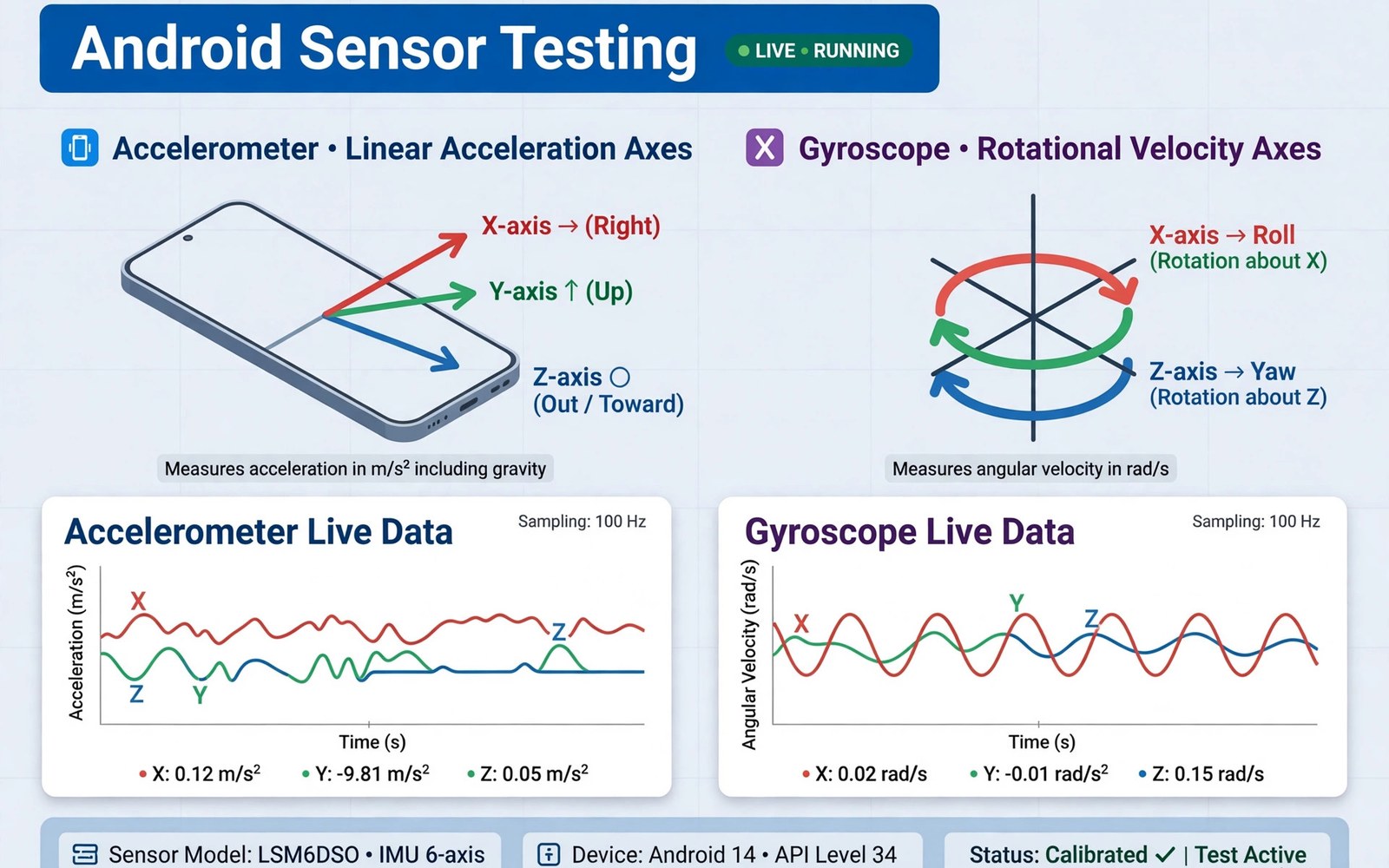
Sensor testing apps check whether your phone accelerometer and gyroscope report true motion. Games and navigation and screen rotation all depend on these sensors. A good tester shows live values and graphs and lets you spot drift or dead zones fast. This guide explains how to test sensors and judge their accuracy. This article covers sensor testing apps in plain language for everyday Android users.
Sensors fail quietly. A drifting gyroscope ruins game aiming before you suspect hardware. A stuck accelerometer breaks auto rotate. Live testing catches these faults in minutes. If you already pulled a full hardware report then confirm the sensor list there first so you test sensors that actually exist on your phone.
How accelerometer tests work
An accelerometer measures acceleration including gravity. At rest on a table it should read near one gravity on one axis. Tilt the phone and values shift across axes smoothly. A tester graphs those shifts live as you move.
Place the phone flat and note the resting values. They should stay stable within a small range. Rotate slowly through each axis and watch for smooth changes. Jumps or flat spots signal a faulty or stuck sensor.
How gyroscope tests work
A gyroscope measures rotation speed around each axis. At rest it should read near zero on all axes. Rotate the phone steadily and values rise smoothly. Stop and values return to near zero fast.
Drift shows as a slow creep away from zero at rest. Small drift is normal and software compensates. Large drift breaks games and AR apps. Note resting drift over thirty seconds. A tester that logs drift makes comparison across phones easy.
Calibration and when it helps
Calibration resets the sensor zero point. It helps when resting values sit off zero consistently. Run calibration on a flat stable surface. Keep the phone still during the whole process.
Calibration cannot fix hardware faults. A sensor with dead zones stays faulty after calibration. A sensor that jumps randomly stays faulty too. Calibrate once and retest. If results stay bad then the fault is hardware and needs service.
Testing other sensors in one pass
Test magnetometer with a compass check. Rotate the phone in a figure eight and watch heading stability. Test proximity by covering the top sensor during a call screen. Test light sensor by moving between bright and dark rooms.
Test barometer only if your phone lists one. Compare its pressure reading with a known weather value nearby. A full sensor pass takes ten minutes and it settles every doubt about motion and environment hardware at once.
Using results for games and navigation
Game aiming needs low gyroscope drift. Navigation needs a stable magnetometer. Screen rotation needs a responsive accelerometer. Match test results to the feature you care about. A phone can pass rotation yet fail game aiming if gyroscope drift is high.
Share test graphs with support when you report a fault. A graph proves drift better than words. Note phone model and software version next to results. Support teams act faster on evidence than on descriptions alone.
Magnetometer and compass accuracy
Magnetometer accuracy decides compass reliability. Metal objects and magnets distort readings badly. Test compass away from metal cases and magnetic mounts. A figure eight motion recalibrates most magnetometers. Repeat the motion until heading stabilizes.
Compare compass heading against a known direction. A street map gives true north reference. Large steady errors after calibration signal sensor fault. Small wobble is normal noise. Judge compass by steady error and not by momentary wobble.
Proximity and light sensor checks
Proximity sensors turn the screen off during calls. Test by covering the top edge during a call screen. The screen should sleep instantly. Uncover and it should wake. Delayed response signals a dirty sensor window or a fault.
Light sensors drive auto brightness. Move between a bright window and a dark room. Brightness should adapt within seconds. Stuck brightness suggests a blocked sensor or a software setting override. Clean the sensor window first before suspecting hardware.
Barometer uses beyond weather
Barometers help altitude tracking for hiking and floors. They improve GPS height accuracy too. Test by comparing pressure against a local weather station value. Small offsets are normal due to altitude differences. Large offsets suggest calibration need.
Barometers also detect floor changes indoors. That ability aids indoor navigation research. Most users never need barometer precision. Hikers and fitness users benefit most. Test barometer only when your activities use altitude data.
Sensor drift over phone lifetime
Sensors drift slowly as phones age. Gyroscope drift grows with wear and heat exposure. Accelerometer zero points shift slightly over years. Annual sensor tests catch drift before it ruins games or navigation. Compare yearly logs to spot trends.
Software updates sometimes improve sensor handling. New fusion algorithms compensate drift better. Test after major updates to see whether drift improved. If drift persists across updates then hardware wear is likely. Service decisions follow from that evidence.
Sensor testing before buying used
Sensor tests belong in every used phone inspection. Run accelerometer and gyroscope rest tests on the spot. Check compass heading against a known direction. Test proximity during a fake call screen. Ten minutes of tests reveal hidden hardware faults.
Sellers may hide sensor faults since they show no visible damage. A phone with a dead gyroscope looks perfect yet plays motion games terribly. Test results protect your money better than a visual inspection alone. Walk away from failed sensors unless the price reflects repair cost.
Accelerometer uses in everyday apps
Accelerometers power more features than screen rotation alone. Step counting uses accelerometer patterns to detect walking. Fall detection uses sudden acceleration changes to trigger alerts. Camera stabilization uses motion data to steady shots. Each feature depends on clean accelerometer signals. A noisy sensor degrades all of them subtly before any single feature fails obviously.
Test everyday features when sensor readings look borderline. Walk a known distance and compare step counts. Rotate the phone and check screen response speed. Shake gently and watch stabilization behavior. Real feature tests confirm whether borderline readings matter practically. Lab numbers alone never decide user impact.
Gyroscope drift in AR and VR
AR apps anchor virtual objects to real world positions using gyroscope data. Drift shifts those anchors slowly away from truth. Virtual furniture slides across the floor as drift accumulates. Games lose aiming accuracy as drift grows. AR quality depends on gyroscope stability more than on any other single sensor factor.
Test AR drift with a simple anchor experiment. Place a virtual object and hold the phone still for one minute. Watch whether the object stays fixed or creeps. Creep beyond a small margin signals problematic drift. Compare across phones with the same AR app for fair judgment. Drift testing turns vague AR complaints into measurable evidence.
Sensor fusion and software compensation
Modern phones fuse multiple sensors into one motion estimate. Accelerometer plus gyroscope plus magnetometer together correct each other weaknesses. Fusion software hides individual sensor flaws impressively. A mediocre gyroscope can still deliver good AR when fusion compensates well. That compensation explains why raw sensor tests sometimes look worse than real app behavior.
Test fused behavior alongside raw readings. Raw drift may look bad while fused AR stays stable. Judge the phone by fused results for user facing features. Judge raw sensors for repair decisions. Both views matter and they answer different questions. Fusion quality varies by vendor software as much as by hardware.
Environmental factors in sensor tests
Temperature affects sensor accuracy measurably. Cold sensors read differently than warm sensors. Magnetic interference skews magnetometer tests near metal. Vibration from nearby machinery adds noise to accelerometer tests. Control the test environment for repeatable results. A stable indoor table away from metal gives the cleanest baseline.
Repeat tests in the same environment for comparison across days. Changing environments between tests invalidates trend analysis. Note temperature and location next to each test log. Environmental notes explain otherwise mysterious result shifts. Careful test conditions separate real sensor change from environmental noise.
adb shell dumpsys sensorservice | head -n 80The command above follows the standard syntax for the Android developer bridge and prints sensor service status so you can compare tester readings with system sensor data.
Common mistakes
The biggest mistake is testing on a moving surface. A bus or a shaky table adds motion that looks like drift. Test on a stable table indoors. Stillness is the baseline for every sensor reading.
Another mistake is calibrating repeatedly to chase perfect zero. Sensors have natural noise. Perfect zero is not the goal. Stable values near zero are the goal. Over calibration wastes time and changes nothing real.
People also test sensors they do not own. A missing sensor is not a failed sensor. Check the sensor list first. A crash log check can also reveal whether a sensor app fails from missing hardware or from a software bug.
Frequently asked questions
Why does my gyroscope drift at rest?
Small drift is normal sensor noise. Software compensates for it in most apps. Large steady drift signals calibration need or hardware wear. Calibrate once on a flat surface and retest.
Can sensor apps fix hardware faults?
No. Apps test and calibrate but they cannot repair hardware. A sensor with dead zones or wild jumps needs service. Test graphs help prove the fault to a repair shop.
Do sensor tests drain battery?
Very little. Sensors run at low power during tests. A ten minute test pass uses negligible battery. Close the tester after testing so it does not poll sensors in the background.
Conclusion
Sensor testing apps turn invisible motion hardware into visible graphs. Test at rest and in motion and judge drift over time. Calibrate once on a flat surface and service real hardware faults.
Your next step is concrete. Run a flat rest test for thirty seconds today. Note accelerometer rest values and gyroscope drift. Then check display calibration since rotation and display work together for a smooth screen experience.

