

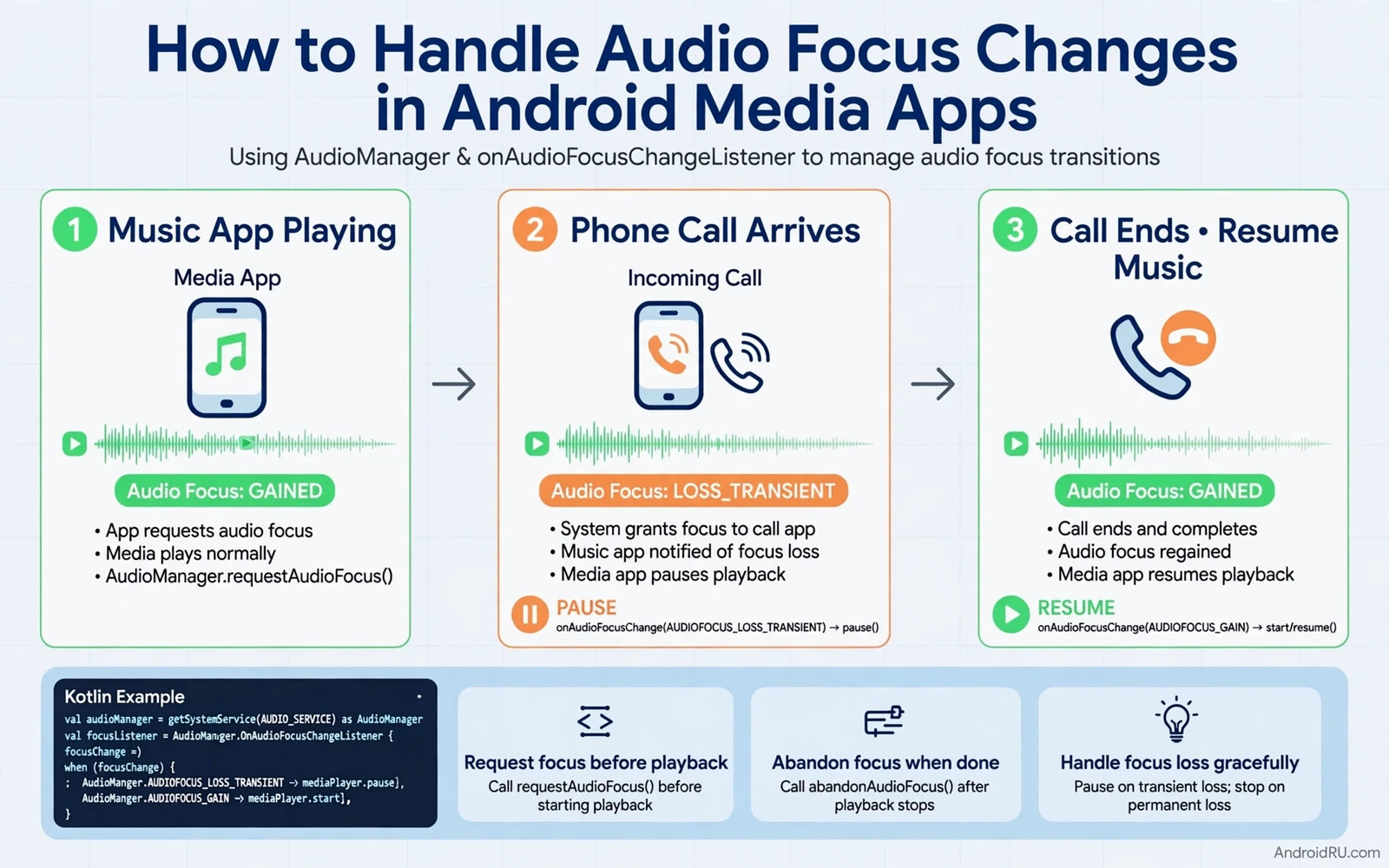
What Audio Focus Means
Audio focus is a cooperative system that lets apps share a single audio output politely. Only one app should play loud audio at a time in most situations. An app requests focus before it plays. The system grants focus when no other app needs it exclusively. The system notifies the current holder when another app needs focus. The holder then lowers its volume or pauses or stops depending on the type of interruption. That cooperation keeps phone calls and navigation prompts and media playback from colliding.
Focus is not enforced by muting alone. The system does not force an app to stop. It asks the app to cooperate through a callback. An app that ignores focus changes will play over a phone call or over another media app. Users will notice that rudeness quickly. An app that handles focus well feels polite because it yields when needed and resumes when the interruption ends. Politeness in audio is a core part of media app quality.
Focus types describe how long and how exclusively an app needs audio. A music app needs long term focus for a full song or podcast. A navigation app needs short term focus for a spoken prompt. A game may need focus that can duck rather than pause. A notification sound needs only a brief moment. Choosing the right focus type tells the system how to treat other apps during playback. A wrong type creates either unnecessary pauses or unwanted overlap.
Requesting Focus Before Playback
An app should request focus at the moment when playback is about to start rather than at app launch. Requesting early blocks other apps while the user has not yet pressed play. Requesting late risks a short burst of audio before focus is granted. The request should describe the intended use such as media playback. It should describe whether the app can duck when another app needs transient focus. Ducking means lowering volume rather than pausing. Some content ducks well. Spoken content usually pauses better than ducking.
The system returns a result for the focus request. A granted result means playback can start. A delayed result means another app holds focus and playback should wait. A failed result means playback should not start. An app that starts playback after a failed request will overlap the current holder. The app should show a clear state when playback is waiting for focus. The user should understand why play did not start immediately.
Focus should be abandoned when playback stops permanently. Abandoning focus tells the system that other apps may now play. An app that holds focus after stopping blocks other apps for no reason. An app that abandons focus on pause but resumes quickly should request focus again on resume. That request and abandon cycle keeps focus ownership aligned with actual playback.
Loss Types and Correct Responses
A transient loss means another app needs audio briefly. A navigation prompt or a notification may cause transient loss. A media app should pause during transient loss when the content is spoken. A music app may duck during transient loss when the interruption is short and the content is musical. The choice depends on content type. Spoken words become unintelligible when ducked under another voice. Music remains enjoyable at lower volume under a brief prompt.
A transient loss that allows ducking is a softer signal. The system tells the app that it may continue at lower volume. The app should lower volume to a clearly quieter level. It should restore full volume when focus returns. The volume change should be smooth rather than abrupt. An abrupt change startles the listener. A smooth fade feels intentional.
A permanent loss means another app has taken focus for a long period. A new music app starting playback causes permanent loss for the previous player. The previous player should stop playback and release focus. It should not resume automatically when the new app stops unless the user asks for it. Automatic resume after permanent loss surprises users who have moved on to new content. The player should show a stopped state and wait for user action.
Phone Calls and System Interruptions
A phone call is the strongest interruption for most media apps. The system requests focus for the call and the media app should pause immediately. The call audio must be clear and private. A media app that continues under a call creates a privacy and safety problem. The user may miss call audio or the other party may hear media in the background. Pause on call is a non negotiable rule for media apps.
After a call ends the media app should not resume automatically in all cases. A user who was listening to a podcast may want to resume. A user who took a long call may have moved to another task. A safe design resumes only when the interruption was short and the app was playing immediately before the call. A long interruption should leave playback paused with a clear resume button. User control matters more than automatic convenience here.
Alarms and timers also need focus handling. An alarm should be audible even when a media app is playing. The media app should duck or pause during the alarm depending on its content. A timer that ends during a podcast should not be hidden under continued playback. The user set the timer for a reason. Respecting system sounds builds trust in the media app as a good citizen on the device.
Focus and Playback State Together
Playback state and focus state must stay in sync. A player that shows playing while it is paused for focus loss confuses the user. A notification that shows a pause button while audio is ducked confuses the user as well. The player state machine should treat focus loss as a state transition. Pause for focus loss is a distinct state from user pause in some designs. That distinction allows the app to resume automatically after a transient loss while staying paused after a user pause.
Media session integration helps keep state consistent across the system. A media session exposes playback state to the system and to connected devices such as earbuds and cars and watches. Focus changes should update the media session state. A car display should show paused when the phone app pauses for a call. A watch control should show the same state as the phone. Inconsistent state across devices makes the app feel broken even when phone playback is correct.
Bluetooth devices add another layer. Connecting earbuds may trigger playback in some apps. Disconnecting earbuds should pause playback in most media apps. That behaviour is tied to focus and to routing rather than to focus alone. The app should pause when the output device disappears unexpectedly. It should not resume automatically when earbuds reconnect unless the user has chosen that behaviour. Automatic resume after reconnection can start audio in a public place unexpectedly.
Ducking Done Well
Ducking works best for music under a short voice prompt. The music volume drops enough that the prompt is clear. The music does not stop. The listener can still follow the music at low volume. The drop should be noticeable but not silent. A drop to silence is effectively a pause without the state change. A drop to a low level preserves the sense of continuity.
Ducking works poorly for podcasts and audiobooks under a voice prompt. Two voices at once are hard to follow even when one is quieter. The listener loses the thread of both. A podcast app should pause rather than duck for voice interruptions. The app can remember the pause position and resume from the same point. That resume accuracy matters for spoken content because a few seconds of missed speech can lose meaning.
Ducking implementation should use the audio system volume controls for the player stream rather than a manual gain hack in the app when possible. System managed ducking integrates with focus callbacks and with other apps. Manual gain changes can drift out of sync with focus state. A player that ducks manually must restore gain exactly on focus return. A missed restore leaves playback permanently quiet and users will think the app is broken.
Testing Focus Behaviour
Testing should cover each loss type separately. Start playback and then start a second media app. The first app should stop or pause permanently. Start playback and then trigger a navigation prompt. The first app should duck or pause transiently and then resume or restore volume. Start playback and then receive a call. The first app should pause and stay paused or resume only under the designed rule. Each test should be run with earbuds and with the phone speaker because routing changes behaviour.
Testing should also cover focus request timing. Press play in the app while another app is playing. The app should request focus and wait or fail cleanly. It should not play over the other app. Press play twice quickly. The app should handle duplicate requests without double playback. Switch apps rapidly. Focus ownership should follow the most recent user action rather than getting stuck with a background app.
Understanding how system events reach an app helps a team place focus work in context and the guide to broadcast receivers and intent filters explains how an app learns about system changes that may affect playback. Layout and state work also connect because a player screen must show focus driven pauses clearly on every screen size and the guide to responsive layouts in Jetpack Compose shows how that player screen can adapt well. Asset work connects too because a player interface needs sharp icons for play and pause states and the comparison of vector drawables versus bitmap assets helps a team choose icons that stay crisp in every player state.
Common Mistakes to Avoid
One common mistake is playing without requesting focus. The app will overlap other audio and users will close it. Another mistake is never abandoning focus after playback stops. Other apps will be blocked for no reason. A third mistake is resuming automatically after permanent loss. Users who switched to new content will hear old content return unexpectedly.
Another mistake is ducking spoken content under a voice prompt. The listener loses both voices. A further mistake is ignoring delayed focus results and starting playback anyway. The app will overlap the current holder. A final mistake is showing a playing state while audio is paused for focus loss. The user will tap pause and nothing will happen because the app is already paused internally.
// Audio focus request sketch in Kotlin
// val request = AudioFocusRequest.Builder(AudioManager.AUDIOFOCUS_GAIN)
//     .setAudioAttributes(attributes)
//     .setOnAudioFocusChangeListener(listener)
//     .build()
// val result = audioManager.requestAudioFocus(request)

