

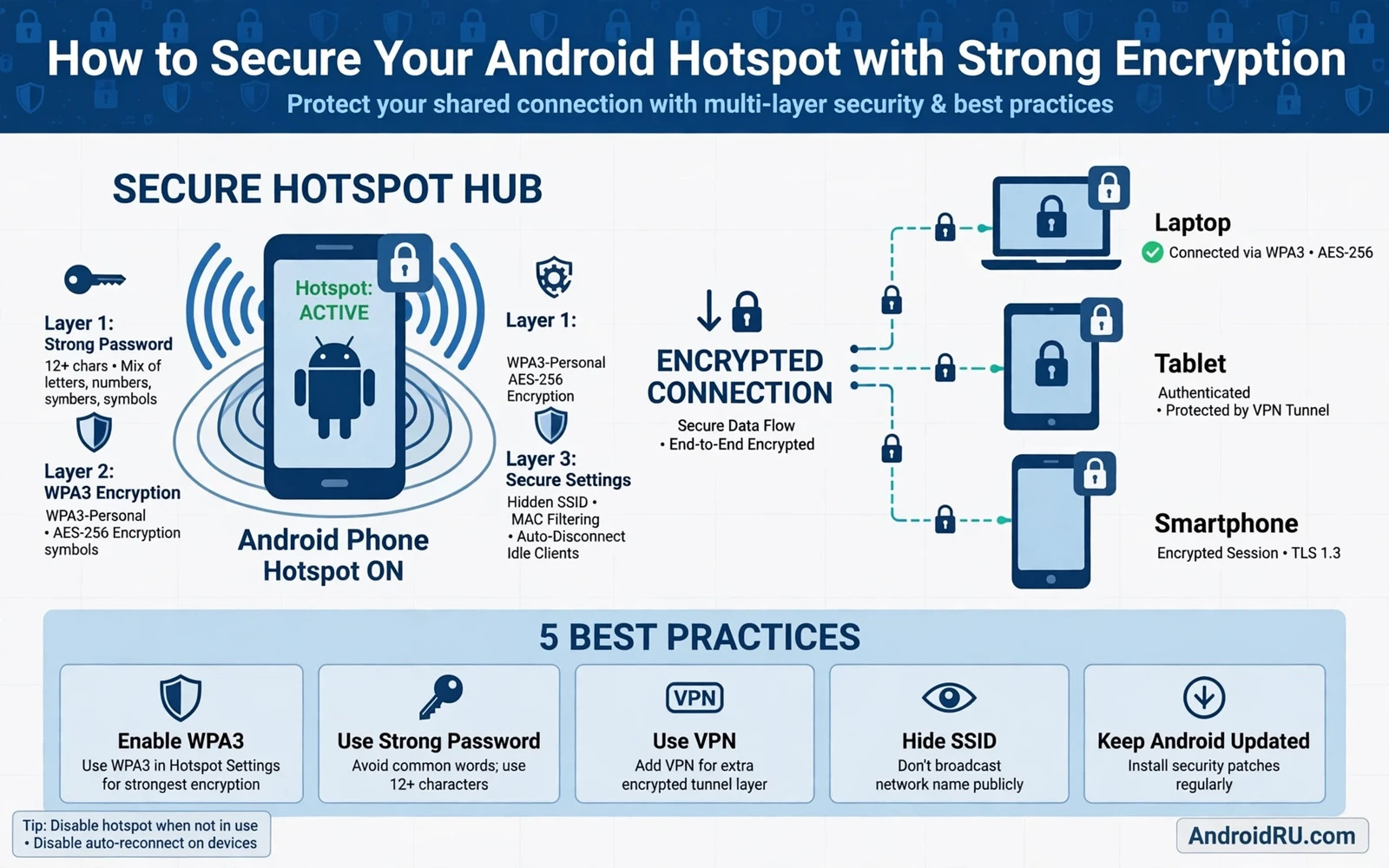
An Android hotspot turns your phone into a small wireless router for a laptop or a tablet or another phone. That convenience creates a real network boundary that strangers can see from nearby. Anyone within wireless range can detect the hotspot name and can attempt to join it and can probe connected devices once inside. Strong encryption and a strong password and tight sharing controls turn that open invitation into a guarded door that only your own devices can use.
Hotspot security starts with the encryption standard that the hotspot uses to protect traffic between your phone and a connected device. Modern Android phones offer a strong modern standard on recent hardware and older compatibility modes exist only for devices that cannot handle the modern standard. Choosing the strongest standard that your devices support gives every connected device real traffic protection rather than a false sense of security. Choosing an open hotspot or an outdated standard for convenience removes that protection entirely and should never be a permanent setting.
This guide covers hotspot encryption choice and password design and hotspot naming and device approval and automatic shutoff and the habits that keep a shared connection safe on the road. The steps take only a few minutes and they matter most in crowded places such as stations and cafes and airports where many strangers sit within range and where an open or weakly protected hotspot invites abuse within seconds.
Choose The Strongest Encryption Your Devices Support
Open hotspot settings and look for the security option beside the password field. Select the strongest option offered on your phone and check that every device that you plan to connect also supports that option. If one older device forces a weaker mode then consider whether that device truly needs hotspot access or whether a USB tether or a Bluetooth tether gives it connectivity without weakening protection for every other device. A single weak device should not dictate the security level for the whole hotspot.
Avoid open hotspots and avoid outdated encryption modes for anything beyond a brief test with no sensitive traffic. An open hotspot sends traffic without wireless encryption and lets any nearby device join without a password. An outdated mode may still ask for a password but its cryptography has known weaknesses that modern tools can exploit quickly. The password prompt alone does not prove strong protection. The encryption standard behind the prompt decides how hard that protection is to break.
Design A Hotspot Password That Resists Guessing
A hotspot password should be long and unique and different from your other passwords. Use a passphrase built from several unconnected words plus a number and a symbol that you can type reliably on a laptop keyboard. Avoid your phone number and your name and your birth year and the hotspot name itself because those values are easy to guess from nearby observation or from social profiles. Store the hotspot password in a password manager so that you can share it with a trusted device without shouting it across a room or writing it on paper.
Change the hotspot password after sharing it with a device that you do not fully control. A guest laptop or a borrowed tablet that once held your password can rejoin later without your knowledge if the password never changes. Rotate the password after travel and after lending access and after any suspicion that an unknown device connected. Rotation costs a minute and it revokes access cleanly without needing to identify exactly which device held the old password.
Control Which Devices Can Join And Stay Connected
Check the connected devices list while the hotspot runs and remove any device that you do not recognise immediately. Many Android phones show connected devices by name and let you block a device directly from that list. Review that list every time you run the hotspot in a public place because an unknown entry is a warning that your password leaked or that your encryption setting allowed an unexpected join. Do not assume that a familiar sounding device name belongs to you because attackers can rename a device to look ordinary.
Hide or neutralise the hotspot name when your phone offers that option and avoid a name that identifies you or your phone model or your employer. A hotspot name that contains your full name tells every nearby stranger who owns the network. A neutral name gives nothing away and forces an attacker to guess rather than target you by name. Combine a neutral name with a strong password rather than treating a hidden name as protection on its own because hidden names can still be discovered by wireless tools.
Automatic Shutoff And Session Habits
Switch on automatic hotspot shutoff so that the hotspot stops broadcasting when no device is connected for a short period. A hotspot left running in a bag or a pocket keeps advertising itself long after you stopped using it and gives attackers a standing target. Set the timeout to the shortest period that still suits your work and switch the hotspot off manually the moment you finish. Manual shutoff plus automatic shutoff gives two independent layers that both must fail before an idle hotspot stays exposed.
Treat hotspot traffic as shared network traffic even with encryption switched on. Devices on the same hotspot can still attempt to reach each other unless your phone isolates clients or unless device firewalls block that access. Keep device firewalls switched on and avoid file sharing and printer sharing while connected through a hotspot. Use encrypted websites and encrypted apps for sensitive work and consider a VPN on the laptop as an extra layer when the hotspot runs in a high risk location.
Troubleshooting Without Lowering Security
When a trusted device cannot join the hotspot resist the urge to remove the password or to drop to an outdated mode as a first fix. Check the password for typing errors and check that the device supports the chosen encryption standard and restart the hotspot and restart the connecting device. Check for a blocked device entry that may have been added by mistake. Most join failures come from a wrong password or a stale saved network entry on the connecting device rather than from the encryption standard itself.
If a device truly cannot support the modern standard then give that device a separate connection method rather than weakening the main hotspot. USB tethering keeps traffic off the wireless network entirely and it suits a single laptop well. Bluetooth tethering suits low bandwidth needs and it avoids broadcasting a wireless network name. Either option protects the main hotspot standard for every other device and avoids a permanent downgrade for a single legacy gadget.
Hotspot safety sits beside wider wireless hygiene so compare your settings with securing your Android phone on public Wi-Fi networks and with managing Bluetooth security and visibility settings while best mobile VPN services for Android security and speed adds an extra encrypted layer for sensitive work over shared connections.
- Select the strongest hotspot encryption that all trusted devices support
- Use a long unique hotspot passphrase and rotate it after guest access or travel
- Review connected devices during every public hotspot session and block unknown entries
- Use a neutral hotspot name and switch on automatic shutoff for idle sessions
- Switch the hotspot off manually the moment shared access is no longer needed
Hotspot Habits For Travel And Daily Work
Travel hotspots deserve stricter habits than home hotspots because crowded transport hubs and hotels expose your network name to many strangers at once. Before travel set the strongest encryption and a fresh passphrase and a neutral hotspot name. During travel check connected devices every time that you start the hotspot and switch the hotspot off between sessions rather than leaving it running in a bag. After travel rotate the passphrase again because any device that joined during the trip could rejoin later without your knowledge.
Daily work hotspots benefit from a fixed routine that removes decision fatigue. Keep the hotspot switched off by default and switch it on only for a defined work session. Connect only the laptop or tablet that the session requires and disconnect that device when the session ends. Avoid sharing the hotspot with acquaintances in a work setting because each additional device increases the chance that a password leaks or that an unknown device stays connected unnoticed. A disciplined work hotspot protects both your phone and your laptop at once.
Plan for the moment when a trusted device cannot join despite correct settings. Keep a USB cable in your work bag so that USB tethering can replace a failing wireless hotspot without weakening encryption. Keep a written note of the hotspot passphrase in your password manager rather than in a notebook that could be lost. Those two backups prevent the common travel failure where a user removes the password in frustration and then forgets to restore protection after the session ends. Preparation preserves security during stressful connectivity problems.
Hotspot Security For Shared Family Devices
Family hotspot sharing needs clear rules because children and guests may connect devices that you never reviewed. Share the hotspot password only with family members who understand that the password must not be passed onward to friends. Rotate the passphrase after a family gathering where several guests connected. Check connected devices during family hotspot sessions and block any device that no family member recognises. Those rules protect the household network without turning every sharing moment into a security lecture.
Teach family members to switch the hotspot off when they finish using it rather than leaving it running for convenience. A hotspot left running overnight in a home still broadcasts to neighbours and to passers by. Show younger users where the hotspot toggle lives and explain that switching it off is part of finishing a homework session or a streaming session. A household where everyone switches off the hotspot after use enjoys shared connectivity with far less standing exposure than a household where one phone broadcasts all day.
A secure hotspot is a hotspot that you control tightly from start to finish. Strong encryption and a unique password and a neutral name and active device review and fast shutoff together make casual intrusion impractical. Keep those controls switched on as your default rather than as a special travel mode and your phone will share connectivity without sharing access to your network.

